
1. Bubuka jeung Leuwihview
This manual provides essential information for the installation, operation, and maintenance of your EVGA GeForce GTX 1080 SC GAMING ACX 3.0 graphics card. The EVGA GeForce GTX 1080 features NVIDIA's "Pascal" graphics processor, designed for high-performance gaming and immersive virtual reality experiences. This model incorporates EVGA's ACX 3.0 cooling technology, which includes optimized fan blades, double ball bearings, and an extreme low power motor for efficient cooling and quiet operation.

Image 1.1: EVGA GeForce GTX 1080 SC GAMING ACX 3.0 graphics card and packaging.
2. Eusi Paket
Please verify that all items listed below are included in your product package. If any items are missing or damaged, please contact EVGA customer support.
- EVGA GTX 1080 SC GAMING ACX 3.0 Graphics Card
- CD Supir
- Guide instalasi
- 6-Pin (x2) to 8-Pin Power Adapter
- EVGA Gaming Poster
- Powered by EVGA Case Badge
- EVGA Enthusiast Built Sticker

Image 2.1: Included accessories and documentation.
3. Fitur Produk
The EVGA GeForce GTX 1080 SC GAMING ACX 3.0 graphics card offers a range of features designed to enhance your computing and gaming experience:
- Kinerja luhur: Real Base Clock of 1708 MHz and Real Boost Clock of 1847 MHz.
- Advanced Memory: 8192MB GDDR5X memory for demanding applications and games.
- Cooling efisien: EVGA ACX 3.0 cooling technology for optimal thermal performance and quiet operation.
- Dukungan DirectX 12: Full support for DirectX 12 with OSD (On-Screen Display) via EVGA Precision XOC software.
- Kasaluyuan Sistem Operasi: Supports Windows 10 (32/64bit), Windows 8 (32/64bit), and Windows 7 (32/64bit).
- VR Siap: Designed to deliver immersive virtual reality experiences.
- Konéktivitas Tampilan: Multiple output options including DVI, DisplayPort, and HDMI.
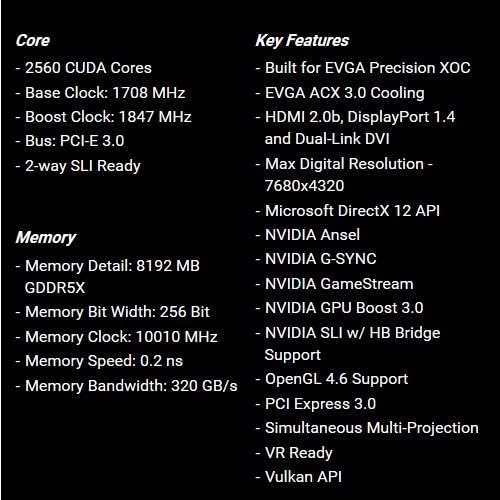
Image 3.1: Core and memory specifications, along with key features.
4. Pituduh Pamasangan (Setup)
Follow these steps to properly install your EVGA GeForce GTX 1080 SC GAMING ACX 3.0 graphics card into your computer system. Ensure your system meets the minimum requirements before proceeding.
- Nyiapkeun Sistim anjeun: Power off your computer and unplug all cables from the power outlet. Open your computer case.
- Manggihan slot PCIe: Identify an available PCI Express x16 slot on your motherboard. This is typically the longest slot.
- Leupaskeun panutup slot: Remove the metal slot covers from the back of your computer case corresponding to the PCIe slot you will use.
- Selapkeun Kartu Grafik: Carefully align the graphics card with the PCIe slot and press down firmly until it is securely seated. You should hear a click from the slot's retention clip.
- Kartu Aman: Use screws to secure the graphics card to the computer case at the back panel.
- Sambungkeun Kakuatan: Connect the required 8-pin PCIe power connector(s) from your power supply to the graphics card. If your power supply only has 6-pin connectors, use the included 6-pin to 8-pin adapter. Ensure all power connections are firm.
- Tutup Kasus: Tutupkeun casing komputer anjeun teras sambungkeun deui sadaya kabel éksternal.
- Pasang Supir: Power on your computer. Once the operating system loads, install the latest graphics drivers from the included Driver CD or download them from the official EVGA websitus (www.evga.com/drivers).

Gambar 4.1: Hareupeun view of the graphics card.

Image 4.2: Rear I/O ports (DVI, DisplayPort, HDMI).
5. Parentah Operasi
After successful installation and driver setup, your graphics card is ready for use.
- Sambungan tampilan: Connect your monitor(s) to the appropriate display outputs on the graphics card (DVI, DisplayPort, or HDMI).
- Pembaruan supir: Regularly check for and install the latest graphics drivers from the NVIDIA or EVGA website to ensure optimal performance and compatibility with new games and applications.
- EVGA Precision XOC: For advanced control, monitoring, and overclocking, install the EVGA Precision XOC software. This utility allows you to adjust fan curves, monitor temperatures, and customize RGB LED lighting (if applicable to your specific model).
- Sarat Sistim: Ensure your system meets the recommended power supply wattage and other hardware requirements for stable operation.
6. Pangropéa
Pangropéa anu leres tiasa manjangkeun umur sareng mastikeun kinerja kartu grafik anjeun konsisten.
- Ngaleungitkeun lebu: Bersihkeun lebu tina kipas kartu grafis sareng heatsink sacara berkala nganggo udara anu dikomprés. Pastikeun komputer dipareuman sareng dicabut tina colokan sateuacan dibersihkeun.
- Tiupan hawa: Maintain good airflow within your computer case to prevent heat buildup. Ensure case fans are functioning correctly and cables are managed to avoid obstructing airflow.
- Pembaruan supir: Keep your graphics drivers updated. New drivers often include performance optimizations and bug fixes.
7. Cara ngungkulan
Upami anjeun mendakan masalah sareng kartu grafik anjeun, tingal léngkah-léngkah ngungkulan umum ieu:
- Henteu aya kaluaran tampilan:
- Pastikeun kabel monitor disambungkeun sacara aman ka kartu grafik sareng monitor.
- Pariksa yén kartu grafis dipasang sapinuhna dina slot PCIe.
- Check that all required PCIe power connectors are securely attached to the graphics card.
- Uji nganggo kabel tampilan atanapi monitor anu béda upami mungkin.
- Masalah supir:
- Laksanakeun pamasangan anu bersih pikeun panggerak grafis panganyarna. Copot heula panggerak anu tos aya sateuacan masang anu énggal.
- If issues persist, try an older, stable driver version.
- Overheating:
- Ensure proper airflow within your computer case.
- Bersihkeun lebu tina kipas kartu grafis sareng heatsink.
- Monitor temperatures using EVGA Precision XOC or similar software.
- Instabilitas Sistem / Kacilakaan:
- Verify your power supply unit (PSU) meets the recommended wattage for your system, including the graphics card.
- Ensure the graphics card is not excessively overclocked. Reset to default settings if necessary.
- Pariksa masalah mémori sistem (RAM).
For further assistance, refer to the official EVGA support websitus atanapi ngahubungan tim rojongan teknis maranéhanana.
8. Spésifikasi
| Fitur | Rincian |
|---|---|
| Nomer modél | 08G-P4-6183-KR |
| Prosesor Grafika | NVIDIA GeForce GTX 1080 |
| CUDA Cores | 2560 |
| Jam Dasar | 1708 MHz |
| Naekeun Jam | 1847 MHz |
| Tipe Mémori | 8GB GDDR5X |
| Memory Bit Width | 256-bit |
| Jam Mémori | 10010 MHz |
| Bandwidth memori | 320 GB/s |
| Resolusi Digital Max | 7680x4320 |
| Panganteur Kaluaran Video | DVI, DisplayPort, HDMI |
| Antarbeungeut beus | PCI Express 3.0 |
| Solusi cooling | EVGA ACX 3.0 |
| Ukuran (L x W x H) | 10.5 x 1.5 x 4.38 inci |
| Item Beurat | 3 pon |
| Rojongan System Operasi | Windows 10/8/7 (32/64bit) |

Gambar 8.1: Angled view of the graphics card, highlighting its cooling design.

Gambar 8.2: Tukangeun view of the graphics card, showing the backplate.
9. Garansi jeung Rojongan
For detailed warranty information, please refer to the official EVGA website or the documentation included with your product. EVGA provides customer support and resources for their products.
- Buku Panduan Resmi (PDF): Pikeun pituduh lengkep, Anjeun bisa ngundeur manual pamaké resmi Ieuh.
- EVGA Support: Visit the EVGA support page for drivers, FAQs, and contact information: www.evga.com/support.