
evga
EVGA GeForce GTX 1080 Founders Edition User Manual
Model: 08G-P4-6180-KR
1. Bubuka
This manual provides comprehensive instructions for the installation, operation, and maintenance of your EVGA GeForce GTX 1080 Founders Edition graphics card. Please read this manual thoroughly before proceeding with installation to ensure proper setup and optimal performance.

Figure 1.1: The EVGA GeForce GTX 1080 Founders Edition graphics card alongside its packaging.
2. Émbaran Kasalametan
Always observe the following safety precautions to prevent damage to the graphics card, your computer system, or personal injury:
- Ensure your computer system is powered off and unplugged from the wall outlet before installing or removing the graphics card.
- Discharge any static electricity from your body by touching a grounded metal object (e.g., the computer chassis) before handling the graphics card.
- Handle the graphics card by its edges. Avoid touching the gold-plated PCI Express connector or the components on the circuit board.
- Ulah kakeunaan kartu grafis ka kalembaban atanapi suhu anu ekstrim.
- Pastikeun aliran hawa anu cekap dina jero casing komputer anjeun pikeun nyegah panas teuing.
- Upami anjeun teu yakin kana léngkah-léngkah pamasangan naon waé, konsultasi ka teknisi anu mumpuni.
3. Eusi Paket
Verify that all items are present in your EVGA GeForce GTX 1080 Founders Edition package:
- EVGA GeForce GTX 1080 Founders Edition Graphics Card
- Driver CD / DVD (or link to driver download)
- Pituduh Pamasangan Gancang / Manual Pangguna
- Power Adapter Cable (if applicable, e.g., 6-pin to 8-pin PCIe power adapter)
- EVGA Case Badge

Gambar 3.1: Kelamples of EVGA documentation and branding materials that may be included.

Figure 3.2: A PCIe power adapter cable, which may be necessary for some power supply configurations.
4. Sarat Sistim
Sateuacan masang, pastikeun sistem anjeun nyumponan sarat minimum ieu:
- Motherboard patuh PCI Express sareng slot grafik x16 dual-lebar.
- Minimum 500W or greater power supply with one 8-pin PCI Express power connector. (Consult your power supply manufacturer for specific details).
- 300MB of available hard-disk space.
- 4GB system memory (8GB or more recommended).
- Microsoft Windows 10, Windows 8.1, Windows 8, Windows 7, or Linux operating system.
- CD-ROM or DVD-ROM drive (for driver installation) or internet connection.
5. Setup jeung Instalasi
Follow these steps to install your EVGA GeForce GTX 1080 Founders Edition graphics card:
- Nyiapkeun Sistim anjeun: Power off your computer and unplug the power cord from the wall outlet. Open your computer case.
- Manggihan slot PCI Express: Identify an available PCI Express x16 slot on your motherboard. This card requires a dual-width slot, meaning it will occupy two expansion slots on your case.
- Leupaskeun panutup slot: Remove the two metal slot covers from the back of your computer case corresponding to the chosen PCI Express slot.
- Pasang Kartu Grafis: Carefully align the graphics card with the PCI Express slot. Apply even pressure to both ends of the card until it is fully seated in the slot. A click may be heard when it is properly seated.
- Ngamankeun Kartu: Secure the graphics card to the computer case using the screws from the removed slot covers.
- Sambungkeun Kakuatan: Connect the 8-pin PCI Express power connector from your power supply to the corresponding port on the graphics card. If your power supply does not have an 8-pin connector, use the included 6-pin to 8-pin adapter cable.
- Tutup Case sareng Sambungkeun Periferal: Close your computer case. Reconnect the power cord, monitor cables, and any other peripherals.

Figure 5.1: The EVGA GeForce GTX 1080 Founders Edition graphics card, ready for installation into a PCI Express slot.

Figure 5.2: The rear I/O panel of the graphics card, featuring DisplayPort, HDMI, and DVI connectors for display output.
6. Ngoperasikeun Kartu Grafika
6.1 Pamasangan Supir
After physical installation, you must install the graphics drivers for proper functionality:
- Mimitian Sistem Anjeun: Power on your computer. Windows will detect new hardware and may attempt to install generic drivers.
- Pasang Supir:
- Tina CD/DVD: Insert the included driver CD/DVD into your optical drive and follow the on-screen instructions.
- Tina Internét: Visit the official EVGA websitus (www.evga.com/drivers/) atanapi resmi NVIDIA websitus (www.nvidia.com/drivers) to download the latest drivers for your GeForce GTX 1080. Run the downloaded installer and follow the prompts.
- Balikan deui System: After the driver installation is complete, restart your computer when prompted.
6.2 Parangkat Lunak sareng Utilitas
EVGA provides additional software to enhance your experience:
- EVGA Precision XOC: This utility allows for monitoring, overclocking, and fan control of your graphics card. It can be downloaded from the EVGA websitus.
- NVIDIA GeForce Experience: This software optimizes game settings, updates drivers, and provides features like ShadowPlay for recording gameplay.
7. Pangropéa
Pangropéa anu leres mastikeun umur panjang sareng kinerja kartu grafis anjeun:
- Tetep Pembalap diropéa: Regularly check for and install the latest graphics drivers from EVGA or NVIDIA to ensure optimal performance and compatibility with new games and applications.
- Lebu Bersih: Periodically clean dust from the graphics card's heatsink and fans using compressed air. Ensure the system is powered off and unplugged before cleaning. Hold the fan blades gently to prevent them from spinning rapidly during cleaning.
- Monitor Suhu: Use monitoring software (e.g., EVGA Precision XOC) to keep an eye on GPU temperatures, especially during heavy loads. Ensure temperatures remain within safe operating limits.
- Pastikeun aliran hawa anu leres: Verify that your computer case has adequate ventilation and that case fans are functioning correctly to facilitate proper airflow around the graphics card.
8. Cara ngungkulan
Upami anjeun mendakan masalah sareng kartu grafik anjeun, tingal léngkah-léngkah ngungkulan umum ieu:
| Masalah | Mungkin Cukang lantaranana / Solusi |
|---|---|
| No display output / Black screen |
|
| System crashes / Freezes during gaming |
|
| Poor performance in games / applications |
|
| Noise kipas kaleuleuwihan |
|
For further assistance, refer to the EVGA support websitus atanapi ngahubungan rojongan teknis maranéhna.
9. Spésifikasi
| Fitur | Rincian |
|---|---|
| Nomer modél | 08G-P4-6180-KR |
| Prosesor Grafika | NVIDIA GeForce GTX 1080 |
| Mémori | 8GB GDDR5X |
| Speed Jam GPU | 1607 MHz (Base) / 1733 MHz (Boost) |
| Antarmuka Kaluaran Video | 3x DisplayPort 1.4, 1x HDMI 2.0b, 1x Dual-Link DVI-D |
| PCI Express | PCI Express 3.0 x16 |
| Panyambung kakuatan | 1x PCIe 8-pin |
| Disarankeun PSU | 500W atanapi langkung ageung |
| Ukuran (L x W x H) | 10.63 x 0.39 x 4.33 inci |
| Beurat | 2.2 pon |

Gambar 9.1: Top view tina kartu grafis, nunjukkeunasing its cooling solution.
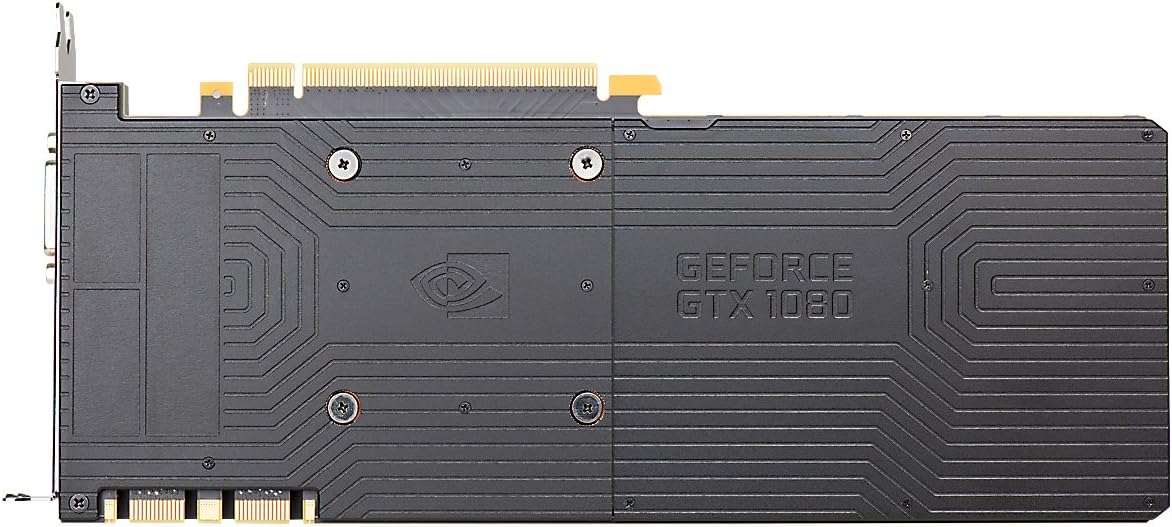
Figure 9.2: The backplate of the graphics card, providing structural support and heat dissipation.
10. Garansi jeung Rojongan
EVGA products are backed by a limited warranty. For detailed warranty information, including terms, conditions, and registration, please visit the official EVGA websitus:
For technical support, driver downloads, FAQs, and community forums, please visit:
When contacting support, please have your product model number (08G-P4-6180-KR) and serial number ready.
Ask a question about this manual
Ask about setup, troubleshooting, compatibility, parts, safety, or missing instructions. Manuals+ will review the question and use this page’s manual context to help answer it.