
1. Bubuka
Hatur nuhun pikeun meuliasing the Forever BS600 Bluetooth Speaker. This portable wireless speaker combines powerful audio with versatile playback options, including Bluetooth, FM radio, USB, and SD card support. It also features a built-in microphone for hands-free calling. Please read this manual carefully to ensure proper use and maintenance of your device.
Komponén Kaasup:
- Forever BS600 Bluetooth Speaker
- 3.5mm Jack Cable
- Kabel Ngecas USB
- Lithium Battery (pre-installed)

Image 1.1: Forever BS600 speaker with its accompanying 3.5mm audio cable and USB charging cable.
2. Émbaran Kasalametan
To ensure safe and optimal operation, please observe the following precautions:
- Entong ngalaan alat ka suhu anu ekstrim, sinar panonpoé langsung, atanapi kalembaban anu luhur.
- Hindarkeun lungsur atanapi nahan panyatur kana tabrakan anu kuat.
- Ulah ngabongkar, ngalereskeun, atawa ngaropéa alat sorangan. Rujuk sadayana jasa ka tanaga anu mumpuni.
- Jauhkeun spéker tina cai sareng cairan sanés. Éta henteu tahan cai.
- Use only the provided or approved charging cables.
- Dispose of batteries according to local regulations. Do not expose batteries to excessive heat.
3. Produk Langkungview
Biasakeun diri sareng kadali sareng port speaker:
Tombol kontrol:
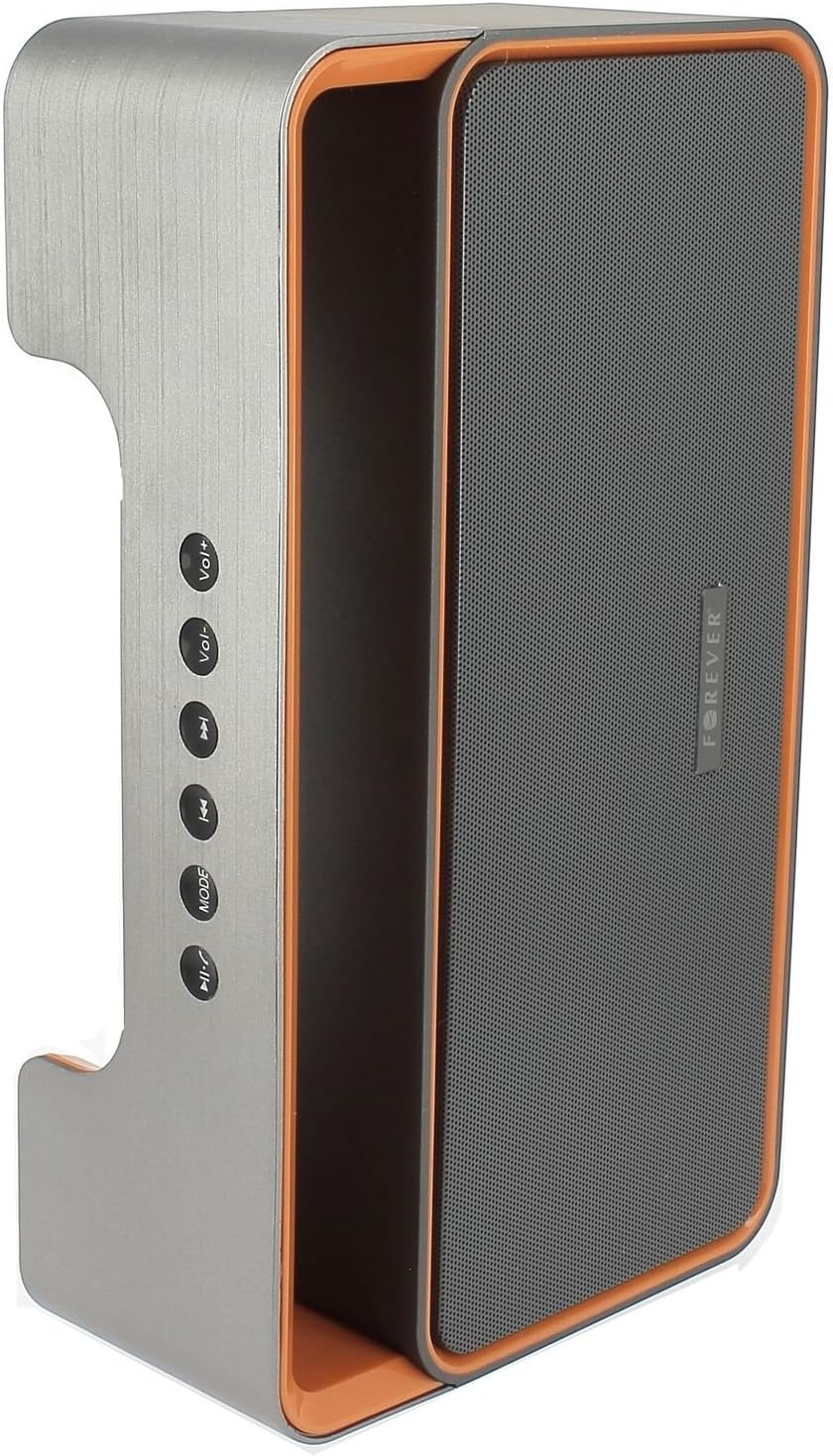
Image 3.1: Side panel with control buttons.
- Vol+ / Vol-: Adjust volume.
- Lagu Sateuacanna / Lagu Salajengna: Navigate between tracks in playback modes or stations in FM mode.
- MODÉ: Switch between Bluetooth, FM Radio, USB, SD Card, and AUX modes.
- Play / Reureuh: Play or pause audio. Answer or end calls.
Palabuhan sareng Konektor:

Image 3.2: Rear panel with ports and power switch.
- Input AUX: For connecting external audio devices via 3.5mm cable.
- Slot Kartu Micro SD: For playing music from a Micro SD card.
- Port USB: For playing music from a USB flash drive.
- Port USB Ngecas Mikro: Pikeun ngecas batré internal spiker.
- ON / OFF Pindah: To power the speaker on or off.
4. Setélan
4.1 Ngecas Speaker
- Connect the small end of the USB charging cable to the Micro USB port on the back of the speaker.
- Sambungkeun tungtung kabel USB anu langkung ageung ka adaptor kakuatan USB (teu kalebet) atanapi port USB komputer.
- Lampu indikator ngecas bakal hurung (warna tiasa rupa-rupa) pikeun nunjukkeun yén spiker nuju ngecas.
- Sakali dicas pinuh, lampu indikator bakal robah atanapi pareum. Cabut kabel ngecas.
Note: For first-time use, fully charge the speaker for approximately 3-4 hours.
4.2 Powering on / Pareum
- To power on, slide the ON/OFF switch on the rear panel to the 'ON' position. You will hear an audible prompt.
- Pikeun mareuman, geser saklar ON/OFF ka posisi 'OFF'.
5. Parentah Operasi
5.1 Pamilihan Mode
Pencét éta MODÉ button repeatedly to cycle through the available modes: Bluetooth, FM Radio, USB, SD Card, and AUX.
5.2 Nyapasangkeun Bluetooth
- Hurungkeun speaker. Spiker bakal otomatis asup kana modeu pasangan Bluetooth, dituduhkeun ku lampu LED anu kedip-kedip sareng aya bewara anu tiasa disada.
- Aktipkeun Bluetooth dina alat sélulér anjeun (smartphone, tablet, komputer).
- Milarian pikeun available Bluetooth devices. You should find "BS600" in the list.
- Select "BS600" to connect. Once paired, the LED light will stop flashing, and you will hear a confirmation sound.
- Anjeun ayeuna bisa muterkeun audio tina alat Anjeun ngaliwatan speaker.
5.3 Modeu Radio FM
- Switch the speaker to FM Radio mode using the MODÉ kancing.
- Pencét jeung tahan tombol Play / Reureuh button to initiate an automatic scan for FM stations. The speaker will save all found stations.
- Ngagunakeun éta Lagu saméméhna jeung Lagu salajengna tombol pikeun nganapigasi antara stasiun disimpen.
5.4 USB / SD Card Playback
- Insert a USB flash drive or a Micro SD card (with MP3 audio files) into the corresponding port on the rear panel.
- The speaker will automatically switch to USB or SD card mode and begin playing music. If not, press the MODÉ tombol pikeun milih mode nu bener.
- Ngagunakeun éta Lagu saméméhna, Lagu salajengna, jeung Play / Reureuh tombol pikeun ngadalikeun playback.
5.5 Modeu AUX
- Sambungkeun hiji tungtung kabel audio 3.5mm kana port input AUX dina spiker.
- Connect the other end of the cable to the headphone jack of your external audio device.
- Ganti speaker ka modeu AUX nganggo MODÉ kancing.
- Kadalikeun putereun tina alat audio éksternal anjeun.
5.6 Nanganan Telepon (Modeu Bluetooth)
- Ngajawab Telepon: When a call comes in during Bluetooth mode, press the Play / Reureuh tombol sakali pikeun ngajawab.
- Tungtung Telepon: During a call, press the Play / Reureuh tombol sakali pikeun ngeureunkeun telepon.
- Nolak Telepon: When a call comes in, press and hold the Play / Reureuh tombol pikeun nolak telepon.
5.7 Volume Control
Pencét éta Vol+ tombol pikeun ngaronjatkeun polumeu jeung Vol- tombol pikeun ngurangan polumeu.
6. Pangropéa
6.1 beberesih
- Pastikeun spéker dipareuman sareng dipegatkeun tina sumber listrik naon waé sateuacan beberesih.
- Anggo lawon anu lemes, garing, sareng henteu buluan pikeun ngusap permukaan luar speaker.
- Do not use abrasive cleaners, solvents, or chemical sprays, as these may damage the finish or internal components.
6.2 Panyimpenan
- Lamun teu dipaké pikeun période nambahan, nyimpen speaker dina tiis, tempat garing, jauh ti sinar panonpoé langsung jeung hawa ekstrim.
- It is recommended to charge the battery at least once every three months to maintain its lifespan.
7. Cara ngungkulan
| Masalah | Mungkin Cukang lantaranana | Solusi |
|---|---|---|
| Speaker teu hurung. | Batré béak. | Cas speaker nganggo kabel USB. |
| Taya sora. | Volume teuing low; modeu salah dipilih; alat teu disambungkeun. | Increase volume; press MODE button to select correct source; ensure Bluetooth/AUX connection is active. |
| Papasangan Bluetooth gagal. | Speaker not in pairing mode; device too far; Bluetooth not enabled on source. | Ensure speaker is in Bluetooth mode and flashing; move device closer; enable Bluetooth on your device. |
| panarimaan radio FM goréng. | sinyal lemah; gangguan lingkungan. | Pindahkeun spiker ka daérah anu resepsi anu langkung saé. |
| USB / kartu SD teu maén. | Lepat file format; kartu/drive teu dipasangkeun kalawan bener; média rusak. | Mastikeun files are MP3 format; reinsert media; try a different USB drive/SD card. |
8. Spésifikasi
| Ngaran modél | BS600 |
| merek | Salawasna |
| Téhnologi konektipitas | Bluetooth, Auxiliary, USB |
| Tipe Speaker | Speaker Bluetooth portabel |
| Fitur husus | FM Radio, USB Reader, SD Card Reader |
| Daya Kaluaran Maksimum | 10 Watt (2 x 5W) |
| Mode Kaluaran Audio | Mono |
| Sumber Daya | Didukung ku Batré (Litium-ion) |
| Métode kontrol | Tactile Buttons |
| Ukuran (approx.) | Height: 13 cm, Width: 24 cm |
| Warna | Kulawu / Oranyeu |
| Tahan cai | No |
9. Émbaran jaminan
The Forever BS600 Bluetooth Speaker comes with a limited warranty. Please refer to the warranty card included with your purchase or contact your retailer for specific terms and conditions. This warranty typically covers manufacturing defects but does not cover damage caused by misuse, accidents, unauthorized modifications, or normal wear and tear.
10. Rojongan
If you encounter any issues not covered in the troubleshooting section or require further assistance, please contact the retailer where you purchased the product or visit the official Forever website for support resources. Please have your product model (BS600) and purchase details ready when seeking support.