
Bubuka
Hatur nuhun pikeun meuliasing the Andoer AD-980II i-TTL GN58 Flash Speedlite. This powerful and versatile flash unit is designed to provide enhanced lighting for your photography, compatible with Nikon cameras. It features a high guide number of 58 (ISO 100, 180mm), multiple operating modes including i-TTL, Manual, Multi, Master, and Slave, as well as High-Speed Sync (HSS) up to 1/8000s. Please read this manual thoroughly to understand the product's functions and ensure safe and optimal operation.
Precautions Kasalametan
- Ulah ngabongkar atanapi ngarobih unit lampu kilat. Voltase luhurtage components are present inside.
- Jaga unit lampu kilat tetep garing. Ulah kakeunaan hujan, kalembaban, atanapi kalembaban anu luhur.
- Avoid direct eye exposure to the flash light, especially at close range, as it can impair vision.
- Jauhkeun tina jangkauan barudak.
- Use only recommended batteries. Do not mix old and new batteries or different types of batteries.
- If the flash unit overheats, allow it to cool down before further use.
Produk Leuwihview
Komponén

Gambar 1: Hareupeun view of the Andoer AD-980II Flash Speedlite, showing the flash head and infrared sensor.

Gambar 2: Tukangeun view of the flash, highlighting the LCD display and control buttons (Mode, Fn, Clear, Zoom, On/Off, Directional Pad, Lock).
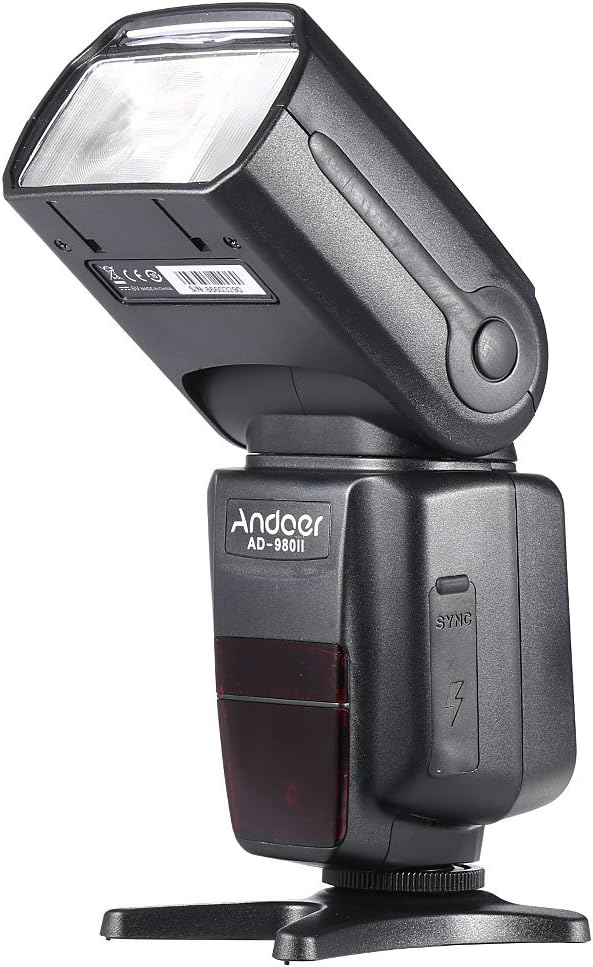
Gambar 3: Sisi view of the flash, illustrating the PC sync port and external power interface cover.

Angka 4: Ngabeledug view showing key components: built-in diffuser and reflector, PC port & external power interface, battery compartment, and fast transmission contacts on the hot shoe.
Panel kontrol sareng tampilan
The rear of the flash unit features an LCD display and several control buttons for adjusting settings and selecting modes.
- Tombol MODE: Cycles through i-TTL, Manual (M), Multi, and Slave modes.
- Tombol Fn: Accesses function settings.
- Tombol JELAS: Used to clear settings or confirm selections.
- Tombol ZOOM: Adjusts the flash head's zoom position (Auto/Manual).
- Tombol ON/OFF: Ngahurungkeun atanapi mareuman unit.
- Pad arah: Navigasi menu sareng nyaluyukeun nilai.
- Saklar konci: Ngamankeun lampu kilat kana hot shoe kaméra.
Disetél
1. Pamasangan batré
- Open the battery compartment cover located on the side of the flash unit (refer to Figure 4).
- Insert four (4) AA-size batteries, ensuring correct polarity (+/-) as indicated inside the compartment.
- Tutup panutup kompartemen batré aman.
Catetan: For optimal performance and recycle times, use high-quality alkaline or Ni-MH rechargeable batteries.
2. Masang Lampu Kilat kana Kaméra Anjeun
- Selapkeun hot shoe unit lampu kilat kana dudukan hot shoe kaméra anjeun.
- Rotate the LOCK switch clockwise until it is firmly secured. Do not overtighten.
- To remove the flash, rotate the LOCK switch counter-clockwise and slide the flash off the hot shoe.
Modeu Operasi
Pencét éta MODÉ tombol pikeun ngalingkung modeu lampu kilat anu sayogi.
1. i-TTL Mode (Automatic Flash)
In i-TTL mode, the flash automatically determines the optimal flash output based on the camera's metering system. This mode is ideal for quick and convenient shooting.
- Attach the flash to your Nikon camera's hot shoe.
- Turn on the flash and the camera.
- Select i-TTL mode using the MODE button.
- The flash will communicate with the camera to set the appropriate exposure.
2. Modeu Manual (M)
Manual mode allows you to set the flash output power manually, from 1/1 (full power) to 1/128 power, in 1/3 stop increments. This provides precise control over lighting.
- Select M mode using the MODE button.
- Use the directional pad to adjust the flash output power.
- Take a test shot and adjust power as needed.
3. Multi (Stroboscopic) Mode
Multi mode fires the flash repeatedly during a single exposure, creating a stroboscopic effect. You can set the flash frequency (Hz), number of flashes, and flash output.
- Select Multi mode using the MODE button.
- Use the directional pad and Fn button to set the frequency, number of flashes, and power.
4. Master/Slave Modes (Wireless Flash)
The AD-980II can function as a master unit to control other slave flashes or as a slave unit triggered by a master flash or camera's built-in flash. It supports 4 channels in 3 groups.
- Modeu Master: Set the flash to Master mode (often indicated by a specific icon or 'M' with wireless symbol). Use the Fn button to set channels and groups.
- Slave Mode (C/N, S1, S2):
- C/N Slave Mode: Optical slave mode compatible with Nikon's wireless flash system.
- Modeu S1: Optical slave mode that triggers the flash upon detecting the first flash from a master unit. Suitable for manual flash.
- Modeu S2: Optical slave mode that ignores the pre-flash from a master unit and triggers on the main flash. Suitable for i-TTL flash.
To use slave modes, ensure the flash's optical sensor is facing the master flash or camera's built-in flash.
Fitur canggih
1. Sinkronisasi Gancang-Luhur (HSS)
The AD-980II supports High-Speed Sync (HSS) up to 1/8000s, allowing you to use flash at shutter speeds faster than your camera's maximum flash sync speed. This is useful for freezing fast motion or using wide apertures in bright conditions.
- Ensure your camera supports HSS.
- Activate HSS on the flash unit (usually via the Fn button or a dedicated HSS icon on the display).
- Set your camera's shutter speed above its normal sync speed.
2. Rear-Curtain Sync
Rear-curtain sync fires the flash just before the second curtain closes, creating a natural-looking trail of light behind moving subjects when using slow shutter speeds.
- Activate Rear-curtain sync through the flash's custom functions or camera settings.
3. Auto/Manual Zoom
The flash head's zoom position can be adjusted automatically to match the lens focal length or manually set from 18mm to 180mm.
- Pencét éta ZOOM button to cycle between Auto and Manual zoom settings.
- In Manual zoom, use the directional pad to adjust the focal length.
4. Sound Prompt
The flash unit includes a sound prompt feature to indicate when the flash is fully recycled and ready to fire. This can be enabled or disabled via the function settings.
5. Over-Heat Protection
To prevent damage from continuous high-power firing, the flash unit has an over-heat protection system. If the unit becomes too hot, it will temporarily disable firing until it cools down.
Pangropéa
- beberesih: Anggo lawon anu lemes sareng garing pikeun ngabersihkeun unit lampu kilat. Pikeun kokotor anu bandel, anggo sakedikamp cloth and then dry thoroughly. Do not use organic solvents or strong cleaning agents.
- Panyimpenan: Upami teu dianggo salami lami, cabut batréna pikeun nyegah bocor. Simpen lampu kilat di tempat anu tiis, garing, sareng jauh tina sinar panonpoé langsung sareng suhu anu ekstrim.
- Perawatan batré: Replace all batteries at the same time. Do not mix battery types.
Pamérésan masalah
| Masalah | Mungkin Cukang lantaranana | Solusi |
|---|---|---|
| Lampu kilat teu hurung. | Batré pareum atawa salah dipasang. | Ganti batré atanapi pariksa polaritasna. |
| Flash teu seuneu. | Flash not securely mounted; camera settings incorrect; flash in sleep mode; flash overheated. | Ensure flash is locked onto hot shoe; check camera flash settings; press shutter button halfway to wake flash; allow flash to cool down. |
| Kaluaran lampu kilat teuing lemah/kuat. | Kompensasi paparan lampu kilat (FEC) anu salah atanapi setélan daya manual. | Adjust FEC on camera or flash; adjust manual power setting in M mode. |
| Wireless slave mode not working. | Optical sensor blocked; incorrect channel/group settings; master flash not firing. | Ensure clear line of sight to optical sensor; verify channel/group settings match master; check master flash operation. |
spésifikasi
| Nomer modél | AD-980II |
| Nomer Panungtun | GN58 (ISO 100, 180mm) |
| Sinyalna Flash | 18-180mm (Auto/Manual Zoom) |
| Modeu Flash | i-TTL, M, Multi, Master, Slave (C/N, S1, S2) |
| Sinkronisasi Gancang-Luhur (HSS) | Nepi ka 1/8000s |
| Daur ulang Waktos | Kira-kira 2.9 detik (kakuatan pinuh) |
| Sudut Rotasi nangtung | -7 nepi ka 90 derajat |
| Sudut Rotasi Horizontal | 0 nepi ka 360 derajat |
| Komunikasi Nirkabel | Optical Pulse (4 channels, 3 groups) |
| Sumber Daya | 4 x batré ukuran AA |
| Diménsi | 19.56 x 5.08 x 7.62 cm |
| Beurat | 616.89 g |
| UPC | 743022313320 |
Garansi sareng Rojongan
Kanggo inpormasi garansi sareng dukungan téknis, mangga tingal dokuméntasi anu disayogikeun sareng pameseran anjeun atanapi ngahubungi pangecér anjeun. Simpen bukti pameseran anjeun pikeun klaim garansi.
You can also visit the official Andoer websitus kanggo bantosan salajengna sareng apdet produk.