1. Bubuka
This manual provides essential instructions for the safe and efficient operation of your JVC LT-32EM75 32-inch 720p LED TV. Please read this manual thoroughly before using the television and retain it for future reference. Proper installation, setup, and maintenance are crucial for optimal performance and longevity of your device.
Émbaran Kasalametan penting
- Ulah meungpeuk bukaan ventilasi. Pastikeun spasi nyukupan sabudeureun TV pikeun aliran hawa ditangtoskeun.
- Ulah nempatkeun TV deukeut sumber panas kayaning radiators, registers panas, kompor, atawa alat sejenna (kaasup ampLiifiers) anu ngahasilkeun panas.
- Nangtayungan kabel listrik tina leumpang atawa diciwit, utamana dina colokan, wadah merenah, jeung titik dimana aranjeunna kaluar tina aparat.
- Ngan anggo kantétan/aksésori anu ditunjuk ku produsén.
- Cabut colokan alat ieu nalika badai kilat atanapi nalika henteu dianggo kanggo waktos anu lami.
- Rujuk sadayana jasa ka tanaga jasa anu mumpuni. Diperlukeun ngalayanan nalika aparatur ruksak ku cara naon waé, sapertos kabel catu daya atanapi colokan rusak, cairan tumpah atanapi barang murag kana aparatur, aparatur parantos kakeunaan hujan atanapi lembab, henteu beroperasi normal. , atawa geus turun.
2. Eusi Paket
Sateuacan neraskeun setélan, mangga pariksa yén sadaya item anu didaptarkeun di handap kalebet kana pakét anjeun:
- JVC LT-32EM75 32-inch 720p LED TV
- Stand TV (Dasar sareng Beuheung)
- Kadali jauh
- Kabel listrik
- Manual pangguna (dokumén ieu)
- Screws pikeun Majelis Stand
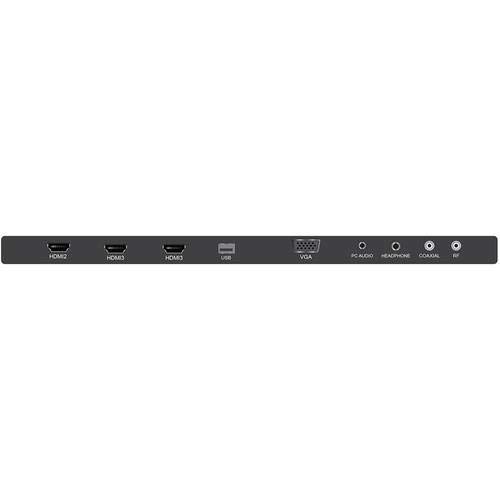
Figure 2.1: JVC LT-32EM75 32-inch 720p LED TV. This image shows the front view of the television with its stand.
3. Setélan
3.1 Ngagantelkeun TV Stand
- Teundeun layar TV sacara saksama dina permukaan anu lemes sareng bersih pikeun nyegah goresan.
- Align the stand neck with the mounting holes on the bottom of the TV.
- Secure the stand neck to the TV using the provided screws.
- Attach the stand base to the stand neck, ensuring it clicks into place or is secured with screws if applicable.
- Angkat TV sacara saksama teras teundeun dina permukaan datar anu stabil.
3.2 Nyambungkeun Alat éksternal
Your JVC LT-32EM75 TV features multiple input ports for connecting various devices. Ensure the TV is powered off before making any connections.

Gambar 3.1: Tukangeun view of the JVC LT-32EM75 TV showing input ports. This image illustrates the location of HDMI, USB, and other connection ports.
- Alat HDMI: Connect up to three HDMI-enabled devices (e.g., Blu-ray player, game console, cable box) to the HDMI ports. Use high-quality HDMI cables for best picture and sound.
- Antena/Kabel: Connect an antenna or cable TV coaxial cable to the "ANT/CABLE" input for over-the-air or basic cable channels.
- Alat USB: Insert a USB flash drive into the USB port to view photos or play compatible media files.
- Kaluaran Audio: Use the digital audio output (optical) or headphone jack to connect external audio systems or headphones.
3.3 Power Connection and Initial Scan
- Plug the power cord into the TV's power input, then into a standard electrical outlet (AC 120V, 60Hz).
- Pencét tombol Daya dina TV atanapi remot kontrol pikeun ngahurungkeun TV.
- Follow the on-screen instructions to complete the initial setup, including language selection and channel scanning. This process will detect available channels from your antenna or cable connection.
4. Ngoperasikeun TV
4.1 Fungsi Remote Control
The included remote control allows you to access all TV functions. Ensure two AAA batteries are inserted with correct polarity.

Figure 4.1: JVC LT-32EM75 Remote Control. This image displays the layout of the remote control buttons, including power, volume, channel, input, and menu navigation.
- kakuatan: Ngahurungkeun atawa mareuman TV.
- input: Selects the input source (HDMI 1, HDMI 2, HDMI 3, TV, USB).
- VOL +/-: Saluyukeun tingkat polumeu.
- CH +/-: Robah saluran.
- MENU: Opens the main menu for settings adjustments.
- ARROW BUTTONS (Up/Down/Left/Right): Navigates ngaliwatan pilihan ménu.
- ENTER/OK: Konfirmasi pilihan.
- KALUAR: Nutup menu ayeuna atanapi tampilan dina layar.
4.2 Operasi Dasar
- Ngarobah Sumber Input: Pencét éta INPUT button on the remote repeatedly to cycle through available input sources, or press it once to bring up the input menu and select your desired source using the arrow buttons and Asupkeun.
- Nyaluyukeun Setélan Gambar: Pencét MENU, navigate to "Picture" settings. Here you can adjust Brightness, Contrast, Color, Tint, Sharpness, and select Picture Modes (e.g., Standard, Dynamic, Movie).
- Nyaluyukeun setelan sora: Pencét MENU, navigate to "Sound" settings. Options include Bass, Treble, Balance, and Sound Modes (e.g., Standard, Music, Movie). Note that the built-in speakers may have limitations in sound quality.
5. Pangropéa
5.1 Ngabersihan Layar TV
- Sok cabut TV samemeh beberesih.
- Use a soft, lint-free cloth (e.g., microfiber cloth) to gently wipe the screen.
- Pikeun tanda pengkuh, enteng dampen lawon jeung cai atawa cleaner layar husus. Ulah nyemprot cleaner langsung kana layar.
- Avoid using abrasive cleaners, alcohol, benzene, or thinners, as these can damage the screen coating.
5.2 Ngabersihkeun TV Casing
- Ngusap casing ku lawon anu lemes sareng garing.
- Upami diperlukeun, make rada damp cloth. Do not allow water to enter the TV's interior.
6. Cara ngungkulan
Sateuacan ngahubungi dukungan palanggan, mangga tingal pituduh ngungkulan ieu di handap pikeun masalah umum.
| Masalah | Mungkin Cukang lantaranana | Solusi |
|---|---|---|
| Taya kakuatan | Power cord not connected; Power outlet not working; TV is off. | Ensure power cord is securely plugged into TV and outlet. Test outlet with another device. Press the Power button on the TV or remote. |
| Henteu aya gambar, tapi aya sora | Sumber input anu dipilih salah; Alat éksternal teu dihurungkeun atanapi teu nyambung kalayan leres. | Pencét éta INPUT button to select the correct source. Check connections of external devices and ensure they are powered on. |
| Henteu aya sora, tapi aya gambar | Volume is muted or too low; Incorrect audio output selected; External device audio issue. | Pencét VOL+ or unmute the TV. Check audio settings in the menu. Ensure external device audio settings are correct. |
| Kadali jauh teu jalan | Batteries are dead or incorrectly inserted; Obstruction between remote and TV; Remote sensor on TV is blocked. | Replace batteries with new ones, ensuring correct polarity. Remove any obstructions. Ensure the TV's remote sensor is clear. |
| Poor picture quality (e.g., blurry, grainy) | Weak antenna signal; Incorrect picture settings; Low-quality source material. | Adjust antenna position or check cable connection. Reset picture settings to default or adjust manually. Ensure source device is outputting high-quality signal. |
| Sound quality is not optimal | Built-in speaker limitations; Incorrect sound settings. | Adjust sound settings (Bass, Treble, Sound Mode) in the TV menu. Consider connecting external speakers or a soundbar for improved audio experience. |
7. Spésifikasi
| Fitur | Rincian |
|---|---|
| Ngaran modél | LT-32EM75 |
| Ukuran layar | 32 inci |
| Téknologi tampilan | LED |
| Resolusi | 720 p |
| Refresh Laju | 60 Hz |
| Téhnologi konektipitas | HDMI |
| Palabuhan HDMI | 3 |
| Voltage | 120 volt |
| Wattage | 45 watt |
| Item Beurat | 10 Pon (kira-kira 4.5 kg) |
| Ukuran produk (L x W x H) | 40 x 10 x 25 inci (kalayan nangtung) |
| Tipe Pamasangan | Méja Gunung |
8. Garansi jeung Rojongan
8.1 Garansi Produsén
This JVC LT-32EM75 television typically comes with a 1-taun jaminan produsén urang from the date of purchase. This warranty covers defects in materials and workmanship under normal use. Please retain your proof of purchase for warranty claims. For specific terms and conditions, refer to the warranty card included with your product or visit the official JVC support websitus.
8.2 Rojongan Palanggan
If you encounter issues not covered in the troubleshooting section or require further assistance, please contact JVC customer support. You can usually find contact information (phone number, email, or support website) on the official JVC websitus atawa dina dokuméntasi disadiakeun kalawan TV Anjeun.
Note: JVC does not sell extended warranties for this specific model.


