1. Bubuka
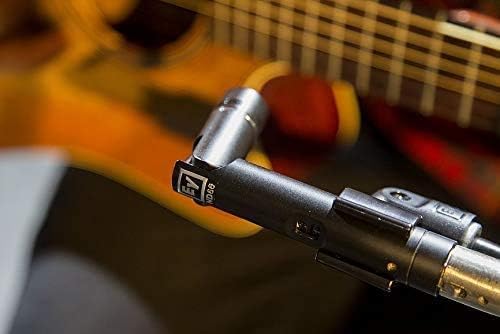
The Electro-Voice ND66 is a high-performance small-diaphragm condenser instrument microphone designed for capturing the intricate dynamics of percussive and stringed instruments. It delivers a clean, crisp, and detailed sound, making it suitable for various recording and live sound applications. Its unique locking rotating head allows for precise microphone placement in diverse environments.

2. Fitur Produk
- Small-Diaphragm Condenser Element: Provides vivid responsiveness to the dynamic nature of percussive and stringed instruments, ensuring clean, crisp, and detailed audio capture.
- Locking Rotating Head: An exclusive feature that allows for precise and ideal microphone placement. Simply push a button, rotate the head to the desired position, and release to lock it securely.
- Selectable -10 dB and -20 dB Pads: Offers necessary gain reduction to prevent overloading of the microphone element when capturing high sound pressure levels (SPL) sources.
- Selectable 75 Hz and 150 Hz High-Pass Filters: Helps eliminate bothersome low frequencies from the signal path, reducing rumble and unwanted bass buildup.
- Pola Polar Cardioid: Focuses audio capture on the sound source directly in front of the microphone, minimizing off-axis noise and feedback.
3. Setélan
3.1 Unboxing jeung Eusi
Upon opening the package, verify that the following item is included:
- Electro-Voice ND66 Condenser Cardioid Instrument Microphone
3.2 Nyambungkeun Mikropon
The ND66 utilizes a standard XLR connector for audio output. As a condenser microphone, it requires 48V phantom power, which is typically supplied by a mixing console, audio interface, or dedicated phantom power supply. Ensure phantom power is enabled on your input channel.
- Connect a balanced XLR cable to the microphone's output.
- Connect the other end of the XLR cable to an available input on your mixing console or audio interface.
- Activate 48V phantom power for the corresponding input channel.
3.3 Pamasangan sareng Penempatan
The ND66 is designed for flexible mounting. Use a standard microphone stand and clip. The unique locking rotating head allows for precise angling.
- Attach the microphone to a suitable microphone stand using a compatible microphone clip.
- Position the microphone near your instrument.
- To adjust the angle of the microphone head, press the button on the side of the microphone, rotate the head to the desired position, and then release the button to lock it.

4. Parentah Operasi
4.1 Pad Switches
The ND66 features selectable attenuation pads to handle high sound pressure levels without distortion. These switches are located on the microphone body.
- 0 dB: Standard setting for most applications.
- -10 dB: Engages a 10 dB attenuation, useful for moderately loud sources.
- -20 dB: Engages a 20 dB attenuation, recommended for very loud sources such as close-miked drums or guitar amplifsters.
4.2 High-Pass Filters
Two selectable high-pass filters are available to reduce unwanted low-frequency content, which can improve clarity and prevent muddiness in recordings.
- Datar: No high-pass filter applied.
- 75Hz: Engages a high-pass filter at 75 Hz, suitable for reducing stage rumble or proximity effect.
- 150Hz: Engages a high-pass filter at 150 Hz, for more aggressive low-frequency rolloff, often used for vocals or instruments where deep bass is not desired.

4.3 Instrument Placement Guidelines
Optimal microphone placement is crucial for achieving the best sound. Experiment with distances and angles to find the sweet spot for your specific instrument and desired tone.
- Gitar Akustik: Start by pointing the microphone towards the 12th fret or the edge of the soundhole, a few inches away. Adjust for brightness or warmth.
- Drums/Percussion: For cymbals, position the microphone overhead or near the edge, aiming for a balanced sound. For snare or tom drums, use the pad switches and position to capture attack and body.
- Other Instruments: The ND66's versatility allows it to be used on various instruments. Always consider the instrument's sound projection and the desired sonic character when positioning.


5. Pangropéa
Proper care and maintenance will ensure the longevity and optimal performance of your Electro-Voice ND66 microphone.
- beberesih: Anggo lawon anu lemes sareng garing pikeun ngusap awak mikropon. Ulah nganggo pembersih cair atanapi pangleyur, sabab ieu tiasa ngaruksak lapisan atanapi komponén internal.
- Panyimpenan: When not in use, store the microphone in its protective case or a clean, dry environment to prevent dust accumulation and physical damage.
- Penanganan: Avoid dropping the microphone or subjecting it to harsh impacts, as this can affect its delicate internal capsule.
6. Cara ngungkulan
If you encounter issues with your ND66 microphone, consider the following common troubleshooting steps:
- Henteu aya sora:
- Ensure the XLR cable is securely connected at both ends.
- Verify that 48V phantom power is enabled on your mixer or interface input.
- Check the input gain level on your mixer/interface.
- Test with a different XLR cable or input channel.
- Sora distort:
- Engage the -10 dB or -20 dB pad switch if the sound source is very loud.
- Reduce the input gain on your mixer or interface.
- Pastikeun mikropon teu ditempatkeun caket teuing ka sumber sora anu tarik pisan.
- Excessive Low-End/Rumble:
- Engage the 75 Hz or 150 Hz high-pass filter to reduce unwanted low frequencies.
- Adjust microphone placement to minimize proximity effect.
If these steps do not resolve the issue, contact Electro-Voice customer support for further assistance.
7. Spésifikasi
| Spésifikasi | Nilai |
|---|---|
| merek | Éléktro-Sora |
| Ngaran modél | ND66 |
| Faktor Bentuk Mikropon | Diafragma leutik |
| Pola Polar | Saarah (Cardioid) |
| Téhnologi konektipitas | Dikabel |
| Tipe Panyambung | XLR |
| Sumber Daya | Phantom Power (48V required) |
| Sensitipitas Audio | 20 desibel |
| Impedansi | 150 ohm |
| Rasio Signal-to-Noise | 77 dB |
| Réspon Frékuénsi | 150 Hz (Note: This likely refers to a filter point, not full range) |
| Item Beurat | 16 ons (1 pon) |
| Ukuran produk (L x W x H) | 3 x 5 x 10 inci |
| Bahan | Alloy Steel |
| Warna | Hideung |
| Dianjurkeun Mangpaat | Musical Instrument Recording and Performance |
| Fitur husus | Clip, Stand (Refers to compatibility/accessories) |
| UPC | 800549805407 |
8. Garansi jeung Rojongan
For information regarding warranty coverage, service, or technical support for your Electro-Voice ND66 microphone, please refer to the official Electro-Voice websitus atanapi ngahubungan departemén layanan palanggan maranéhanana langsung. Simpen bukti pameseran anjeun pikeun klaim garansi.
Sumberdaya Online: Kunjungi Electro-Voice resmi website for product registration, FAQs, and additional support documentation.
Kontak Rojongan: Refer to the contact information provided on the Electro-Voice websitus pikeun rojongan telepon atawa email.


