1. Parentah Kasalametan penting
Nalika nganggo alat listrik, pancegahan kaamanan dasar kedah diturutan, kalebet ieu:
- Baca sadaya parentah sateuacan nganggo alat.
- Ulah nyobian ngajalankeun oven ieu kalawan panto muka sabab ieu bisa ngakibatkeun paparan ngabahayakeun kana énergi gelombang mikro.
- Ulah nempatkeun sagala objék antara beungeut hareup oven jeung panto atawa ngidinan taneuh atawa résidu cleaner akumulasi dina surfaces sealing.
- Ulah ngajalankeun oven lamun geus ruksak. Ieu hususna penting yén panto oven nutup leres tur teu aya karuksakan kana: (1) panto (ngagulung), (2) hinges na latches (pegat atawa loosened), (3) segel panto na surfaces sealing.
- Oven teu kedah disaluyukeun atanapi repaired ku saha iwal tanaga jasa mumpuni leres.
- Pastikeun alatna dibumikeun leres.
- Ulah neuleumkeun ari atawa nyolok kana cai.
- Pengawasan anu ketat diperyogikeun nalika alatna dianggo ku atanapi caket barudak.
- Ulah nganggo oven pikeun tujuan anu sanés salian ti manaskeun kadaharan.
2. Produk Langkungview
2.1. Microwave Oven Components

Gambar 1: Hareupeun view of the Sharp R-369T Microwave Oven, showcasing its 33L capacity, 6 microwave power levels, and various cooking functions.
The Sharp R-369T is a 33-liter solo microwave oven designed for efficient food preparation. It features a sleek silver finish and a black glass door. Key components include the oven cavity, glass turntable, control panel, and door with a push-open mechanism.

Gambar 2: Interior view of the microwave oven, showing the spacious 33L cavity and the removable glass turntable for even cooking.
The interior includes a 272mm glass turntable that rotates during operation to ensure food is heated evenly. The oven door opens with a simple push mechanism.
2.2. Panel kontrol
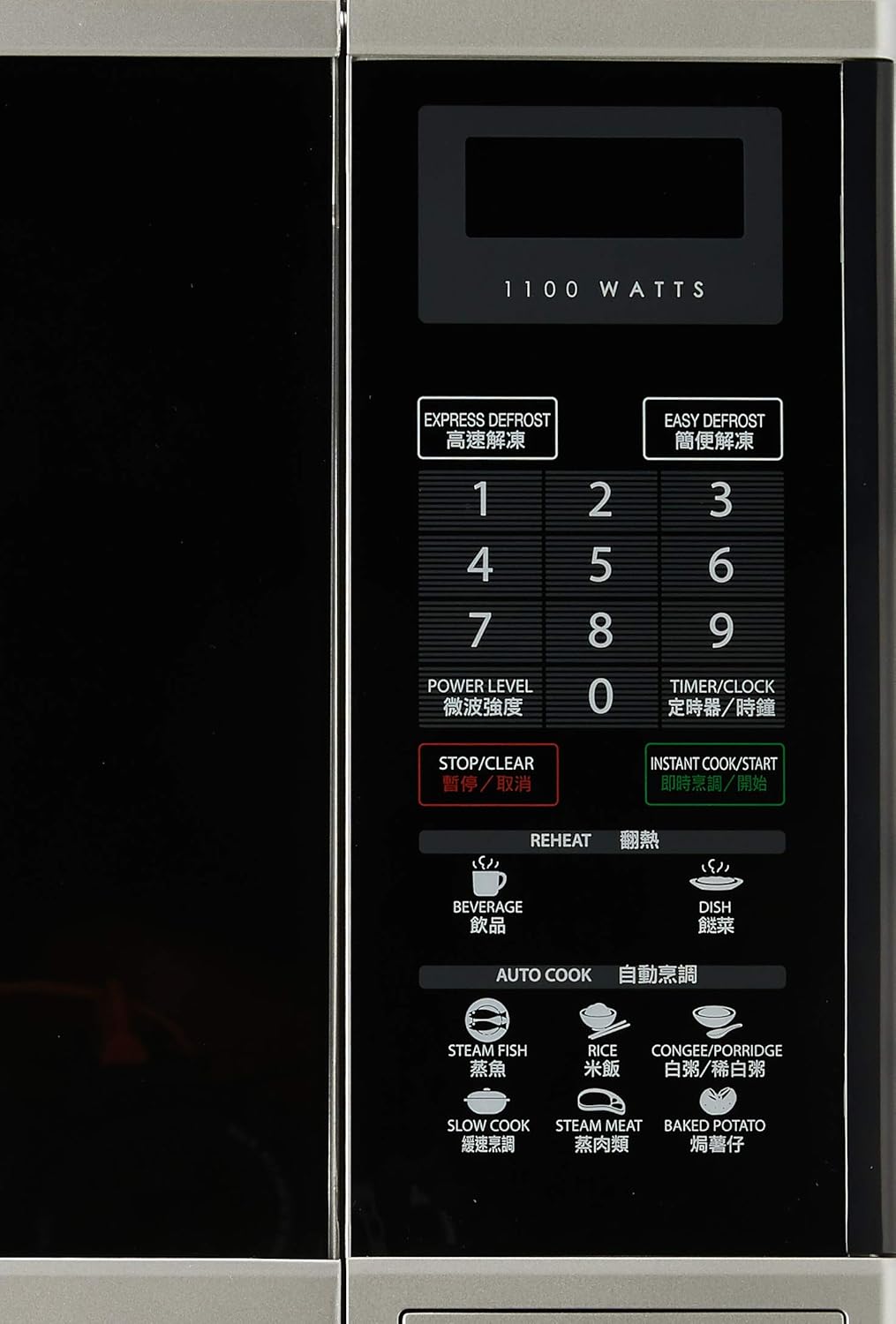
Gambar 3: Detil view of the control panel, featuring numerical keys, function buttons, and the digital display.
The control panel is located on the right side of the oven and features a digital display, numerical keypad (0-9), and various function buttons:
- EXPRESS DEFROST / EASY DEFROST: For quick and convenient defrosting.
- TINGKAT kakuatan: Nyaluyukeun kaluaran daya gelombang mikro.
- TIMER / JAM: Sets the cooking timer or the current time.
- STOP/BERSIH: Ngeureunkeun operasi ayeuna atanapi ngahapus setélan.
- INSTANT COOK/START: Starts cooking immediately or confirms settings.
- PANAS deui: Dedicated buttons for reheating beverages and dishes.
- MASAK OTOMATIS: Pre-programmed settings for various food types like Steam Fish, Rice, Congee/Porridge, Slow Cook, Steam Meat, and Baked Potato.
3. Setup jeung Instalasi
3.1. Ngabongkar bungkusan
Carefully remove the microwave oven and all packing materials from the carton. Check the oven for any damage, such as dents or a misaligned door. Do not operate the oven if it is damaged. Contact your dealer or authorized service center.
3.2. Panempatan
- Place the oven on a flat, stable surface strong enough to hold its weight (approximately 17kg).
- Ensure adequate ventilation. Leave a minimum of 10 cm (4 inches) clearance at the rear, 20 cm (8 inches) at the top, and 5 cm (2 inches) on each side for proper airflow.
- Ulah meungpeuk liang hawa.
- Jauhkeun oven tina sumber panas, uap, atanapi cairan cipratan.
- Ulah nempatkeun oven deukeut radio atawa TV, sabab bisa ngabalukarkeun gangguan.
3.3. Sambungan Listrik

Gambar 4: Tukangeun view of the microwave oven, illustrating the power cord connection and important safety warnings regarding microwave energy.
- Plug the oven into a properly grounded 220V, 50Hz AC outlet with a dedicated circuit.
- Entong nganggo kabel ekstensi atanapi adaptor.
- Pastikeun kabel listrik henteu ruksak atanapi ciwit.
4. Parentah Operasi
4.1. Nyetél Jam
- Pencét éta TIMER / JAM tombol sakali.
- Use the numerical keypad to enter the current time (e.g., 12:30 for 12:30 PM).
- Pencét éta TIMER / JAM tombol deui pikeun mastikeun.
4.2. Dasar Microwave Masak
- Teundeun dahareun dina wadah microwave-aman dina turntable kaca.
- Tutup panto oven aman.
- Pencét éta TINGKAT kakuatan button repeatedly to select the desired power level (e.g., P100 for 100% power, P80 for 80% power). The oven offers 6 microwave power levels.
- Use the numerical keypad to enter the cooking time.
- Pencét INSTANT COOK/START pikeun ngamimitian masak.
4.3. Défrosting
The oven offers two defrost functions:
- EXPRESS DEFROST: For quick defrosting of smaller items. Follow on-screen prompts or manual for specific weight settings.
- EASY DEFROST: For more controlled defrosting. Refer to the manual for weight and food type guidelines.
- Teundeun kadaharan beku dina turntable.
- Pencét boh EXPROST DEFROST or EASY DEFROST.
- Enter the weight of the food using the numerical keypad.
- Pencét INSTANT COOK/START.
4.4. Reheat Functions
The oven includes 2 Reheat Menu keys for common items:
- inuman: For reheating drinks.
- DISH: For reheating prepared meals.
- Place the item to be reheated on the turntable.
- Pencét anu cocog PANAS deui button (BEVERAGE or DISH).
- The oven will automatically set the time. Press INSTANT COOK/START pikeun ngamimitian.
4.5. Auto Cook Functions
The OTOMATIS MASAK menu provides pre-programmed settings for various foods:
- IKAN IKAN
- béas
- CONGEE/PORRIDGE
- LEMAH MASAK
- DAGING KUAP
- Kentang dipanggang
- Place the food in a suitable container on the turntable.
- Pencét anu dipikahoyong OTOMATIS MASAK kancing.
- Select the quantity or weight if prompted (refer to the full manual for specific auto cook settings).
- Pencét INSTANT COOK/START.
5. Pangropéa jeung beberesih
Pembersihan rutin tina oven microwave anjeun bakal mastikeun umur panjang sareng operasi anu efisien.
5.1. beberesih exterior
- Ngusap permukaan luar kalayan lemes, damp lawon.
- Ulah make cleaners abrasive atawa bahan kimia kasar.
5.2. beberesih interior
- Bersihkeun rohangan oven saatos dianggo nganggo deterjen hampang sareng lawon lemes.
- Pikeun cipratan kadaharan anu bandel, simpen samangkuk cai anu dieusi irisan jeruk nipis teras panaskeun dina microwave dina suhu luhur salami 2-3 menit. Uapna bakal ngaleungitkeun sésa kadaharan, janten langkung gampang diusap.
- Mastikeun segel panto na surfaces sealing bersih pikeun ngajaga operasi ditangtoskeun.
5.3. Kaca Turntable
- Kaca turntable jeung roller ring bisa dihapus pikeun beberesih.
- Ngumbah aranjeunna dina cai haneut, soapy atawa dishwasher nu.
- Pastikeun aranjeunna tos rengse garing saméméh nempatkeun deui dina oven.
6. Cara ngungkulan
Sateuacan ngahubungan jasa, pariksa masalah umum ieu:
| Masalah | Mungkin Cukang lantaranana | Solusi |
|---|---|---|
| Oven henteu ngamimitian | Kabel listrik henteu dipasang; Panto teu ditutup leres; Fuse ditiup atawa circuit breaker tripped. | Colokkeun kabel listrik; Tutup panto aman; Pariksa sekering atanapi reset circuit breaker. |
| Dahareun teu pemanasan | Waktu masak atanapi tingkat daya anu disetel teu leres; Panto teu ditutup kalayan leres. | Adjust time/power; Ensure door is latched. |
| Meja puteran henteu diputer | Turntable teu leres seated; Halangan handapeun turntable. | Reposition turntable na roller ring; Leupaskeun sagala halangan. |
| Sparking jero oven | Metal or foil in oven; Food splatters. | Cabut barang-barang logam; Bersihkeun interior oven sacara saksama. |
If the problem persists after checking these points, please contact an authorized service technician.
7. Spésifikasi
| merek | Seukeut |
| Modél | R-369T |
| Kapasitas | 33 liter |
| Daya Kaluaran | 800W (Microwave) |
| Wattage | 1100 watt (Input) |
| Diaméter turntable | 272 mm |
| Ukuran Luar (W x H x D) | 520 x 310 x 448 mm |
| Beurat | 16.96 kg |
| Voltage | 220 volt |
| Frékuénsi | 50 Hz |
| Bahan | Baja |
| Fitur husus | Programmable, 6 Microwave Power Levels, 2 Reheat Menu Keys, Easy Defrost, Slow Cook Key, Black Glass Door |

Figure 5: Dimensional drawing of the Sharp R-369T Microwave Oven, illustrating its width (520 mm / 52 cm), height (310 mm / 31 cm), and depth (448 mm / 44.8 cm).
8. Garansi jeung Rojongan
Kanggo inpormasi garansi sareng dukungan palanggan, mangga tingal kartu garansi anu kalebet dina produk anjeun atanapi kunjungan ka Sharp resmi websitus pikeun wewengkon Anjeun. Simpen resi pameseran anjeun salaku bukti pameseran pikeun klaim garansi.
For technical assistance or service inquiries, please contact Sharp customer service.


