1. Bubuka
This manual provides essential information for the safe and efficient operation, installation, and maintenance of your Daitsu ADDH10 Digital Dehumidifier. Please read these instructions thoroughly before using the appliance and retain them for future reference.
The Daitsu ADDH10 is designed to reduce humidity levels in indoor environments, helping to prevent mold, mildew, and other moisture-related issues. It features a digital display and automatic functions for user convenience.
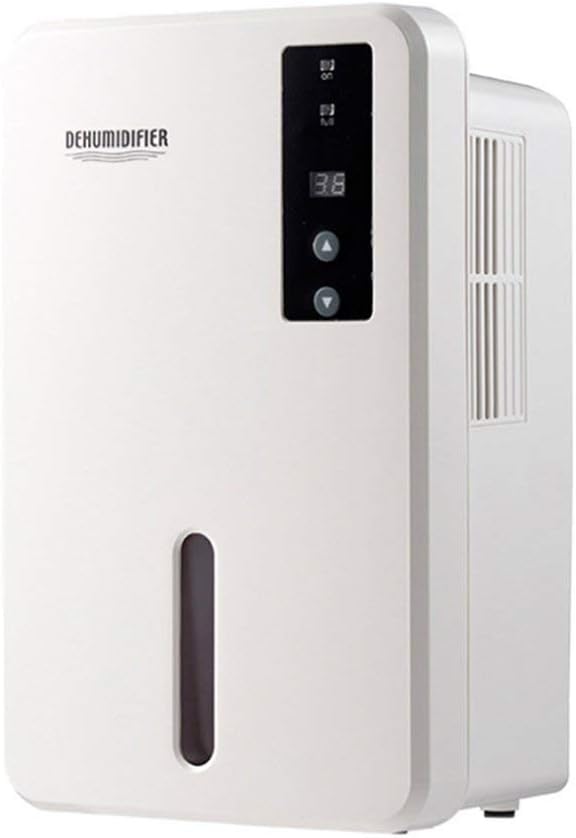
Gambar 1.1: Hareupeun view of the Daitsu ADDH10 Digital Dehumidifier, showing the control panel and water tank window.
2. Émbaran Kasalametan
Salawasna turutan pancegahan kaamanan dasar nalika nganggo alat-alat listrik pikeun ngirangan résiko kahuruan, kejutan listrik, sareng tatu.
- Baca sagala parentah saméméh ngagunakeun dehumidifier nu.
- Pastikeun catu daya cocog sareng voltage dieusian dina labél rating.
- Ulah ngajalankeun dehumidifier ku ari ruksak atawa colokan.
- Jauhkeun alat tina sumber panas, sinar panonpoé langsung, sareng bahan anu gampang kaduruk.
- Do not block the air inlet or outlet. Ensure adequate air circulation around the unit.
- Salawasna tempatkeun dehumidifier dina permukaan anu stabil sareng rata.
- Cabut colokan unit sateuacan beberesih, pangropéa, atanapi upami henteu dianggo salami lami.
- Alat ieu henteu dimaksudkeun pikeun dianggo ku jalma (kalebet murangkalih) anu ngirangan kamampuan fisik, indrawi atanapi mental, atanapi kirang pangalaman sareng pangaweruh, kecuali aranjeunna dipasihan pangawasan atanapi petunjuk ngeunaan panggunaan alat ku jalma anu tanggung jawab kana kasalametanana.

Image 2.1: Illustration of the dehumidifier's double security protection, including automatic shut-off when the water tank is full and over-temperature protection (auto-stop if heat sink exceeds 80°C).
3. Komponén produk na Fitur
Biasakeun diri anjeun sareng bagian utama dehumidifier anjeun:
- Panél kontrol: Layar digital sareng tombol pikeun operasi.
- Inlet Udara: Tempat hawa lembab disedot kana unit.
- Outlet hawa: Dimana hawa garing diusir.
- Tangki cai: Collects condensed water. Features a transparent window to monitor water level.
- Water Tank Handle/Lid: For easy removal and emptying.

Image 3.1: Diagram showing the key components: Air outlet, Control panel, Air inlet, and the 1.5L water tank capacity.
The dehumidifier has a 1.5-liter water tank capacity and features automatic shut-off when the tank is full, indicated by a float sensor. It also includes over-temperature protection.
4. Setup jeung Instalasi
4.1 Ngabongkar bungkusan
- Sacara saksama piceun dehumidifier tina bungkusanna.
- Cabut sadaya bahan bungkus, pita, sareng pilem pelindung.
- Inspect the unit for any signs of damage. If damaged, do not operate and contact your retailer.
4.2 Nempatkeun
- Tempatkeun dehumidifier dina permukaan anu teuas sareng rata anu tiasa nahan beuratna nalika tangki cai pinuh.
- Ensure there is at least 20 cm (8 inches) of space around the air inlet and outlet for proper air circulation.
- Avoid placing the unit near walls, furniture, or curtains that could obstruct airflow.
- Do not place the unit in direct sunlight or near heat-generating appliances.
- For optimal performance, operate the dehumidifier in an enclosed area. Close all doors and windows in the room.
4.3 Sambungan Daya
- Ensure your hands are dry before plugging in the unit.
- Colokkeun kabel listrik kana stop kontak listrik anu grounded leres.
5. Parentah Operasi
5.1 Control Panel Leuwihview
The control panel features a digital display and control buttons:
- Digital tampilan: Shows current humidity level or settings.
- Tombol Daya: Ngahurungkeun atanapi mareuman unit.
- Tombol Naék / Turun: Adjust desired humidity level or other settings.

Image 5.1: Various angles of the dehumidifier, highlighting the digital control panel with up/down buttons and the transparent water tank.
5.2 Operasi Dasar
- Hurungkeun: Press the Power button to turn on the dehumidifier. The digital display will light up, showing the current room humidity.
- Setel kalembaban anu dipikahoyong: Use the Up and Down buttons to set your desired humidity level. The unit will operate until the room humidity reaches the set level, then cycle on and off to maintain it.
- Pareuman: Press the Power button again to turn off the dehumidifier.
5.3 Ngosongkeun Tangki Cai
When the water tank is full, the dehumidifier will automatically stop operating, and an indicator light (if available) may illuminate. The unit will not resume operation until the tank is emptied and reinserted correctly.
- Tarik kaluar tangki cai ti hareup unit lalaunan.
- Kalayan ati-ati bawa tangki ka solokan atanapi bak cuci piring.
- Remove the tank lid (if applicable) and pour out the collected water.
- Replace the lid securely and slide the empty water tank back into the dehumidifier until it clicks into place.
- The unit will resume operation automatically if the power is on and the desired humidity level has not been reached.

Image 5.2: The transparent water tank, designed for easy removal and emptying.
6. Pangropéa
Pangropéa rutin ngajamin kinerja optimal sareng manjangkeun umur dehumidifier anjeun. Salawasna cabut colokan unit sateuacan ngalakukeun perawatan naon waé.
6.1 Ngabersihan Tangki Cai
- Clean the water tank regularly (e.g., every few weeks) to prevent mold and bacteria growth.
- Remove the water tank as described in Section 5.3.
- Wash the tank with mild detergent and warm water. Rinse thoroughly.
- Tegalan tank sagemblengna saméméh reinserting kana unit.
6.2 Ngabersihan Exterior
- Ngusap bagian luar tina dehumidifier ku lemes, damp lawon.
- Ulah nganggo pembersih abrasif, pangleyur, atanapi bahan kimia anu keras, sabab ieu tiasa ngaruksak permukaan.
- Pastikeun euweuh cai asup kana komponén internal.
6.3 Panyimpenan
- If storing the dehumidifier for an extended period, ensure the water tank is empty and clean.
- Ngabersihan bagian luar unit.
- Simpen unit dina posisi nangtung di tempat anu tiis sareng garing, jauh tina sinar panonpoé langsung sareng suhu anu ekstrim.
7. Cara ngungkulan
Sateuacan ngahubungi dukungan palanggan, mangga tingal pituduh ngungkulan ieu pikeun masalah umum:
| Masalah | Mungkin Cukang lantaranana | Solusi |
|---|---|---|
| Dehumidifier teu hurung. | Taya catu daya. Kabel listrik henteu dicolokkeun sacara aman. |
Pariksa naha stop kontak listrik berpungsi. Pastikeun yén kabel listrik dicolok pageuh kana unit sareng stop kontak témbok. |
| Unit jalan tapi henteu ngumpulkeun cai. | Kalembaban kamar geus handap. Suhu handap teuing. Aliran udara diblokir. |
Check the current humidity level on the display. If it's below your set point, the unit will not collect water. Dehumidifier kurang efektif dina lingkungan anu tiis pisan. Pastikeun inlet jeung outlet hawa teu obstructed. |
| Unit eureun beroperasi sareng lampu indikator hurung. | Tangki cai pinuh. Water tank is not properly inserted. |
Ngosongkeun bak cai. Reinsert the water tank correctly until it clicks into place. |
| Noise mahiwal salila operasi. | Unit henteu dina permukaan anu rata. Masalah komponén internal. |
Pastikeun unit disimpen dina permukaan datar anu stabil. Upami aya gangguan, eureunkeun panggunaan sareng hubungi layanan palanggan. |
8. Spésifikasi
| Fitur | Spésifikasi |
|---|---|
| merek | Daitsu |
| Nomer modél | ADDH10 (Technical Model: bb_S0403263) |
| Warna | Bodas |
| Item Beurat | 10 kg |
| Ukuran produk (approx.) | 286mm (Jangkungna) x 180mm (Rubak) x 134mm (Jona) |
| Kapasitas Tangki Cai | 1.5 liter |
| Modeu Operasi | Otomatis |
| Komponén Kaasup | Dehumidifier |
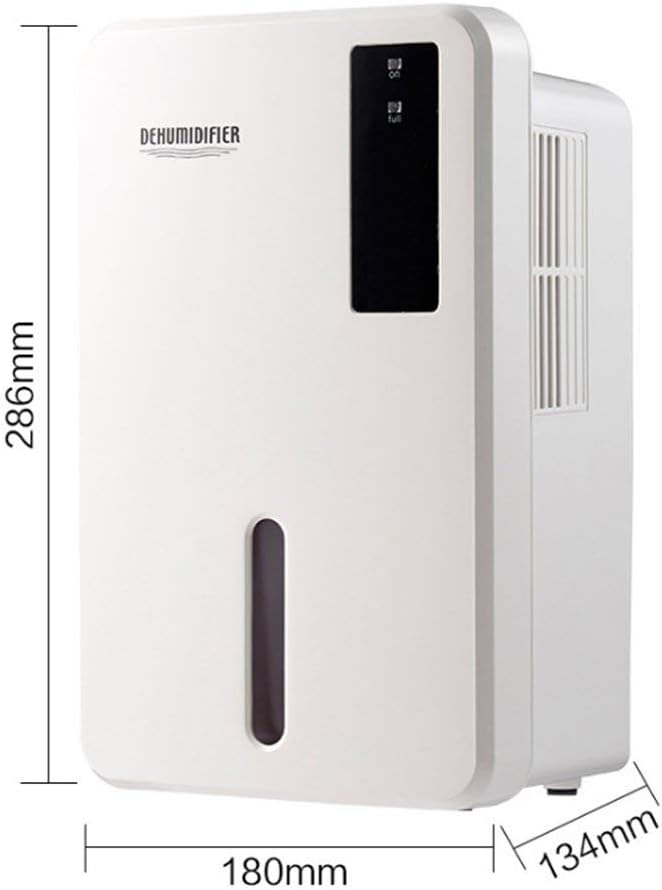
Image 8.1: Diagram illustrating the dimensions of the dehumidifier: 286mm height, 180mm width, and 134mm depth.
9. Garansi jeung Rojongan
For warranty information, please refer to the documentation included with your product packaging or visit the official Daitsu websitus. Sarat jeung kaayaan jaminan bisa rupa-rupa dumasar wewengkon sarta pangecér.
If you encounter issues not covered in the troubleshooting section or require further assistance, please contact your retailer or the manufacturer's customer support. Have your model number (ADDH10) and purchase details ready when contacting support.


