Bubuka
The Sinopé TR1310 Non-Programmable Expansion Unit is designed to increase the maximum load capacity of your Sinopé floor heating thermostat. This unit is essential for large floor heating areas exceeding 15 amperes, allowing a single master thermostat to control multiple floor heating sections efficiently. By integrating this expansion unit, you can manage extensive heated floor areas without the need for additional thermostats, optimizing your heating system and potentially reducing costs.
This manual provides detailed instructions for the safe and correct installation, operation, and maintenance of your TR1310 expansion unit. Please read all instructions carefully before beginning installation or use.
Fitur produk
- Compatible with Floor Heating: Works seamlessly with any Sinopé smart, programmable, or non-programmable floor heating thermostat.
- Increased Load Capacity: Multiplies the allowed maximum load by combining this expansion unit with any compatible floor heating thermostat, enabling control of large floor heating installations exceeding 15 A.
- Sistem anu tiasa dilegakeun: Connect up to 10 expansion units per thermostat for extensive coverage.
- Gampang-dipasang: Designed for straightforward setup with a handy installation guide.
- Kasalametan Terpadu: Equipped with a built-in Class A Ground Fault Circuit Interrupter (GFCI) and protection for engineered wood flooring.
Eusi pakét
Upon opening the product box, verify that all components are present and undamaged:
- Sinopé TR1310 Expansion Unit
- Instruksi Manual
- Floor Temperature Sensor (if applicable)
- Wire Nuts / Connectors
- Pamasangan screws
- Small Screwdriver (for terminal connections)
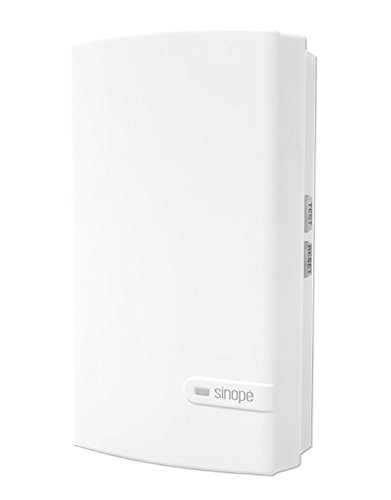 Image: Sinopé TR1310 Non-Programmable Expansion Unit in its packaging, showing the main unit, sensor cable, wire nuts, and instruction manual.
Émbaran Kasalametan
PERHATOSAN: Risk of electric shock. Installation must be performed by a qualified electrician in accordance with local and national electrical codes. Disconnect power at the main service panel before installing or servicing this unit.
- Always turn off the main power supply at the circuit breaker before performing any electrical work.
- Pastikeun grounding ditangtoskeun pikeun nyegah shock listrik.
- Do not use the unit if it appears damaged.
- This unit is designed for resistive loads only.
- Operasi voltage: 120/208/240 Vac, 50/60 Hz.
- Maximum load: 3600 W @ 240 V / 15 A.
Pamasangan
Professional installation by a qualified electrician is highly recommended to ensure safety and compliance with electrical codes.
Lengkah 1: Nyiapkeun pikeun Instalasi
- Turn off the power to the floor heating circuit at the main electrical panel.
- Remove the existing thermostat (if any) and identify the power supply wires (Line 1, Line 2/Neutral) and the heating element wires (Load 1, Load 2).
- Separate the front panel of the TR1310 expansion unit from its back plate using a small screwdriver.
Step 2: Wiring the Expansion Unit
The TR1310 unit has pre-attached wires for connection. Ensure all connections are secure and insulated with wire nuts.
- Connect Heating Element Wires (Load): The expansion unit has two wires labeled 'LOAD' (typically black and white, or as indicated by stickers). Connect these to the wires leading to your floor heating element (e.g., heating cable, heating film, or heating mat) using the provided wire nuts.
- Connect Power Supply Wires (Line): The unit also has two wires for power supply (Line 1 and Line 2/Neutral). Connect these to your main power supply wires from the electrical panel. The unit is dual voltage compatible (120VAC or 240VAC).
- Connect Floor Temperature Sensor: If using a floor temperature sensor, connect its two wires to the designated sensor terminals (typically labeled 'Sensor' or with numbers 1 and 2) on the back plate of the expansion unit. Tighten the terminal screws to secure the connections.
Lengkah 3: Pasang Unit
- Lebetkeun sadaya kabel kana kotak listrik kalayan ati-ati.
- Secure the back plate of the expansion unit to the electrical box using the provided mounting screws.
- Align the front panel with the back plate and gently push until it clicks into place. Ensure the pins are straight and not bent.
Step 4: Initial Power-Up and GFCI Test
- Restore power to the circuit at the main electrical panel.
- The unit should power on. Locate the GFCI test button (usually on the side or bottom of the unit).
- Press the GFCI test button. The unit should trip, indicating the GFCI is functioning correctly.
- Press the reset button (if separate) or cycle the power to reset the GFCI.
Parentah Operasi
The Sinopé TR1310 is a non-programmable expansion unit, meaning its primary function is to extend the load capacity of a master thermostat. It does not have independent temperature controls or scheduling features. All temperature settings and programming are managed by the connected master Sinopé thermostat.
GFCI Test and Reset
The built-in GFCI is a critical safety feature. It is recommended to test the GFCI monthly.
- To test, press the 'TEST' button on the unit. The unit should trip, cutting power to the heating element.
- To reset, press the 'RESET' button (if available) or cycle the power to the unit.
- If the GFCI does not trip or reset correctly, discontinue use and contact a qualified electrician.
Pangropéa
The Sinopé TR1310 expansion unit requires minimal maintenance.
- beberesih: Wipe the unit's surface with a soft, damp lawon. Ulah make cleaners abrasive atawa pangleyur.
- Periodic GFCI Testing: Test the GFCI monthly as described in the Operating Instructions section to ensure continued safety.
- Pamariksaan: Periodically inspect the unit and wiring for any signs of damage or wear. If any issues are found, disconnect power and contact a qualified electrician.
Pamérésan masalah
If you experience issues with your TR1310 expansion unit, refer to the following common troubleshooting steps:
- Unit teu diaktipkeun:
- Check the circuit breaker for the floor heating circuit.
- Pastikeun sadaya sambungan kabel aman.
- Verify the main power supply is active.
- GFCI Trips Frequently:
- This indicates a ground fault. Inspect the heating element and wiring for damage.
- Ensure the unit is not exposed to moisture.
- Contact a qualified electrician to diagnose and repair the fault.
- Floor Not Heating:
- Check the settings on the master Sinopé thermostat.
- Ensure the GFCI on the expansion unit has not tripped.
- Verify the heating element is properly connected and functional.
For issues not resolved by these steps, please contact Sinopé Technologies customer support or a qualified electrician.
spésifikasi
| Fitur | Rincian |
|---|---|
| Nomer Bagian | TR1310 |
| Dimensi produk | 12.2 x 7.2 x 2.6 cm |
| Item Beurat | 270 g |
| Warna | Bodas |
| Gaya | Modern |
| Sumber Daya | AC |
| Voltage | 240 volt |
| Wattage | 3600 watt |
| Amperage Kamampuh | 15 Amps |
| Tipe Pamasangan | Tembok Gunung |
| Sertifikasi | ETL Didaptarkeun |
| Fitur husus | Korded |
| Negara asal | Cina |
Garansi sareng Rojongan
Katerangan jaminan: This Sinopé product is covered by a 3-year manufacturer limited warranty from the date of purchase.
Pabrikan: Sinopé Technologies
Tempat Usaha: Sinopé Technologies Inc., 705 av. Montrichard, Saint-Jean-sur-Richelieu, QC, Canada, J2X 5K8.
Rojongan Palanggan: For technical assistance or warranty claims, please contact Sinopé Technologies at 1-855-741-7701 or visit their official websitus.