
1. Bubuka
Thank you for choosing the SPYPOINT FORCE-11D Ultra Compact Trail Camera. This manual provides detailed instructions for setting up, operating, maintaining, and troubleshooting your camera to ensure optimal performance. The FORCE-11D is designed for capturing high-quality images and videos in various outdoor conditions.
Key features of the SPYPOINT FORCE-11D include:
- 11MP photo resolution and HD video recording with sound.
- 42 low glow LEDs for enhanced night imaging with a 100' flash range.
- Ultra-fast 0.07-second trigger speed, one of the fastest on the market.
- Blur Reduction and Infrared Boost technologies for clear images.
- 80' detection distance with a curved motion sensor lens.
- Multi-shot, time-lapse, and continuous camera modes.
- Integrated 2-inch viewing screen for easy setup and photo review.
2. Produk Langkungview
Familiarize yourself with the components of your SPYPOINT FORCE-11D camera.
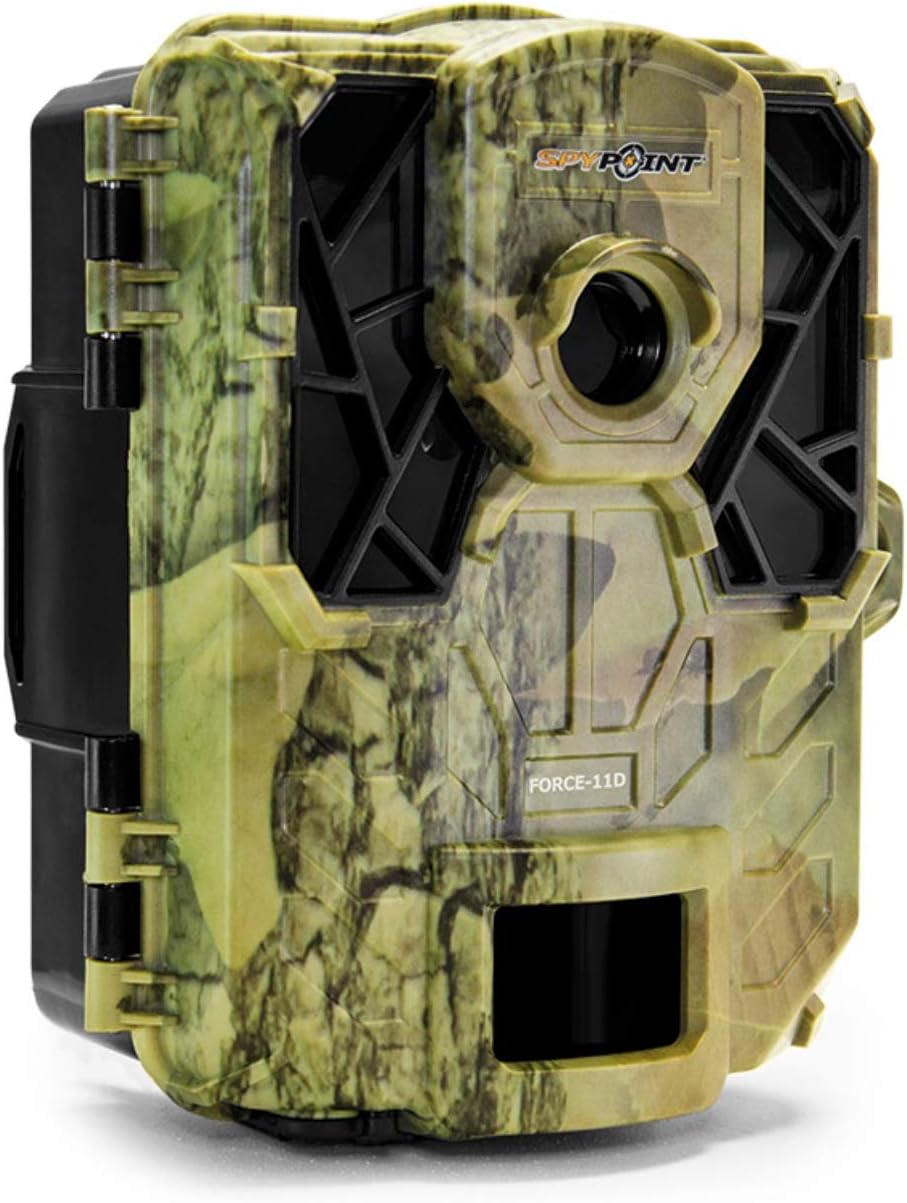
Gambar 2.1: Hareupeun view of the SPYPOINT FORCE-11D trail camera, showing the camouflage casing, lens, and infrared LEDs.

Gambar 2.2: Di jero view of the SPYPOINT FORCE-11D trail camera when opened, revealing the control panel, 2-inch viewing screen, battery compartments, and SD card slot.
Dina Kotak:
- SPYPOINT FORCE-11D Trail Camera
- Ningkatna Kurung
- Gancang Mimitian Guide
- Tali Pamasangan
Items Not Included (Required for Operation):
- 6 AA Batteries (Alkaline or Lithium recommended)
- SD/SDHC Memory Card (up to 32GB, Class 10 recommended)
3. Setup jeung Instalasi
3.1. Pamasangan batré
- Buka kaméra casing ku unlatching klip samping.
- Locate the battery compartments.
- Selapkeun 6 batré AA, mastikeun polaritasna bener (+/-) sakumaha dituduhkeun di jero kompartemen.
- Tutup panutup kompartemen batré aman.
3.2. Instalasi Kartu SD
- With the camera open, locate the SD card slot, typically near the viewlayar ing.
- Insert an SD/SDHC memory card (up to 32GB) into the slot until it clicks into place. Ensure the card is inserted in the correct orientation.
- Pikeun nyabut, pencét kartu gently dugi spring kaluar.
3.3. Masang kaméra
- Pilih lokasi anu cocog pikeun kaméra anjeun, sapertos tangkal atanapi tihang, pastikeun tempatna jelas view wewengkon nu dipikahoyong.
- Use the provided mounting strap to secure the camera. Thread the strap through the slots on the back of the camera and around the mounting surface.
- Tighten the strap firmly to prevent camera movement.
- Adjust the camera's angle to optimize the detection area. The curved motion sensor lens improves detection angle and distance.
4. Parentah Operasi
4.1. Powering on / Pareum
- Pikeun Ngahurungkeun: Pencét éta OK button. The screen will illuminate.
- Pikeun mareuman: Pencét jeung tahan tombol OK tombol pikeun 2 detik.
4.2. Napigasi Menu
Gunakeun tombol panah (UP, TURUN, Kénca, BENER) to navigate through menu options on the 2-inch viewing screen. Press OK pikeun mastikeun pilihan.
4.3. Nyetél Modeu Kaméra
The FORCE-11D supports various capture modes:
- Modeu Poto: Captures still images (11MP).
- Modeu Video: Records HD video with sound.
- Multi-shot Mode: Captures multiple photos per trigger (up to 6 shots).
- Modeu Selang Waktu: Captures images at set intervals regardless of motion.
- Mode Kontinyu: Records continuously for a set duration.
Refer to the on-screen menu for specific settings related to each mode, including resolution, delay, and length.
4.4. Viewing Poto sareng Pidéo
Anu 2 inci viewing screen allows you to review captured media directly on the camera. Navigate to the playback mode using the menu and use the arrow buttons to browse through files.
5. Pangropéa
- beberesih: Anggo lawon anu lemes sareng garing pikeun ngabersihkeun lénsa sareng wadah kaméra. Hindarkeun pembersih atanapi pangleyur anu abrasif.
- Ngagantian batré: Replace batteries when the low battery indicator appears on the screen or when performance degrades. Always use fresh batteries of the same type.
- Manajemén Kartu SD: Regularly format your SD card using the camera's menu option to ensure optimal performance and prevent data corruption. Back up important files saméméh pormat.
- Panyimpenan: Upami teu dianggo kanggo waktos anu berkepanjangan, cabut batré sareng simpen kaméra di tempat anu tiis sareng garing jauh tina sinar panonpoé langsung.
6. Cara ngungkulan
| Masalah | Mungkin Cukang lantaranana | Solusi |
|---|---|---|
| Kaméra teu hurung. | Batré paéh atawa salah dipasang. | Pariksa polaritasna batré. Ganti ku batré seger. |
| No photos/videos recorded. | SD card full, corrupted, or not inserted correctly; incorrect settings; no motion detected. | Format or replace SD card. Check camera mode and sensitivity settings. Ensure camera is placed within detection range. |
| Poor night images. | Objects too close/far; IR Boost not enabled; low battery. | Ensure subjects are within 100' flash range. Check IR Boost setting. Replace batteries. |
| Gambar kabur. | Camera movement; subject movement; lens dirty. | Securely mount the camera. Ensure Blur Reduction is active. Clean the lens. |
7. Spésifikasi
| Fitur | Rincian |
|---|---|
| Ngaran modél | FORCE-11D |
| Resolusi Poto | 11 megapiksel |
| Resolusi Video | 720 piksel (HD) |
| Laju micu | 0.07 detik |
| Kisaran Flash | 100 suku (30 méter) |
| Jarak Deteksi | 80 suku (24 méter) |
| LEDs | 42 low glow LEDs |
| Layar Pintonan | 2 inci viewlayar ing |
| Rojongan Kartu Mémori | SD/SDHC up to 32GB (not included) |
| Sumber Daya | 6 batré AA (teu kaasup) |
| Ukuran (L x W x H) | 12.7 x 8.3 x 10.2 cm (kira-kira 5 x 3.25 x 4 inci) |
| Beurat | 255 g (kira-kira 0.56 lbs) |
| Warna | Kamuflase |
8. Garansi jeung Rojongan
SPYPOINT offers a garansi 2 taun on trail cameras. For complete details regarding warranty coverage and terms, please refer to the official SPYPOINT websitus atanapi ngahubungan rojongan customer.
For technical assistance, troubleshooting beyond this manual, or warranty claims, please contact SPYPOINT customer support through their official channels. Keep your proof of purchase for warranty validation.
Sumberdaya Online:
- Official SPYPOINT Websitus: www.spypoint.com (for complete details and support)