1. Bubuka
The Acer Predator XB321HK is a 32-inch IPS UHD (3840 x 2160) widescreen display designed for gaming. It features NVIDIA G-Sync technology to reduce screen tearing and stuttering, providing a smoother visual experience. Key specifications include a 4ms response time, 350 cd/m² brightness, and multiple input ports.
2. Eusi Paket
Pastikeun yén sadaya item aya dina bungkusan:
- tampilan
- Nangtung
- Kabel listrik
3. Setélan
3.1 Ngarakit Stand Monitor
Carefully remove the monitor from its packaging. Attach the stand base to the stand neck, then secure the assembled stand to the back of the monitor. Ensure all screws are tightened appropriately.

Gambar: Tukangeun view monitor sareng dudukanna napel.

Gambar: Tukangeun view of the monitor, showing the mounting points for the stand.
3.2 Nyambungkeun Monitor
Connect the power cord to the monitor and a power outlet. Use either an HDMI or DisplayPort cable to connect the monitor to your computer's graphics card. For additional connectivity, utilize the available USB 3.0 ports.
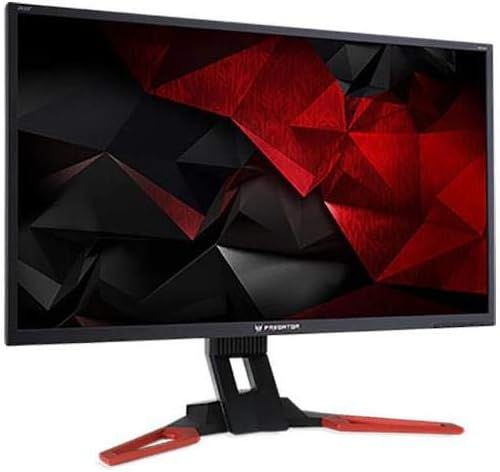
Gambar: Hareupeun view of the Acer Predator XB321HK monitor.
3.3 Pidéo Dilanjutkeunview
Tonton pidéo resmi ieu kanggo langkung tiview of the Acer Predator XB1 Series, highlighting key features and design elements.
Video: Official Acer Predator XB1 Series overview, nuduhkeuncasing ZeroFrame design, IPS technology, and NVIDIA G-SYNC capabilities.
4. Ngoperasikeun Monitor
4.1 Daya Hurung/Pareuman
Press the power button located on the monitor's bezel to turn the display on or off. The power indicator light will illuminate when the monitor is active.
4.2 Menu dina layar (OSD).
The OSD menu allows you to adjust various monitor settings. Use the control buttons, typically located on the rear or bottom right of the monitor, to navigate through the menu options. Common adjustments include brightness, contrast, color settings, input selection, and gaming features.
4.3 NVIDIA G-Sync Technology
This monitor supports NVIDIA G-Sync, which synchronizes the display's refresh rate with the GPU's frame rate. This eliminates screen tearing and minimizes display stutter and input lag, providing a smoother gaming experience. Ensure your NVIDIA graphics card drivers are up to date and G-Sync is enabled in the NVIDIA Control Panel.
4.4 IPS Panel Benefits
The In-Plane Switching (IPS) panel technology provides wide viewing angles and consistent, accurate color reproduction, ensuring a high-quality visual experience from various perspectives.
5. Pangropéa
5.1 Ngabersihan Layar
Pikeun ngabersihkeun layar, usap lembut nganggo kaen anu lemes sareng teu aya serat. Pikeun tanda pengkuh, enteng dampen the cloth with water or a non-abrasive screen cleaner. Avoid using harsh chemicals or abrasive materials that could damage the screen surface.
5.2 Perawatan Umum
Keep the monitor in a well-ventilated area. Avoid exposing it to direct sunlight, high humidity, or extreme temperatures. Do not place heavy objects on the monitor or its cables.
6. Cara ngungkulan
6.1 Taya Gambar dina Layar
- Pastikeun kabel daya disambungkeun sacara aman ka monitor sareng stopkontak.
- Verify that the video cable (HDMI or DisplayPort) is firmly connected to both the monitor and your computer.
- Pariksa lamun sumber input bener dipilih dina menu OSD monitor.
- Pastikeun yén komputer anjeun dihurungkeun sareng henteu dina modeu sare.
6.2 Screen Flickering or Stuttering
- Ensure NVIDIA G-Sync is properly configured and enabled in your graphics card settings.
- Apdet supir kartu grafik anjeun ka versi panganyarna.
- Check for any external interference from other electronic devices.
- Coba kabel video atawa port béda.
6.3 Kualitas Gambar Miskin
- Saluyukeun setélan kacaangan, kontras, sareng warna ngalangkungan menu OSD.
- Ensure the display resolution is set to its native 3840 x 2160 in your computer's display settings.
- Pariksa kabel video pikeun karuksakan atawa sambungan leupas.
7. Spésifikasi
| Nomer modél | XB321HK bmiphz |
| Runtuyan | UM.JX1AA.001 |
| Ukuran layar | 32 inci |
| Resolusi | 3840 x 2160 (UHD 2160p) |
| Rasio Aspék | 1.78:1 |
| Waktu Tanggapan | 4 ms |
| Sudut Dengdekkeun | -5 ° ka 25 ° |
| Pitch Piksel | 0.185 mm |
| Caang | 350 cd/m² |
| Input Sinyal | 1 x HDMI, 1 x Display Port (v1.2) |
| palabuhan USB | 4 x USB 3.0 |
| Panyatur | Speaker 2 x 2W |
| Warna | Hideung |
| Item Beurat | 24.9 pon |
| Ukuran produk (L x W x H) | 12.2 x 29 x 17.1 inci |
| Produsén | Komputer Acer |
| Fitur husus | NVIDIA G-Sync, Flicker-less Technology |
8. Garansi jeung Rojongan
8.1 Émbaran jaminan
This product typically comes with a manufacturer's warranty. Please refer to the warranty card included with your product or visit the official Acer websitus pikeun istilah jaminan lengkep jeung kaayaan husus pikeun wewengkon Anjeun.
8.2 Rojongan Téknis
For technical assistance, troubleshooting beyond this manual, or service inquiries, please contact Acer customer support. Contact information can usually be found on the Acer official websitus atanapi dina dokuméntasi produk Anjeun.