1. Bubuka
The Aduro Amplify LED Wireless Speaker, model BSP15, is a portable audio device designed for wireless music playback and hands-free calling. It features integrated LED lighting with multiple settings to enhance the audio experience. This manual provides instructions for the proper setup, operation, and maintenance of your speaker.
Naon anu aya dina Kotak:
- Aduro Amplify LED Wireless Speaker (BSP15)
- Kabel Ngecas
2. Émbaran Kasalametan
- Do not expose the speaker to water or moisture. This product is not water-resistant.
- Avoid extreme temperatures. Do not place near heat sources or in direct sunlight for extended periods.
- Ulah nyobian ngabongkar atanapi ngarobih speaker. Ieu tiasa ngabatalkeun garansi sareng nyababkeun karusakan.
- Anggo ukur kabel ngecas anu disayogikeun atanapi anu sarimbag anu disertipikasi.
- Jauhkeun tina jangkauan barudak.
3. Fitur Produk
- Konéktipitas nirkabel: Connects to smartphones, tablets, and other Bluetooth-enabled devices.
- Easy-Touch Pairing: Simplifies the process of connecting to your device.
- Mikropon Terpadu: Allows for hands-free phone calls.
- Kaluaran Sora Kualitas Luhur: Delivers clear and loud audio.
- Multiple LED Settings: Offers various light modes to complement your audio experience.
4. Kontrol Leuwihview
The Aduro Amplify speaker features intuitive controls located on the top panel for easy access to functions.
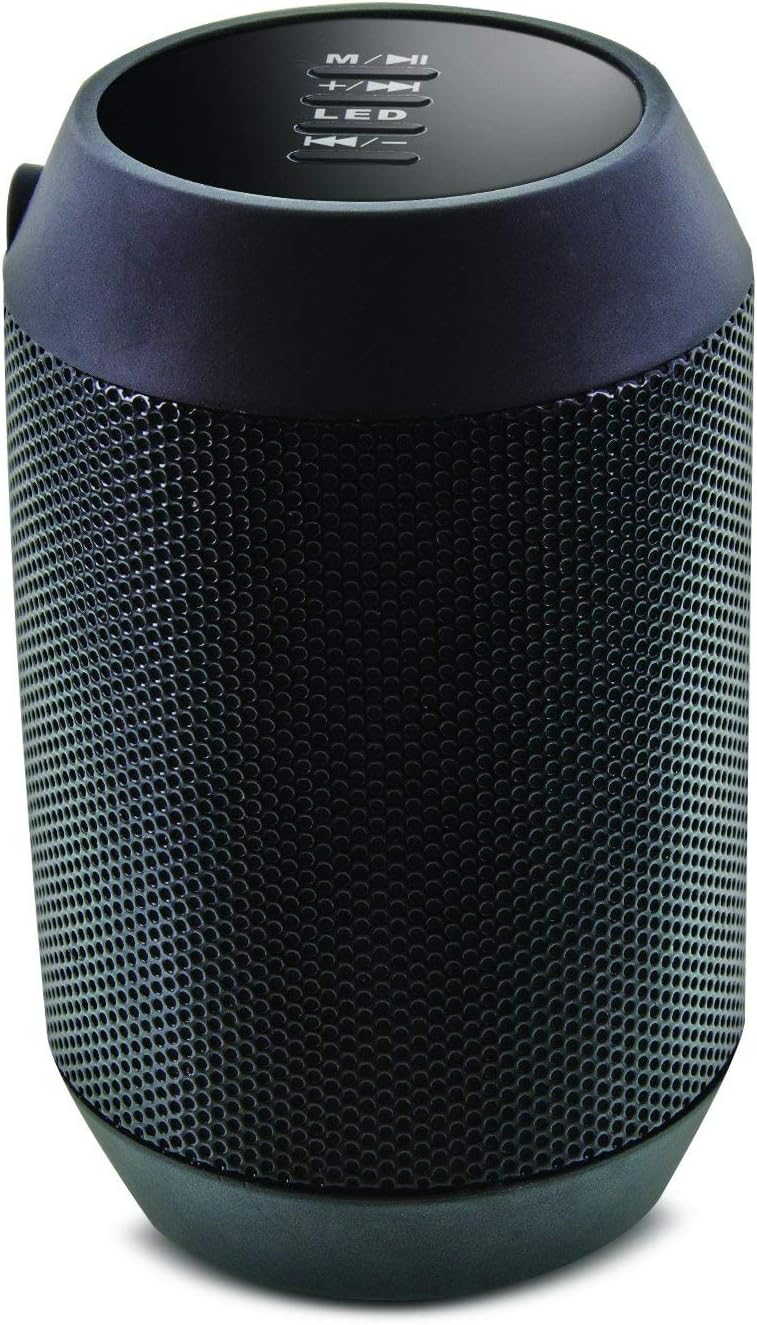
Gambar: Top view of the Aduro Amplify speaker, highlighting the control panel. From top to bottom, buttons include: M/▶█ (Mode/Play/Pause), +/▶▶ (Volume Up/Next Track), LED (LED Mode Control), ◀◀/- (Volume Down/Previous Track).
- M/▶█ Button: Press to switch between modes (e.g., Bluetooth, AUX). Press and hold to power on/off. Short press to Play/Pause music.
- +/▶▶ Button: Short press to increase volume. Press and hold to skip to the next track.
- Tombol LED: Pencét pikeun ngabalikeun modeu lampu LED anu béda-béda.
- ◀◀/- Button: Short press to decrease volume. Press and hold to go to the previous track.
5. Parentah Setup
5.1 Ngecas Speaker
Before first use, fully charge the speaker. Connect the provided charging cable to the speaker's charging port and the other end to a USB power source (e.g., computer USB port, USB wall adapter). The LED indicator will show charging status and turn off or change color when fully charged.
5.2 Powering on / Pareum
- Pikeun Ngahurungkeun: Pencét jeung tahan tombol M/▶█ button for approximately 3 seconds until you hear an audible prompt or see the LED indicator light up.
- Pikeun mareuman: Pencét jeung tahan tombol M/▶█ button for approximately 3 seconds until you hear an audible prompt or the LED indicator turns off.
5.3 Nyapasangkeun Bluetooth
Pikeun nyambungkeun speaker anjeun ka alat nu diaktipkeun Bluetooth:
- Ensure the speaker is powered on and in Bluetooth pairing mode. The LED indicator will typically flash rapidly, indicating it is ready to pair.
- On your smartphone, tablet, or other device, navigate to the Bluetooth settings.
- Aktipkeun Bluetooth sareng milarian alat anu sayogi.
- Select "Aduro BSP15" (or similar name) from the list of found devices.
- Once paired, the speaker will emit an audible confirmation, and the LED indicator will typically stop flashing and remain solid.
- Spéker bakal otomatis nyobian nyambung deui ka alat anu dipasangkeun terakhir nalika diaktipkeun.
5.4 Sambungan Kabel (AUX)
For devices without Bluetooth, you can use a 3.5mm audio cable (not included) to connect to the speaker's AUX input port. Once connected, the speaker should automatically switch to AUX mode. If not, press the M/▶█ button to cycle to AUX mode.
6. Parentah Operasi
6.1 Maén Audio
- Puter / Reureuh: Pencét pondok M/▶█ kancing.
- Volume Up: Pencét pondok +/▶▶ kancing.
- Volume Turun: Pencét pondok ◀◀/- kancing.
- Lagu salajengna: Pencét jeung tahan tombol +/▶▶ kancing.
- Lagu Sateuacanna: Pencét jeung tahan tombol ◀◀/- kancing.
6.2 Telepon Hands-Free
When connected via Bluetooth, the speaker's built-in microphone allows for hands-free calling.
- Ngajawab Telepon: Pencét pondok M/▶█ tombol nalika aya telepon asup disada.
- Tungtung Telepon: Pencét pondok M/▶█ tombol salami keur nelepon.
- Nolak Telepon: Pencét jeung tahan tombol M/▶█ tombol nalika aya telepon asup disada.
6.3 LED Light Settings
Pencét éta LED button to cycle through the available light modes. The speaker offers various visual effects, including pulsating lights that react to music.
7. Pangropéa
7.1 beberesih
Lap spiker ku lawon anu lemes sareng garing. Entong nganggo pembersih anu kasar, alkohol, atanapi pangleyur kimia anu sanés, sabab ieu tiasa ngaruksak permukaan.
7.2 Panyimpenan
Upami teu dianggo salami lami, simpen spiker di tempat anu tiis, garing, sareng jauh tina sinar panonpoé langsung sareng suhu anu ekstrim. Disarankeun pikeun ngecas batré sacara berkala pikeun ngajaga umurna.
8. Cara ngungkulan
- Speaker moal hurung:
Pastikeun batréna tos dicas. Sambungkeun kabel ngecas teras cobian deui saatos sababaraha menit. - Teu tiasa dipasangkeun sareng alat Bluetooth:
Ensure the speaker is in pairing mode (LED flashing). Make sure Bluetooth is enabled on your device and it is within range (typically 10 meters/30 feet). Turn both devices off and on again, then try pairing. Ensure no other devices are currently connected to the speaker. - Henteu aya sora atanapi volume rendah:
Check the volume levels on both the speaker and your connected device. Ensure the speaker is correctly paired or the AUX cable is fully inserted. If using AUX, ensure the correct mode is selected. - Lampu LED teu jalan:
Press the LED button to cycle through modes. If still unresponsive, power cycle the speaker.
9. Spésifikasi

Gambar: Sisi view of the Aduro Amplify LED Wireless Speaker, showing its cylindrical design and speaker grille.
| Ngaran modél | BSP15 |
| Nomer Modél Item | LU4-01-BSP15 |
| merek | Aduro |
| Bahan | palastik |
| Tipe Speaker | Subwoofer |
| Fitur husus | Built-in Microphone, Portable |
| Téhnologi konektipitas | Nirkabel (Bluetooth) |
| Komunikasi Nirkabel | Bluetooth |
| Mode Kaluaran Audio | Stereo |
| Speaker Maksimum Kaluaran Power | 5 Watt |
| Métode kontrol | Toél |
| Dimensi produk | 6 "D x 3.8" W x 3.5" H |
| Item Beurat | 6.7 ons |
| Tingkat Résistansi Cai | Henteu Tahan Cai |
| Sumber Daya | Listrik Kabel (pikeun ngecas) |
10. Garansi jeung Rojongan
10.1 Garansi kawates
This Aduro product is covered by a limited warranty against defects in materials and workmanship under normal use. The duration and terms of the warranty may vary. Please refer to the warranty card included with your purchase or contact Aduro customer support for specific details.
10.2 Rojongan Palanggan
For technical assistance, warranty claims, or product inquiries, please contact Aduro customer support. Contact information can typically be found on the manufacturer's official websitus atanapi dina bungkusan produk.
Manufacturer: Aduro


