1. Produk Langkungview
The Dino-Lite AM4113ZT is a versatile USB digital microscope designed for detailed observation and analysis. It features 1.3-megapixel resolution, offering true optical magnification from 20x to 50x, and up to 200x. This model includes integrated polarized light to reduce glare on reflective surfaces, MicroTouch for convenient image capture, and measurement capabilities through its accompanying software.

Image 1.1: The Dino-Lite AM4113ZT USB Digital Microscope, showcasing desain kompak na.

Gambar 1.2: Leuwihview of the Dino-Lite AM4113ZT's primary features, including magnification range, software compatibility, and specialized functions.
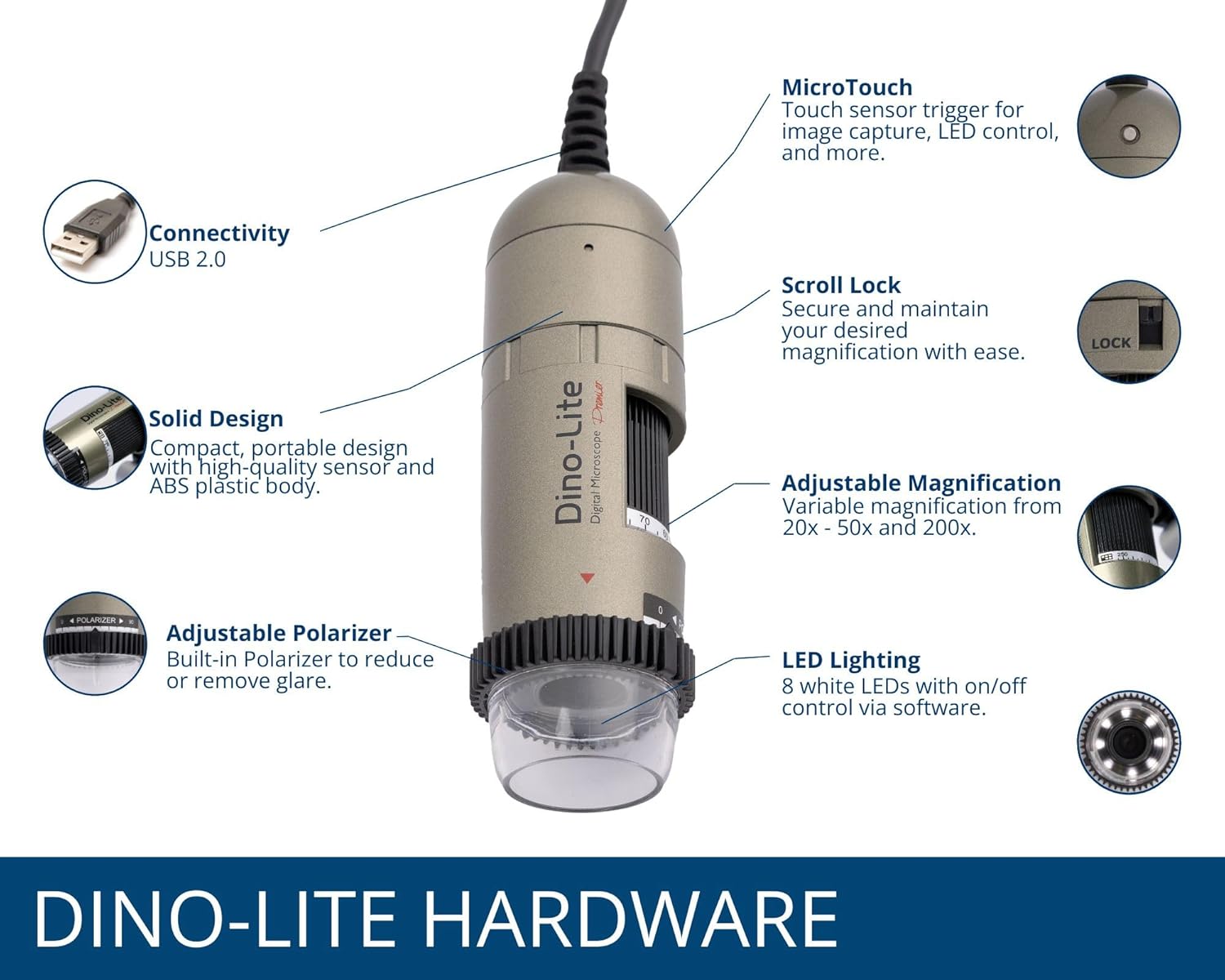
Image 1.3: Detailed illustration of the Dino-Lite AM4113ZT hardware, highlighting its various components and their functions.
2. Eusi Paket
Pastikeun yén sadaya item anu didaptarkeun di handap aya dina pakét produk anjeun:
- Mikroskop Digital Dino-Lite AM4113ZT USB
- Gancang Mimitian Guide
- Software Download Link/Information
- Mawa Kantong
- Calibration Target + Cover
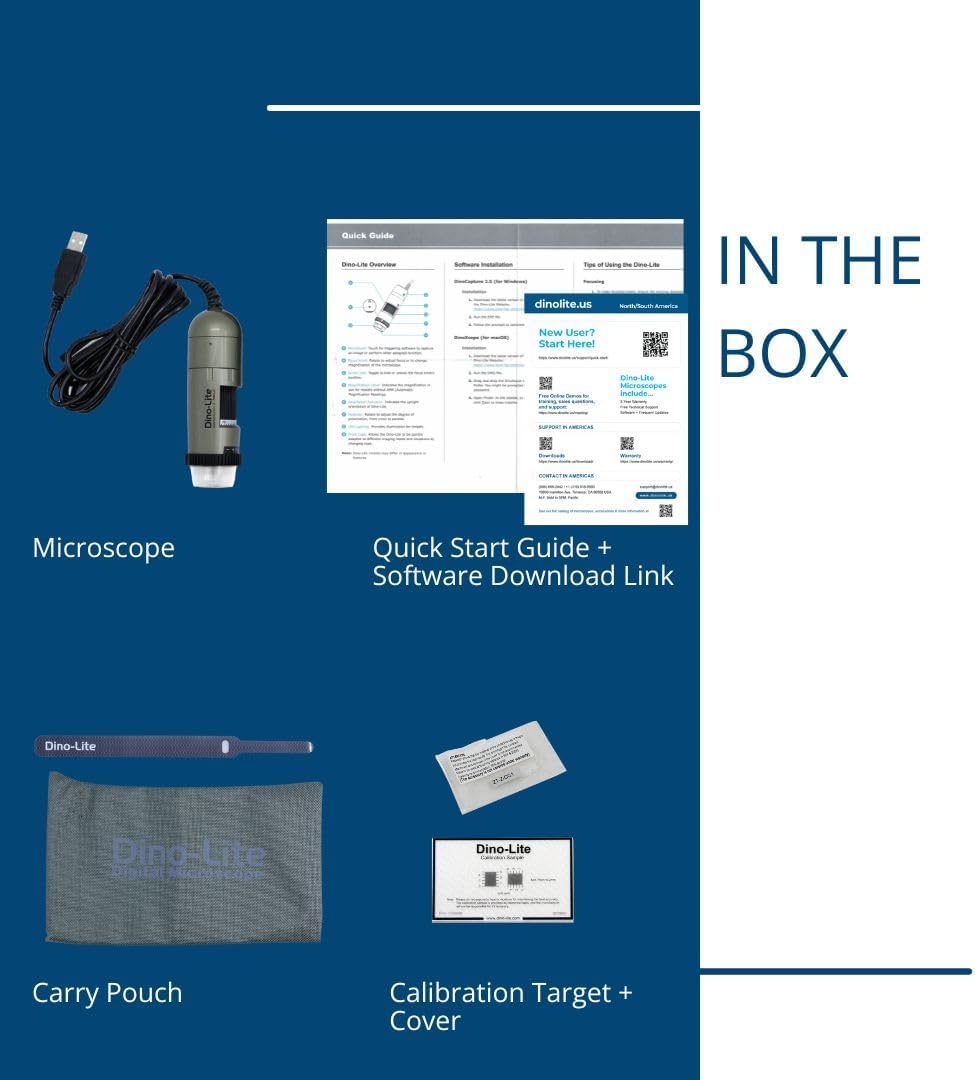
Image 2.1: Visual representation of the items included in the Dino-Lite AM4113ZT product box.
3. Setélan
3.1 Pamasangan parangkat lunak
- Unduh parangkat lunak: Kunjungi Dino-Lite resmi website or use the provided software download link to obtain the latest version of DinoCapture (for Windows) or DinoXcope (for Mac).
- Pasang Parangkat Lunak: Turutan pitunjuk dina layar pikeun masang parangkat lunak dina komputer anjeun.
- Sarat Sistim: Ensure your operating system (Windows or Mac) meets the minimum requirements specified by the software.

Image 3.1: The DinoCapture software interface displayed on a laptop, demonstrating its functionality for image capture and analysis.
3.2 Nyambungkeun Mikroskop
- Connect the USB cable from the Dino-Lite AM4113ZT microscope to an available USB port on your computer.
- The operating system should automatically detect the device.
- Launch the DinoCapture (Windows) or DinoXcope (Mac) software. The microscope's live feed should appear in the software window.
The Dino-Lite AM4113ZT can be used handheld for quick inspections or mounted on an optional stand (sold separately) for more stable and precise observations.

Image 3.2: The Dino-Lite AM4113ZT shown in both handheld use and mounted on a stand, demonstrating its adaptability for various inspection needs.
4. Parentah Operasi
4.1 Nyaluyukeun Magnification
The AM4113ZT offers variable optical magnification from 20x to 50x, and a fixed 200x magnification. To adjust the magnification:
- Rotate the magnification dial on the microscope body.
- Observe the live image in the software to achieve the desired level of detail.
- For stable observation at a specific magnification, use the scroll lock mechanism to secure the dial.

Image 4.1: Close-up of the magnification dial and scroll lock on the Dino-Lite AM4113ZT.
4.2 Using Polarized Light
The integrated adjustable polarizer helps reduce glare on reflective surfaces, improving image clarity:
- Rotate the polarizer ring located at the front of the microscope.
- Adjust until glare is minimized and surface details become clearer.

Image 4.2: The adjustable polarizer ring, designed to control reflections and enhance image quality.
4.3 Image Capture and LED Control
- MikroTouch: Gently touch the MicroTouch sensor on the microscope body to capture a still image.
- Software Capture: Use the capture button within the DinoCapture/DinoXcope software to take photos or record videos.
- Lampu LED: The microscope features 8 white LEDs. Control their on/off status and brightness through the software interface.
4.4 Fungsi Pangukuran
The DinoCapture/DinoXcope software provides advanced measurement tools:
- After capturing an image, use the software to perform various measurements such as length, area, and angles.
- Ensure proper calibration using the included calibration target for accurate measurements.

Image 4.3: The Dino-Lite AM4113ZT positioned on a stand, illustrating a stable setup for detailed observation and measurement tasks.
5. Pangropéa
5.1 beberesih
- Lensa: Use a soft, lint-free cloth specifically designed for optical lenses to gently wipe the microscope lens. Avoid abrasive materials or harsh chemicals.
- awak: Lap awak mikroskop ku lawon anu lemes sareng garing. Upami diperyogikeun, rada diusapamp lawon anu dieusi sabun hampang tiasa dianggo, teras usap ku lawon garing. Pastikeun teu aya cairan anu asup kana alat.
- Hindarkeun: Do not use alcohol, benzene, thinners, or other chemical solvents, as they may damage the plastic components.
5.2 Panyimpenan
- Store the microscope in its protective carry pouch when not in use.
- Simpen alat ieu di tempat anu tiis sareng garing, jauh tina sinar panonpoé langsung, suhu anu ekstrim, sareng kalembaban anu luhur.
- Hindarkeun nyimpen dina lingkungan berdebu.
6. Cara ngungkulan
6.1 Taya Gambar Ditémbongkeun
- Pastikeun kabel USB disambungkeun pageuh kana mikroskop sareng komputer.
- Pariksa yén parangkat lunak DinoCapture/DinoXcope nuju jalan sareng alat anu leres parantos dipilih.
- Coba sambungkeun kana port USB anu sanés dina komputer anjeun.
- Pareuman terus hurungkeun deui parangkat lunak sareng/atanapi komputer anjeun.
6.2 Blurry or Unfocused Image
- Adjust the magnification dial to bring the object into focus.
- Ensure the microscope is held steady or mounted on a stable stand.
- Check the working distance between the microscope lens and the object. Adjust as needed for optimal focus at the selected magnification.
- Clean the microscope lens if smudges or dust are present.
6.3 Software Issues (Crashing, Freezing)
- Pastikeun parangkat lunak anjeun diénggalan kana vérsi pangénggalna.
- Check your computer's system resources (RAM, CPU) to ensure they meet the software's requirements.
- Tutup aplikasi nu butuh pisan lianna nu jalan di tukang.
- Pasang deui parangkat lunak upami masalahna masih aya.
6.4 Glare on Specimen
- Rotate the adjustable polarizer ring on the microscope to minimize reflections.
- Adjust the intensity of the LED lighting through the software.
- Change the angle of the microscope relative to the specimen.
7. Spésifikasi
| Fitur | Rincian |
|---|---|
| Ngaran modél | AM4113ZT |
| Resolusi gambar | 1.3 Megapixels (1280 x 1024) |
| Magnification | 20x - 50x, 200x (Optical) |
| Laju Pigura Pidéo | Nepi ka 30 FPS |
| Konektipitas | USB 2.0 |
| Sumber Cahaya | 8 White LEDs (adjustable via software) |
| Fitur husus | MicroTouch, Measurement, Adjustable Polarized Light |
| Alat nu cocog | Personal Computer, Laptop (Windows/Mac) |
| Dimensi produk | 6.5 "L x 7.3" W x 2.6" H |
| Item Beurat | 0.11 Kilogram (3.87 ons) |
| Bahan | palastik |
| Voltage | 5 Volt (ngalangkungan USB) |
8. Garansi jeung Rojongan
8.1 Émbaran jaminan
For detailed warranty information regarding your Dino-Lite AM4113ZT USB Digital Microscope, please refer to the warranty card included in your product packaging or visit the official Dino-Lite websitus. Sarat jeung kaayaan jaminan bisa rupa-rupa dumasar wewengkon jeung tanggal meuli.
8.2 Rojongan Téknis
If you encounter issues not covered in this manual or require further assistance, please contact Dino-Lite customer support. Contact information can typically be found on the official Dino-Lite websitus atanapi dina dokuméntasi produk Anjeun.
- Sumberdaya Online: Check the Dino-Lite website for FAQs, driver updates, and additional support materials.
- Kontak: Refer to your product's quick start guide or the manufacturer's website for specific contact details (phone, email, or support portal).


