1. Bubuka
The Midiplus MIDI Merge 4 is a compact and efficient MIDI merger designed to combine MIDI messages from up to four input sources into a single MIDI output stream. This device operates as a plug-and-play unit, requiring no drivers for basic functionality. It is powered via a 5V USB connection, allowing for standalone operation with a compatible USB power bank or connection to a computer.
2. Produk Langkungview
2.1 Fitur
- 4 x MIDI Input ports
- 1 x MIDI Output port
- 4 LEDs for MIDI Input signal indication
- Port USB pikeun catu daya
- Lampu indikator kakuatan
- Operasi plug-and-play
2.2 Eusi pakét
- Midiplus MIDI Merge 4 unit
- kabel USB
- Buku pituduh
2.3 Tata Tata Alat

Gambar 1: Hareupeun View. This image displays the front panel of the Midiplus MIDI Merge 4, showing the 'MIDIPLUS MIDI Merge 4' branding, a USB port for power, a MIDI OUT port, and a power button with an indicator light.

Gambar 2: Balik View. This image shows the rear panel of the Midiplus MIDI Merge 4, featuring four MIDI IN ports labeled 'MIDI IN 1' through 'MIDI IN 4', each with a corresponding LED indicator above it.
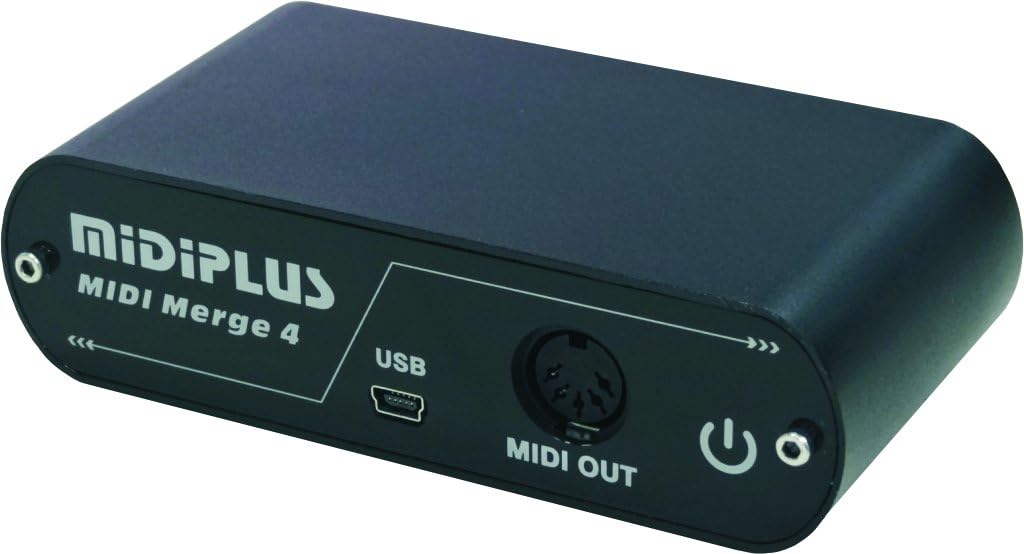
Gambar 3: Angled View. This image provides an angled perspective of the Midiplus MIDI Merge 4, illustrating its compact size and the arrangement of both front (USB, MIDI OUT, power) and back (MIDI INs) connections.
3. Setélan
- Sambungan Daya: Connect the provided USB cable to the USB port on the MIDI Merge 4 unit. Plug the other end of the USB cable into a 5V USB power source, such as a computer's USB port or a USB power adapter/power bank. The power indicator light on the unit will illuminate.
- MIDI Input Connections: Connect up to four MIDI devices (e.g., MIDI keyboards, controllers, sequencers) to the MIDI IN 1, MIDI IN 2, MIDI IN 3, and MIDI IN 4 ports on the back of the MIDI Merge 4 using standard MIDI cables.
- MIDI Output Connection: Connect the MIDI OUT port of the MIDI Merge 4 to the MIDI IN port of your target MIDI device (e.g., sound module, audio interface, computer MIDI interface) using a standard MIDI cable.
4. Parentah Operasi
The Midiplus MIDI Merge 4 operates automatically once powered on and connected. It functions as a hardware MIDI merger, combining all incoming MIDI data from its four input ports into a single, unified MIDI stream that is sent out through the MIDI OUT port.
- MIDI Signal Indicators: Each MIDI IN port has a corresponding LED. When MIDI data is received on an input port, its respective LED will flash, indicating active data transmission.
- Data Merging: All MIDI messages (Note On/Off, Control Change, Program Change, etc.) received from any active MIDI IN port are merged and transmitted simultaneously through the MIDI OUT port.
- Plug-and-Play: The device does not require any software installation or configuration. It is designed for immediate use upon connection.
5. Pangropéa
- beberesih: Use a soft, dry cloth to clean the exterior of the unit. Avoid using liquid cleaners or solvents.
- Panyimpenan: Simpen alat dina tempat anu tiis sareng garing jauh tina sinar panonpoé langsung sareng suhu anu ekstrim.
- Penanganan: Hindarkeun ngaragragkeun unit atanapi nahan kana tabrakan anu kuat.
6. Cara ngungkulan
- Henteu aya kakuatan: If the power indicator light does not illuminate, ensure the USB cable is securely connected to both the MIDI Merge 4 and the power source. Verify that the USB power source is functional.
- Teu aya Sinyal MIDI: If an input LED does not flash when a MIDI device is active, check the MIDI cable connection between the source device and the MIDI IN port. Ensure the MIDI source device is powered on and transmitting MIDI data.
- Taya Kaluaran: If the receiving device is not responding to MIDI data, check the MIDI cable connection from the MIDI OUT port of the Merge 4 to the MIDI IN of the receiving device. Confirm the receiving device is correctly configured to receive MIDI data.
- Unexpected MIDI Behavior: If MIDI messages are not being merged as expected or if the receiving device exhibits unusual behavior, ensure all MIDI cables are correctly connected and not damaged. Verify that the MIDI devices connected to the inputs are sending standard MIDI messages.
7. Spésifikasi
| Spésifikasi | Nilai |
|---|---|
| Nomer modél | MIDI Merge 4 |
| Item Beurat | 8.8 ons (249.5 gram) |
| Dimensi produk | 4.69 x 1.38 x 2.35 inci (11.9 x 3.5 x 6.0 cm) |
| MIDI Input Ports | 4 |
| MIDI Output Ports | 1 |
| Téhnologi konektipitas | USB (pikeun kakuatan) |
| Panganteur Hardware | USB |
| Sasayogian tanaga | 5V USB |
| Fitur husus | Lightweight, Plug-and-Play |
8. Garansi jeung Rojongan
For warranty information and technical support, please refer to the documentation provided with your purchase or visit the official Midiplus websitus. Inpormasi kontak pikeun layanan palanggan biasana sayogi dina halaman produsén websitus.