1. Bubuka
The FiiO Q1 is a versatile portable USB Digital-to-Analog Converter (DAC) and headphone amplifier designed to enhance your audio experience. It can be used with various devices, including computers and mobile phones, to deliver high-fidelity sound.
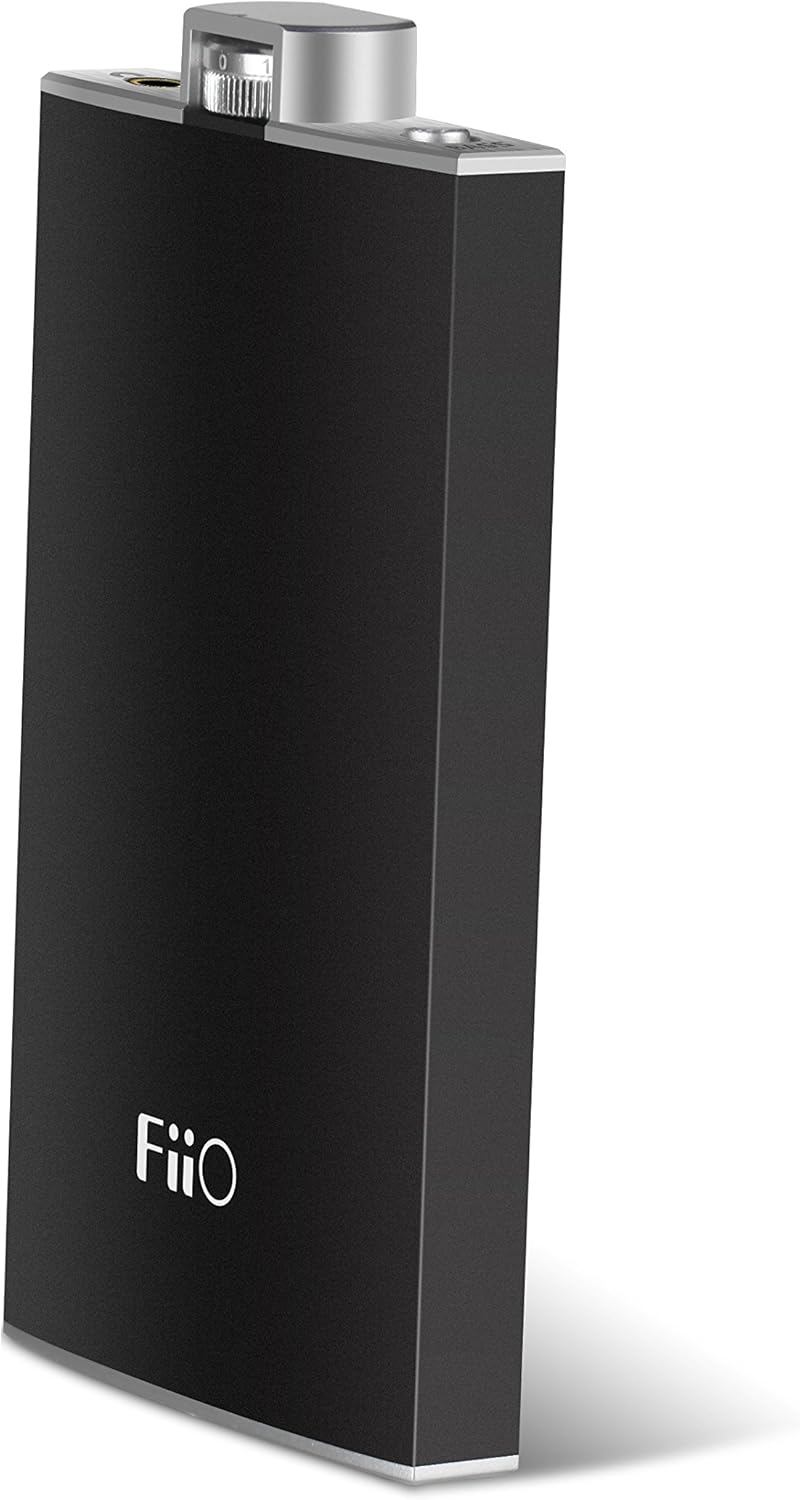
Figure 1: FiiO Q1 Portable USB DAC Amplifier. This image shows the sleek black casing of the device with the FiiO logo prominently displayed on the front.
Fitur konci:
- Output power: Greater Than 190mW (32Ω loaded)
- Recommended headphone impedance: 16-150 Ohms
- Max. supported sample rate (USB decoding): 96kHz/24bit
- Kapasitas batré: 1400mAh
- Play time: Greater Than 30 hours (32Ω earphones, normal listening levels)
2. Setélan
Before using your FiiO Q1, ensure it is properly charged and connected to your audio source.
2.1 Ngecas Alat
Connect the FiiO Q1 to a USB power source (e.g., computer USB port, USB wall adapter) using the provided USB cable. The LED indicator will show the charging status:
- Beureum: Ngecas
- magénta: On and Charging
- héjo: Dicas pinuh
2.2 Nyambungkeun ka Sumber Audio
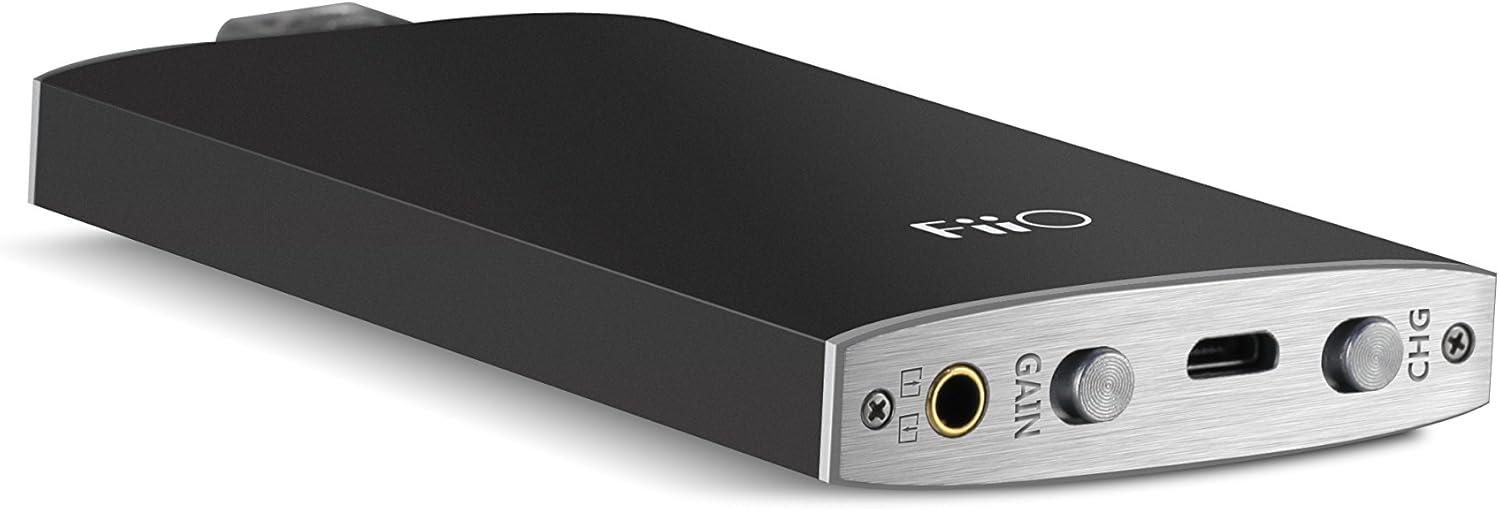
Figure 2: FiiO Q1 Ports and Controls. This image highlights the various input and output ports, including the 3.5mm audio jack, USB port, and control switches.
2.2.1 USB DAC Mode (for Computers/Smartphones)
To use the FiiO Q1 as a DAC, connect it to your computer or smartphone via the USB port. The device will bypass your source's internal sound card for improved audio quality.
- Pikeun Komputer: Connect the FiiO Q1 to your computer's USB port using the supplied USB cable. The computer should automatically recognize the device. Select the FiiO Q1 as the audio output device in your operating system's sound settings.
- Pikeun smartphone: Connect the FiiO Q1 to your smartphone using an appropriate USB On-The-Go (OTG) cable (not included). Ensure your smartphone supports USB audio output.
2.2.2 Amplifier Mode (for Analog Sources)
To use the FiiO Q1 solely as an amplifier, connect your audio source (e.g., MP3 player, smartphone headphone jack) to the 3.5mm audio input port on the FiiO Q1 using a 3.5mm audio cable (not included). Connect your headphones to the 3.5mm headphone output port.
3. Ngoperasikeun Alat
Familiarize yourself with the controls and indicators for optimal use.
3.1 Kadali
- Jilid Kenop: Located at the top of the device, this knob controls the audio output volume. Rotate clockwise to increase volume, counter-clockwise to decrease. Turning the knob fully counter-clockwise will also power off the device.
- Saklar Gain: This switch allows you to select between high and low gain settings. Use the low gain setting for sensitive headphones or when high volume is not required. Switch to high gain for less sensitive headphones or when more power is needed.
- Saklar Panguat Bass: Activate this switch to enhance the bass frequencies in your audio. Deactivate it for a flatter frequency response.
3.2 Indikator LED
The LED indicator provides visual feedback on the device's status:
- Biru: Device is powered on and operating.
- Beureum: Paranti ngeusi batre.
- magénta: Device is powered on and charging simultaneously.
- héjo: Batré dicas pinuh.
4. Pangropéa
Proper care and maintenance will ensure the longevity of your FiiO Q1.
- beberesih: Anggo lawon anu lemes sareng garing pikeun ngabersihkeun bagian luar alat. Entong nganggo pembersih cair atanapi pangleyur.
- Perawatan batré: To preserve battery life, avoid fully discharging the battery frequently. If storing the device for an extended period, charge it to approximately 50% before storage.
- Panyimpenan: Simpen alat ieu di tempat anu tiis sareng garing, jauh tina sinar panonpoé langsung, suhu anu ekstrim, sareng kalembaban anu luhur.
5. Cara ngungkulan
If you encounter issues with your FiiO Q1, refer to the following common problems and solutions.
| Masalah | Mungkin Cukang lantaranana | Solusi |
|---|---|---|
| Taya kaluaran sora | Device is off; Volume is too low; Incorrect input/output connection; Source device not playing audio; Incorrect audio output selected on source. | Ensure device is powered on (blue LED); Increase volume; Check all cable connections; Verify audio playback on source; Select FiiO Q1 as audio output on computer/smartphone. |
| Device not recognized by computer/smartphone | Device not powered on; Faulty USB cable; USB port issue; Driver issue (rare for plug-and-play devices). | Power on the FiiO Q1; Try a different USB cable; Use a different USB port on your computer; Restart your computer/smartphone. |
| Batré teu ngecas atanapi nahan muatan | Faulty USB cable/charger; Device defect; Battery degradation. | Try a different USB cable and power adapter; Ensure the charging LED illuminates; If issues persist, contact FiiO support. |
| Kualitas sora anu menyimpang atanapi goréng | Source audio quality is low; Incorrect gain setting; Faulty cables; Headphone impedance mismatch. | Ensure high-quality audio source; Adjust gain switch (try low gain first); Replace audio cables; Ensure headphone impedance is within recommended range (16-150 Ohms). |
6. Spésifikasi
| Fitur | Spésifikasi |
|---|---|
| Nomer modél | FIO_Q1_BLK |
| Daya Kaluaran | Greater Than 190mW (32Ω loaded) |
| Disarankeun Headphone Impedansi | 16-150 ohm |
| Max. Supported Sample Rate (USB Decoding) | 96kHz/24bit |
| Kapasitas batré | 1400 mah |
| Play Time | Greater Than 30 hours (32Ω earphones, normal listening levels) |
| Tipe Panyambung | USB Tipe A |
| Tipe Kabel | USB |
| Alat nu cocog | Headphone |
| Fitur husus | Portabel |
| Warna | Hideung |
| Item Beurat | 100 Gram (3.53 ons) |
| Dimensi produk | 0.22 x 0.51 x 3.82 inci |
| Produsén | FiiO |
| UPC | 602519848847, 702534722877 |
| Tanggal Kahiji Sadia | 11 April 2015 |
7. Garansi jeung Rojongan
For warranty information, please refer to the documentation included with your product or visit the official FiiO websitus. Sarat jeung kaayaan jaminan bisa rupa-rupa dumasar wewengkon sarta pangecér.
Rojongan Palanggan:
For technical support, product inquiries, or service requests, please visit the official FiiO website or contact their customer service department directly. Contact information can typically be found on the FiiO websitus atanapi bungkusan produk.
Note: No official product videos from the seller were found for embedding.


