
1. Bubuka
The Sony SBH54 is a versatile Stereo Bluetooth Headset designed for wireless communication and audio playback. It offers both handset and headset functionalities, allowing you to take and make calls, view messages, listen to music, and tune into FM radio directly from its display. Crafted from premium metal with a splash-proof design, it combines elegance with durability.
Key features include Bluetooth Wireless 3.0, NFC technology for easy pairing, an OLED display, and built-in noise cancellation for clear audio during calls. The headset supports A2DP profile and can connect to two devices simultaneously.
2. Produk Langkungview
The SBH54 features a compact design that fits comfortably in your hand. It includes an OLED display for information at a glance and physical controls for media and call management.
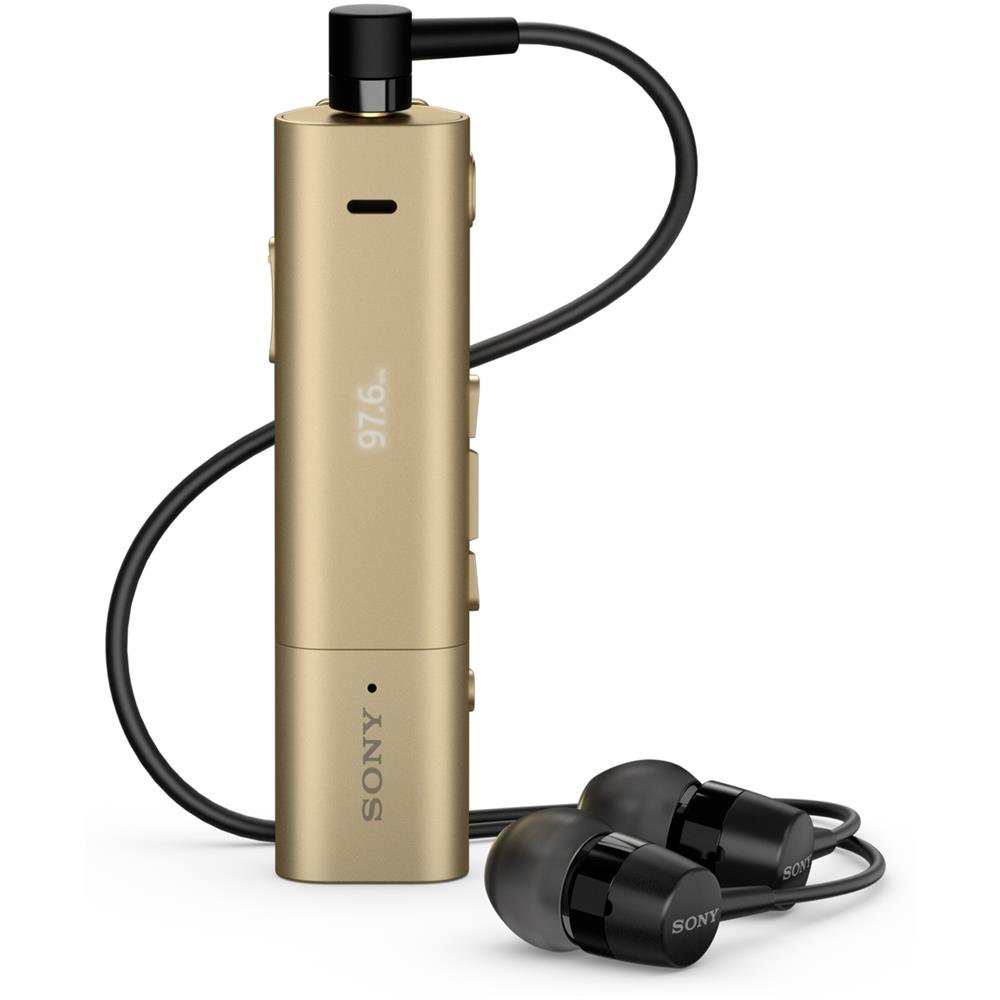
Image: Sony SBH54 Gold Stereo Bluetooth Headset. This image displays the compact, gold-colored headset with its integrated clip and display screen.
Kontrol sareng Indikator:
- Tampilan OLED: Shows caller ID, messages, music track information, and FM radio frequency.
- Tombol multi-fungsi: For call answering/ending, play/pause music.
- Tombol Volume: Saluyukeun volume audio.
- Tombol Napigasi: For menu navigation and track skipping.
- Mikropon: Integrated for voice calls.
- Jack headphone: 3.5mm port for connecting the included premium headphones.
- Port ngecas: Port micro USB pikeun ngecas alat.
3. Setélan
3.1 Ngecas Headsét
- Connect the supplied USB cable to the headset's charging port and to a USB power adapter or a computer's USB port.
- Indikator batré dina tampilan bakal nembongkeun status ngecas.
- Ngecas headset sapinuhna samemeh dipake heula.
3.2 Pairing with a Device (Bluetooth)
- Pastikeun headset tos dicas sareng dipareuman.
- Press and hold the power button until the headset enters pairing mode (indicated by a specific light pattern or message on the display).
- Dina telepon pinter anjeun atanapi alat Bluetooth anu sanés, aktipkeun Bluetooth teras milarian alat anu sayogi.
- Select "SBH54" from the list of found devices.
- Upami dipenta, lebetkeun kodeu aksés "0000" (opat nol).
- Once paired, the headset will indicate a successful connection.
3.3 Pairing with a Device (NFC)
For devices with NFC (Near Field Communication):
- Ensure NFC is enabled on your smartphone and the screen is unlocked.
- Touch the NFC detection area of your smartphone to the NFC detection area on the SBH54 headset.
- Turutan ajakan dina layar pikeun ngarengsekeun prosés papasangan.
4. Ngoperasikeun Headsét
4.1 Daya Hurung/Pareuman
- Pikeun Ngahurungkeun: Pencét jeung tahan tombol daya nepi ka tampilan hurung.
- Pikeun mareuman: Pencét terus tahan tombol daya nepi ka layar pareum.
4.2 Nelepon jeung Narima Telepon
- Ngajawab Telepon: When a call comes in, press the multi-function button.
- Nutup Telepon: During a call, press the multi-function button.
- Nolak Telepon: Pencét terus tahan tombol multi-fungsi nalika aya telepon asup.
- Nelepon: Dial the number on your phone. The call will automatically route to the headset. You can also use voice commands if supported by your phone.
- Handset Function: The compact SBH54 can be used as an unobtrusive handset for calls.
- Pembatalan Noise: The headset features echo, wind, and noise cancellation for clear voice transmission.
- Sora HD: Enhances voice clarity for both parties during a call.
4.3 Puterkeun Musik
- Puter / Reureuh: Press the multi-function button.
- Lagu salajengna: Press the forward navigation button.
- Lagu Sateuacanna: Press the backward navigation button.
- Kontrol volume: Use the volume up/down buttons.
4.4 Radio FM
- Aktipkeun Radio FM: Navigate through the headset menu to select the FM Radio function.
- Stasion-stasion Lagu: Use the navigation buttons to scan or manually tune to FM frequencies.
- Simpen prasetél: The headset may allow saving favorite stations (refer to on-screen prompts).
5. Pangropéa
- beberesih: Ngusap headsét nganggo kaén anu lembut sareng garing. Ulah make bahan kimia kasar atawa bahan abrasive.
- Tahan cai: The SBH54 has a splash-proof design. This means it can withstand light splashes of water but should not be submerged or exposed to heavy rain. Ensure the charging port cover is securely closed.
- Panyimpenan: Simpen headset di tempat anu tiis sareng garing jauh tina sinar panonpoé langsung sareng suhu anu ekstrim.
- Perawatan batré: Pikeun manjangkeun umur batré, ulah sering ngosongkeun batréna. Cas sacara rutin.
6. Cara ngungkulan
Masalah umum sareng Solusi:
- Headset teu hurung: Pastikeun batréna geus dieusian. Sambungkeun ka sumber listrik teras cobian deui.
- Teu tiasa dipasangkeun sareng alat:
- Pastikeun headset aya dina mode papasangan.
- Pastikeun Bluetooth diaktipkeun dina alat Anjeun.
- Pindahkeun headset ngadeukeutan ka alat Anjeun.
- Balikan deui headset sareng alat anjeun.
- Pupus sambungan Bluetooth samemehna dina alat Anjeun tur coba masangkeun deui.
- Henteu aya audio atanapi kualitas audio anu goréng:
- Pariksa tingkat polumeu boh dina headset sareng alat Anjeun nu disambungkeun.
- Pastikeun headset aya dina jangkauan alat anjeun.
- Pegatkeun sambungan jeung sambungkeun deui sambungan Bluetooth.
- Ensure the headphones are properly plugged into the 3.5mm jack.
- Radio FM teu jalan: Ensure you are in an area with good FM signal reception.
7. Spésifikasi
| Fitur | Rincian |
|---|---|
| merek | Sony |
| Nomer modél | SBH54GD |
| Warna | emas |
| Panempatan Ceuli | Dina Ceuli |
| Faktor Bentuk | Dina Ceuli |
| Kontrol bising | Pembatalan Noise aktip |
| Item Beurat | 0.1 kg |
| Tipe Supir Audio | Supir dinamis |
| Rentang Frékuénsi | 20 Hz - 20,000 Hz |
| Bahan Kandang | logam |
| Alat nu cocog | Smartphones, Laptops, Tablets, Bluetooth-enabled Devices |
| Tingkat Résistansi Cai | Tahan cai (tahan cipratan) |
| Téhnologi konektipitas | Bluetooth, NFC |
| Téhnologi nirkabel | Bluetooth, NFC |
| Vérsi Bluetooth | 3.0 |
| Tipe Kontrol | Kontrol Média |
| Métode kontrol | Jauh |
8. Garansi jeung Rojongan
For warranty information and customer support, please refer to the documentation included with your purchase or visit the official Sony support websitus. Sarat garansi khusus tiasa bénten-bénten gumantung kana daérah sareng pangecér.
Dukungan Online: www.sony.com/electronics/support