
1. Bubuka
Thank you for choosing the SONY HDRCX240/L Video Camera. This manual provides essential information for the safe and efficient operation, maintenance, and troubleshooting of your camcorder. Please read this manual thoroughly before using the device and retain it for future reference.
The SONY HDRCX240/L is a compact and versatile camcorder designed to capture high-quality video and still images. Featuring a 9.2MP Exmor R CMOS Sensor, 27x optical zoom Carl Zeiss lens, and a 2.7-inch LCD, it is ideal for capturing family events, vacations, sports, and content creation.
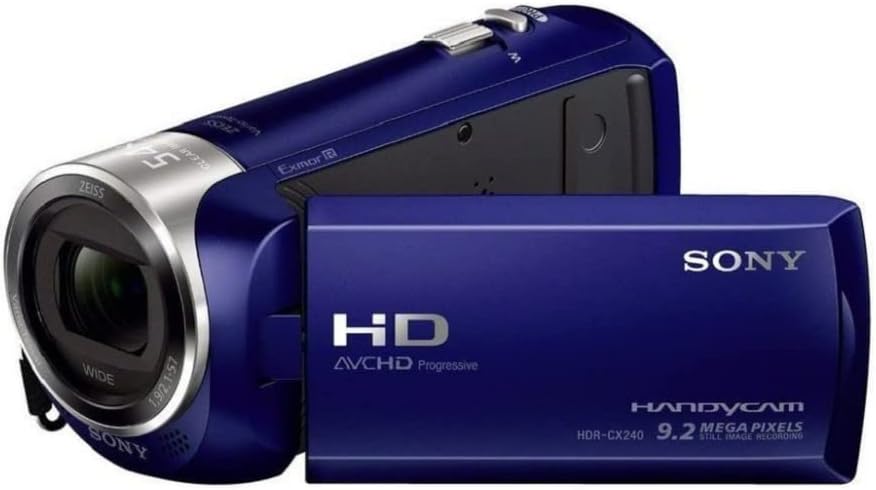
Figure 1: SONY HDRCX240/L Video Camera (Front View)
This image displays the SONY HDRCX240/L Video Camera from the front, showcasing its compact design, the Carl Zeiss lens, and the SONY branding. The camcorder is blue.
2. Setélan
2.1. Pamasangan Batré sareng Ngecas
- Buka Kompartemen Batré: Locate the battery compartment cover on the rear of the camcorder and slide it open.
- Selapkeun Batré: Insert the supplied Lithium-Ion battery into the compartment, ensuring the terminals align correctly. Push until it clicks into place.
- Tutup Kompartemen: Tutup panutup kompartemen batré aman.
- Ngeusi batre: Connect the camcorder to a power outlet using the supplied USB cable and AC adapter (if included). The charging indicator will illuminate. Charge the battery fully before first use. A full charge typically takes several hours.
2.2. Selapkeun Card Mémori
The HDRCX240/L uses a Micro SD card for storage.
- Locate the Memory Card Slot: Open the LCD panel to reveal the memory card slot, typically located near the battery compartment or on the side.
- Selapkeun Kartu Micro SD: Gently insert the Micro SD card with the metal contacts facing down (or as indicated by the diagram near the slot) until it clicks into place. Ensure it is a Class 10 or higher speed card for optimal performance.
- Format kartu mémori: For optimal performance and to prevent data corruption, it is recommended to format a new memory card using the camcorder's menu system. Refer to the 'Operating the Camera' section for menu navigation.
3. Ngoperasikeun kaméra
3.1. Powering on / Pareum
To power on the camcorder, open the LCD panel. To power off, close the LCD panel or press and hold the power button (if available).

Figure 2: SONY HDRCX240/L Video Camera with LCD Screen Open
This image shows the SONY HDRCX240/L Video Camera with its 2.7-inch LCD screen articulated and open, displaying a vibrant scene. This view highlights the operational readiness of the camcorder.
3.2. Ngarékam Pidéo
- Pilih Mode Video: Ensure the camcorder is in video recording mode. This is usually indicated by an icon on the LCD screen.
- Mimitian Ngarékam: Press the REC START/STOP button, typically located on the back or side of the camcorder. A red indicator light or on-screen icon will confirm recording is in progress.
- Eureun Rekaman: Pencét tombol REC START/STOP deui pikeun eureun ngarékam.
3.3. Nyandak Poto Diam
- Select Still Photo Mode: Switch the camcorder to still photo mode using the mode button or menu option.
- Ngarekam Poto: Press the PHOTO button (or the shutter button) to capture a 9.2-megapixel still image.
3.4. Fungsi zum
Use the zoom lever, usually located near the top of the camcorder, to control the zoom. Push the lever towards 'T' (Telephoto) to zoom in and towards 'W' (Wide) to zoom out. The camcorder features 27x optical zoom and 54x Clear Image Zoom.
3.5. Puterkeun deui
- Enter Playback Mode: Press the PLAYBACK button or select playback mode from the menu.
- Pilih eusi: Use the directional buttons or touch screen (if applicable) to navigate through your recorded videos and photos.
- Mimitian Playback: Pencét tombol PLAY pikeun view selected content.
3.6. Mindahkeun Files kana Komputer
To transfer videos and photos to a computer:
- Connect the Camcorder: Use the supplied USB cable to connect the camcorder to your computer.
- Aksés Files: The camcorder should appear as a removable drive on your computer. Open the drive to access your recorded MP4 video files jeung gambar files.
- nyalin Files: Drag and drop or copy the desired files kana komputer Anjeun.
4. Pangropéa
4.1. Ngabersihkeun Kaméra
- Lensa: Use a soft, dry lens cleaning cloth to gently wipe the lens. Avoid using harsh chemicals or abrasive materials.
- Layar LCD: Wipe the LCD screen with a soft, lint-free cloth. For stubborn smudges, slightly dampen lawon jeung cai.
- awak: Anggo lawon anu lemes sareng garing pikeun ngabersihkeun awak kaméra video.
4.2. Kaperawatan batré
- Hindarkeun sering-sering ngeusi batre.
- Simpen batréna di tempat anu tiis sareng garing upami henteu dianggo.
- Upami disimpen kanggo waktos anu lami, eusian batréna dugi ka kapasitas sakitar 50%.
4.3. Panyimpenan
When not in use, store the camcorder in a dry, dust-free environment, away from extreme temperatures and direct sunlight. Consider using a protective case.
5. Cara ngungkulan
| Masalah | Mungkin Cukang lantaranana | Solusi |
|---|---|---|
| Camcorder does not power on | Battery is discharged or incorrectly inserted. | Ngecas batré pinuh. Selapkeun deui batréna leres. |
| Recording stops unexpectedly or shows errors | Memory card is full, slow, or corrupted. | Pupus teu perlu files. Use a high-speed (Class 10 or higher) Micro SD card. Format the card in the camcorder. |
| Poor image or video quality | Cahayana kurang, lénsa kotor, setélanna salah. | Ensure adequate lighting. Clean the lens. Adjust shooting modes (e.g., Night Vision for low light). |
| Software glitches or freezing | Masalah software samentara. | Remove and reinsert the battery to reset the device. |
| Taya sora salila playback | Polumeu dijempékeun atanapi rendah teuing. | Adjust the volume settings on the camcorder. |
6. Spésifikasi
- merek: Sony
- model: HDRCX240/L
- Resolusi Capture Video: 1080p lengkep HD
- Resolusi Tetep Éféktif: 9.2 MP
- Téknologi Sénsor Poto: Exmor R CMOS
- Lensa: Carl Zeiss, 29.8mm wide angle
- Zoom optik: 27x
- Clear Image Zoom: 54x
- Ukuran layar: 2.7 inci
- Tipe Mémori Flash: Micro SD (C10 recommended)
- Format Capture Video: MP4
- Format audio anu dirojong: AAC, MP3
- Stabilisasi Gambar: Yes (Optical)
- Téknologi konektipitas: USB
- Fitur: Visi Peuting
- kakuatan: 1 batré Litium Ion (kaasup)
- Ukuran barang (D x W x H): 6.3" x 4.8" x 3.5"
7. Garansi jeung Rojongan
For warranty information and technical support, please refer to the documentation provided with your purchase or visit the official Sony support websitus. Simpen bukti pameseran anjeun pikeun klaim garansi.