
Bubuka
This manual provides essential information for the safe and efficient operation, installation, and maintenance of your HP 5065-5262 DYNAMITE Power Supply. This 340-watt power supply is designed with integrated cooling fans for reliable performance in disk systems. Please read this manual thoroughly before installation and use.
Émbaran Kasalametan
Salawasna merhatikeun pancegahan kaamanan di handap ieu pikeun nyegah tatu atanapi karusakan alat:
- Ensure the power supply is disconnected from the main power source before installation, removal, or servicing.
- Ngan tanaga anu mumpuni kedah ngalaksanakeun pamasangan sareng perawatan.
- Ulah muka catu daya casing. There are no user-serviceable parts inside, and dangerous voltages hadir.
- Pastikeun grounding ditangtoskeun pikeun nyegah shock listrik.
- Operate the power supply within its specified voltage jeung ratings ayeuna.
- Maintain adequate ventilation around the power supply to prevent overheating.
Setup sareng Instalasi
Follow these steps for proper installation of the HP 5065-5262 DYNAMITE Power Supply:
- Persiapan: Before beginning, ensure your system is powered off and unplugged from the wall outlet. Discharge any static electricity by touching a grounded metal object.
- Cabut Catu Daya Lawas (upami aya): Disconnect all cables from the existing power supply. Unscrew and carefully remove the old unit from the chassis.
- Insert New Power Supply: Gently slide the HP 5065-5262 DYNAMITE Power Supply into the designated bay in your disk system chassis. Ensure it aligns correctly with the mounting holes.
- Ngamankeun catu daya: Use the appropriate screws to firmly secure the power supply to the chassis. Do not overtighten.
- Sambungkeun kabel: Connect all necessary power cables from the power supply to the motherboard, disk drives, and any other components requiring power. Refer to your system's motherboard manual for specific power connector locations.
- Cék ahir: Double-check all connections to ensure they are secure and correctly seated. Ensure no loose cables are obstructing airflow.
- Daya Hurung: Close the system chassis, plug the system back into a grounded power outlet, and power on the system.
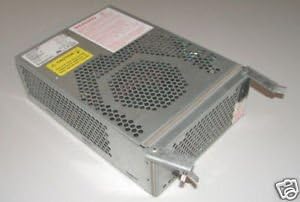
Gambar 1: Angled view of the HP 5065-5262 DYNAMITE Power Supply, illustrating its size and design for integration into a disk system.
Parentah Operasi
The HP 5065-5262 DYNAMITE Power Supply operates automatically once installed and connected. It provides stable power to your disk system components.
- Hurungkeun/Pareuman: The power supply is controlled by the system's main power switch. When the system is powered on, the power supply will activate and deliver power.
- Kipas pendingin: The integrated cooling fans will operate automatically to maintain optimal internal temperatures. Ensure fan vents are not obstructed.
- Indikator Status: Some systems may have diagnostic LEDs on the motherboard or chassis that indicate power supply status. Refer to your system's manual for details.
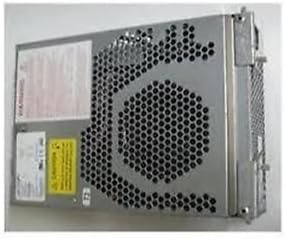
Gambar 2: Sisi view of the HP 5065-5262 DYNAMITE Power Supply, highlighting the ventilation design crucial for its cooling system.
Pangropéa
Regular maintenance helps ensure the longevity and stable operation of your power supply:
- Ngaleungitkeun lebu: Periodically (e.g., every 6-12 months), power off and unplug your system. Use compressed air to gently clear dust from the power supply's fan vents and internal components. Hold the fan blades to prevent them from spinning too fast during cleaning.
- Pamariksaan kabel: Check all power cables connected to the power supply for any signs of wear, fraying, or loose connections. Replace damaged cables immediately.
- Kaayaan Lingkungan: Ensure the operating environment is clean, dry, and within the recommended temperature range to prevent dust buildup and moisture damage.
Pamérésan masalah
Upami anjeun ngalaman masalah sareng catu daya anjeun, tingali masalah sareng solusi umum ieu:
| Masalah | Mungkin Cukang lantaranana | Solusi |
|---|---|---|
| Sistem henteu hurung. | Sambungan kabel listrikna leupas. Soket témbok lepat. Kagagalan catu daya. | Check all power connections (wall, power supply, motherboard). Nguji stop kontak jeung alat sejen. Upami tiasa, uji nganggo catu daya anu parantos dipikanyaho saé. |
| Sistem hurung tapi pareum sacara dadakan. | Overheating (poor ventilation). Overload (too many components). Power supply instability. | Ensure proper airflow; clean dust from vents. Disconnect non-essential components to check for overload. Consider professional diagnosis or replacement. |
| Loud fan noise from power supply. | Kekebul numpuk dina kipas. Worn fan bearing. | Clean fan with compressed air. If noise persists, the fan may be failing; consider professional service or replacement of the power supply. |
If these steps do not resolve the issue, contact HP support or a qualified technician.
spésifikasi
| Fitur | Rincian |
|---|---|
| merek | HEWLETT PACKARD |
| Nomer modél | 5065-5262 |
| Wattage | 340 watt |
| Métode Cooling | Air (with integrated fans) |
| ASIN | B014S277MO |
| UPC | 787322237757 |
| Kahiji Sadia | 9 Juli 2013 |
Garansi sareng Rojongan
This HP 5065-5262 DYNAMITE Power Supply is typically covered by Hewlett Packard's standard manufacturer warranty. For specific warranty terms and conditions, please refer to the documentation provided with your original system or contact HP customer support directly.
For technical support, service, or to inquire about replacement parts, please visit the official Hewlett Packard support website or contact their customer service line. Have your product model number (5065-5262) and serial number (if applicable) ready when contacting support.
Rojongan HP Websitus: https://www.hp.com/support