1. Bubuka
Thank you for choosing the MANHATTAN 176354 USB Numeric Keypad. This compact and efficient 19-key numeric keypad is designed to enhance data entry for laptops and other devices without a built-in numeric section. It offers a convenient solution for tasks requiring frequent number input, such as accounting, spreadsheets, and data analysis. This manual provides detailed instructions for setup, operation, maintenance, and troubleshooting to ensure optimal performance and longevity of your device.
2. Eusi Paket
Please verify that all items are present and in good condition upon opening the package. If any items are missing or damaged, please contact your retailer or MANHATTAN customer support.
- MANHATTAN 176354 USB Numeric Keypad
- Manual pangguna (dokumén ieu)
3. Parentah Setup
The MANHATTAN 176354 USB Numeric Keypad is designed for simple plug-and-play installation. No additional drivers are typically required for most operating systems.
- Connect the Keypad: Locate an available USB port on your computer (desktop, laptop, or compatible device). Insert the USB connector of the numeric keypad firmly into the USB port.
- Pangenal Sistim: Your operating system should automatically detect and install the necessary drivers for the keypad. This process usually takes a few seconds. A notification may appear indicating that the device is ready for use.
- Verifikasi Fungsionalitas: Open a text editor, spreadsheet program, or any application where you can input numbers. Press a few keys on the numeric keypad to confirm that it is functioning correctly.
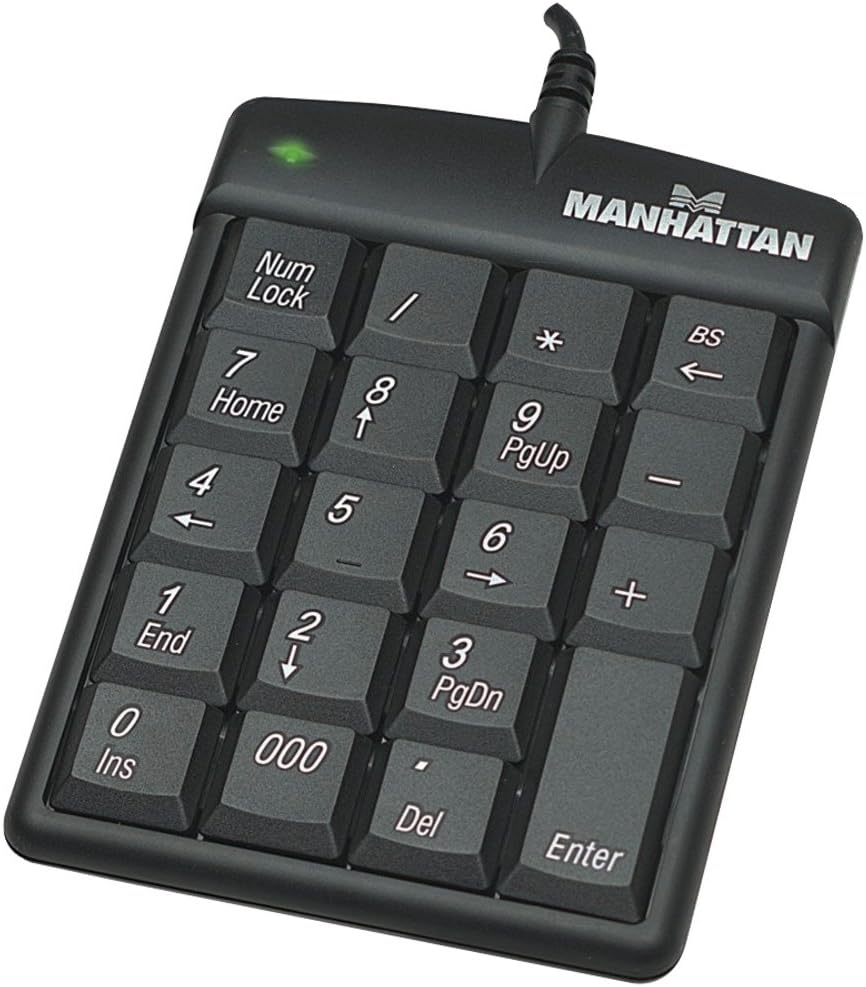
Figure 1: The MANHATTAN 176354 USB Numeric Keypad, showing its 19 keys and integrated USB cable. The Num Lock indicator light is visible at the top left.
4. Parentah Operasi
The MANHATTAN 176354 Numeric Keypad features a standard 19-key layout, providing all essential numeric functions.
- Konci Nomer: The Num Konci key activates or deactivates the numeric function of the keypad. When Num Lock is active, the indicator light (usually green) on the keypad will be illuminated, and the keys will input numbers. When Num Lock is inactive, some keys may function as navigation keys (e.g., Home, End, PgUp, PgDn, arrow keys).
- Standard Numeric Input: Use the number keys (0-9) for numerical input.
- Arithmetic Operators: The keypad includes keys for addition (+), subtraction (-), multiplication (*), and division (/).
- Titik desimal: The Del key functions as a decimal point when Num Lock is active.
- Lebetkeun konci: The Lebetkeun key functions identically to the main keyboard's Enter key.
- Backspace (BS) Key: The BS key functions as a backspace, deleting the character to the left of the cursor.
- Triple Zero (000) Key: Provides quick input for three zeros.
Catetan: The functionality of navigation keys (Home, End, PgUp, PgDn, arrow keys) when Num Lock is off may vary slightly depending on the application and operating system.
5. Pangropéa
Proper care and maintenance will help extend the life of your numeric keypad.
- beberesih: Disconnect the keypad from your computer before cleaning. Use a soft, slightly damp, lint-free cloth to wipe the surface. Avoid using harsh chemicals, abrasive cleaners, or solvents. For cleaning between keys, a can of compressed air can be used to remove dust and debris.
- Panyimpenan: When not in use, store the keypad in a clean, dry environment away from extreme temperatures and direct sunlight.
- Hindarkeun Tumpahan: Keep liquids away from the keypad to prevent damage to internal components.
6. Cara ngungkulan
If you encounter issues with your MANHATTAN 176354 Numeric Keypad, please refer to the following common solutions:
- Keypad Teu Ngabales:
- Ensure the USB cable is securely connected to both the keypad and the computer's USB port.
- Try plugging the keypad into a different USB port on your computer.
- Balikan deui komputer anjeun.
- Test the keypad on another computer to determine if the issue is with the keypad or your computer's USB ports/drivers.
- Keys Inputting Incorrect Characters or Not Numbers:
- Pariksa Num Konci indicator light. If it is off, press the Num Konci key to activate numeric input.
- Ensure no other software or system settings are interfering with keyboard input.
- Konektipitas Intermittent:
- Hindarkeun ngabengkokkeun atanapi ngabengkokkeun kabel USB kaleuleuwihi.
- Ensure the USB port is clean and free of debris.
If these steps do not resolve the issue, please contact MANHATTAN customer support for further assistance.
7. Spésifikasi
Below are the technical specifications for the MANHATTAN 176354 USB Numeric Keypad:
| Fitur | Rincian |
|---|---|
| Nomer modél | 176354 |
| merek | MANHATTAN |
| Konektipitas | USB |
| Jumlah konci | 19 |
| Warna | Hideung |
| Item Beurat | 11.8 ons |
| Fitur husus | FI Certified |
| Orientasi leungeun | Ambidextrous |
| Komponén Kaasup | 1 Keypad numerik |
| Tanggal Kahiji Sadia | 18 Agustus 2015 |
8. Garansi jeung Rojongan
MANHATTAN products are designed for quality and reliability. For specific warranty information, please refer to the warranty card included with your product or visit the official MANHATTAN websitus. Kanggo dukungan téknis, pendaptaran produk, atanapi ka view frequently asked questions, please visit the MANHATTAN support page or contact their customer service department.
Anjeun tiasa mendakan langkung seueur inpormasi sareng sumber dukungan ku nganjang ka MANHATTAN Store on Amazon.


