
1. Bubuka
This manual provides essential information for the installation, operation, and maintenance of your ASUS Z170-A ATX DDR4 Motherboard. The ASUS Z170-A is designed for enhanced performance and entertainment, featuring One-Click Total System Optimization, M.2 and SATA Express support, high-clarity Crystal Sound 3, and enduring 5X Protection II.
For detailed instructions and advanced configurations, please refer to the official Pituduh Pamaké (PDF).
2. Produk Langkungview
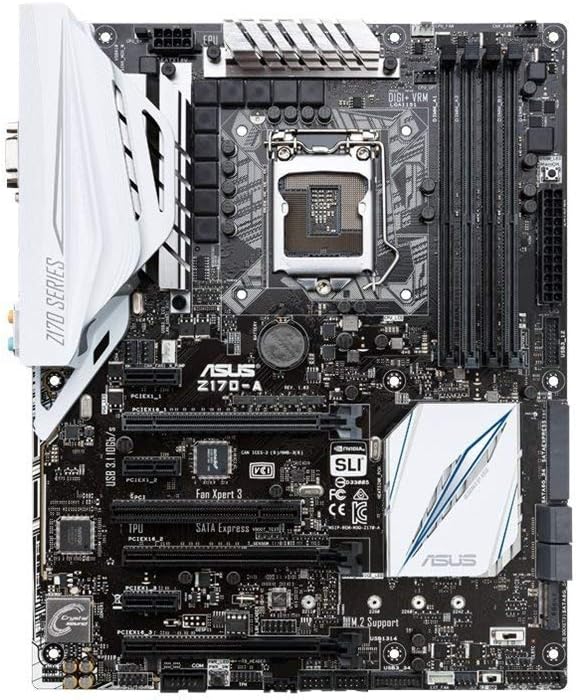
Gambar 2.1: Top view of the ASUS Z170-A Motherboard, showcasing the CPU socket, RAM slots, PCIe slots, and various headers.
The ASUS Z170-A motherboard is an ATX form factor board compatible with Intel LGA 1151 processors and DDR4 RAM. It offers a robust platform for building high-performance desktop systems.
Fitur konci:
- Dual Intelligent Processors 5 with 5-Way Optimization: Provides comprehensive system tuning with a single click.
- USB 3.1 Boost: Enhances USB 3.1 transfer speeds.
- M.2 and SATA Express Support: Offers flexible and high-speed storage options.
- 5X Protection II: Ensures hardware safeguards for long-term durability.
- DTS Studio Sora: Delivers high-quality audio experience.

Gambar 2.2: Angled view of the ASUS Z170-A Motherboard, highlighting the I/O shield area and various connectivity ports.
3. Setup jeung Instalasi
Pamasangan anu leres penting pisan pikeun operasi motherboard anjeun anu stabil. Salawasna pastikeun sistem anjeun dipareuman sareng dicabut tina colokan sateuacan ngurus komponén.
3.1. Daptar pariksa Pra-Pasang:
- Ensure you have a compatible Intel LGA 1151 CPU.
- Acquire DDR4 RAM modules (2133 MHz recommended, check QVL for compatibility).
- Prepare a suitable ATX PC case and power supply unit.
- Gather necessary tools: Phillips-head screwdriver, anti-static wrist strap.
3.2. Component Installation Sequence:
- Pamasangan CPU: Carefully open the CPU socket lever, align the CPU with the triangle marker, gently place it into the socket, and close the lever.
- Pamasangan CPU Cooler: Pasangkeun pendingin CPU pilihan anjeun numutkeun pitunjuk ti produsénna.
- Pamasangan RAM: Open the DIMM slot clips, align the RAM modules with the key notch, and press firmly until the clips snap into place.
- Pamasangan motherboard: Install standoffs in your PC case, then carefully place the motherboard and secure it with screws.
- Pamasangan Alat Panyimpen: Connect SATA drives to the SATA ports or install M.2 SSDs into the M.2 slot.
- Pamasangan Kartu Grafis (GPU): Selapkeun kartu grafis anjeun kana slot PCIe x16 primér teras amankeun.
- Sambungan catu daya: Sambungkeun konektor daya ATX 24-pin sareng konektor daya CPU 8-pin tina catu daya anjeun ka motherboard. Sambungkeun daya ka komponén sanés upami diperyogikeun.
- Sambungan Panel hareup: Connect the case's front panel headers (power button, reset button, USB, audio) to the corresponding pins on the motherboard. Refer to the motherboard manual for pinout diagrams.
4. Parentah Operasi
Sakali sadaya komponén dipasang sareng disambungkeun, anjeun tiasa ngaktipkeun sistem anjeun.
4.1. Initial Boot and BIOS/UEFI Setup:
- Pencét tombol daya dina kasus PC Anjeun.
- Salila prosés boot, pencét sababaraha kali DEL konci atawa F2 konci pikeun ngasupkeun BIOS / UEFI utilitas setelan.
- In the BIOS/UEFI, you can configure boot order, enable XMP profiles for RAM, adjust fan speeds, and perform basic overclocking.
- Save changes and exit the BIOS/UEFI to continue booting.
4.2. Operating System and Driver Installation:
- Install your preferred operating system (e.g., Windows, Linux) from a bootable USB drive or optical disc.
- After OS installation, install the latest drivers for your motherboard chipset, audio, LAN, and other integrated components from the ASUS support websitus atanapi CD / USB supir anu disayogikeun.
- Install drivers for your graphics card and other peripheral devices.
5. Pangropéa
Pangropéa teratur ngabantosan umur panjang sareng kinerja optimal tina motherboard sareng sistem PC anjeun.
- Ngaleungitkeun lebu: Periodically clean dust from inside your PC case, especially from fans, heatsinks, and motherboard components, using compressed air or a soft brush. Ensure the system is powered off and unplugged.
- Pembaruan BIOS/UEFI: Pariksa dukungan ASUS website for the latest BIOS/UEFI updates. Updates can improve stability, compatibility, and performance. Follow the update instructions carefully to avoid issues.
- Pembaruan supir: Keep your system drivers updated to ensure compatibility and optimal performance with new software and hardware.
- Manajemén Kabel: Pastikeun kabel internal dialirkeun rapih pikeun ningkatkeun aliran hawa sareng nyegah gangguan.
6. Cara ngungkulan
If you encounter issues, the following basic troubleshooting steps may help. For more complex problems, refer to the comprehensive Pituduh Pamaké (PDF) atanapi ngahubungan rojongan teknis.
- Henteu Kakuatan / Henteu Boot:
- Pastikeun sadaya kabel kakuatan (24-pin ATX, 8-pin CPU) disambungkeun aman ka motherboard jeung catu daya.
- Pastikeun saklar catu daya aya dina posisi ON.
- Pariksa sambungan tombol kakuatan panel hareup kana motherboard nu.
- Henteu aya tampilan:
- Ensure the monitor is connected to the graphics card (or integrated graphics port) and powered on.
- Pasang deui kartu grafik sareng modul RAM.
- Coba boot ku ngan hiji iteuk RAM.
- Instabilitas Sistem / Kacilakaan:
- Pariksa suhu CPU sareng GPU. Pastikeun cooling nyukupan.
- Pariksa RAM dipasang kalawan bener sareng cocog. Jalankeun alat diagnostik mémori.
- Ngamutahirkeun chipset jeung grafik drivers.
- Periferal Teu Dideteksi:
- Pastikeun alatna nyambung kalayan leres.
- Install or update drivers for the peripheral.
- Try a different port or slot.
7. Spésifikasi
| Fitur | Spésifikasi |
|---|---|
| merek | ASUS |
| Ngaran modél | FBA_90MB0LS0-M0EAY0 (Z170-A) |
| CPU Socket | LGA 1151 |
| Prosesor cocog | Intel LGA 1151 Processors |
| Téhnologi Mémori RAM | DDR4 |
| Laju mémori | 2133 MHz |
| Kapasitas Panyimpenan Mémori | 64 GB (Max) |
| Tipe Chipset | Intel Z170 |
| Jumlah USB 2.0 palabuhan | 6 |
| Ukuran produk (L x W x H) | 10.4 x 2.7 x 12.9 inci |
| Item Beurat | 3 pon |
| Produsén | ASUS Computer International Direct |
| Tanggal Sadia munggaran | 5 Agustus 2015 |
8. Garansi jeung Rojongan
Your ASUS Z170-A Motherboard is manufactured by ASUS Computer International Direct. For specific warranty terms and conditions, please refer to the documentation included with your purchase or visit the official ASUS support websitus.
Ngahubungan Rojongan:
For technical assistance, driver downloads, or further information, please visit the official ASUS support website. You can typically find support resources by searching for "ASUS Support" online and navigating to the support section for your specific model (Z170-A).