
1. Bubuka
This manual provides instructions for the LaView LV-PB932F4 IP Bullet Camera. This camera is designed for surveillance applications, offering 1080P HD resolution for both indoor and outdoor use. It features day and night vision capabilities, with infrared (IR) night vision up to 100 feet. The camera is weatherproof with an IP66 rating and operates in temperatures from -13°F to 140°F (-25°C to 60°C).

Image 1.1: LaView LV-PB932F4 IP Bullet Camera features.
2. Eusi Paket
Pastikeun yén sadaya item aya dina pakét anjeun:
- 1 x LaView LV-PB932F4 2MP 1080P IP Bullet Camera
- (Additional accessories such as mounting screws, anchors, and Ethernet cable may vary by package and are often sold separately.)
3. Setup jeung Instalasi
3.1 Sateuacan Instalasi
Ensure your Network Video Recorder (NVR) system is compatible with IP 2MP cameras. Plan the camera's placement to maximize coverage and minimize obstructions.
3.2 Instalasi fisik
The camera is designed for wall mounting. Select a suitable location that provides the desired field of view and protection from direct impact.
Léngkah-léngkah pamasangan:
- Mark drilling points using the camera's base as a template.
- Drill pilot holes appropriate for your mounting surface.
- Secure the camera to the mounting surface using appropriate screws and anchors (not included).
- Saluyukeun sudut kaméra pikeun sinyalna optimal.
3.3 Sambungan
This camera utilizes Power over Ethernet (PoE) for simplified installation. A single network cable provides both power and data connection.
- Connect one end of an Ethernet cable (Cat 5e or Cat 6 recommended) to the camera's Ethernet port.
- Connect the other end of the Ethernet cable to a PoE-enabled port on your NVR or a PoE switch.
- The camera should automatically power on and attempt to connect to your NVR system.
Catetan: For systems that do not automatically configure, refer to your NVR's manual for adding IP cameras and network configuration.
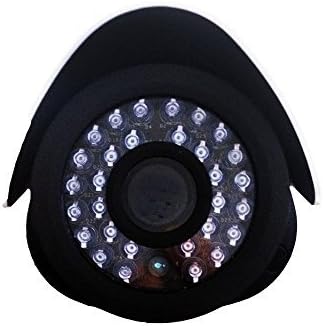
Gambar 3.1: Hareupeun view of the camera lens and IR LEDs.
4. Operasi
4.1 Panglihatan Siang/Peuting
The camera automatically switches between day (color) and night (black and white, infrared) modes based on ambient light conditions. In night mode, the camera's infrared LEDs activate to provide visibility up to 100 feet in darkness.
4.2 Deteksi Gerak
The camera supports motion detection. Configuration of motion detection zones and sensitivity settings is typically done through your connected NVR system's interface. Refer to your NVR's manual for detailed instructions on setting up motion alerts and recording triggers.
4.3 Ngarékam sareng Maénkeun Pidéo
Video recording and playback functions are managed by your NVR system. Consult your NVR's user manual for instructions on accessing live view, configuring recording schedules, and reviewing dirékam footage.
5. Pangropéa
Pikeun mastikeun kinerja anu optimal sareng umur panjang kaméra anjeun, turutan pedoman perawatan ieu:
- beberesih: Périodik ngabersihan lénsa kaméra ku lemes, damp cloth. Avoid abrasive cleaners or solvents that could damage the lens coating.
- Pamariksaan kabel: Regularly inspect all cables for damage, wear, or loose connections.
- Pembaruan firmware: Check the official LaView website for any available firmware updates for your camera model. Firmware updates can improve performance, enhance security, and add new features.
- Perlindungan Lingkungan: While the camera is IP66 weatherproof, extreme environmental conditions (e.g., direct lightning strikes, prolonged submersion, or corrosive environments) should be avoided.
6. Cara ngungkulan
6.1 No Image/Video Signal
- Pariksa kakuatan: Ensure the camera is receiving power via the PoE connection. Verify the Ethernet cable is securely connected to both the camera and the PoE source (NVR/switch).
- Pariksa sambungan jaringan: Confirm the Ethernet cable is not damaged. Try a different port on your NVR/switch.
- Kompatibilitas NVR: Ensure your NVR system is compatible with 2MP IP cameras.
- Konflik Alamat IP: If manually configuring, check for IP address conflicts on your network.
6.2 Kualitas Gambar Miskin
- Lensa bersih: Bersihkeun lénsa kaméra tina kokotor, lebu, atanapi noda.
- Kaayaan Pencahayaan: Ensure adequate lighting for optimal image quality. In low light, the camera will automatically switch to IR night vision.
- Setélan Resolusi: Verify the video resolution settings on your NVR are set to 1080P or higher, if supported by your NVR.
6.3 Night Vision Not Working
- LED IR: In dark conditions, check if the infrared LEDs are illuminating. They may emit a faint red glow.
- Halangan: Ensure there are no obstructions directly in front of the camera that could block the IR light.
6.4 Masalah Deteksi Gerakan
- Setélan sensitipitas: Adjust the motion detection sensitivity on your NVR. High sensitivity can lead to false alarms (e.g., from insects, moving branches).
- Zona deteksi: Verify that the motion detection zones are correctly configured to cover the desired areas.
7. Spésifikasi Téknis
| Fitur | Spésifikasi |
|---|---|
| Nomer modél | LV-PB932F4 |
| Resolusi Capture Video | 1080 p |
| Resolusi Sénsor Poto | 2 MP |
| Resolusi Masih Éféktif | 4 MP |
| Téhnologi konektipitas | Kabel (PoE) |
| Pamakéan jero rohangan / outdoor | Jero rohangan, Luar |
| Peunteun waterproof | IP66 |
| Wengi Sawangan Sawangan | 100 suku |
| Fitur husus | Sénsor gerak, Visi Peuting |
| Suhu Operasi | -13°F nepi ka 140°F (-25°C nepi ka 60°C) |
| Sumber Daya | Kabel Listrik (PoE) |
| Item Dimensi | 8.5 x 5 x 5 inci |
| Item Beurat | 1.35 pon |
| Faktor Bentuk | Pelor |
| Tipe Gunung | Tembok Gunung |
8. Garansi jeung Rojongan
8.1 Émbaran jaminan
This LaView product is covered by a 2-year manufacturer's warranty. Please retain your proof of purchase for warranty claims. The warranty covers defects in materials and workmanship under normal use.
8.2 Rojongan Téknis
For technical assistance or support, please visit the official LaView website or contact their customer service. Lifetime technical support is provided to assist with setup, operation, and troubleshooting.
LaView Resmi Websitus: www.laviewkaamanan.com