1. Bubuka
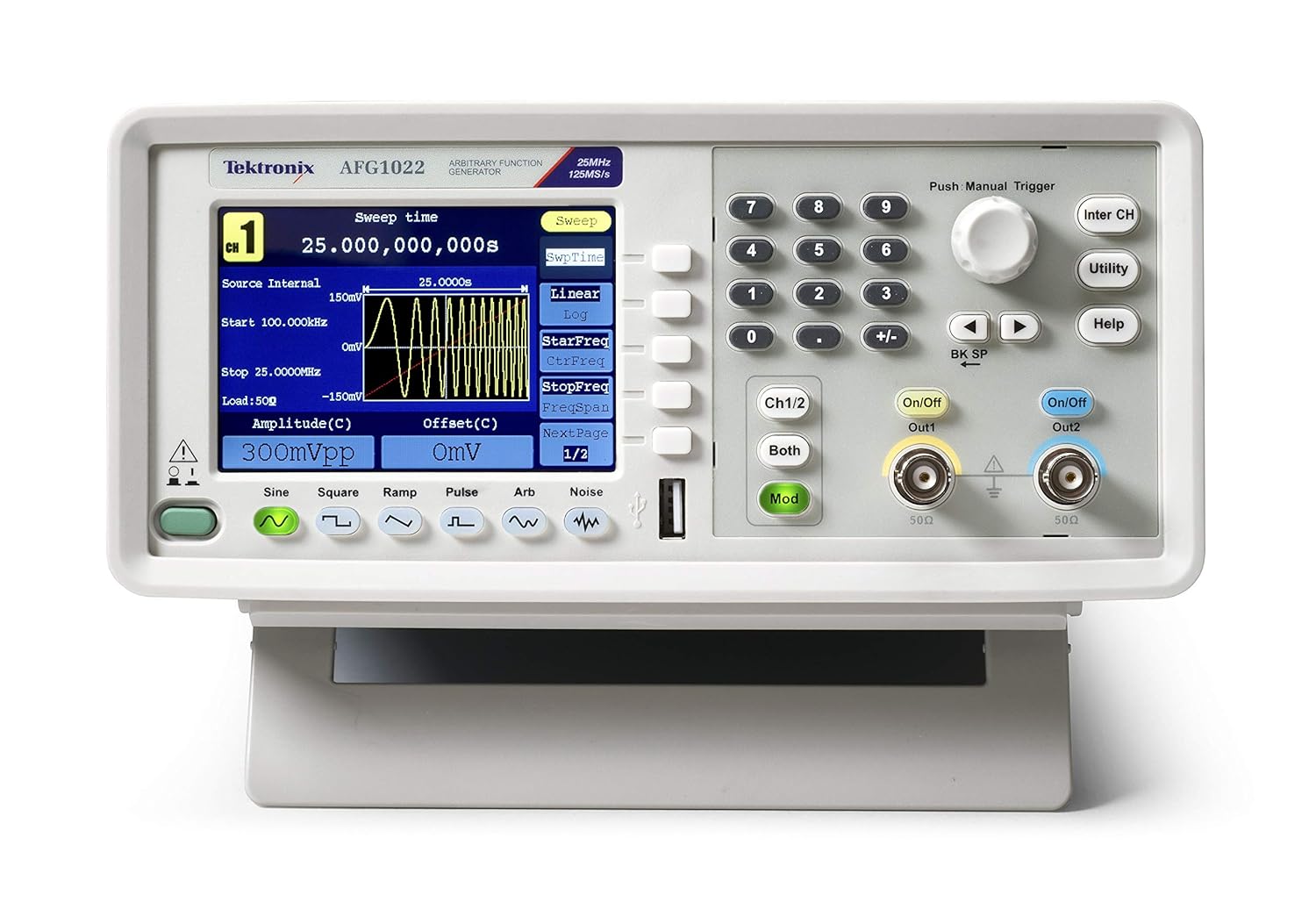
The Tektronix AFG1022 Arbitrary Function Generator is a versatile instrument designed for generating various waveforms required in laboratory and testing environments. With a bandwidth of 25 MHz or 60 MHz and dual output channels, it provides an output amplitude ranging from 1 mVpp to 10 Vpp across its full bandwidth. This device offers a comprehensive set of features for waveform generation, making it a valuable tool for a wide range of applications.
fitur konci ngawengku:
- Dual-channel operation with 25 MHz bandwidth.
- Kaluaran amplitude from 1 mVpp to 10 Vpp.
- 14-bit vertical resolution and 1 µHz frequency resolution.
- 50 built-in arbitrary waveforms.
- Support for continuous, modulation, sweep, and burst modes.
- Dedicated 3.95-inch TFT LCD display for clear visualization.
- User-friendly front panel and menu navigation.
2. Émbaran Kasalametan
Before operating the Tektronix AFG1022, please read and understand all safety instructions to prevent injury and avoid damage to the instrument or other connected equipment. This device is designed for use by qualified personnel only.
Pancegahan Kasalametan Umum:
- Grounding: Always ensure the instrument is properly grounded. The power cord provided has a three-prong plug for this purpose. Do not defeat the grounding-type plug.
- Sumber Daya: Connect the instrument to a power source that is within the specified voltage range (100-240V AC, 50/60 Hz). Verify the line selector switch on the rear panel is set correctly for your local voltage.
- Ventilasi: Ensure proper ventilation around the instrument. Do not block ventilation openings. Overheating can cause damage.
- Lingkungan: Operate the instrument in a clean, dry environment. Avoid exposure to moisture, extreme temperatures, or corrosive gases.
- Palayanan: Refer all servicing to qualified service personnel. Do not attempt to service the instrument yourself unless you are qualified to do so.
- Kabel sareng Panyambung: Use only specified cables and connectors. Ensure all connections are secure before applying power.
- beberesih: Pegatkeun sambungan kakuatan saméméh beberesih. Paké lawon lemes, garing. Entong nganggo pembersih cair atanapi aerosol.
3. Naon dina Box
Upon unpacking your Tektronix AFG1022 Arbitrary Function Generator, please verify that all the following items are included:
- Tektronix AFG1022 Arbitrary Function Generator Unit
- Pernyataan patuh
- CD (containing software and documentation)
- Manual pangguna (dokumén ieu)
- Fuse (2 pieces, spare)
- Cables (3 pieces, including USB and BNC cables)
- Sertipikat Kalibrasi
- Kabel listrik
If any items are missing or damaged, please contact your Tektronix supplier or customer support immediately.
4. Setélan
Follow these steps to set up your AFG1022 Arbitrary Function Generator for initial use.
4.1 Ngabongkar sareng Inspeksi
- Carefully remove the instrument and all accessories from the packaging.
- Inspect the instrument for any signs of physical damage that may have occurred during transit. If damage is found, contact your supplier.
- Retain the original packaging materials for future transport or storage.
4.2 Sambungan Daya
- Locate the power inlet on the rear panel of the AFG1022.
- Pariksa éta Pamilih Jalur switch on the rear panel is set to the correct voltage for your region (110V AC or 220V AC). Adjust if necessary.
- Connect the provided power cord to the instrument's power inlet and then to a grounded AC power outlet.

4.3 Kaluaran Nyambungkeun
- Identify the two output channels (Out1 and Out2) on the front panel. These are BNC connectors.
- Connect appropriate BNC cables from the desired output channel(s) to your test circuit or device under test.
- Ensure the impedance setting on the AFG1022 matches the impedance of your load (typically 50Ω or high impedance).
5. Parentah Operasi
bagian ieu nyadiakeun leuwihview of the basic operation of the Tektronix AFG1022. For detailed instructions on specific functions, refer to the comprehensive user manual provided on the included CD.
5.1 Ngahurungkeun sareng Layar Mimiti
- Press the power button located on the front panel to turn on the instrument.
- The display will show the Tektronix logo and then transition to the main waveform generation interface.
5.2 Basic Waveform Generation
The AFG1022 can generate various standard waveforms and arbitrary waveforms.
- Milih Tipe Gelombang: Use the dedicated buttons below the display (Sine, Square, Ramp, Pulse, Arb, Noise) to select the desired waveform.
- Frékuénsi Setélan: Use the numeric keypad and the rotary knob to input the desired frequency. The display will update in real-time.
- Setélan Amplitude and Offset: Saluyukeun amplitude (Vpp) and DC offset (V) using the corresponding soft keys and the rotary knob.
- Enabling Output: Pencét éta Hurung/Pareuman button for Channel 1 (Out1) or Channel 2 (Out2) to enable the waveform output. The button will illuminate when the output is active.

5.3 Fungsi Maju
- Modulasi: Pencét éta Mod button to access modulation settings (AM, FM, PM, FSK, PWM).
- Nyapu: Configure frequency sweeps by pressing the sasapu konci lemes.
- Burst: Generate burst waveforms by pressing the Burut konci lemes.
- Bentuk Gelombang Sawenang-wenang: The AFG1022 supports user-defined arbitrary waveforms. Refer to the full manual for instructions on creating and loading custom waveforms.
6. Pangropéa
Proper maintenance ensures the longevity and optimal performance of your Tektronix AFG1022.
6.1 beberesih
- Always disconnect the power cord before cleaning the instrument.
- Use a soft, dry cloth to wipe the exterior surfaces. For stubborn dirt, a cloth lightly dampened with mild detergent and water may be used.
- Do not use abrasive cleaners, solvents, or strong chemicals, as these can damage the plastic parts and labels.
- Avoid spraying liquids directly onto the instrument.
6.2 Ngagantian sekering
If the instrument does not power on, check the fuse located in the power inlet on the rear panel. Ensure the replacement fuse matches the specified type and rating (e.g., 250V, 2A). Refer to the full manual for detailed instructions on fuse replacement.
6.3 Kalibrasi
For continued accuracy, periodic calibration by qualified service personnel is recommended. Refer to the calibration certificate for the recommended calibration interval.
7. Cara ngungkulan
This section provides solutions to common issues you might encounter with your AFG1022. If the problem persists, contact Tektronix customer support.
| Masalah | Mungkin Cukang lantaranana | Solusi |
|---|---|---|
| Alatna teu bisa dihurungkeun. | No power, faulty power cord, blown fuse. | Check power cord connection. Verify power outlet. Check and replace fuse if necessary. Ensure line selector is correct. |
| No waveform output. | Output channel not enabled, incorrect amplitude/offset settings, faulty cable, incorrect load impedance. | Press the On/Off button for the desired channel. Verify amplitude and offset settings. Check BNC cable connections. Ensure load impedance matches instrument setting. |
| Pintonan kosong atanapi beku. | Software error, internal fault. | Power cycle the instrument (turn off, wait 10 seconds, turn on). If issue persists, contact support. |
| Incorrect waveform shape/frequency. | Incorrect settings, external interference. | Double-check all waveform parameters (frequency, amplitude, offset, modulation settings). Ensure proper shielding of cables. |
8. Spésifikasi
The following table lists the key specifications for the Tektronix AFG1022 Arbitrary Function Generator. All specifications are typical unless otherwise noted.
| Parameter | Nilai |
|---|---|
| Ngaran modél | AFG1022 |
| Bandwidth | 25 MHz |
| Saluran | Dual-kanal |
| Kaluaran Amplituit | 1 mVpp to 10 Vpp |
| Resolusi nangtung | 14-bit |
| Resolusi Frékuénsi | 1 µHz |
| Built-in Waveforms | 50 Arbitrary Waveforms |
| tampilan | 3.95-inci TFT LCD |
| Sumber Daya | Electricity Powered |
| Voltage | 100-240V AC (selectable) |
| Item Beurat | 4.9 Kilogram (10.8 Pon) |
| Ukuran Paket | 17.2 x 14 x 11.4 inci |
| Produsén | Tektronix |
| Tanggal Kahiji Sadia | 15 Juli 2015 |
9. Jaminan & Dukungan
Tektronix products are designed for reliability and performance. For specific warranty terms and conditions applicable to your AFG1022, please refer to the warranty information provided with your purchase or visit the official Tektronix websitus.
Rojongan Palanggan:
If you require technical assistance, have questions about your instrument, or need to arrange for service, please contact Tektronix customer support. Support contact information can typically be found on the Tektronix websitus atanapi dina dokuméntasi anu kalebet sareng produk anjeun.
When contacting support, please have your instrument's model number (AFG1022) and serial number ready. The serial number is located on the rear panel of the instrument.
For the latest information, drivers, software, and additional resources, please visit the official Tektronix websitus: www.tek.com


