Produk Leuwihview
The Soleus GPS Fly is designed to assist you in your training runs by providing essential data such as speed, distance, pace, and calories burned. It features an 8-hour battery life, customizable data display, 100-lap memory, automatic lap splits, and storage for 30 run data records.

Gambar: Hareupeun view of the Soleus GPS Fly Digital Watch, featuring a teal strap and a digital display showing time and GPS status.
Ngamimitian: Setup
Ngecas Alat
Before initial use, fully charge your Soleus GPS Fly watch.
- Connect the provided charger clip to the charging contacts on the back of the watch.
- Plug the USB end of the charger into a standard USB power adapter or a computer's USB port.
- The watch display will indicate charging status. Allow sufficient time for a full charge.

Image: The USB charger clip for the Soleus GPS Fly watch, designed to connect to the watch for power.
Nyala Mimiti sareng Setélan Waktos
Press and hold the appropriate button (refer to watch diagram for specific button functions) to power on the device. Follow on-screen prompts to set initial time, date, and user preferences.
Operating Your GPS Fly Watch
Fungsi GPS
The watch features a high-sensitivity GPS receiver for accurate tracking.
- Pastikeun anjeun aya di daérah anu kabuka kalayan jelas view langit pikeun akuisisi sinyal GPS anu optimal.
- Activate GPS mode from the main menu. The watch will search for satellites.
- Once a signal is acquired, the GPS indicator will confirm readiness for tracking.
Tracking Your Run
The watch tracks pace, speed, distance, and calories burned.
- Pace / Speed / Distance Tracker: Displays current and total values in miles or kilometers per hour/minute.
- Calories Burned Counter: Estimates calories expended during activity.
- 100 Lap Memory Data Storage: Stores up to 30 run files with 100 laps of data per run.
- Auto-Lap: Automatically records laps based on your customizable distance settings.
Fitur tambahan
- 1/100 Second Chronograph: Pikeun timing tepat.
- 5 Programmable Alarms: Set reminders or training alerts.
- EL Backlight with Night Mode: Lights up the display for visibility in dark conditions. Night mode allows automatic activation of the light while running at night.
- Waktu Dunya: Displays time in various global zones.

Image: Diagram illustrating key product features such as GPS receiver, distance, pace/speed, calories burned, auto-lap, alarms, chronograph, EL backlight, night mode, 100 lap storage, USB data upload, and 30M water resistance.
Manajemén Data
USB Data Upload
Upload your workout data to STRAVA on your PC or Mac using the Soleus Sync software. This allows for detailed analysis and tracking of your progress.
Pangropéa
Tahan cai
The watch is 30M water resistant, meaning it withstands rain and splashes of water. It is teu dianjurkeun for showering, swimming, or submersion in water.
Perawatan batré
The watch uses a rechargeable Lithium Ion battery. To prolong battery life, avoid extreme temperatures and fully charge the device regularly.
Pamérésan masalah
Masalah Akuisisi Sinyal GPS
- Ensure you are outdoors with an unobstructed view ti langit.
- Move away from tall buildings or dense foliage that may block signals.
- Allow several minutes for the watch to acquire a signal, especially during first use or after a long period of inactivity.
Pintonan Teu Ngabales
- Pariksa tingkat batré jeung ngecas lamun perlu.
- Attempt a soft reset by holding down all buttons simultaneously for a few seconds (refer to specific model instructions if available).
Specifications (Model: SG012-345)
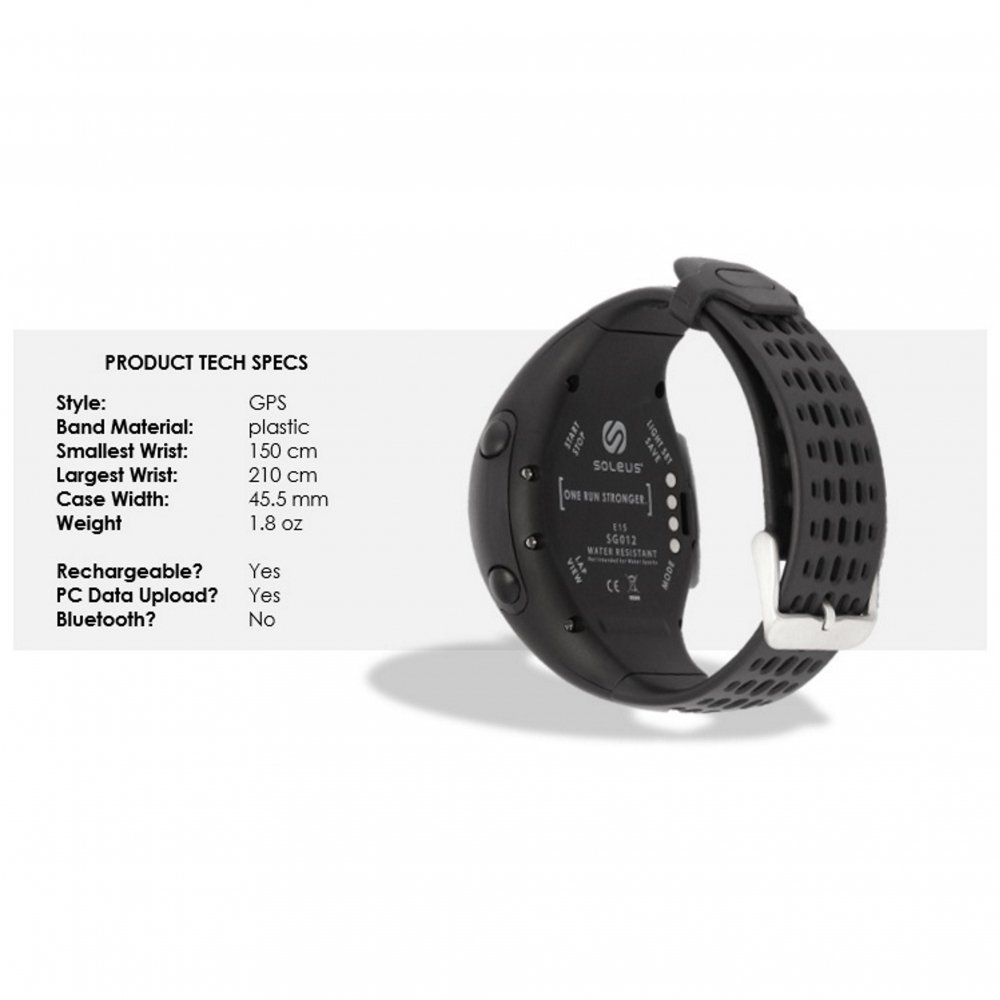
Image: Diagram showing the back of the Soleus GPS Fly watch and a table of technical specifications.
| Fitur | Rincian |
|---|---|
| Nomer modél | SG012-345 |
| Konektipitas | GPS |
| Téknologi tampilan | LCD |
| Tahan cai | 30M |
| Jenis Batré | 1 Litium Ion (kaasup) |
| Dimensi produk | 23 x 4.5 x 2.5 cm |
| Item Beurat | 68 g |
| Ukuran Kasus | 46 mm |
| Bahan Tali | Poliuretana |
| PC Data Upload | Sumuhun |
Garansi sareng Rojongan
Émbaran jaminan
Produk ieu hadir kalawan a Garansi 1 Taun from the date of purchase. Please retain your proof of purchase for warranty claims. The warranty covers manufacturing defects under normal use. It does not cover damage caused by misuse, accidents, unauthorized modifications, or failure to follow instructions in this manual.
Rojongan Palanggan
For further assistance, technical support, or warranty inquiries, please contact Soleus customer service. Refer to the official Soleus websitus pikeun detil kontak.


