Produk Leuwihview
The Keyless2Go Replacement Key Fob is designed to provide a reliable and affordable solution for replacing your original keyless entry remote. This remote is a complete unit, including all necessary electronics and a pre-installed battery, ready for programming.
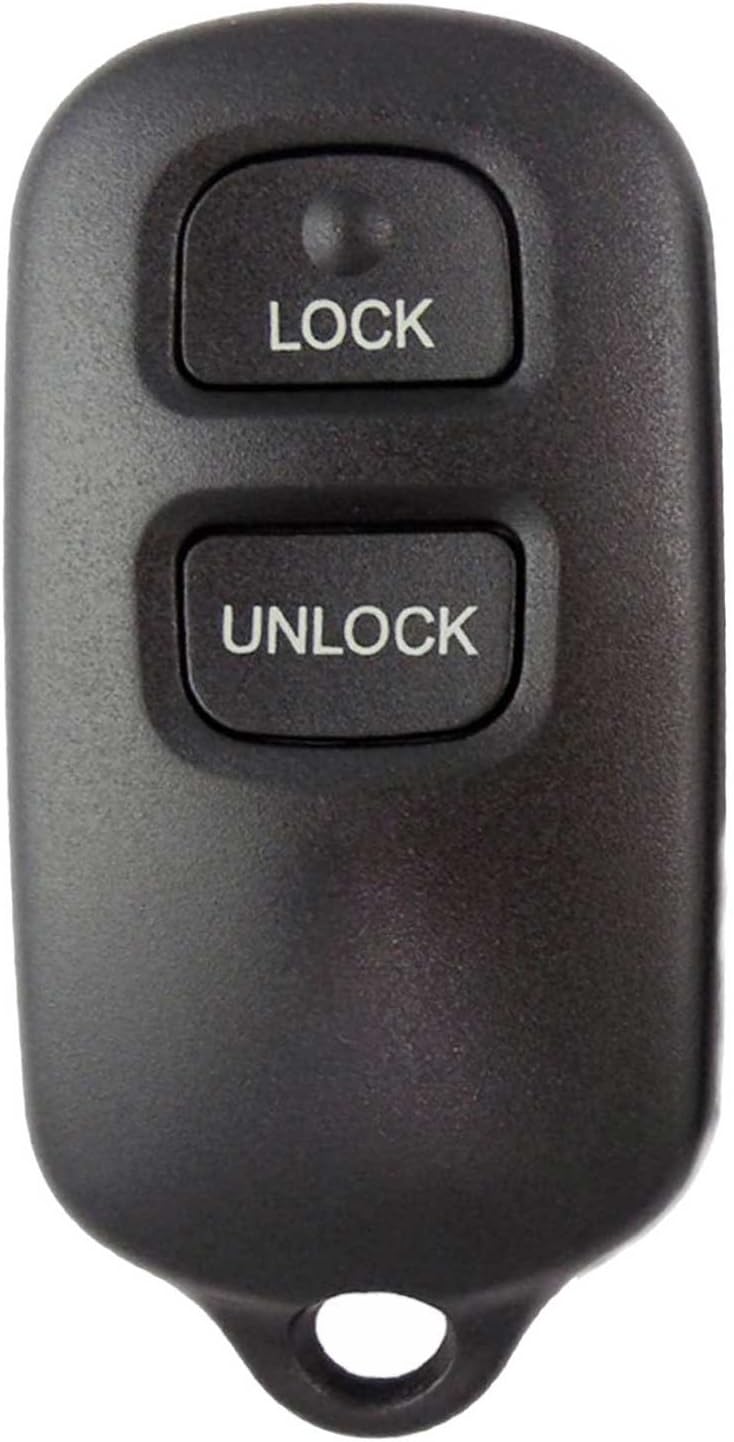
Hareupeun view of the key fob, showing the 'LOCK' and 'UNLOCK' buttons.

Balik deui view of the key fob, featuring a blank area and a red panic button.
Fitur konci:
- Brand new replacement key fob remote for select Toyota vehicles.
- Each remote is tested for transmission before shipping.
- Includes all electronics and battery.
- FCC ID: GQ43VT14T, Part #: 89742-06010.
Kasaluyuan
This replacement key fob is compatible with various Toyota and Pontiac models. Please ensure your vehicle is listed below and that your original remote does not have an LED light, as this replacement will not work with LED-equipped originals.
| Jieun | Modél | Mangtaun-taun |
|---|---|---|
| Pontiac | Getaran | 2003 - 2008 |
| Toyota | Camry | 2000 - 2006 |
| Toyota | Corolla | 2003 - 2008 |
| Toyota | Matriks | 2003 - 2008 |
| Toyota | Sienna | 1999 - 2003 |
| Toyota | Solara | 1999 - 2003 |
Catetan penting: If your original remote has an LED indicator, this replacement remote will not be compatible. Always verify compatibility with your vehicle's specific requirements before programming.

Visual representation of the key fob and compatible vehicle, highlighting DIY programming.
Setup jeung Programming
This Keyless2Go remote requires programming to your vehicle. DIY programming instructions are provided to assist you with this process. It is crucial to follow the instructions precisely for successful programming.
Léngkah-léngkah Pemrograman:
- Parentah aksés: A website link to free DIY programming instructions will be provided with your order. Please refer to this link for detailed, step-by-step guidance.
- Nyiapkeun kandaraan: Ensure your vehicle is in the correct state as specified in the programming instructions (e.g., doors closed, ignition off).
- Programming Sequence: Follow the specific sequence of actions involving your vehicle's ignition, doors, and existing remote (if applicable) as outlined in the provided instructions. This may include turning the ignition on/off, opening/closing doors, and pressing buttons on the remote.
- Konfirmasi: The vehicle's locks may cycle or a light may flash to confirm successful programming. If programming fails, repeat the steps carefully.
Catetan: Some vehicles may require all existing remotes to be reprogrammed simultaneously with the new remote. If you encounter difficulties, refer to the troubleshooting section or contact support.
Operating the Key Fob
Once successfully programmed, your Keyless2Go remote will function similarly to your original factory remote.
Fungsi Tombol:
- Tombol konci: Pencét sakali pikeun ngonci sadaya panto kendaraan.
- Tombol UNLOCK: Press once to unlock the driver's door. Press twice within a few seconds to unlock all vehicle doors.
- Panic Button (Red Square on Back): Press and hold to activate the vehicle's alarm system. Release to deactivate.
The remote operates wirelessly, allowing you to lock and unlock your vehicle from a distance. Optimal range may vary based on environmental factors and vehicle battery strength.
Pangropéa
The Keyless2Go remote is designed for durability and requires minimal maintenance.
Ngagantian batré:
The remote comes with a pre-installed lithium metal battery. When the remote's range decreases significantly or it stops responding, the battery may need replacement.
- Buka remot c kalawan ati-atiasing using a small flat-head screwdriver or a prying tool.
- Note the orientation of the existing battery.
- Remove the old battery and insert a new one of the same type (typically a coin cell battery, e.g., CR2032), ensuring correct polarity.
- Tempelkeun remot casing ngahiji deui kalawan aman.
beberesih: Lap remot ku lawon anu lemes sareng garing. Ulah nganggo bahan kimia anu keras atanapi pembersih anu abrasif.
Panyimpenan: Simpen remote di tempat anu garing, jauh tina suhu anu ekstrim sareng sinar panonpoé langsung.
Pamérésan masalah
If you experience issues with your Keyless2Go remote, consider the following troubleshooting steps:
- Jauh Teu Ngabales:
- Ensure the remote is properly programmed to your vehicle. Re-attempt programming if unsure.
- Check the battery. A low or dead battery is a common cause of non-responsiveness. Replace if necessary.
- Verify vehicle compatibility. This remote will not work if your original remote had an LED.
- Rentang ngurangan:
- Ganti batréna.
- Ensure there are no obstructions between the remote and the vehicle.
- Environmental interference (e.g., strong radio signals, power lines) can affect range.
- Kasesahan Pemrograman:
- Carefully re-read and follow the DIY programming instructions provided with your order. Even minor deviations can cause failure.
- Ensure all vehicle doors are closed and the ignition is in the correct position as per instructions.
- If your vehicle requires all remotes to be programmed at once, ensure all remotes (new and existing) are present during the programming sequence.
If problems persist after attempting these steps, please contact Keyless2Go customer support for assistance.
spésifikasi
| Atribut | Rincian |
|---|---|
| merek | Keyless2Go |
| Nomer modél | R-TOY-14T3.go |
| ID FCC | GQ43VT14T |
| Nomer Bagian | 89742-06010 |
| UPC | 731882400144 |
| Dimensi produk | 1 "L x 0.5" W |
| Item Beurat | 0.634 ons |
| Warna | Hideung |
| Bahan | palastik |
| Jumlah Kancing | 3 (Lock, Unlock, Panic) |
| Jenis Batré | 1 batré Litium Metal (kaasup) |
Support and Legal Information
Rojongan Palanggan:
Keyless2Go provides free technical support with every order. If you have questions regarding programming, compatibility, or any other issues, please refer to the contact information provided with your purchase or visit the official Keyless2Go websitus.
For general inquiries, you can visit the Keyless2Go Store on Amazon.
Bantahan Hukum:
All product names, brands, logos, and other trademarks mentioned are the property of their respective owners. These are used solely to simplify the identification of the proper parts for a particular vehicle. Keyless2Go is not affiliated with, endorsed by, or sponsored by any of the companies or trademarks referenced in this manual or on its products.


