Bubuka
This manual provides comprehensive instructions for the installation, operation, and maintenance of your Alcatel-Lucent 4018 Extended Edition IPTouch VoIP Phone. Please read this manual carefully before using the device to ensure proper functionality and to prevent damage.
Émbaran Kasalametan
Perhatikeun tindakan pencegahan kaamanan ieu pikeun ngirangan résiko kahuruan, sengatan listrik, sareng tatu:
- Anggo ngan ukur adaptor daya anu disayogikeun sareng telepon.
- Ulah nepi ka telepon kakeunaan cai atawa kalembaban.
- Hindarkeun nempatkeun telepon caket sumber panas atanapi dina sinar panonpoé langsung.
- Ulah nyobian muka atawa ngalereskeun telepon sorangan. Rujuk sadayana jasa ka tanaga anu mumpuni.
- Pastikeun ventilasi ditangtoskeun sabudeureun alat.
Eusi pakét
Pariksa yén pakét anjeun ngandung barang-barang ieu:
- Alcatel-Lucent 4018 Extended Edition IPTouch VoIP Phone
- Handset
- Kabel Handset
- Kabel Ethernet
- Adaptor Daya (upami aya)
- Gancang Mimitian Guide
Produk Leuwihview
The Alcatel-Lucent 4018 Extended Edition IPTouch VoIP Phone is designed for efficient communication. Familiarize yourself with its components:
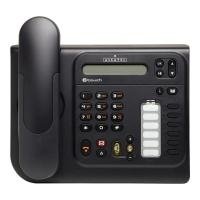
Hareupeun view of the Alcatel-Lucent 4018 Extended Edition IPTouch VoIP Phone, showing the display, keypad, and function buttons.
Komponén konci:
- Layar tampilan: Shows call information, menus, and status.
- Contextual Keys: Buttons below the display that change function based on the current menu.
- Tombol Napigasi: For scrolling through menus and options.
- Dial Pad: Keypad numerik standar pikeun nelepon.
- Tombol Fungsi: Dedicated buttons for features like voicemail, hold, transfer, and speakerphone.
- Handset: Pikeun paguneman pribadi.
- Speakerphone: Pikeun komunikasi tanpa nganggo leungeun.
Disetél
1. Nyambungkeun Telepon
- Connect the handset cord to the handset and the designated port on the phone base.
- Connect one end of the Ethernet cable to the LAN port on the back of the phone and the other end to your network switch or router.
- If Power over Ethernet (PoE) is not available, connect the power adapter to the phone's power port and then to an electrical outlet.
2. Konfigurasi awal
Upon first power-up, the phone will attempt to connect to your network and register with your VoIP server. This process may require network credentials or specific server settings, which are typically provided by your IT administrator.
- Turutan sagala ajakan dina layar pikeun setelan awal.
- Contact your system administrator for specific IP address, subnet mask, gateway, and DNS server settings if manual configuration is required.
Parentah Operasi
Nelepon:
- Angkat handset atawa pencét kenop Speaker kancing.
- Pencét nomer telepon anu dipikahoyong nganggo alas kenop.
- Pencét éta Telepon contextual key or wait for the call to connect automatically.
Ngajawab Telepon:
- Sawaktos telepon hurung, angkat héndsét atawa pencét kenop Speaker kancing.
- Alternatipna, pencét tombol Waleran contextual key.
Nutup Telepon:
- Ganti héndsét atawa pencét tombol Tungtung Telepon contextual key or Speaker kancing.
Surat sora:
- Pencét dedicated Surat sora button (often indicated by an envelope icon).
- Follow the audio prompts to access and manage your messages.
Hold and Transfer:
- Nalika nelepon aktip, pencét éta Tahan tombol pikeun nahan telepon.
- Pikeun nransper télépon, pencét tombol Mindahkeun tombol, mencet nomer anyar, terus pencét Mindahkeun again or hang up (consult your system's specific transfer method).
Pangropéa
- beberesih: Use a soft, dry cloth to clean the phone's surface. Do not use liquid cleaners or aerosols directly on the phone.
- Panyimpenan: Upami nyimpen telepon kanggo waktos anu lami, pegatkeun sambungan tina listrik sareng jaringan, teras simpen di tempat anu tiis sareng garing.
- Apdet parangkat lunak: Firmware updates are typically managed by your IT department. Do not attempt to update the firmware without guidance from your administrator.
Pamérésan masalah
| Masalah | Mungkin Cukang lantaranana | Solusi |
|---|---|---|
| Telepon teu hurung. | Taya sambungan kakuatan atawa adaptor kakuatan faulty. | Check power cable connection. Ensure power adapter is functional. If using PoE, verify network cable and switch. |
| Teu tiasa nelepon atanapi nampi telepon. | Network connectivity issue or VoIP registration failure. | Check Ethernet cable connection. Restart the phone. Contact your IT administrator to verify VoIP server settings and registration status. |
| Taya nada dial. | Handset not properly connected or phone not registered. | Ensure handset cord is securely connected. Verify phone is registered to the VoIP server (check display for status). |
| Kualitas audio goréng. | Network congestion or faulty handset/speaker. | Check network connection. Try restarting the phone. If problem persists, contact support. |
For issues not listed here, please contact your IT support or the product manufacturer.
spésifikasi
| Fitur | Rincian |
|---|---|
| Nomer modél | 3GV27063DB |
| Alat nu cocog | Internet, computers, VoIP services |
| Tipe Telepon | Korded |
| Bahan | palastik |
| Sumber Daya | Kabel listrik |
| Tipe Telepon | Single keypad |
| Jenis System Ngajawab | Digital |
| Item Beurat | 4.52 pon |
| ID panelepon | Sumuhun |
| Batré Diperlukeun | Non-standard battery requires batteries (Note: This usually implies a backup battery or specific type, not standard AA/AAA) |
Garansi sareng Rojongan
For warranty information, technical support, or service inquiries, please contact your vendor or IT administrator. Alcatel-Lucent provides support through authorized channels.
Spare parts availability: Information unavailable on spare parts.
Apdet parangkat lunak dijamin dugi ka: Inpormasi teu sayogi.


