
1. Bubuka
The Motorola Talkabout T465 Rechargeable Two-Way Radio Bundle is designed for clear and dependable communication, ideal for outdoor adventures, emergencies, and staying connected when cellular service is unavailable. This manual provides essential information for setting up, operating, and maintaining your T465 radios.
2. Émbaran Kasalametan
Before using your Motorola Talkabout T465 radios, please read all safety instructions carefully. Failure to do so may result in injury or damage to the product.
- Kasalametan batré: Use only approved Motorola rechargeable batteries or 3 AA alkaline batteries. Do not mix battery types. Dispose of batteries properly.
- Proposisi 65 Peringatan: Produk ieu tiasa ngandung bahan kimia anu dipikanyaho di Propinsi California anu nyababkeun kanker sareng cacat lahir atanapi cilaka réproduktif sanés.
- Perlindungan dédéngéan: Use the lowest volume necessary to hear clearly. Prolonged exposure to loud volumes may cause hearing damage.
- gangguan: Turn off your radio in areas where two-way radios are prohibited, such as hospitals or aircraft.
3. Eusi Paket
Your Motorola Talkabout T465 bundle includes:
- 2 x T465 Two-Way Radios
- 2 x Micro-USB Wall Charging Cables
- 2 x Rechargeable NiMH Battery Packs (or use 2 AA batteries per radio)
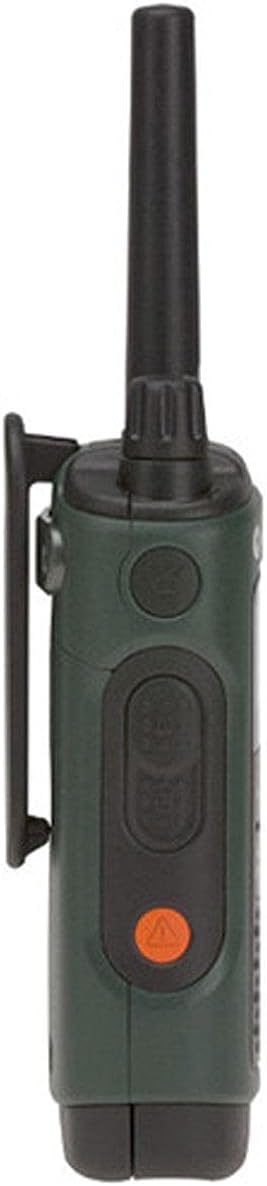
- 2 x Sabuk Klip
- 2 x Earbuds with Push-to-Talk (PTT) Microphone
- 1 x Bisi Kasus
- User Guide and Accessory Sheet (English and French)
4. Setélan
4.1 Pamasangan batré
Your T465 radios can be powered by either the included rechargeable NiMH battery packs or 3 AA alkaline batteries (not included). To install:
- Pastikeun radio dipareuman.
- Cabut panutup kompartemen batré anu aya di tukang radio.
- Insert the NiMH battery pack or 3 AA batteries, observing the polarity markings.
- Replace the battery compartment cover, ensuring it clicks securely into place to maintain water resistance.
4.2 Ngeusi batre
To charge the rechargeable NiMH battery packs:
- Connect the Micro-USB charging cable to the charging port on the side of the radio.
- Plug the other end of the cable into a standard USB wall adapter.
- The battery indicator on the radio display will show charging status. A full charge typically takes 8.5 hours.
4.3 Ngalampirkeun Klip Beubeur
To attach the belt clip, align the clip with the slots on the back of the radio and slide it down until it locks into place.

5. Ngoperasikeun Radio Anjeun
5.1 Hurung/Pareum sareng Volume
- Daya Hurung: Rotate the On/Off/Volume knob clockwise until you hear a click and the display illuminates.
- Pareum listrik: Rotate the On/Off/Volume knob counter-clockwise until you hear a click and the display turns off.
- Saluyukeun Volume: Rotate the On/Off/Volume knob to increase or decrease the listening volume.
5.2 Pamilihan Saluran
Your T465 radio has 22 channels. To select a channel:
- Pencét éta ménu tombol nepi ka nomer saluran kedip-kedip.
- Ngagunakeun éta Up or Turun tombol pikeun milih saluran nu dipikahoyong.
- Pencét éta ménu tombol deui atanapi PTT tombol pikeun mastikeun pilihan Anjeun.
5.3 Kodeu Privasi
Privacy codes help reduce interference by filtering out transmissions from other users on the same channel. Your T465 radios offer 121 privacy codes.
- Pencét éta ménu tombol dua kali dugi ka nomer kode privasi kedip-kedip.
- Ngagunakeun éta Up or Turun tombol pikeun milih kodeu privasi nu dipikahoyong.
- Pencét éta ménu tombol deui atanapi PTT tombol pikeun mastikeun. Note: Both radios must be on the same channel and privacy code to communicate.
5.4 Tombol Push-to-Talk (PTT)
The PTT button is located on the side of the radio. It has two power settings:
- Kakuatan luhur: Press the upper part of the PTT button for maximum range. This consumes more battery.
- Daya rendah: Press the lower part of the PTT button for shorter range, conserving battery life.
To transmit, press and hold the PTT button, speak clearly into the microphone, and release the button to listen.
5.5 Call/Page Tone
To send a call tone to alert other radios in your group, briefly press the Call button (often a musical note icon) on the front of the radio.
5.6 Konci Keypad
Pikeun nyegah parobahan teu kahaja kana setelan Anjeun, pencét jeung tahan tombol ménu button until the lock icon appears on the display. Repeat to unlock.

6. Fitur canggih
6.1 NOAA Weather Radio and Alerts
Your T465 radio can receive NOAA Weather Radio broadcasts, providing real-time weather information and alerts.
- Pencét éta Modus button until the weather channel icon appears.
- Ngagunakeun éta Up or Turun buttons to select a weather channel.
- The radio can be set to automatically alert you to severe weather conditions. Consult the full user guide for detailed setup of weather alerts.
6.2 Emergency Alert Button
The T465 features an orange Emergency Alert button on the side. Pressing and holding this button will activate an audible alert on your radio and other compatible Motorola radios within range, set them to maximum volume, and enable hands-free transmission (VOX) for a period, allowing you to speak without holding the PTT button.
6.3 Diwangun-di Senter
The radio includes a built-in LED flashlight for convenience in low-light conditions. To activate, press the dedicated flashlight button (often located on the top or side). Press again to turn off.
6.4 VibraCall™ Alert
For discreet communication, the VibraCall™ feature provides a silent vibrating alert instead of an audible tone. This is useful in quiet environments or when you need to avoid startling game during hunting.
7. Pangropéa
Proper care ensures the longevity and performance of your T465 radios.
- beberesih: Ngagunakeun lemes, damp cloth to clean the radio's exterior. Do not use abrasive cleaners or solvents.
- Perawatan batré: Store batteries in a cool, dry place. If not using the radios for an extended period, remove alkaline batteries to prevent leakage. Recharge NiMH batteries periodically to maintain their capacity.
- Tahan cai: The T465 is rated IP44 waterproof, meaning it is protected against splashing water from any direction. Ensure all ports and battery covers are securely closed to maintain water resistance. Do not submerge the radio.
8. Cara ngungkulan
If you encounter issues with your T465 radios, try the following:
- Henteu aya kakuatan: Check battery installation and charge level. Replace alkaline batteries if depleted.
- Jangkauan/Gangguan Goréng: Ensure both radios are on the same channel and privacy code. Move to an area with fewer obstructions (e.g., buildings, dense foliage). Range can be significantly reduced by terrain and conditions.
- Cannot Hear Other Radios: Verify volume is up. Check that privacy codes match. Ensure radios are within range.
- Radio Teu Ngecas: Check USB cable connection and wall adapter. Ensure battery pack is correctly inserted.
9. Spésifikasi
| Fitur | Rincian |
|---|---|
| merek | Motorola Leyuran |
| Nomer modél | T465 |
| Warna | Héjo |
| Jumlah Saluran | 22 |
| Protokol konektipitas | GMRS |
| Tipe Tuner | UHF |
| Ngawangkong Range Maximum | 35 Miles (actual range varies by terrain and conditions) |
| Tingkat Résistansi Cai | Waterproof (IP44) |
| Sumber Daya | Pakét Batré NiMH anu tiasa dicas ulang (kalebet) atanapi 3 batré AA (teu kalebet) |
| Batré Rata Kahirupan | 8.5 Jam |
| Dimensi produk | 1.37 "D x 2.26" W x 7.54" H |
| Item Beurat | 1.9 pon |
10. Garansi jeung Rojongan
10.1 Émbaran jaminan
The Motorola Talkabout T465 Two-Way Radio Bundle comes with a 1-taun jaminan kawates from the date of purchase. This warranty covers defects in materials and workmanship under normal use. For full terms and conditions, please refer to the warranty card included in your package or visit the Motorola Solutions websitus.
10.2 Rojongan Palanggan
For technical assistance, troubleshooting not covered in this manual, or warranty claims, please contact Motorola Solutions customer support. Contact information can typically be found on the Motorola Solutions website or on the accessory sheet included with your product.
11. Video produk
Motorola Talkabout T465 Product Overview
video ieu nyadiakeun leuwih umumview of the Motorola Talkabout T465 Two-Way Radio Bundle, highlighting its rugged design, features for outdoor use, and various applications like hunting, camping, and emergencies. It showcases the IP54 weatherproofing, VibraCall™ alert, PTT power boost, dual power options, NOAA weather channels, emergency alert button, and built-in flashlight.
Motorola T4XX Series User Instructions - How To Guide
This instructional video demonstrates how to operate Motorola T4XX series radios, including powering on, adjusting volume, selecting channels, using privacy codes, and understanding the various buttons and features. It also covers battery installation and charging options, providing a practical guide for new users.