1. Bubuka
Thank you for choosing the Lanaform Vapolux LA120119 Cool Mist Humidifier. This device is designed to restore and maintain optimal humidity levels in your indoor environment, contributing to improved air quality and comfort. Proper humidity can help alleviate issues associated with dry air, such as static electricity and respiratory discomfort. This manual provides essential information for the safe and effective use, maintenance, and troubleshooting of your humidifier.
2. Parentah Kasalametan
Please read all safety instructions carefully before operating the humidifier and retain this manual for future reference. Failure to follow these instructions may result in electric shock, fire, or serious injury.
- Always place the humidifier on a firm, flat, water-resistant surface, away from walls and heat sources.
- Jauhkeun alat tina jangkauan barudak sareng piaraan.
- Entong neuleumkeun unit dasar dina cai atanapi cairan sanés.
- Cabut colokan humidifier tina stop kontak sateuacan ngeusian, ngabersihkeun, atanapi mindahkeunana.
- Anggo ngan ukur cai ledeng anu bersih sareng tiis atanapi cai sulingan. Ulah nganggo cai panas.
- Ulah nambahkeun minyak atsiri, pangobatan, atawa aditif séjén langsung kana tank cai atawa base, sabab ieu bisa ngaruksak unit jeung batal jaminan.
- Ensure the mist outlet is not blocked.
- Do not operate the humidifier if the power cord or plug is damaged, or if the unit malfunctions or has been dropped.
- Ngan nganggo kantétan sareng asesoris anu ditunjuk ku produsén.
3. Produk Langkungview
Familiarize yourself with the components of your Lanaform Vapolux LA120119 Humidifier.
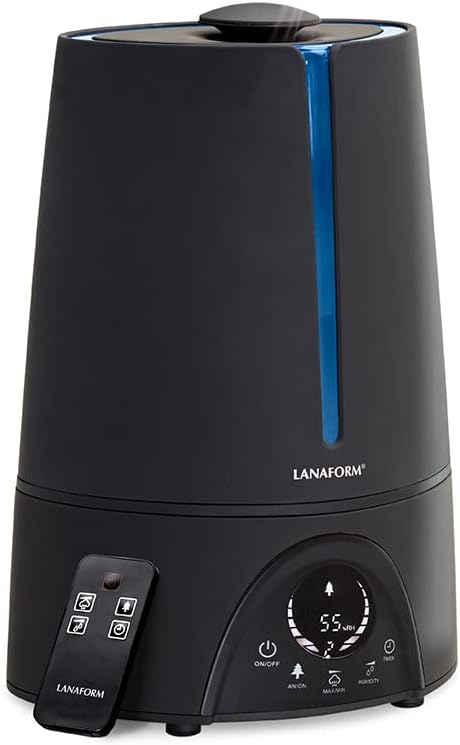
Gambar 3.1: The Lanaform Vapolux LA120119 Cool Mist Humidifier, showcasing its sleek black design, integrated digital display, and accompanying remote control. The blue LED strip is visible on the front.

Gambar 3.2: A nutup-up view of the humidifier's top, illustrating the cool mist being released into the air, indicating active operation.
Komponén konci:
- Tangki cai: Removable reservoir for water.
- Unit Dasar: Contains the ultrasonic transducer, fan, and control electronics.
- Outlet Halimun: Top opening where mist is dispersed.
- Panél kontrol: Touch-sensitive buttons and LCD display for operation.
- Kadali jauh: Pikeun operasi merenah ti kajauhan.
- Hygrostat: Sensor for detecting and displaying ambient humidity.
4. Setélan
Turutan léngkah-léngkah ieu pikeun nyetél humidifier anjeun pikeun panggunaan anu munggaran.
- Ngabongkar: Cabut sadaya komponén tina bungkusna kalayan ati-ati. Simpen bungkusna kanggo disimpen atanapi diangkut.
- panempatan: Place the humidifier on a flat, stable, and water-resistant surface at least 15 cm (6 inches) away from walls and furniture. Ensure it is not placed directly on carpet or near heat sources.
- Tangki cai ngeusian:

Gambar 4.1: Demonstrates the process of lifting the water tank from the humidifier's base for refilling or cleaning.
- Angkat tangki cai tina unit dasar nganggo gagang anu terintegrasi.
- Unscrew the tank cap at the bottom of the tank.
- Fill the tank with clean, cool tap water. Distilled or demineralized water is recommended, especially in hard water areas, to prevent mineral buildup. Do not fill past the maximum fill line.
- Pasang deui tutup tangki kalayan pageuh.
- Pasangkeun deui tangki cai anu tos dieusi kana unit dasar, pastikeun tangki cai parantos dipasang kalayan leres.
- Sambungkeun Kakuatan: Colokkeun kabel listrik kana stop kontak listrik anu cocog. Unit bakal asup kana mode standby.
5. Parentah Operasi
Your Lanaform Vapolux LA120119 Humidifier can be operated via the touch control panel or the remote control.

Gambar 5.1: A lengkep view of the LCD display, indicating the current humidity level (e.g., 55% RH) and a warning icon for low water level, alongside other operational indicators.
Panel Kontrol & Fungsi Jarak Jauh:
- Tombol ON/OFF: Press to turn the humidifier on or off. The LCD display will illuminate upon activation.
- Humidity Setting (Hygrostat): Press the 'Humidity' button to set your desired humidity level (e.g., 40% to 80% RH). The humidifier will automatically operate to maintain this level and pause when reached.
- Mist Output (MIN/MAX): Press the 'MIN/MAX' button to cycle through different mist output levels (Low, Medium, High).
- Fungsi Timer: Press the 'Timer' button to set an operating duration (e.g., 1 to 12 hours). The humidifier will automatically turn off once the set time expires.
- Negative Ion (ANION) Function: Press the 'ANION' button to activate the negative ion generator, which helps to purify the air.
- Layar LCD: Shows current ambient humidity, set humidity, mist output level, timer setting, and other operational indicators.
6. Pangropéa jeung beberesih
Regular cleaning is crucial for optimal performance and hygiene. Always unplug the humidifier before cleaning.
Pangropéa poéan:
- Empty and rinse the water tank with fresh water.
- Eusian deui ku cai bersih sareng tiis.
Beberesihan Mingguan:
- Tangki cai bersih: Remove the tank, unscrew the cap, and clean the inside with a soft brush and mild detergent. Rinse thoroughly to remove any soap residue.
- Clean Base Unit & Transducer: Empty any remaining water from the base. Gently wipe the inside of the base with a soft, damp cloth. Carefully clean the ultrasonic transducer (the small metal disc) with a soft brush to remove any mineral deposits. Do not scratch the transducer.
- Descaling (for hard water areas): If mineral deposits (white scale) accumulate, fill the base with a mixture of equal parts white vinegar and water. Let it soak for 20-30 minutes, then gently scrub with a soft brush. Rinse thoroughly with clean water. Repeat for the water tank if necessary.
Panyimpenan:
When not in use for an extended period, ensure the humidifier is completely empty and clean. Dry all parts thoroughly and store in a cool, dry place, preferably in its original packaging.
7. Cara ngungkulan
If you encounter issues with your humidifier, refer to the following common problems and solutions.
| Masalah | Mungkin Cukang lantaranana | Solusi |
|---|---|---|
| Taya halimun atawa halimun saeutik pisan | Tingkat cai handap Tangki cai teu dipasang kalawan bener Transducer dirty or scaled | Eusian bak cai Ensure tank is properly placed on the base Clean the transducer as per maintenance instructions |
| Sora teu biasa | Unit henteu dina permukaan anu rata Foreign object in water tank or base | Teundeun dina datar, permukaan stabil Check and remove any foreign objects |
| Leak cai | Water tank cap not tightened Tangki cai teu dipasang kalawan bener Crack in water tank | Tighten the water tank cap Re-seat the water tank properly Hubungi layanan palanggan upami tangki rusak |
| Display shows low water warning (Figure 5.1) | Tingkat cai teuing handap | Refill the water tank immediately |
If the problem persists after attempting these solutions, please contact Lanaform customer support.
8. Spésifikasi
Technical details for the Lanaform Vapolux LA120119 Cool Mist Humidifier.
- merek: Lanaform
- Jumlah modél: LA120119
- Ukuran (L x W x H): 28.5 x 21.8 x 38.6 cm
- beurat: 2.44 kg
- Kapasitas Tangki Cai: 4.5 liter
- kakuatan: 30 Watt
- Bahan: karét
- Tingkat Noise: 35 desibel
- Otonomi: Nepi ka 8 jam (gumantung kana kaluaran kabut)
- Fitur husus: Hygrostat (Kontrol Kelembapan Otomatis)
- Modeu operasi: Ultrasonik
- Métode kontrol: Panel Kontrol Toél, Kontrol Jarak Jauh
9. Garansi jeung Rojongan
For information regarding warranty coverage, terms, and conditions, please refer to the documentation provided with your purchase or visit the official Lanaform website. For technical support or service inquiries, please contact Lanaform customer service through their official channels.


