
Bubuka
This manual provides essential information for the safe and efficient use of your Sharp LC-48LE653U 48-Inch 1080p 60Hz Smart LED TV. Please read these instructions thoroughly before operating the television and retain them for future reference. This television offers reliable performance with AquoMotion 120 technology for smooth motion, reduced blur, and access to SmartCentral Apps for various streaming services. It features an ultra-narrow bezel, a sleek modern design, Wallpaper Mode, three HDMI inputs (including MHL support), and built-in 20W audio.
Naon dina Box
Pastikeun yén sadaya komponén aya sateuacan neraskeun setelan.
- Sharp LC-48LE653U 48-Inch Smart LED TV
- Kadali jauh
- Ngadeg TV
- Batré AA (2)
- Kabel listrik
- Dokuméntasi (Panduan Mimitian Gancang, Kartu Garansi)
Disetél
1. Unpacking na panempatan
Carefully remove the television from its packaging. Place the TV on a stable, level surface or mount it on a wall using a compatible VESA mount (sold separately). Ensure adequate ventilation around the television.
2. Ngagantelkeun Stand
If using the included stand, align the stand with the mounting holes on the bottom of the TV. Secure it with the provided screws. Refer to the diagram below for proper orientation.

Figure 1: Television with stand and dimensions (10.55"D x 42.56"W x 26.28"H).
3. Alat Sambungkeun
Connect your external devices (e.g., cable box, Blu-ray player, gaming console) to the appropriate ports on the back or side of the TV. The TV features 3 HDMI inputs (one with MHL support), 1 USB port, and component/composite video inputs.

Figure 2: Detail of TV input ports.
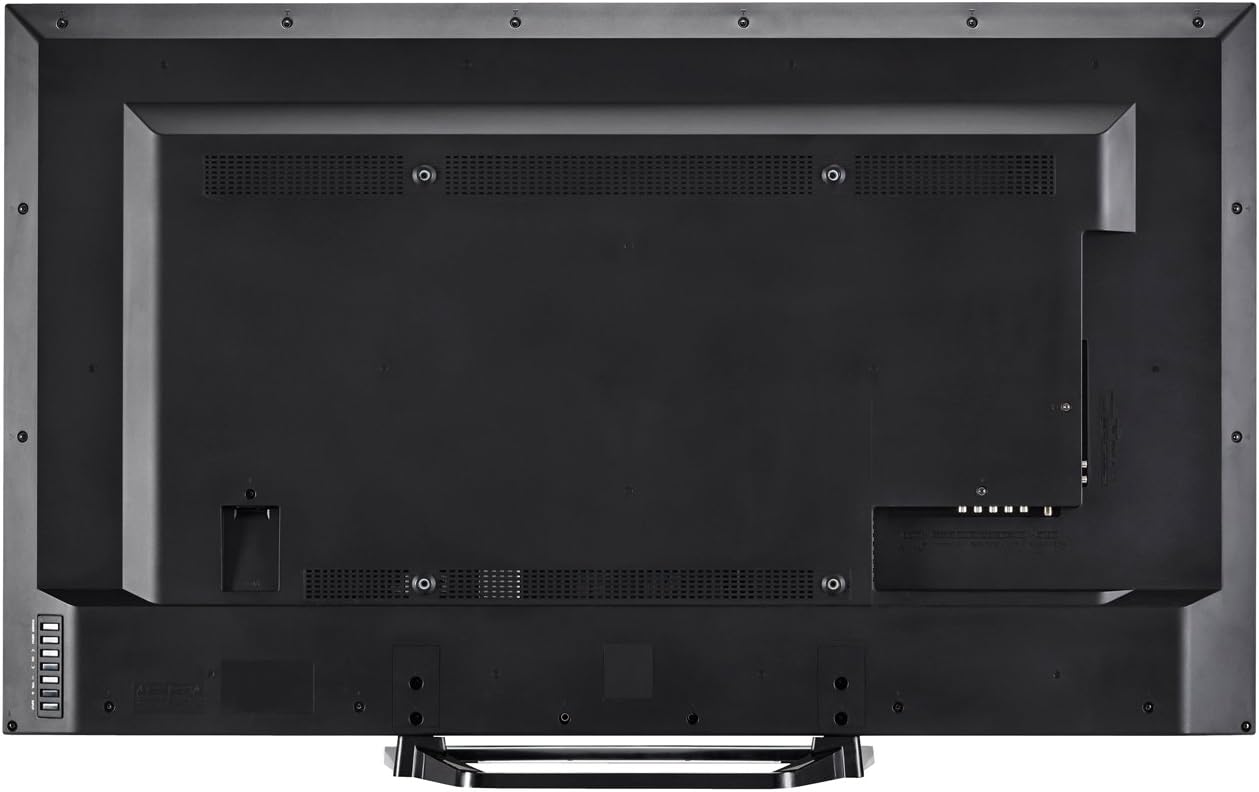
Gambar 3: Tukangeun view of the television with all connections.
4. Sambungan Daya
Plug the power cord into the TV's power input, then into a standard electrical outlet (110 VAC, 60 Hz).
5. Daya Awal Hurung sareng Setup Wizard
Press the Power button on the TV or remote control. Follow the on-screen instructions to complete the initial setup, including language selection, network connection (Wi-Fi or Ethernet), and channel scanning.
Parentah Operasi
1. Fungsi Jauh Jauh
The included remote control allows you to navigate menus, change channels, adjust volume, and access smart features. Insert the two AA batteries into the remote control, observing polarity.

angka 4: Layout kadali jauh.
- kakuatan: Ngahurungkeun atawa mareuman TV.
- Input: Selects the input source (HDMI, Component, etc.).
- Volume (+/-): Nyaluyukeun tingkat sora.
- Saluran (CH +/-): Robah saluran.
- pinter: Accesses SmartCentral Apps.
- Menu: Muka menu setelan utama.
- Tombol Navigasi (Luhur/Handap/Kénca/Katuhu/Enter): Navigates ménu jeung confirms selections.
- Netflix, YouTube, Pandora, Vudu: Tombol khusus pikeun aksés gancang ka layanan streaming ieu.
2. SmartCentral Apps
Your Sharp Smart LED TV comes with built-in Wi-Fi and SmartCentral Apps, providing access to popular streaming services and a web browser. Press the 'Smart' button on your remote or select the SmartCentral Apps icon from the home screen.

Figure 5: SmartCentral Apps Interface.
- Ngaksés Aplikasi: Use the navigation buttons on the remote to select and launch applications like Netflix, Hulu Plus, Pandora, Vudu, and YouTube.
- Web Browser: Ngamangpaatkeun diwangun-di web browser for general internet browsing.
- Sambungan jaringan: Ensure your TV is connected to a stable internet connection via Wi-Fi or Ethernet for optimal Smart TV functionality.
3. Gambar jeung Sora Setélan
Access the TV's menu to customize picture and sound settings. Adjust brightness, contrast, color, and sharpness for picture quality. For audio, select sound modes or adjust bass/treble settings.
4. Wallpaper Mode
When the TV is turned off, Wallpaper Mode allows it to display virtually any image, transforming your TV into a large-format display for photos or artwork. Configure this feature through the TV's settings menu.
Pangropéa
1. Ngabersihan Layar
Lembut usap layar nganggo lawon anu lemes, garing, teu aya serat. Pikeun tanda pengkuh, enteng dampen lawon jeung cai atawa cleaner layar husus. Hindarkeun bahan kimia anu kasar atanapi bahan abrasive.
2. Ngabersihan Kabinet
Lap kabinet TV ku lawon anu lemes sareng garing. Ulah nganggo pembersih cair langsung kana kabinet.
3. Apdet parangkat lunak
Periodically check for software updates through the TV's settings menu to ensure optimal performance and access to the latest features. A stable internet connection is required for updates.
Pamérésan masalah
If you encounter issues with your television, refer to the following common solutions:
- Henteu aya kakuatan: Ensure the power cord is securely plugged into both the TV and the electrical outlet. Test the outlet with another device.
- Taya Gambar/Sora: Verify the correct input source is selected. Check all cable connections to external devices. If using an antenna, ensure it is properly connected and channels are scanned.
- No Sound (intermittent): If sound occasionally cuts out, try unplugging the TV from the power outlet for a few minutes, then plugging it back in. This can reset internal components.
- Kualitas Gambar goréng: Saluyukeun setelan gambar (kacaangan, kontras, seukeutna gambar). Pastikeun sumber input nyadiakeun sinyal kualitas luhur.
- Masalah Konektipitas Jaringan: Check your Wi-Fi router or Ethernet cable connection. Restart your router and the TV. Ensure Wi-Fi settings on the TV are correctly configured.
- Remote Control Teu Gawé: Ganti batréna. Pastikeun teu aya halangan antara jauh sareng sénsor IR TV.
For persistent issues, contact Sharp customer support.
spésifikasi
| Fitur | Spésifikasi |
|---|---|
| Nomer modél | LC-48LE653U |
| Ukuran layar | 48 inci |
| Téknologi tampilan | LCD sareng Lampu Latar LED |
| Resolusi | 1080p (1920 x 1080) |
| Refresh Laju | 60 Hz (AquoMotion 120) |
| Konektipitas | Wi-Fi internal, Ethernet |
| Palabuhan HDMI | 3 (one with MHL) |
| palabuhan USB | 1 |
| Dirojong jasa Internét | Hulu Plus, Netflix, Pandora, Vudu, YouTube |
| Daya Kaluaran Audio | 20 Watt |
| Ukuran produk (D x W x H) | 10.55" x 42.56" x 26.28" |
| Item Beurat | 21 pon |
| Voltage | 110 VAC 60 Hz |
Émbaran jaminan
This Sharp LC-48LE653U television is covered by a 1-taun jaminan kawates from the date of purchase. This warranty covers manufacturing defects in materials and workmanship under normal use. It does not cover damage caused by misuse, accidents, unauthorized modifications, or external causes. Please retain your proof of purchase for warranty claims.
Ngarojong
For technical assistance, troubleshooting beyond this manual, or warranty service, please contact Sharp customer support. Refer to the contact information provided in your product documentation or visit the official Sharp websitus.
Dukungan Online: www.sharpusa.com/support
Rojongan Telepon: Refer to your warranty card or Sharp's official websitus pikeun nomer kontak panganyarna.