1. Bubuka
This manual provides detailed instructions for the proper installation, operation, and maintenance of your Sony MEX-N4200BT Single-Din Car Stereo Receiver. Please read this manual thoroughly before using the unit to ensure correct usage and to prevent damage. Keep this manual for future reference.
2. Émbaran Kasalametan
- Kasalametan nyetir: Always operate the unit safely. Distracted driving can lead to accidents.
- Tingkat volume: Keep the volume at a level where you can still hear outside sounds, such as emergency vehicles.
- Sumber Daya: Sambungkeun unit ngan ukur kana batré mobil 12V DC anu gaduh ground négatif.
- Wiring: Ensure all wiring is correctly connected to prevent short circuits or damage. Refer to the wiring diagram carefully.
- Pamasangan profésional: If you are unsure about installation, consult a qualified professional.
- Hindarkeun Uap: Ulah ngalaan unit ka hujan atawa Uap pikeun nyegah seuneu atawa shock listrik.
3. Eusi Paket
Pastikeun yén sadaya item aya dina bungkusan:
- Sony MEX-N4200BT Car Stereo Receiver
- Diiringkeun kabel
- Mikropon éksternal
- Kadali jauh
- Installation Hardware (Screws, Mounting Sleeve)
- Manual pangguna (dokumén ieu)
4. Setup jeung Instalasi
Proper installation is crucial for optimal performance. Disconnect the vehicle's negative battery terminal before starting installation.
4.1 Diagram Wiring
Refer to the diagram below for correct wiring connections. Ensure all connections are secure and insulated.

Gambar 4.1: Tukangeun view of the Sony MEX-N4200BT receiver, illustrating the wiring harness connection points, RCA pre-outputs for front, rear, and subwoofer, the external microphone input, and the 10A fuse. The multi-colored wires of the harness are visible, indicating connections for power, ground, speakers, and accessories.
- Daya (konéng): Sambungkeun ka daya 12V konstan.
- Asesoris (Beureum): Sambungkeun ka daya 12V anu diaktipkeun (kontak).
- Taneuh (Hideung): Nyambung ka titik taneuh chassis bersih.
- Kabel Speaker: Connect to vehicle's speaker wires, observing polarity.
- Remote Turn-On (Blue/White): Nyambung ka amplifier remote input (if applicable).
- Mikropon: Plug the external microphone into the designated input on the rear panel. Position the microphone in a clear area for optimal voice pickup.
- Pra-Kaluar: Anggo kabel RCA pikeun nyambungkeun ka alat éksternal amplifiers for front, rear, and subwoofer channels.
4.2 Pamasangan
Insert the mounting sleeve into the dashboard opening. Bend the tabs to secure it. Slide the receiver into the mounting sleeve until it locks into place.
4.3 Daya Awal Hurung
After all connections are made and the unit is mounted, reconnect the vehicle's negative battery terminal. Turn on the vehicle's ignition. The unit should power on. Follow any on-screen prompts for initial setup, such as language selection or clock setting.
5. Operasi
5.1 Kadali Dasar
Familiarize diri jeung kadali panel hareup pikeun operasi gampang.

Gambar 5.1: Front panel of the Sony MEX-N4200BT receiver, displaying the main rotary knob (volume/enter), source button, call buttons, seek buttons, display button, and numbered preset buttons. The unit features blue illumination around the main controls.
- Rotary Knob (Volume/Enter): Turn to adjust volume. Press to select menu items or confirm actions.
- Tombol SRC (Sumber): Press to cycle through available audio sources (Tuner, CD, USB, Bluetooth Audio, AUX).
- CALL Buttons: Use for hands-free calling (answer/end calls).
- SEEK +/- Buttons: Use to change radio stations, tracks, or navigate menus.
- Tombol MENU: Buka menu utama pikeun setelan sareng pangaturan.
- Tombol Bernomor (1-6): Used for radio station presets, direct track selection, or menu navigation.
- DSPL (Display) Button: Changes display information or illumination settings.
5.2 Konektipitas Bluetooth
The MEX-N4200BT features built-in Bluetooth for hands-free calling and audio streaming.
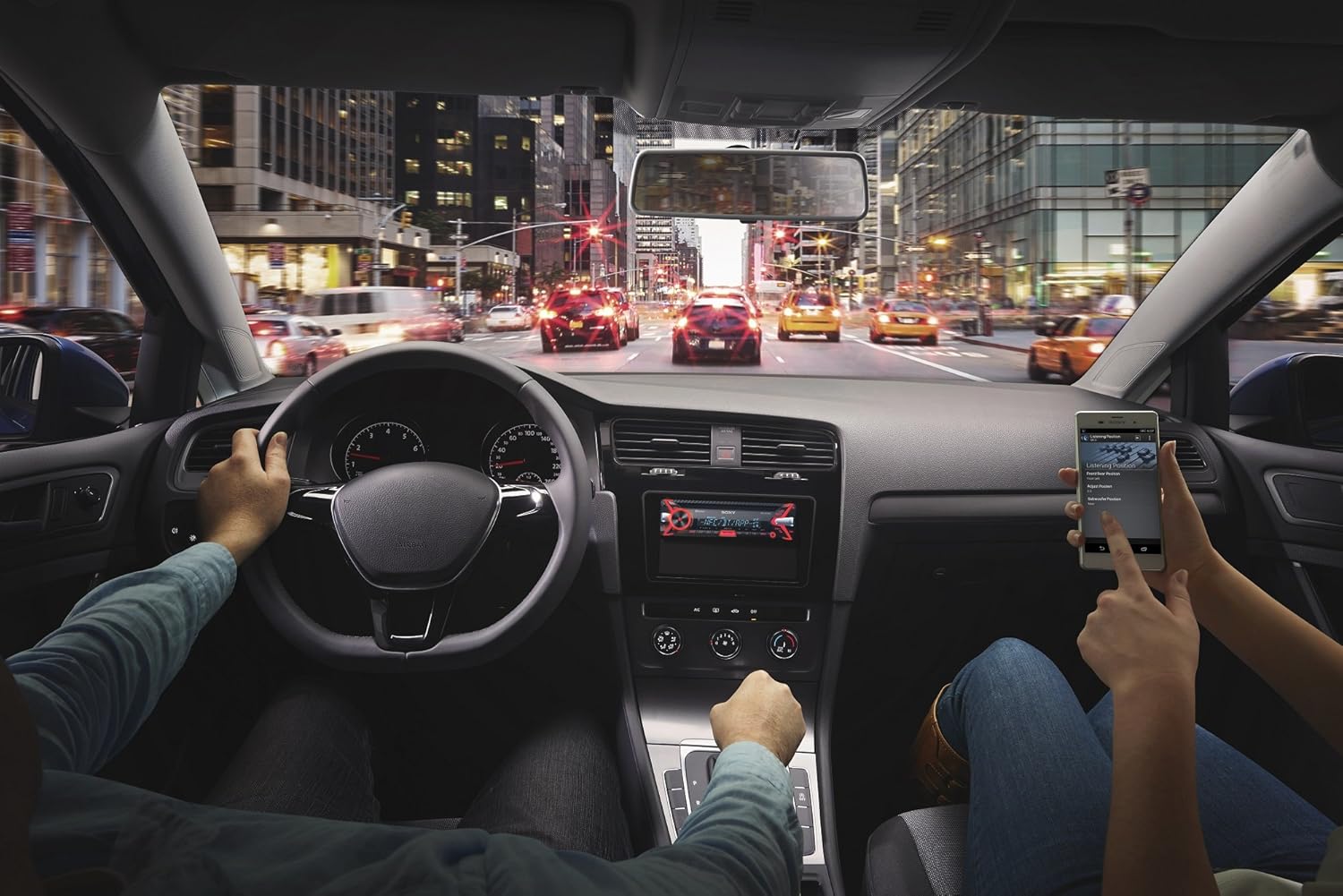
Gambar 5.2: An in-car scene demonstrating smartphone integration with the car stereo. The driver is focused on the road, while a passenger interacts with a smartphone, likely controlling music or navigation through the Sony MEX-N4200BT receiver.
- papasangan:
- Hurungkeun Bluetooth dina smartphone Anjeun.
- Dina panarima, pilih sumber Bluetooth.
- Milarian pikeun available devices on your smartphone and select "MEX-N4200BT".
- Pastikeun kode papasangan upami dipenta.
- Hands-Free Calling (HFP, PBAP):
- Once paired, you can make and receive calls through the receiver.
- Use the CALL buttons on the front panel.
- The external microphone ensures clear voice transmission.
- The unit supports Phone Book Access Profile (PBAP) to display caller names.
- Audio Streaming (A2DP, AVRCP):
- Stream music wirelessly from your smartphone to the receiver.
- Use the receiver's controls (SEEK buttons) or your smartphone to play, pause, and skip tracks.
- Supports Advanced Audio Distribution Profile (A2DP) for high-quality audio and Audio/Video Remote Control Profile (AVRCP) for basic remote functions.
- Dual Bluetooth Connectivity: The unit allows connecting two Bluetooth devices simultaneously. One for full functionality (hands-free, audio streaming) and a second for hands-free calling only.
5.3 Playback USB
Connect a USB device (flash drive, smartphone) to the front USB port for audio playback.
- Supported audio formats include MP3, WMA, and FLAC.
- Use the SEEK buttons to navigate folders and tracks.
- The USB port also provides charging for connected devices.
5.4 CD / MP3 Playback
Lebetkeun CD kana slot disk. Unit bakal otomatis ngalih ka sumber CD sareng ngamimitian muterkeun.
- Supports CD, CD-R, and CD-RW discs.
- Plays MP3/WMA files burned onto CDs.
- Press the EJECT button to remove a disc.
5.5 Radio (AM/FM)
Select the Tuner source to listen to AM/FM radio.
- Tuning Manual: Press and hold SEEK buttons to manually tune.
- Milarian Tuning: Press SEEK buttons briefly to automatically search for the next strong station.
- Prasetél: Store your favorite stations using the numbered buttons (1-6). Press and hold a numbered button to save the current station.
5.6 Input Bantu
Connect external audio devices (e.g., portable music players) to the front 3.5mm auxiliary input jack using a stereo mini-plug cable.
5.7 Setélan Sora
Customize your audio experience using the built-in sound adjustment features.

Gambar 5.3: A smartphone screen showing a graphic equalizer interface, allowing precise adjustment of audio frequencies across 10 bands, from 32 Hz to 16 kHz. This illustrates the detailed sound customization available through the unit or its companion app.
- Ékualiser Grafik 10-Band: Access through the MENU button to fine-tune audio frequencies for optimal sound quality. Adjust bass, mid-range, and treble levels.
- Mega Bass: This feature enhances low-frequency sounds for a more powerful bass response.
- Praamp Kaluaran: The unit provides 2 sets of preamp outputs (front, rear, and subwoofer) for connecting external amplifiers, allowing for a more powerful and customizable sound system.

Gambar 5.4: A close-up of the Sony MEX-N4200BT front panel, with a finger pressing the prominent 'MEGA BASS' button, indicating activation of the bass enhancement feature.
5.8 Integrasi Smartphone
The receiver is compatible with Apple iPhone (iOS) and Android devices, offering control over various applications.
- Kontrol Aplikasi: Use compatible apps like Pandora, Spotify, and iHeartRadio directly through the receiver's controls or via the Sony SongPal app (if installed on your smartphone).
- Kontrol sora: Utilize your smartphone's voice assistant (e.g., Siri, Google Assistant) through the receiver for hands-free commands, navigation, and communication.
6. Pangropéa
- Ngabersihan Unit: Anggo lawon anu lemes sareng garing pikeun ngusap panel hareup. Pikeun kokotor anu bandel,ampen lawon jeung cai. Hindarkeun pembersih abrasive atanapi pangleyur.
- Detaching the Faceplate: The faceplate is detachable for theft deterrence. Press the release button (usually near the top left of the faceplate) and gently pull the faceplate off. Store it in the provided case.
- Slot CD: Keep the CD slot free of dust and debris. Do not insert anything other than standard CDs.
7. Cara ngungkulan
If you encounter issues, refer to the table below for common problems and solutions before contacting support.
| Masalah | Mungkin Cukang lantaranana | Solusi |
|---|---|---|
| Taya kakuatan | Sekringna bocor; kabelna teu bener; aki kandaraan kosong. | Check and replace fuse (10A); verify wiring connections; charge vehicle battery. |
| Taya sora | Volume too low; mute activated; speaker wires disconnected; incorrect source selected. | Increase volume; deactivate mute; check speaker connections; select correct audio source. |
| Bluetooth teu nyambung/pasangkeun | Bluetooth off on phone/receiver; device out of range; pairing mode not active. | Ensure Bluetooth is on; bring devices closer; activate pairing mode on receiver. |
| CD error | Dirty or scratched disc; disc inserted incorrectly. | Clean disc; ensure disc is inserted correctly with label side up. |
| alat USB teu dipikawanoh | Teu dirojong file format; damaged USB device; improper connection. | Mastikeun files are MP3/WMA/FLAC; try a different USB device; re-insert USB device. |
8. Spésifikasi
| Fitur | Rincian |
|---|---|
| Nomer modél | MEX-N4200BT |
| Ukuran Chassis | Tunggal-DIN |
| Kaluaran Daya (Puncak) | 55 watt x 4 saluran |
| Kaluaran Kakuatan (RMS) | 20 watt x 4 saluran |
| Praamp Voltage | 2 volt |
| Praamp Kaluaran | 2 Sets (Front, Rear, Subwoofer) |
| Tipe tampilan | LCD |
| Téhnologi konektipitas | Auxiliary, Bluetooth, USB |
| Vérsi Bluetooth | 3.0 + EDR certified |
| Bluetooth Profiles Dirojong | HFP, PBAP, A2DP, AVRCP, SPP |
| Média Playback Dirojong | CD, CD-R/RW, MP3, WMA, WAV, AAC, FLAC (via USB) |
| Ékualiser | 10-band ékualiser grafik |
| Input USB | USB hareup |
| Input bantu | Hareupna 3.5mm |
| Alat nu cocog | Smartphone (Android, ios) |
| Item Beurat | 2.64 pon (kira-kira 1.2 kg) |
| Dimensi produk | 9.82 x 9.5 x 9.07 inci (kira-kira 24.9 x 24.1 x 23.0 cm) |
9. Garansi jeung Rojongan
9.1 Garansi Produsén
This Sony MEX-N4200BT receiver comes with a 1-taun jaminan produsén urangMangga simpen bukti pameseran anjeun kanggo klaim garansi. Garansi ieu ngawengku cacad dina bahan sareng padamelan dina panggunaan normal. Éta henteu ngawengku karusakan anu disababkeun ku salah panggunaan, kacilakaan, modifikasi anu henteu sah, atanapi pamasangan anu henteu leres.
9.2 Rojongan Palanggan
For technical assistance, troubleshooting beyond this manual, or warranty service, please contact Sony customer support. Refer to the official Sony website for the most current contact information, including phone numbers and online support resources.