
Creative X7
Buku Panduan Pangguna Creative Sound Blaster X7
Modél: X7
1. Bubuka
The Creative Sound Blaster X7 is a high-resolution audio device designed to function as an external USB Digital-to-Analog Converter (DAC) and a powerful audio amplifier. It features low-latency Bluetooth connectivity and an integrated Dolby Digital decoder, providing an enhanced audio experience for various applications.
This manual provides detailed instructions for setting up, operating, and maintaining your Sound Blaster X7 to ensure optimal performance and longevity.

Gambar 1: Hareupeun view of the Creative Sound Blaster X7, showcasing its design and main volume control.
2. Eusi Paket
Pastikeun yén sadaya item aya dina bungkusan:
- Creative Sound Blaster X7 Unit
- Adaptor kakuatan
- Kabel USB
- Stereo RCA ka 3.5mm Cable
- Kabel Optik
- Pituduh Mimitian Gancang (upami aya)
3. Setélan
3.1 Nyambung kana Kakuatan
Connect the provided power adapter to the DC IN 24V port on the rear of the Sound Blaster X7, then plug it into a wall outlet.
3.2 Panyambung Audio
The Sound Blaster X7 offers various audio input and output options. Refer to the diagram below for connection points.
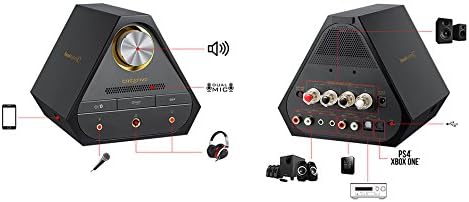
Image 2: Rear panel connections of the Sound Blaster X7, including speaker terminals, line out, optical in/out, and USB ports.
- Sambungan USB (PC/Mac): Use the supplied USB cable to connect the Sound Blaster X7 to your computer for high-resolution audio playback and control.
- Optical In/Out: Connect to compatible devices such as game consoles (PS4, Xbox One) or AV receivers using an optical cable for digital audio transmission.
- Garis kaluar (RCA): Connect to external speakers or amplifters ngagunakeun kabel RCA.
- Terminal Speaker: For passive bookshelf speakers, connect speaker wires to the binding posts. Ensure correct polarity (+/-). The impedance switch allows selection between 4-8 ohms.
- Kaluaran headphone: Two 3.5mm and one 6.3mm (1/4-inch) headphone jacks are available on the front panel for connecting headphones.
- Input mikropon: A 3.5mm microphone input is available on the front panel.
3.3 Driver Installation (for PC/Mac)
For optimal performance and access to all features, download and install the latest drivers and software from the official Creative websitus. Turutan parentah dina-layar salila instalasi.
4. Parentah Operasi
4.1 Daya Hurung/Pareuman
Press the power button on the front panel to turn the unit on or off. The LED indicator will illuminate when powered on.
4.2 Volume Control
Rotate the large knob on the front panel to adjust the master volume. Press the knob to mute/unmute audio.
4.3 Pilihan Sumber Input
Use the input selection buttons on the front panel or the companion software/app to switch between connected audio sources (e.g., USB, Optical, Bluetooth).
4.4 Nyapasangkeun Bluetooth
Pikeun masangkeun alat Bluetooth:
- Ensure the Sound Blaster X7 is powered on.
- Press and hold the Bluetooth button on the front panel until the Bluetooth indicator blinks rapidly.
- On your mobile device, search for Bluetooth devices and select "Sound Blaster X7".
- Once paired, the Bluetooth indicator will glow solid.
4.5 Software and Mobile App Control
The Sound Blaster X7 can be controlled and customized using the Creative Sound Blaster software on PC/Mac or the Sound Blaster Central mobile app (iOS/Android). These applications allow for advanced audio adjustments, sound profiles, and input/output management.
Video 1: Hiji leuwihview of the Creative Sound Blaster X7's features and connectivity options. This video demonstrates the product's versatility across different devices.
5. Pangropéa
- beberesih: Use a soft, dry cloth to clean the exterior of the Sound Blaster X7. Avoid using liquid cleaners or abrasive materials.
- Ventilasi: Ensure the unit has adequate ventilation to prevent overheating. Do not block the ventilation grilles.
- Panyimpenan: Lamun teu dipaké pikeun période nambahan, nyimpen alat dina tiis, tempat garing jauh ti sinar panonpoé langsung jeung hawa ekstrim.
6. Cara ngungkulan
| Masalah | Mungkin Cukang lantaranana | Solusi |
|---|---|---|
| Taya kaluaran audio | Incorrect input source selected; cables not connected properly; volume too low. | Verify input source; check all cable connections; increase volume. Ensure drivers are installed for PC/Mac. |
| Masalah papasangan Bluetooth | Device too far; Sound Blaster X7 not in pairing mode; interference. | Ensure devices are within range; put Sound Blaster X7 into pairing mode (blinking LED); restart both devices. |
| Audio distorsi | Volume too high; incorrect audio settings; faulty cable. | Reduce volume; check audio settings in software/app; try a different cable. |
7. Spésifikasi
- model: X7
- Resolusi Audio: Up to 24-bit / 192kHz
- Impedansi headphone: Supports up to 600 ohms
- AmpKaluaran Lifier: 100W stereo (with appropriate speakers)
- Konektipitas: USB, Optical In/Out, RCA Line Out, Speaker Terminals, 3.5mm/6.3mm Headphone Out, 3.5mm Mic In, Bluetooth
- DAC: Burr-Brown PCM1794 127dB
- decoder: Dolby Digital
- Téknologi nirkabel: Bluetooth
8. Garansi jeung Rojongan
For warranty information and technical support, please visit the official Creative websitus atanapi ngahubungan layanan palanggan maranéhna. Simpen bukti pameseran anjeun pikeun klaim garansi.
Creative Support: us.creative.com/support/
Ask a question about this manual
Ask about setup, troubleshooting, compatibility, parts, safety, or missing instructions. Manuals+ will review the question and use this page’s manual context to help answer it.