1. Bubuka
Hatur nuhun pikeun meuliasing the FOSTEX PA-3(BX) Personal Active Speaker System. This manual provides essential information for the safe and efficient use of your new speaker system. Please read this manual thoroughly before use and retain it for future reference.
The FOSTEX PA-3(BX) is a high-quality 2-way active speaker system designed for personal audio enjoyment and computer use. It features a glossy finish and a dedicated volume controller for convenient operation.
2. Émbaran Kasalametan
Pitunjuk Kasalametan Penting:
- Do not use the device in locations where it may be directly exposed to water or high humidity.
- Do not use the device if it is in an abnormal condition (e.g., emitting smoke, unusual odors, or strange noises). Immediately disconnect the power and contact customer support.
- Pastikeun ventilasi ditangtoskeun sabudeureun speaker pikeun nyegah overheating.
- Use only the provided AC adapter and cables.
- Jauhkeun tina jangkauan barudak.
3. Eusi Paket
Punten parios yén sadaya item di handap ieu kalebet dina pakét anjeun:
- FOSTEX PA-3(BX) Personal Active Speaker System (Pair)
- Volume Controller PC-1e x1
- Adaptor AC x1
- Speaker Cable (Mono Mini Plug - Mono Mini Plug, 1.5m) x1
- RCA Pin Cable (Red/White, 1.5m) x1
- Angle Adjustment Rubber Feet x4
- Manual Pamaké (Dokumén ieu)
4. Produk Langkungview
The FOSTEX PA-3(BX) is an active speaker system designed for superior sound reproduction. It features a 2-way configuration with a dedicated woofer for low frequencies and a tweeter for high frequencies, ensuring balanced audio quality. The system is available in various colors, including Jet Black, Navy Blue, Mustard Yellow, and Bordeaux, allowing you to choose a style that complements your connected equipment or interior decor.

Gambar 4.1: Hareupeun View of PA-3(BX) Speakers
This image displays the front of two red FOSTEX PA-3(BX) active speakers, highlighting their compact design and glossy finish. Each speaker features a woofer and a tweeter.
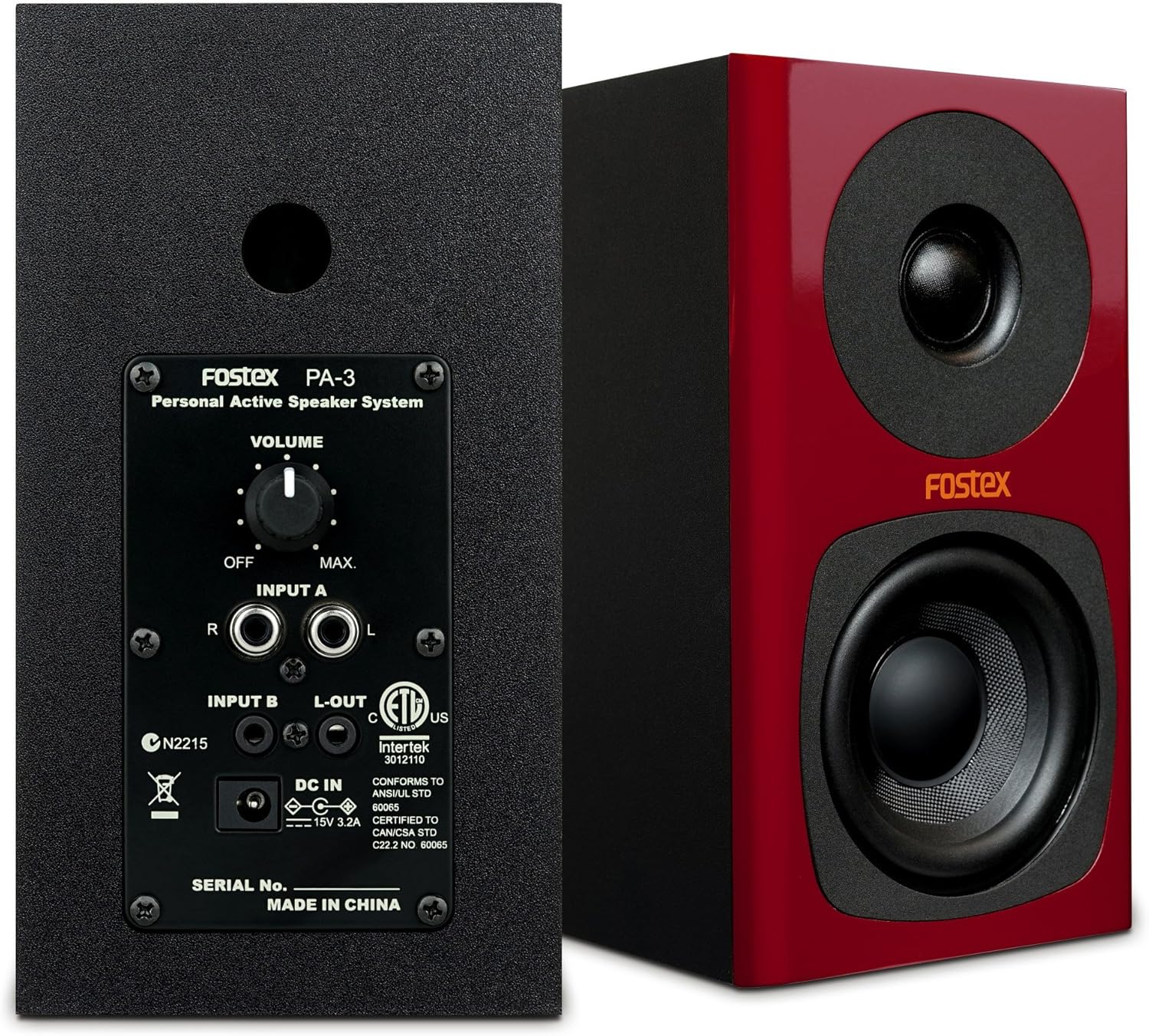
Figure 4.2: Rear Panel and Connections
This image shows the rear panel of one FOSTEX PA-3(BX) speaker, detailing the volume knob, Input A (RCA), Input B (stereo mini), and L-OUT (stereo mini) ports. The power input and serial number are also visible. A second speaker is shown from the front.

Figure 4.3: PA-3(BX) Speakers with Volume Controller
This image features the FOSTEX PA-3(BX) speakers along with the dedicated PC-1e volume controller. The controller allows for convenient and precise audio level adjustments.
5. Setélan
Follow these steps to set up your FOSTEX PA-3(BX) speaker system:
- panempatan: Place the speakers on a stable, flat surface, such as a desk or shelf. Ensure there is adequate space around them for ventilation. For optimal stereo imaging, position the speakers equidistant from your listening position.
- Pasangkeun Suku Karét: Apply the included angle adjustment rubber feet to the bottom of the speakers if desired, to provide stability and slight upward tilt for better sound direction.
- Sambungkeun Speaker: Use the provided mono mini plug speaker cable to connect the two speakers. Connect one end to the 'L-OUT' jack on the main (right) speaker and the other end to the 'INPUT B' jack on the left speaker.
- Sambungkeun Sumber Audio:
- Using RCA Cable (Input A): Connect your audio source (e.g., CD player, audio interface) to the 'INPUT A' RCA jacks (Red for Right, White for Left) on the main speaker using the provided RCA pin cable.
- Using Stereo Mini Plug (Input B): Connect your audio source (e.g., computer, smartphone) to the 'INPUT B' stereo mini jack on the main speaker using a stereo mini plug cable (not included for the source connection).
- Connect Volume Controller (PC-1e): Connect the PC-1e volume controller to your audio source (e.g., computer's headphone jack) and then connect the output of the PC-1e to either Input A or Input B on the main speaker. This allows for convenient volume adjustment at your fingertips.
- Sambungkeun Kakuatan: Connect the AC adapter to the 'DC IN' port on the main speaker, then plug the AC adapter into a wall outlet.
6. Parentah Operasi
Once your speaker system is set up, follow these steps for operation:
- Daya Hurung: Turn the volume knob on the rear of the main speaker clockwise from the 'OFF' position to power on the system. The power indicator on the front of the main speaker will illuminate.
- Penyesuaian volume: Adjust the volume using the dedicated PC-1e volume controller. If not using the PC-1e, use the volume knob on the rear of the main speaker. Start with a low volume and gradually increase it to a comfortable listening level.
- Maénkeun Audio: Mimitian muterkeun audio tina sumber anu nyambung.
- Pareum listrik: To turn off the system, turn the volume knob on the rear of the main speaker counter-clockwise until it clicks into the 'OFF' position.
7. Pangropéa
Proper maintenance ensures the longevity and optimal performance of your speaker system:
- beberesih: Use a soft, dry cloth to wipe the speaker cabinets. Do not use liquid cleaners, aerosols, or abrasive materials, as they may damage the finish.
- Lebu: Regularly dust the speaker grilles and surfaces to prevent dust buildup, which can affect sound quality and ventilation.
- Panyimpenan: Upami nyimpen speaker kanggo waktos anu lami, pegatkeun tina listrik teras simpen di tempat anu tiis sareng garing, jauh tina sinar panonpoé langsung sareng suhu anu ekstrim.
- Hindarkeun Cairan: Never spill liquids on the speakers or expose them to rain or moisture.
8. Cara ngungkulan
If you encounter any issues with your FOSTEX PA-3(BX) system, refer to the following troubleshooting guide:
| Masalah | Mungkin Cukang lantaranana | Solusi |
|---|---|---|
| Taya sora |
|
|
| Sora distort |
|
|
| Only one speaker produces sound |
|
|
| Indikator kakuatan teu hurung |
|
|
If the problem persists after trying these solutions, please contact FOSTEX customer support.
9. Spésifikasi
| Fitur | Katerangan |
|---|---|
| merek | FOSTEX |
| Nomer modél | PA-3(BX) |
| Beurat produk | 2.93 kg |
| Tipe Speaker | Active, 2-Way (Woofer/Tweeter) |
| Sumber Daya | Kabel listrik |
| Métode kontrol | Volume Control (via dedicated controller or rear knob) |
| Tipe Pamasangan | Tabletop Gunung |
| Dianjurkeun Mangpaat | For Computer, Personal Audio |
| Alat nu cocog | PC, various audio sources |
| Tahan cai | No |
| Negara asal | Cina |
10. Garansi jeung Rojongan
For warranty information and customer support, please refer to the warranty card included with your product or visit the official FOSTEX websitus. Simpen bukti pameseran anjeun pikeun klaim garansi.
FOSTEX Official Websitus: www.fostex.jp


