Bubuka
This manual provides comprehensive instructions for the waveshare LM386 Sound Detection Sensor Module. It covers the module's features, specifications, setup, operation, and troubleshooting to ensure proper use and integration into your projects. This module is designed for audio amplification, ambient sound detection, and sound level detection applications.
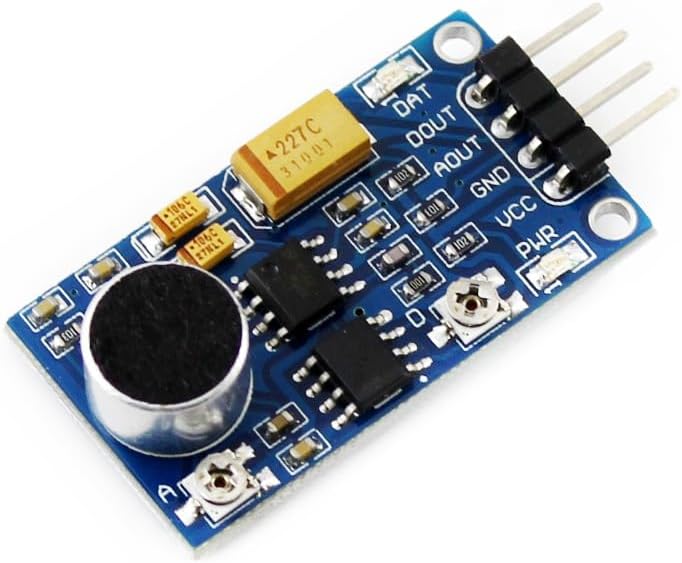
Gambar 1: Ti luhur ka handap view of the waveshare LM386 Sound Detection Sensor Module. This image displays the compact blue PCB with the microphone, LM386 amplifier chip, and pin headers for connection.
Fitur
- Onboard audio power amplifier LM386.
- Audio signal gain up to 200.
- Adjustable accuracy for sensitivity tuning.
- Signal output indicator LED.
- Mic sensitivity: 52dB.

Gambar 2: Hiji leuwihview of the waveshare Sound Sensor Module highlighting its key features, including the LM386 amplifier and its application in audio and sound level detection.
spésifikasi
| Parameter | Nilai |
|---|---|
| Sensitipitas Mic | 52dB |
| Rentang Frékuénsi | 50Hz ~ 20KHz |
| Operasi Voltage | 3.3V ~ 5.3V |
| Mounting Holes Size | 2.0 mm |
| Naék kapal Amppangagung | LM386 |
| Ukuran (L x W x H) | Kira-kira. 34.42mm x 18.67mm x 5.524mm (1.35 x 0.73 x 0.21 inci) |
| Beurat | Kira-kira. 0.32 ons (9 gram) |

Gambar 3: Detailed specifications of the sound sensor module, including mic sensitivity, frequency range, and power requirements. This image also shows the control interface pinout.
Control Interface and Setup
The module features a 4-pin header for connecting to microcontrollers like Raspberry Pi, Arduino, or STM32.
| Pin | Fungsi |
|---|---|
| VCC | Power supply input (3.3V ~ 5.3V) |
| GND | taneuh |
| AOUT | Analog output (connects to MCU.IO analog input) |
| DOUT | Digital output (connects to MCU.IO digital input) |
Léngkah-léngkah Persiapan Dasar:
- Sambungan Daya: Connect the VCC pin to your microcontroller's 3.3V or 5V power supply and the GND pin to the microcontroller's ground.
- Sambungan Kaluaran:
- For analog sound level readings, connect the AOUT pin to an analog input pin on your microcontroller.
- For digital sound detection (threshold-based), connect the DOUT pin to a digital input pin on your microcontroller.
- Power-Up mimiti: Once connected, apply power. The signal output indicator LED will illuminate when sound above the set threshold is detected (for digital output).
Parentah Operasi
Nyaluyukeun Sensitipitas:
The module features an adjustable potentiometer (trimmer) to set the sensitivity for the digital output (DOUT).
- Locate the small potentiometer screw on the module (often labeled "D" or near the digital output).
- Using a small screwdriver, gently turn the potentiometer clockwise to increase sensitivity (detect quieter sounds) or counter-clockwise to decrease sensitivity (detect louder sounds).
- Observe the signal output indicator LED or monitor the DOUT pin on your microcontroller to determine the desired threshold.
- For analog readings from AOUT, the sensitivity adjustment primarily affects the digital output threshold, not the raw analog signal.
Reading Outputs:
- Analog Output (AOUT): Provides a continuous voltage signal proportional to the sound intensity. This can be read using an Analog-to-Digital Converter (ADC) on your microcontroller.
- Digital Output (DOUT): Provides a HIGH or LOW signal. It goes HIGH when the detected sound level exceeds the set threshold and LOW otherwise. This is useful for simple sound detection events.

Gambar 4: Tilasample of the waveshare Sound Sensor Module connected to another development board, illustrating a typical integration scenario.
Pangropéa
- beberesih: Keep the module clean and free from dust and debris, especially the microphone component. Use a soft, dry brush if necessary.
- Kaayaan Lingkungan: Ulah nepi ka modul ieu kakeunaan suhu anu ekstrim, kalembaban anu luhur, atanapi lingkungan anu korosif.
- Penanganan fisik: Handle the module with care to prevent damage to components or solder joints.
- Panyimpenan: Store the module in an anti-static bag when not in use to protect it from electrostatic discharge.
Pamérésan masalah
- No Output / Module Not Responding:
- Verify power connections (VCC and GND) are correct and within the 3.3V-5.3V range.
- Check all wiring for continuity and correct pin assignments.
- Ensure the microcontroller's input pin is configured correctly (analog for AOUT, digital for DOUT).
- Digital Output (DOUT) Always HIGH or Always LOW:
- Adjust the sensitivity potentiometer. If it's always HIGH, decrease sensitivity (turn counter-clockwise). If it's always LOW even with sound, increase sensitivity (turn clockwise).
- Ensure there isn't constant background noise exceeding the threshold if it's always HIGH.
- Inaccurate Analog Readings (AOUT):
- Ensure the power supply is stable and free from noise.
- Check for external electromagnetic interference.
- Verify the ADC reference voltage on your microcontroller is correctly set.
- Modul Panas teuing:
- Geura pegatkeun daya.
- Pariksa input voltage teu ngaleuwihan 5.3V.
- Check for short circuits on the module or in the wiring.
Diménsi
The physical dimensions of the waveshare Sound Detection Sensor Module are provided below for integration planning.
Gambar 5: Outline dimensions of the waveshare Sound Sensor Module, showing measurements in millimeters for length, width, and height.
Inpormasi Tambahan

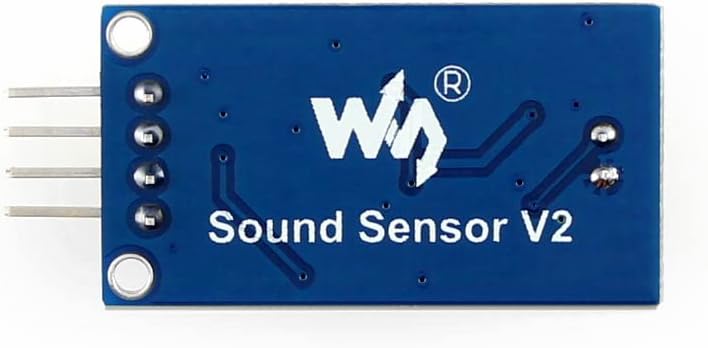
Gambar 6: Balik deui view of the waveshare Sound Sensor Module, showing the "Sound Sensor V2" branding and PCB traces.

Gambar 7: A summary of the module's overview, specifications, applications (audio amplifier, ambient sound detection, sound level detection), and basic usage instructions for MCU integration.


