Bubuka
Hatur nuhun pikeun meuliasing the Marantz CD5005 CD Player. This manual provides detailed instructions for the proper setup, operation, and maintenance of your new audio component. The CD5005 is designed to deliver high-quality audio playback from various disc formats, including CD, CD-R, CD-RW, MP3, and WMA files. It features high-quality audio components such as the CS4398 DAC and Marantz HDAM SA2, ensuring exceptional sound reproduction. Please read this manual thoroughly before using the unit to ensure optimal performance and longevity.
Parentah Kasalametan
Always follow these basic safety precautions when operating the CD5005 CD Player:
- Sumber Daya: Sambungkeun unit ngan ka outlet AC tina voltage dieusian dina panel pungkur.
- Ventilasi: Ensure adequate ventilation. Do not block ventilation openings. Avoid installing in confined spaces.
- Cai sareng Uap: Do not expose the unit to rain, moisture, or excessive humidity. Do not place objects filled with liquids on the unit.
- Panas: Jauhkeun unit tina sumber panas sapertos radiator, registers panas, kompor, atanapi aparat sanésna anu ngahasilkeun panas.
- beberesih: Cabut colokan unit tina stopkontak sateuacan beberesih. Paké lawon garing wungkul.
- Palayanan: Ulah nyobian ngalayanan unit sorangan. Rujuk sadayana jasa ka tanaga jasa anu mumpuni.
- Penanganan Cakram: Handle discs by their edges. Avoid touching the shiny surface. Keep discs clean and free from scratches.
Eusi pakét
Pariksa yén pakét anjeun ngandung barang-barang ieu:
- Marantz CD5005 CD Player
- Kabel Daya anu tiasa dicabut
- Audio Cables (L/R Analog)
- Digital Audio Cable (Coaxial)
- Unit kadali jauh
- AA Batteries for Remote Control (x2)
- Quick Setup Guide (Printed)
- Interactive CD-ROM Manual (except Japan)
Produk Leuwihview
Panel hareup

Gambar 1: Hareupeun view of the Marantz CD5005 CD Player. This image shows the disc tray, display, control buttons, and headphone jack on the front panel.
The front panel of the CD5005 features the disc tray, a clear dual-line display, essential playback control buttons (Play, Pause, Stop, Skip), and a headphone output with a dedicated volume control. The power button is located on the left side.
Panel tukang

Gambar 2: Tukangeun view of the Marantz CD5005 CD Player. This image displays the various input and output terminals, including analog audio outputs, digital coaxial and optical outputs, and the AC power inlet.
The rear panel provides connectivity options including gold-plated analog audio outputs, digital coaxial output, and digital optical output for connecting to an amplifier or receiver. A remote control input/output terminal is also present for system integration, along with the detachable AC power inlet.
Kadali jauh
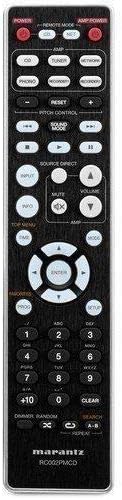
Figure 3: The remote control unit for the Marantz CD5005 CD Player. This remote allows for comprehensive control of the CD player's functions, including playback, track selection, pitch control, and display dimmer.
The included remote control unit provides full functionality for the CD5005, including features not available on the front panel such as pitch control, display dimmer, track randomization, and various repeat functions. It also allows for control of other compatible Marantz components.
Disetél
1. Panempatan
Place the CD5005 on a stable, level surface away from direct sunlight, heat sources, and excessive vibration. Ensure there is adequate space around the unit for proper ventilation.
2. Nyambungkeun Kabel Audio
Choose one of the following methods to connect the CD5005 to your amppangisi daya atanapi panarima:
- Sambungan analog: Use the supplied L/R analog audio cables to connect the AUDIO OUT jacks on the CD5005 to the corresponding CD input jacks on your amplifier. Ensure red plugs connect to red jacks (right channel) and white plugs to white jacks (left channel).
- Sambungan Koaksial Digital: Use the supplied digital coaxial cable to connect the COAXIAL DIGITAL AUDIO OUT jack on the CD5005 to a digital coaxial input on your amplifier atawa panarima.
- Sambungan Optik Digital: Use an optical digital audio cable (not supplied) to connect the OPTICAL DIGITAL AUDIO OUT jack on the CD5005 to a digital optical input on your amplifier atawa panarima.
Catetan: Do not connect both analog and digital outputs to the same input on your amplifier simultaneously, as this may cause interference or unexpected behavior. Select the appropriate input on your amplifier after connecting.
3. Nyambungkeun Kabel Listrik
Connect the detachable power cord to the AC inlet on the rear panel of the CD5005, then plug the other end into a suitable AC wall outlet.
4. Masang Batré Remote Control
Open the battery compartment on the back of the remote control unit. Insert two AA batteries, ensuring correct polarity (+/-) as indicated inside the compartment. Close the cover securely.
Parentah Operasi
Basic CD Playback
- Pencét éta POWER tombol dina panel hareup atawa remot kontrol pikeun ngahurungkeun unit.
- Pencét éta BUKA/TUTUP tombol pikeun muka baki disk.
- Place a CD, CD-R, CD-RW, MP3, or WMA disc onto the disc tray with the label side facing up.
- Pencét éta BUKA/TUTUP button again to close the disc tray. The unit will read the disc.
- Pencét éta ulin tombol pikeun ngamimitian playback.
- Pikeun ngareureuhkeun playback, pencét tombol Reureuh tombol. Pencét deui pikeun nuluykeun.
- Pikeun ngeureunkeun putereun deui, pencét éta EUREUN kancing.
- Ngagunakeun éta LEWAT tombol pikeun nganapigasi antara lagu.
Advanced Features (Remote Control)
- Kontrol pitch: Ngagunakeun éta Kontrol Dadu buttons on the remote to adjust the playback speed and pitch.
- Tampilan Téks CD: If a disc supports CD Text, the display will show track and artist information. Use the TAMPILAN button on the remote to cycle through display modes.
- Ulang Playback: Pencét éta ULANGAN button on the remote to select repeat modes (e.g., repeat one track, repeat all tracks, repeat A-B segment).
- Random Playback: Pencét éta Acak button on the remote to play tracks in a random order.
- Kaluaran headphone: Connect headphones to the front panel headphone jack. Adjust the TINGKAT knob next to the jack to control headphone volume independently. Note that plugging in headphones does not mute the main analog or digital outputs.
- Kontrol Aplikasi: The CD5005 supports app control via RC-5 with a compatible Marantz network player. Refer to the network player's manual for details on this integration.
Pangropéa
Ngabersihkeun Unit
Wipe the exterior surfaces of the CD5005 with a soft, dry cloth. Do not use abrasive cleaners, waxes, or solvents, as these can damage the finish. Avoid spraying liquids directly onto the unit.
Disc Handling and Care
- Always hold discs by their edges to prevent fingerprints and scratches on the playing surface.
- If a disc is dirty, wipe it gently from the center outwards with a soft, lint-free cloth. Do not use circular motions.
- Do not use solvents such as benzene, thinner, or commercially available record cleaners, as they may damage the disc.
- Nyimpen cakram dina kasusna nalika henteu dianggo pikeun ngajagaan tina lebu sareng goresan.
- Avoid exposing discs to direct sunlight or high temperatures for extended periods.
Pamérésan masalah
If you experience issues with your Marantz CD5005, refer to the following common problems and solutions:
| Masalah | Mungkin Cukang lantaranana | Solusi |
|---|---|---|
| Taya kakuatan | Kabel listrik teu disambungkeun sacara aman. | Pariksa sambungan kabel kakuatan ka unit jeung stop kontak témbok. |
| Taya kaluaran sora | Sambungan kabel audio salah; input anu dipilih salah ampliifier; ampVolume cairan teuing handap. | Pariksa sambungan kabel audio. Pilih input anu leres dina ampningkatkeun ampvolume panguat. |
| Disk teu bisa diputer / kasalahan "Teu aya Disk" | Disc inserted incorrectly; disc is dirty or scratched; disc format not supported. | Insert disc with label side up. Clean the disc. Try a different disc. Ensure disc format (CD, CD-R/RW, MP3, WMA) is supported. |
| Skipping or intermittent playback | Disc is dirty or scratched; unit is subject to vibration. | Clean the disc. Place the unit on a stable surface away from vibrations. |
| Kadali jauh teu jalan | Batteries are depleted or inserted incorrectly; obstacle between remote and unit; remote sensor blocked. | Replace batteries, ensuring correct polarity. Remove any obstacles. Ensure the remote sensor on the unit is clear. |
If the problem persists after trying these solutions, please contact Marantz customer support.
spésifikasi
| Fitur | Rincian |
|---|---|
| Nomer modél | CD5005 |
| Kasaluyuan disc | CD, CD-R/RW, MP3, WMA |
| Konverter Digital-ka-Analog (DAC) | CS4398 |
| Analog Output Circuit | Marantz HDAM SA2 |
| Kaluaran | Analog L/R (Gold-plated), Digital Coaxial, Digital Optical, Headphone |
| Fitur husus | Pitch Control, CD Text Display, App Control (via RC-5 with Marantz network player), Auto Standby |
| Konsumsi Daya (Siaga) | Lemah |
| Diménsi Produk (W x D x H) | 17.3 x 14.6 x 4.1 inci (43.9 x 37.1 x 10.4 cm) |
| Item Beurat | 11.02 pon (5.0 kg) |
| Produsén | Marantz |
| Warna | Hideung |
Garansi sareng Rojongan
For warranty information and customer support, please refer to the warranty card included with your product or visit the official Marantz websitus. Simpen bukti pameseran anjeun pikeun klaim garansi.
Resmi Marantz Websitus: www.marantz.com


