1. Bubuka
This manual provides comprehensive instructions for the installation, operation, and maintenance of the Legrand Watt Stopper LMRC-212 Digital 2-Relay Room Controller. This device is designed for efficient lighting control in commercial and industrial applications, integrating occupancy sensors, daylighting controls, and switches within a Digital Lighting Management (DLM) system.
2. Émbaran Kasalametan
PERHATOSAN: Risk of electric shock. Installation and servicing must be performed by qualified personnel only. Disconnect power at the circuit breaker or fuse before installing or servicing. Follow all national and local electrical codes.
- Pastikeun sadaya sambungan kabel aman sareng sasuai sareng kode listrik lokal.
- Ulah dipasang dina baseuh atawa damp lokasi.
- Ulah ngaleuwihan peringkat listrik anu ditangtukeun pikeun alat éta.
- Alat ieu dimaksudkeun pikeun pamakéan jero rohangan wungkul.
3. Produk Langkungview
The LMRC-212 is a digital 2-relay room controller that serves as a foundational component of a Watt Stopper Digital Lighting Management (DLM) system. It features two relays for switching loads and two 0-10 volt outputs for dimmable loads, such as electronic ballasts. The device facilitates integration with various lighting control components via RJ-45 connectivity.
Fitur konci:
- Digital 2-Relay Room Controller
- RJ-45 Connectivity for DLM network integration
- On/Off/0-10 Volt Dimming capabilities
- Supports 120/277V, 20 Amps
- Provides 24VDC, 250 mA output for DLM devices

Gambar 3.1: Hareupeun view of the LMRC-212 controller.

Figure 3.2: Product label on the LMRC-212 controller detailing electrical specifications and certifications.
4. Spésifikasi
| Fitur | Rincian |
|---|---|
| Nomer modél | LMRC-212 |
| Masukan Voltage | 120/277 VAC, 50/60Hz |
| Output Current (DLM) | 250 mA @ 24VDC |
| Maximum Load (Ballast/Incandescent) | 20 Amps |
| Beban Motor | 1 HP @ 120VAC |
| Maximum Combined Load | 20 Amps |
| Dimming Outputs | Two 0-10V dimming outputs |
| Konektipitas | RJ-45 |
| Tipe Pamasangan | Tembok Gunung |
| Diménsi | 7.7 x 7.3 x 4.4 inci |
| Beurat | 1 pon |
| Sertifikasi | UL 2043 Plenum Rated, cULus Listed |
5. Instalasi jeung Wiring
Before beginning installation, ensure that power to the circuit is disconnected at the main breaker. The LMRC-212 is designed for wall mounting and integrates into a Digital Lighting Management (DLM) network.
Sambungan Wiring:
- Input kakuatan: Connect the 120/277V AC power supply to the designated terminals.
- Sambungan beban: Connect lighting loads to Load A and Load B terminals. The LMRC-212 supports two independent relays.
- 0-10V Dimming Outputs: Connect 0-10V dimmable ballasts or LED drivers to the respective 0-10V Dimming Output terminals (Violet + and Grey - for each load).
- DLM Network Connection: Connect the LMRC-212 to the DLM Local Network using an RJ-45 cable. penting: Connect only to a DLM Local Network, not to Ethernet.
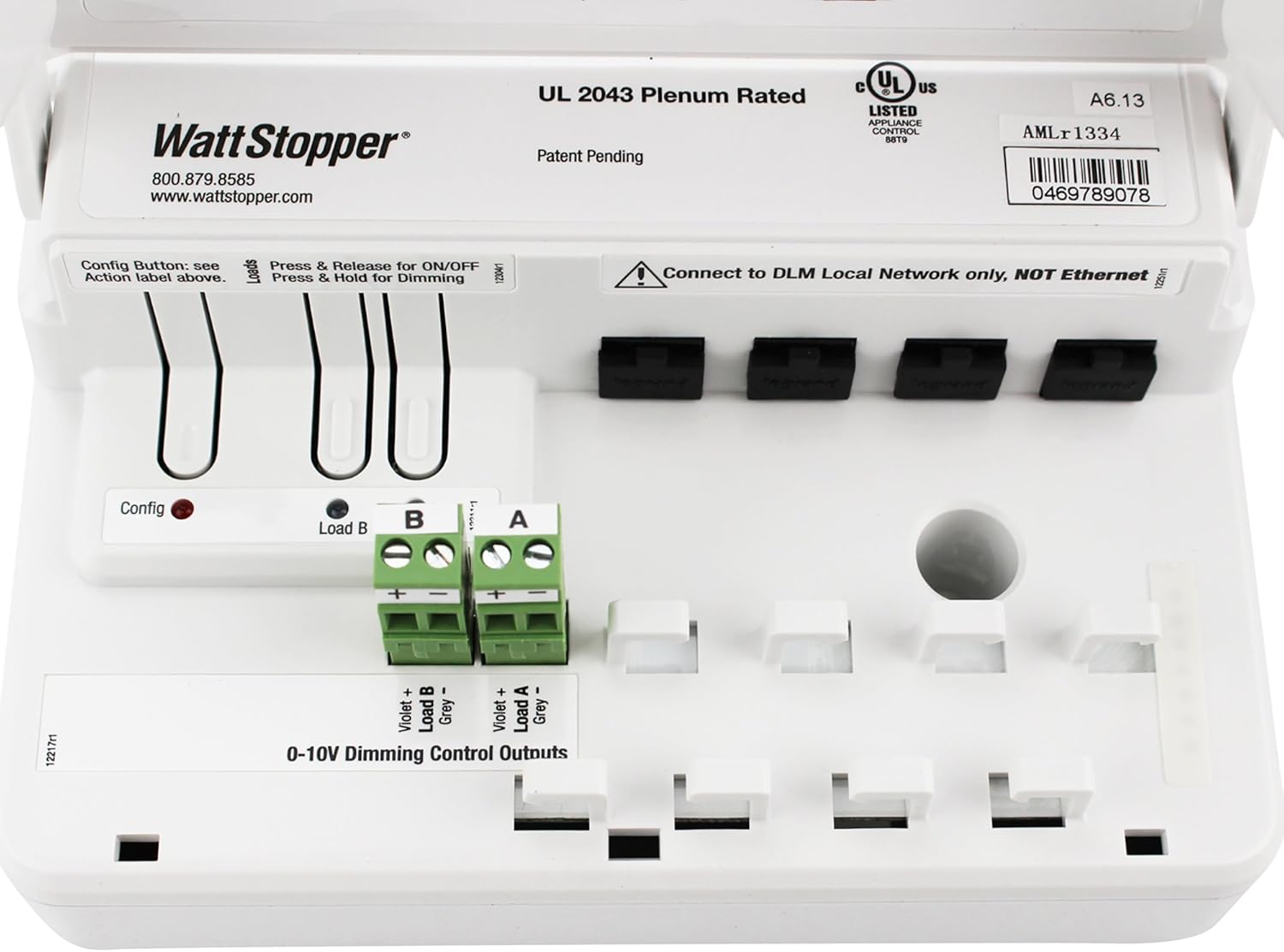
Figure 5.1: Internal wiring diagram of the LMRC-212, highlighting Load A, Load B, 0-10V Dimming Outputs, and RJ-45 DLM network ports.
Configuration Button:
The device includes a configuration button (labeled "Config") for initial setup and pairing with other DLM devices. Refer to the DLM system guide for detailed configuration procedures.
6. Operasi
Once installed and configured within a DLM system, the LMRC-212 controls connected lighting loads based on inputs from DLM occupancy sensors, daylight sensors, and wall switches.
Manual Control (via connected DLM switches):
- Hurung/Pareuman: A quick press and release of a connected DLM switch button will toggle the associated load On or Off.
- Dimming: Press and hold a connected DLM switch button to adjust the dimming level of the associated 0-10V dimmable load. Release the button when the desired light level is reached.
The specific behavior and grouping of loads are determined during the DLM system configuration process.
7. Pangropéa
The LMRC-212 is designed for long-term, reliable operation with minimal maintenance. Periodically inspect the device and its connections to ensure proper functioning.
- beberesih: Disconnect power before cleaning. Wipe the exterior with a soft, dry cloth. Do not use abrasive cleaners or solvents.
- Pamariksaan: Annually inspect wiring connections for tightness and signs of wear or damage.
- Firmware: For firmware updates or advanced diagnostics, consult a qualified Legrand Watt Stopper technician or refer to the latest DLM system documentation.
8. Cara ngungkulan
If the LMRC-212 or connected lighting loads are not functioning as expected, perform the following basic troubleshooting steps:
- Henteu aya kakuatan:
- Check the circuit breaker or fuse supplying power to the controller.
- Verify all power connections to the LMRC-212 are secure.
- Loads Not Responding:
- Ensure the DLM network cable (RJ-45) is securely connected to the LMRC-212 and other DLM devices.
- Verify that the connected DLM switches or sensors are properly configured and communicating with the LMRC-212.
- Check the wiring to the lighting loads (Load A, Load B) and 0-10V dimming outputs.
- Confirm that the loads themselves are functional.
- Masalah dimming:
- Ensure that the connected fixtures are indeed 0-10V dimmable and compatible with the LMRC-212.
- Check the polarity of the 0-10V dimming wires (Violet + and Grey -).
For persistent issues, contact Legrand Watt Stopper technical support.
9. Garansi jeung Rojongan
For warranty information, please refer to the official Legrand Watt Stopper warranty statement available on their website or included with the product packaging. For technical assistance, product support, or to report issues, please contact:
Watt Stopper Technical Support:
Telepon: 800.879.8585
Websitus: www.wattstopper.com