1. Bubuka
The Aiphone GT-BCX Expanded Audio Bus Control Unit is designed to enhance the functionality of the GT Series Multi-Tenant Intercom system. This unit provides expanded audio bus control, facilitating communication within complex multi-tenant environments. It operates on a 24V DC power source and is engineered for DIN rail mounting, ensuring seamless integration into existing setups. This manual provides essential information for the proper installation, operation, and maintenance of your GT-BCX unit.
2. Émbaran Kasalametan
Please read and understand all safety instructions before installing or operating the GT-BCX unit. Failure to follow these instructions may result in injury, damage to the product, or voiding of the warranty.
- Sumber Daya: Only use the specified 24V DC power source. Connecting to an incorrect voltage tiasa ngaruksak unit.
- Pamasangan: Installation should be performed by qualified personnel in accordance with all local electrical codes and regulations.
- Lingkungan: Do not expose the unit to moisture, extreme temperatures, or direct sunlight. Ensure adequate ventilation.
- Wiring: Ensure all wiring is correctly connected and secured to prevent short circuits or loose connections.
- Pangropéa: Pegatkeun sambungan kakuatan sateuacan ngalakukeun pangropéa atanapi beberesih.
3. Eusi Paket
Pastikeun yén sadaya item aya dina bungkusan sateuacan neraskeun pamasangan.
- Aiphone GT-BCX Expanded Audio Bus Control Unit
- Manual Instalasi (dokumén ieu)
- Necessary mounting hardware for DIN rail installation
4. Setup jeung Instalasi
Follow these steps for proper installation of the GT-BCX unit.
4.1 Pamasangan
The GT-BCX unit is designed for DIN rail mounting. Ensure the DIN rail is securely installed in a suitable enclosure or panel.
- Align the GT-BCX unit with the DIN rail.
- Press the unit firmly onto the rail until it clicks into place, ensuring it is securely fastened.
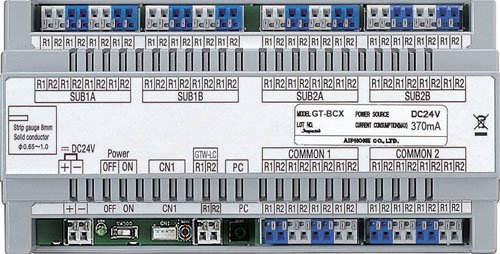
Image 1: The Aiphone GT-BCX Expanded Audio Bus Control Unit, typically shown mounted on a DIN rail. This image illustrates the compact design and connection terminals of the unit.
4.2 Kabel
The GT-BCX unit requires specific wiring for connection to the GT Series intercom system and power supply.
- Jenis kawat: Use 2-conductor, solid, non-shielded wire with PE insulation for bus connections.
- Sambungan Daya: Connect the 24V DC power source to the designated power terminals on the GT-BCX unit. Observe correct polarity.
- Sambungan Bus: Connect the GT Series intercom bus lines to the appropriate terminals on the GT-BCX unit. Refer to the GT Series system manual for specific bus wiring diagrams.
- Grounding: Mastikeun grounding ditangtoskeun sakumaha per kode listrik lokal.
4.3 Mimiti Power-Up
Once all connections are secure, apply power to the unit. Observe any indicator lights for proper operation. Refer to the GT Series system manual for system-wide configuration and testing procedures.
5. Operating the GT-BCX Unit
The GT-BCX unit functions as an integral part of the Aiphone GT Series Multi-Tenant Intercom system. It expands the audio bus capabilities, allowing for more extensive and complex intercom configurations. Its operation is largely automatic once properly installed and configured within the GT Series system. It manages and routes audio signals across the expanded bus, ensuring clear communication between various intercom stations.
Specific operational details, such as call routing, tenant station programming, and system-wide audio adjustments, are managed through the main GT Series control unit and associated software. The GT-BCX unit provides the necessary hardware infrastructure for these expanded audio functions.
6. Pangropéa
The Aiphone GT-BCX unit is designed for reliable, long-term operation with minimal maintenance. However, periodic checks can help ensure optimal performance.
- beberesih: Gently wipe the exterior of the unit with a soft, dry cloth. Do not use harsh chemicals or abrasive cleaners.
- Sambungan: Pariksa sadaya sambungan kabel sacara berkala pikeun mastikeun éta aman sareng bébas tina korosi.
- Lingkungan: Ensure the installation environment remains free from excessive dust, moisture, and extreme temperatures.
- Firmware: Consult Aiphone's official website or your system integrator for information on potential firmware updates for the GT Series system, which may affect the GT-BCX unit's performance.
7. Cara ngungkulan
If you encounter issues with your GT-BCX unit or the GT Series intercom system, refer to the following table for common problems and solutions.
| Masalah | Mungkin Cukang lantaranana | Solusi |
|---|---|---|
| Taya lampu indikator kakuatan | Incorrect 24V DC power connection or no power supply. | Verify 24V DC power supply is connected and active. Check polarity of power connections. |
| No audio through expanded bus | Incorrect bus wiring or configuration issue in the main GT Series control unit. | Check bus wiring for correct connections and continuity. Consult the GT Series system manual for configuration settings. |
| Audio intermittent | Loose wiring connections or interference. | Secure all wiring connections. Ensure proper wire type (2-cond, solid, non-shielded) is used. Check for sources of electrical interference. |
| Unit not recognized by GT Series system | Improper bus connection or system configuration. | Verify bus connections are correct. Ensure the GT Series main control unit is properly configured to recognize expanded bus units. |
If the problem persists after attempting these solutions, contact Aiphone technical support or your system integrator for further assistance.
8. Spésifikasi
Key technical specifications for the Aiphone GT-BCX Expanded Audio Bus Control Unit:
| Fitur | Spésifikasi |
|---|---|
| Nomer modél | GT-BCXB-N |
| Sumber Daya | 24V DC |
| Pamasangan | DIN rel |
| Wire Type (Bus) | 2-conductor, solid, non-shielded, PE insulation |
| Ukuran (L x W x H) | 8.9 x 5.3 x 3.3 inci (22.6 x 13.5 x 8.4 cm) |
| Item Beurat | 1.25 pon (0.57 kg) |
| Bahan Pangwangunan | Plastik ABS |
| Alat nu cocog | GT Series Multi-Tenant Intercom Systems |
| Téhnologi konektipitas | Dikabel |
9. Garansi jeung Rojongan
Aiphone Corporation products are manufactured to high-quality standards. For specific warranty information, please refer to the warranty card included with your product or visit the official Aiphone website. Technical support is available to assist with installation, troubleshooting, and general inquiries.
Aiphone Corporation Contact Information:
Please visit the official Aiphone website for the most current contact details, support resources, and service center locations.


