Bubuka
Hatur nuhun pikeun meuliasing the Soundbot SB510 HD Waterproof Bluetooth Shower Wireless Speaker. This manual provides essential information for setting up, operating, and maintaining your speaker to ensure optimal performance and longevity. Please read these instructions carefully before use.

Image: The Soundbot SB510 speaker, designed for use in wet environments, shown amidst water splashes.
Émbaran Kasalametan
WARNING: THIS PRODUCT CONTAINS SMALL PARTS. Swallowed small parts can stick together across intestines causing serious infections and fatal injury. Seek immediate medical attention if small parts are swallowed or inhaled.
- Ulah ngalaan speaker ka suhu ekstrim atawa sinar panonpoé langsung pikeun période nambahan.
- Hindarkeun lungsur atanapi nahan panyatur kana tabrakan anu kuat.
- Keep the charging port dry before connecting the USB cable.
- Do not attempt to disassemble or modify the speaker, as this will void the warranty and may cause damage.
Eusi pakét
Mangga parios pakét kanggo barang-barang ieu:
- 1 x Soundbot SB510 Water Resistant Bluetooth Shower Speaker
- 1 x Kabel Ngecas USB
- 1 x Pituduh Pamaké

Image: Contents of the Soundbot SB510 package, including the speaker, USB charging cable, and user manual.
Fitur produk
- Desain tahan cai: IPX4 rated for protection against splashing water from any direction.
- Konektipitas Bluetooth 4.0: High-definition wireless audio streaming with a range of up to 33 feet (10 meters).
- Speakerphone terpadu: Diwangun-di mikropon pikeun nelepon hands-free.
- Tombol Kontrol Gampang: Dedicated buttons for power, play/pause, volume, track skipping, and call management.
- Batré anu tiasa dicas deui: Nyayogikeun waktos maén dugi ka 6 jam kalayan sakali ngecas.
- Suction Cup Gunung: Conveniently attachable to smooth surfaces.
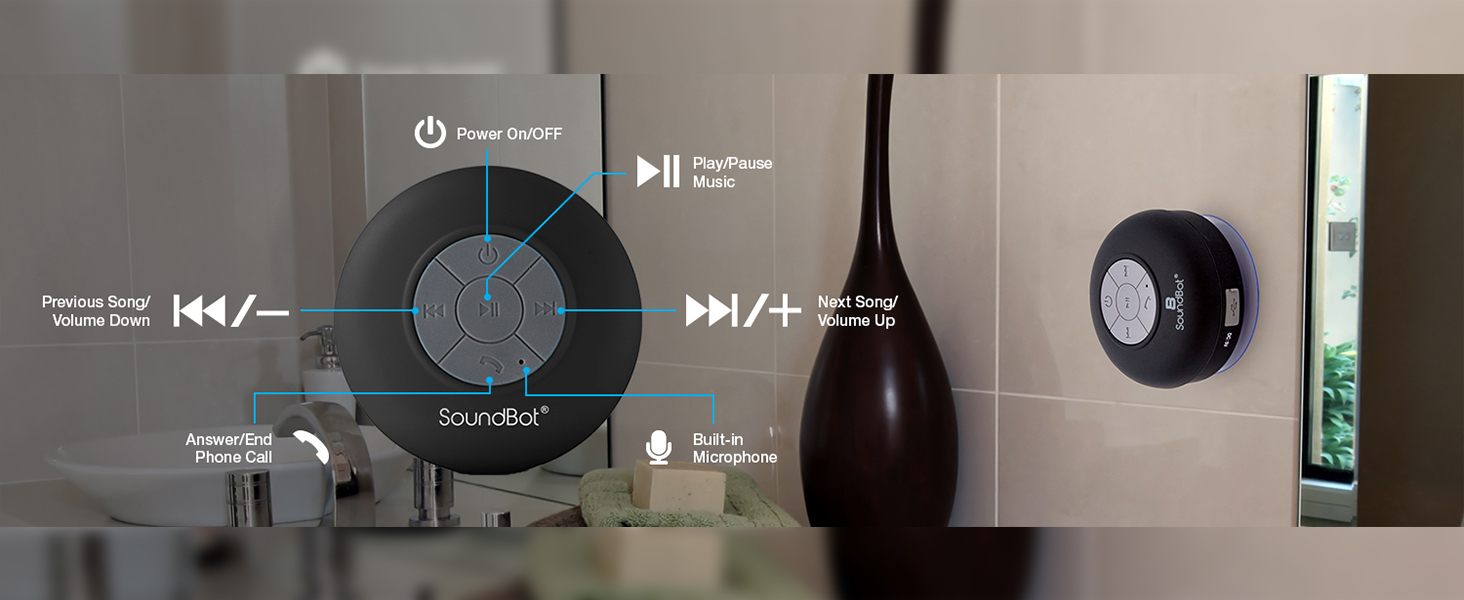
Image: A visual representation highlighting the main features of the Soundbot SB510 speaker.
Kontrol jeung Fungsi
The Soundbot SB510 features intuitive controls on its front panel:

Image: Detailed diagram of the speaker's control buttons and their functions.
- Tombol Daya (⏻): Pencét jeung tahan pikeun mareuman/nonaktipkeun.
- Tombol Puter/Pareuman (⏸): Pencét pikeun muterkeun atawa ngareureuhkeun musik.
- Previous Track / Volume Down (⏪ / -): Pencét sakeudeung pikeun lagu samemehna. Pencét lila pikeun ngurangan volume.
- Next Track / Volume Up (⏩ / +): Pencét pondok pikeun lagu salajengna. Pencét lila pikeun ningkatkeun volume.
- Call Button (☎): Press to answer an incoming call or end an ongoing call.
- Mikropon internal: For hands-free communication during calls.
Disetél
1. Ngecas Speaker
- Pastikeun spiker dipareuman.
- Open the rubber flap covering the charging port on the side of the speaker.
- Connect the small end of the included USB charging cable to the speaker's Micro-USB port.
- Sambungkeun ujung kabel USB nu leuwih gede ka sumber daya USB (contona, port USB komputer, adaptor témbok USB).
- The LED indicator will illuminate during charging and turn off when fully charged. A full charge takes approximately 6 hours.
- Tutupkeun panutup karét pageuh-pageuh saatos ngecas pikeun ngajaga tahan cai.
2. Masang Spiker
The SB510 features a suction cup for easy mounting on smooth, non-porous surfaces.
- Ensure the surface is clean, dry, and smooth (e.g., tile, glass, polished metal).
- Press the suction cup firmly against the desired surface.
- Verify that the speaker is securely attached before releasing éta.

Image: The Soundbot SB510 speaker securely mounted on a smooth bathroom wall.
Parentah Operasi
1. Powering on / Pareum
- To power on, press and hold the Power button (⏻) for approximately 3 seconds until you hear an audible tone and the LED indicator flashes.
- To power off, press and hold the Power button (⏻) for approximately 3 seconds until you hear an audible tone and the LED indicator turns off.
2. Papasangan Bluetooth
- Ensure the speaker is powered on and in pairing mode (LED indicator will flash rapidly).
- On your Bluetooth-enabled device (smartphone, tablet, etc.), go to the Bluetooth settings menu.
- Milarian pikeun available devices. You should see "SB510" in the list.
- Select "SB510" to connect. Once paired, you will hear a confirmation tone, and the LED indicator will flash slowly or remain solid blue.
- Upami dipenta pikeun kecap akses, lebetkeun "0000".
- Spéker bakal otomatis nyobian nyambung deui ka alat anu dipasangkeun terakhir nalika diaktipkeun.
3. Puterkeun Musik
- After successful pairing, open your music player application on your device.
- Use the Play/Pause button (⏸) on the speaker to control playback.
- Use the Previous Track (⏪) and Next Track (⏩) buttons for track navigation.
- Long press the Volume Down (-) or Volume Up (+) buttons to adjust the speaker's volume. You can also control volume from your connected device.
4. Answering/Ending Calls
- When an incoming call is received, the speaker will ring.
- Press the Call button (☎) once to answer the call.
- To end an ongoing call, press the Call button (☎) once.
- To reject an incoming call, press and hold the Call button (☎) for approximately 2 seconds.
Pangropéa
- Ngabersihan spéker ku hipu, damp lawon. Ulah make cleaners abrasive atawa pangleyur.
- Ensure the charging port's rubber flap is always securely closed when not charging to maintain water resistance.
- If the suction cup loses adhesion, clean both the suction cup and the mounting surface with soap and water, then allow to air dry.
- Simpen spéker dina tempat anu tiis sareng garing upami henteu dianggo kanggo waktos anu lami.
Pamérésan masalah
| Masalah | Solusi anu mungkin |
|---|---|
| Speaker teu hurung. | Pastikeun spiker tos dicas pinuh. Sambungkeun ka sumber daya teras cobian deui. |
| Teu tiasa dipasangkeun sareng alat Bluetooth. |
|
| Taya sora atawa volume low. |
|
| Cangkir sedotna teu nempel. |
|
spésifikasi
- model: SB510
- Vérsi Bluetooth: 4.0
- Jangkauan nirkabel: Nepi ka 33 suku (10 méter)
- Tahan cai: IPX4 (tahan cipratan)
- Waktu maén: Nepi ka 6 jam
- Waktu Ngecas: Kurang leuwih 6 jam
- Kaluaran Speaker: 5 Watt
- Mikropon internal: Sumuhun
- Sumber Daya: Batré Powered (1 batré Litium Ion diperlukeun)
- Ukuran produk: 3.5 "D x 3.5" W x 2.3" H
- Beurat barang: 5.6 ons
- Bahan: palastik
- Tipe Pamasangan: Nguseup Piala Gunung
Garansi sareng Rojongan
The Soundbot SB510 speaker comes with a limited warranty. Please refer to the warranty card included in your package for specific terms and conditions.
For technical support or customer service inquiries, please visit the official Soundbot website or contact their customer support channels. Keep your purchase receipt as proof of purchase for warranty claims.
Pabrikan: Soundbot


