
Hewlett-Packard KUS0133
HP KUS0133 SmartCard USB Keyboard User Manual
Model: KUS0133 / 434822-161 | Brand: Hewlett-Packard
1. Bubuka jeung Leuwihview
This manual provides comprehensive instructions for the setup, operation, and maintenance of your HP KUS0133 SmartCard USB Keyboard. Designed for efficiency and security, this keyboard integrates a SmartCard reader, making it suitable for environments requiring secure authentication and data access.
The HP KUS0133 is a wired USB keyboard featuring a standard 104-key layout, including a numeric keypad and dedicated function keys. Its robust design ensures reliable performance for daily computing tasks.
2. Setélan
Follow these steps to connect and prepare your HP KUS0133 SmartCard USB Keyboard for use.
2.1. Nyambungkeun kibor
- Pilari port USB anu sayogi dina komputer anjeun (PC atanapi Laptop).
- Insert the USB-A connector of the keyboard cable firmly into the USB port.
- Your operating system should automatically detect the new hardware and install the necessary generic drivers.
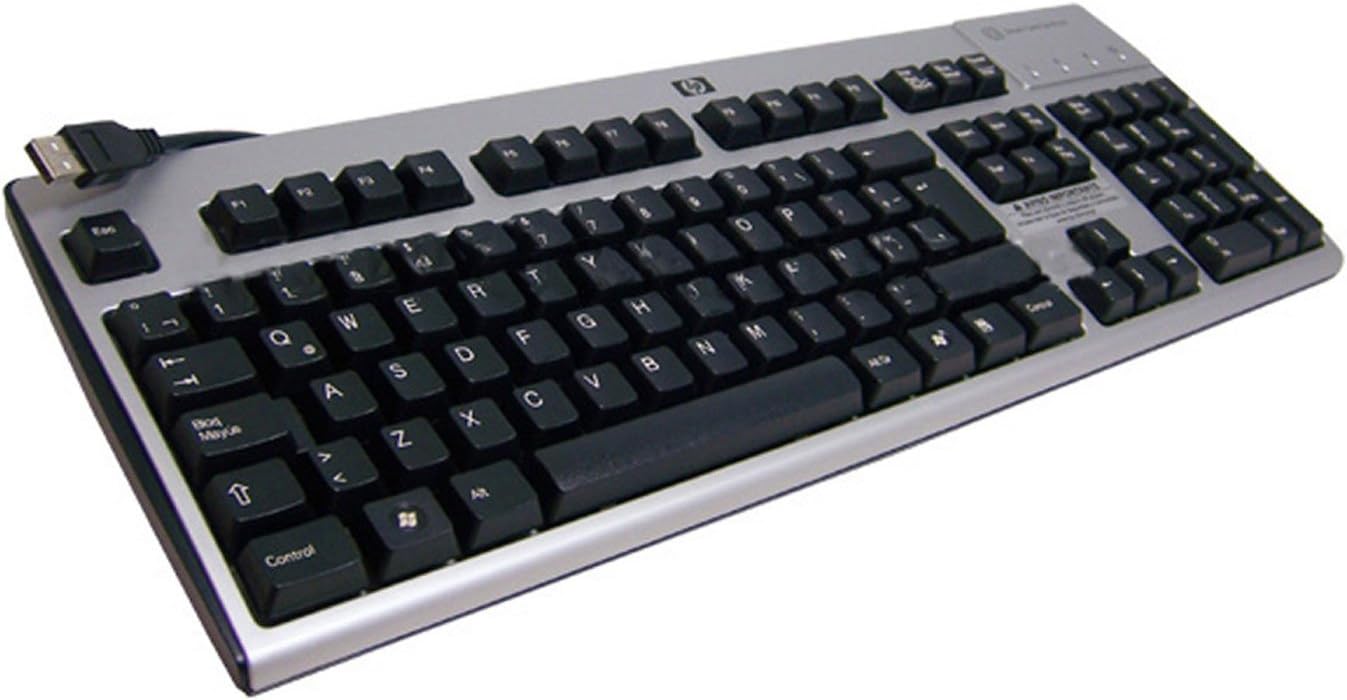
Hiji overhead view of the HP KUS0133 SmartCard USB Keyboard, showing its full layout, including the numeric keypad and the integrated SmartCard reader slot on the top right, with the USB cable extending from the top left.
2.2. Driver Installation (for SmartCard Functionality)
While the basic keyboard functions are plug-and-play, specific drivers or software may be required for the SmartCard reader to function correctly with certain applications or security systems. Consult your system administrator or the software provider for SmartCard reader driver requirements.
- For most modern operating systems, the SmartCard reader drivers are often included or automatically downloaded via Windows Update/macOS updates.
- If prompted, allow the operating system to search for and install the appropriate drivers.
- Restart your computer if instructed to complete the driver installation.
3. Ngoperasikeun kibor
3.1. Fungsi Kibor Dasar
The HP KUS0133 keyboard operates like any standard 104-key keyboard. All alphanumeric keys, function keys (F1-F12), navigation keys, and the numeric keypad function as expected for typing, data entry, and system navigation.
- Ngetik: Anggo tombol alfanumerik pikeun ngasupkeun téks.
- Papan tombol angka: For efficient number entry, ensure Num Lock is active.
- Tombol Fungsi: F1-F12 perform various tasks depending on the active application or operating system.
- Tombol Multimedia: If present, these keys control media playback (e.g., volume, play/pause).
3.2. SmartCard Reader Usage
The integrated SmartCard reader allows for secure login, digital signatures, and access to protected data. Ensure the necessary SmartCard middleware and applications are installed on your computer.
- Identify the SmartCard slot, typically located on the top right side of the keyboard.
- Insert your SmartCard into the slot with the chip facing upwards and towards the keyboard, until it clicks into place.
- Follow the prompts from your operating system or application to enter your PIN or perform the required authentication.
- To remove the SmartCard, gently pull it out from the slot.
4. Pangropéa
Proper care and maintenance will extend the life of your keyboard.
- beberesih: Cabut keyboard tina komputer sateuacan dibersihkeun. Anggo lawon anu lemes sareng henteu ngaganggu saeutikampdikumbah ku cai atanapi larutan pembersih anu hampang. Hindarkeun bahan kimia anu keras atanapi bahan anu abrasif.
- Ngaleungitkeun lebu: Anggo hawa anu dikomprés pikeun ngaleungitkeun lebu sareng lebu tina antara kenop.
- Tumpahan cairan: In case of a liquid spill, immediately disconnect the keyboard and allow it to dry completely before reconnecting. Do not attempt to use the keyboard while wet.
5. Cara ngungkulan
If you encounter issues with your HP KUS0133 SmartCard USB Keyboard, refer to the following common troubleshooting steps.
| Masalah | Mungkin Cukang lantaranana | Solusi |
|---|---|---|
| Keyboard teu ngabales. | Sambungan USB leupas, port USB lepat, masalah supir. |
|
| SmartCard is not detected. | Incorrect card insertion, missing/outdated SmartCard drivers, software conflict. |
|
| Konci caket atanapi henteu ngaréspon. | Debris under keys, liquid damage. |
|
6. Spésifikasi
Key technical specifications for the HP KUS0133 SmartCard USB Keyboard:
| Fitur | Rincian |
|---|---|
| merek | Hewlett-Packard |
| Nomer modél | KUS0133 / 434822-161 |
| Téhnologi konektipitas | USB, USB-A |
| Katerangan kibor | Multimedia, SmartCard Reader Integrated |
| Jumlah konci | 104 |
| Warna | Hideung-Pérak |
| Bahan | palastik |
| Sumber Daya | USB Powered |
| Item Beurat | 4 pon |
| Alat nu cocog | PC, Laptop, Gaming Console |
7. Garansi jeung Rojongan
For warranty information and technical support, please refer to the documentation included with your purchase or visit the official Hewlett-Packard (HP) support websitus. Anjeun biasana tiasa mendakan sumber daya dukungan, unduhan supir, sareng inpormasi kontak pikeun layanan palanggan di dinya.