Bubuka

The Marantz SA8005 is a Super Audio CD player designed for high-fidelity audio reproduction. It features a reference-class D/A converter, HDAM technologies, and versatile digital audio inputs, including USB-A for portable devices and asynchronous USB-B for PC audio. This manual provides instructions for proper setup, operation, and maintenance of your SA8005 player.
The SA8005 incorporates discrete HDAM (Hyper Dynamic Amplifier Module) components, providing wide bandwidth and high slew rate for musical fidelity. It supports SACD and CD playback, along with digital audio files ti sagala rupa sumber.
Disetél
Ngabongkar bungkusan
Sacara saksama miceun sadaya komponén tina bungkusan. Pastikeun aya item di handap ieu:
- Marantz SA8005 Super Audio CD Player
- Kadali jauh
- Kabel Daya anu tiasa dicabut
- Manual Pamilik (dokumén ieu)
- Gancang Mimitian Guide
Nyambungkeun Player
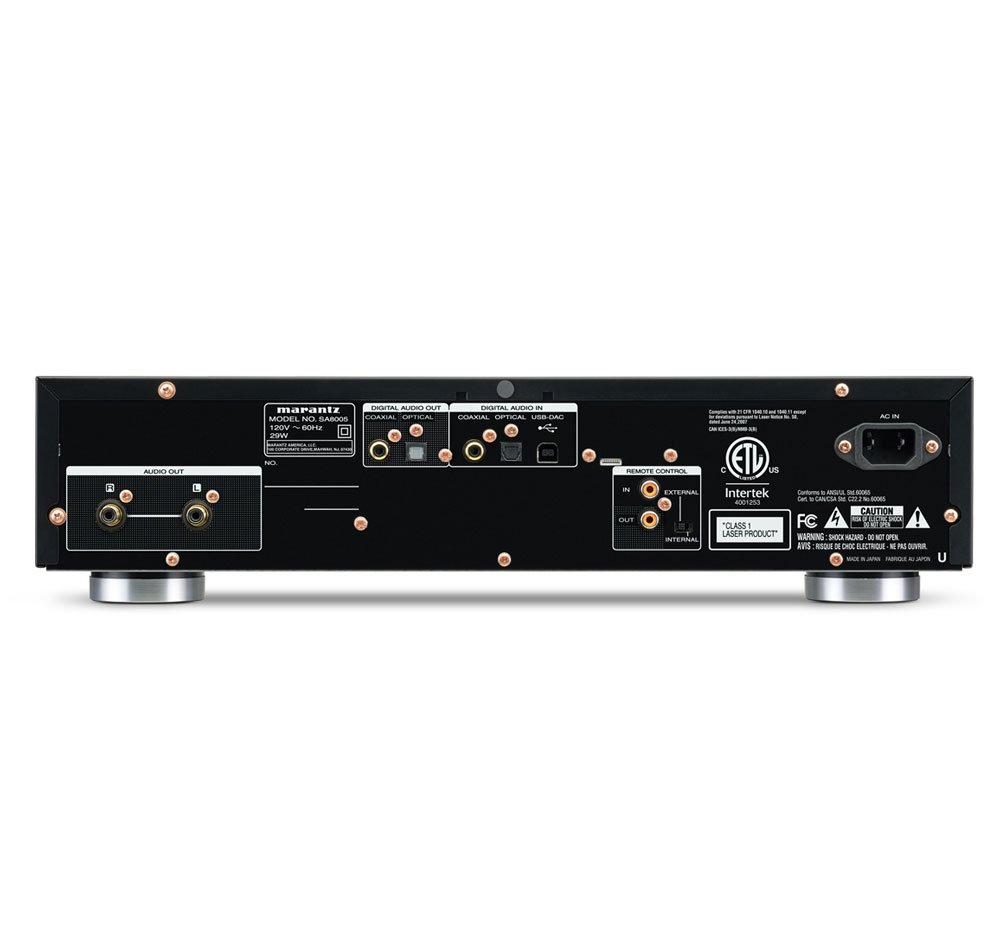
The rear panel of the SA8005 provides various connection options for integration into your audio system.
- Kaluaran Audio Analog: Connect the SA8005's analog audio output (RCA L/R) to the corresponding analog input on your amplifier or receiver using high-quality RCA cables.
- Digital Audio Inputs (Coaxial/Optical): Use these inputs to connect external digital audio sources, allowing the SA8005 to function as a standalone Digital-to-Analog Converter (DAC).
- Input USB-B: Connect a computer to this asynchronous USB-B port using a USB cable. This enables playback of high-resolution PCM and DSD audio files stored on your PC, utilizing the SA8005's internal DAC.
- Sambungan Daya: Connect the detachable power cord to the AC IN port on the rear panel and then to a suitable AC wall outlet.
Setup kadali jauh

The included remote control requires batteries for operation.
- Buka kompartemen batré dina tonggong kadali jauh.
- Selapkeun dua batré AAA, mastikeun polaritasna bener (+/-).
- Tutup kompartemen batré.
Operasi
Basic CD/SACD Playback
- Pencét éta POWER button to turn on the SA8005.
- Pencét éta BUKA/TUTUP tombol pikeun muka baki disk.
- Place a CD or Super Audio CD onto the disc tray with the label side facing up.
- Pencét éta BUKA/TUTUP tombol deui pikeun nutup baki disk. Pamuter bakal maca disk.
- Pencét éta ulin tombol pikeun ngamimitian playback.
- Ngagunakeun éta LEWAT buttons (◀◀ / ▶▶) to navigate between tracks.
- Pencét éta EUREUN tombol pikeun ngeureunkeun playback.
USB-A Device Playback
- Connect your USB thumb drive, iPod, or iPhone to the USB-A port dina panel hareup.
- Pilih input USB nganggo INPUT selector on the front panel or remote control.
- Use the player's controls or remote to browse and select audio files pikeun playback.
Using as a Digital-to-Analog Converter (DAC)
- External Digital Sources: Connect your external digital audio device (e.g., TV, game console) to the COAXIAL IN or OPTIKAL DI ports on the rear panel. Select the corresponding input on the SA8005.
- PC Connection (USB-B): Sambungkeun komputer Anjeun ka USB-B port on the rear panel. Ensure any necessary drivers are installed on your computer (refer to Marantz support for specific driver information if required). Select the USB-B input on the SA8005. Your computer will recognize the SA8005 as an audio output device.
Kaluaran headphone
- Sambungkeun headphone anjeun ka TELEPON jack dina panel hareup.
- Adjust the headphone volume using the TINGKAT knob located next to the headphone jack.
Pangropéa
Proper maintenance ensures the longevity and optimal performance of your SA8005.
- beberesih: Use a soft, dry cloth to clean the exterior surfaces of the player. Avoid using abrasive cleaners, solvents, or chemical sprays, as these can damage the finish.
- Penanganan Cakram: Always handle discs by their edges to prevent fingerprints and scratches. Store discs in their cases when not in use.
- Ventilasi: Pastikeun ventilasi anu cekap di sakitar unit pikeun nyegah panas teuing. Ulah ngahalangan liang ventilasi.
- Palayanan: Do not attempt to open or service the unit yourself. Refer all servicing to qualified Marantz service personnel.
Pamérésan masalah
If you encounter issues with your SA8005, refer to the following table for common problems and solutions.
| Masalah | Mungkin Cukang lantaranana | Solusi |
|---|---|---|
| Taya kakuatan | Power cord not connected; wall outlet not active. | Ensure power cord is securely connected. Check if the wall outlet is functioning. |
| Taya sora atawa sora intermittent | Kabel audio teu nyambung kalawan bener; input anu dipilih salah amppanguat; volume teuing leutik. | Verify all audio cable connections. Select the correct input on your amplifier. Increase volume on both the SA8005 and amppangagung. |
| Disc not playing or skipping | Disc is dirty, scratched, or inserted incorrectly; disc format not supported. | Clean the disc with a soft cloth. Ensure the disc is inserted label-side up. Try a different disc. |
| alat USB teu dipikawanoh | Device not compatible; device not properly connected; file format teu dirojong. | Ensure the USB device is compatible (e.g., FAT16/32 format for USB drives). Reconnect the device. Check supported file format. |
| Noise (hiss/buzz) during playback or idle | Ground loop; interference from other electronics; faulty cables. | Ensure all components are properly grounded. Try disconnecting other electronics to isolate the source of interference. Replace audio cables if suspected faulty. |
| Headphone output volume too low | Headphones not fully plugged in; headphone impedance mismatch; headphone volume knob set too low. | Ensure headphones are fully inserted into the jack. Adjust the TINGKAT knob on the front panel. Consider using headphones with appropriate impedance for the player. |
| Kadali jauh teu jalan | Batteries depleted or inserted incorrectly; obstruction between remote and player; remote sensor blocked. | Replace batteries, ensuring correct polarity. Remove any obstructions. Ensure the remote sensor on the player is not blocked. |
spésifikasi
| Fitur | Rincian |
|---|---|
| Diménsi Produk (W x D x H) | 17 x 13 x 4 inci |
| Item Beurat | 17.2 pon |
| Nomer modél | SA-8005 |
| Téhnologi konektipitas | USB (USB-A, USB-B) |
| Warna | Hideung |
| Batré Kadali Jauh | 2 batré AAA (diperlukeun) |
| D / A Parabot Parobah | CS4398 (supports 2.8/5.6 MHz DSD, up to 24-bit/192 kHz PCM) |
| HDAM Technology | Sumuhun |
| Toroidal Power Supply | Sumuhun |
Garansi sareng Rojongan
Marantz products are designed for reliability and performance. For detailed warranty information, please refer to the separate warranty document included with your purchase or visit the official Marantz websitus.
For technical assistance, service, or further inquiries, please contact Marantz customer support. Contact details can typically be found on the Marantz official websitus atanapi dina dokuméntasi jaminan.


