1. Bubuka
This manual provides detailed instructions for the installation, operation, and maintenance of your Axis P1355 Surveillance/Network Camera. The Axis P13 series offers high-performance fixed cameras designed for both indoor and outdoor surveillance, delivering superb image quality with H.264 compression. These models support HDTV 720p/1080p video and are equipped with features like Wide Dynamic Range and Day/Night functionality for clear imaging in various lighting conditions. Specific models within the P13 series, including HDTV 720p, incorporate Axis Lightfinder technology for enhanced low-light sensitivity, while HDTV 1080p and 5-megapixel cameras feature P-iris control for optimized depth of field and lens resolution.
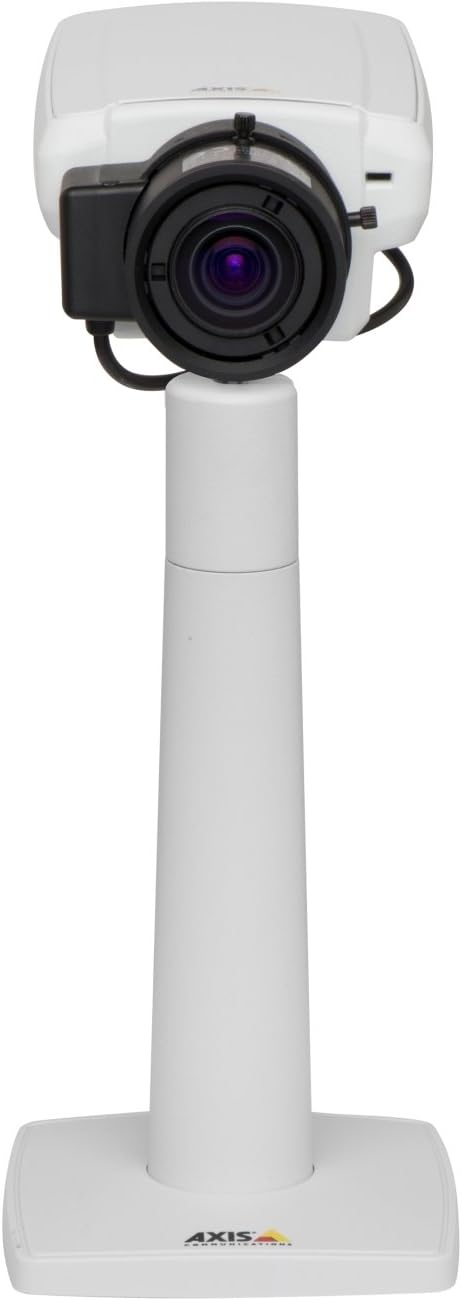
Gambar 1: The Axis P1355 Surveillance Camera shown mounted on its stand. This image illustrates the camera's physical appearance and typical mounting configuration.
2. Émbaran Kasalametan
Please read all safety instructions before installing or operating the camera.
- Ensure the power source matches the camera's requirements to prevent electrical hazards.
- Pamasangan kedah dilaksanakeun ku tanaga anu mumpuni luyu sareng kode listrik lokal.
- Ulah ngalaan kaméra kana suhu anu ekstrim, kalembaban, atanapi lingkungan korosif.
- Hindarkeun lénsa tina paparan langsung ka sumber cahaya anu kuat, sapertos panonpoé, sabab ieu tiasa ngaruksak sénsor gambar.
- Disconnect power before cleaning or servicing the camera.
3. Setup jeung Instalasi
The Axis P1355 camera is designed for both indoor and outdoor use and supports various mounting options.
3.1 Pamasangan
The camera is typically designed for wall mount installation. Ensure the mounting surface is strong enough to support the camera's weight (approximately 2 pounds). Use appropriate screws and anchors for the chosen surface.
- Select a suitable location for optimal surveillance coverage.
- Pasangkeun braket pemasangan kana témbok kalayan pageuh.
- Mount the camera onto the bracket, ensuring it is firmly in place.
- Adjust the camera's angle for the desired field of view.
3.2 Sambungan
The Axis P1355 camera primarily uses wired connectivity for reliable data transmission and power.
- Sambungan Daya: Connect the provided power adapter to the camera's power input and then to a suitable electrical outlet. The camera operates on a corded electric power source.
- Sambungan jaringan: Connect an Ethernet cable from the camera's network port to your network switch or router. This provides wired connectivity for video streaming and control.
- Wireless Connectivity (Optional/Configuration): While primarily wired, the camera supports Wi-Fi for certain configurations. Refer to the Axis product documentation for specific wireless setup instructions if applicable to your model variant.
4. Parentah Operasi
Once installed and connected, the Axis P1355 camera can be configured and operated via a network interface.
4.1 Aksés Awal jeung Konfigurasi
- Anggo Axis IP Utility atanapi alat panemuan jaringan anu sami pikeun milarian alamat IP kaméra dina jaringan anjeun.
- Buka a web panyungsi wéb teras lebetkeun alamat IP kaméra pikeun ngaksésna web panganteur.
- Log in using the default credentials (refer to Axis documentation for default username/password, typically 'root' and 'pass' or similar, which should be changed immediately).
- Turutan parentah dina-layar pikeun nyetel setelan jaringan dasar, tanggal/waktu, jeung akun pamaké.
4.2 Video Monitoring and Features
- Hirup View: Aksés feed pidéo langsung ngalangkungan web interface or compatible video management software.
- Resolusi: The camera supports video capture resolutions up to 720p and effective video resolutions of 1080 pixels, with effective still resolution of 2 MP.
- Color and Monochrome Modes: The camera can operate in both color and monochrome (black and white) modes, automatically switching based on light conditions or configured manually.
- Visi Peuting: Utilize the integrated night vision capabilities for surveillance in low-light or complete darkness.
- Zoom optik: Adjust the optical zoom for detailed views of specific areas.
- P-Iris Control: For models equipped with P-iris, this feature allows precise control over the iris position to optimize depth of field and lens resolution, enhancing image sharpness. This can be configured via the web panganteur.
- Format pidéo: Video is typically captured in MP4 format.
- Kadali jauh: The camera supports remote control for various settings and adjustments.
5. Pangropéa
Regular maintenance ensures optimal performance and longevity of your Axis P1355 camera.
- beberesih: Gently clean the camera lens and housing with a soft, damp lawon. Hindarkeun pembersih abrasive atanapi pangleyur.
- Pembaruan firmware: Périodik pariksa Axis Communications websitus pikeun apdet firmware. Tetep firmware diropéa mastikeun aksés ka fitur panganyarna, patch kaamanan, sarta perbaikan kinerja.
- Pamariksaan kabel: Regularly inspect all cables for signs of wear or damage, especially for outdoor installations.
- Pariksa Lingkungan: Pastikeun lingkungan operasi kaméra tetep aya dina kisaran suhu sareng kalembaban anu ditangtukeun.
6. Cara ngungkulan
This section addresses common issues you might encounter with your Axis P1355 camera.
- Henteu aya kakuatan:
- Pastikeun adaptor daya parantos nyambung kalayan pageuh kana kaméra sareng stop kontak anu tiasa dianggo.
- Pariksa kabel kakuatan pikeun karuksakan nanaon.
- Henteu aya sambungan jaringan:
- Ensure the Ethernet cable is properly connected to the camera and the network switch/router.
- Pariksa status switch/router jaringan.
- Confirm the camera has a valid IP address and is on the same network segment as your viewalat dina.
- Kualitas Gambar goréng:
- Ngabersihan lénsa kaméra.
- Saluyukeun setelan pokus sareng zum via web panganteur.
- Check lighting conditions; enable night vision or adjust exposure settings if necessary.
- Ensure P-iris control is correctly configured for optimal sharpness (if applicable).
- Teu Bisa Aksés Web panganteur:
- Pariksa alamat IP kaméra.
- Pastikeun komputer anjeun aya dina jaringan anu sami sareng kaméra.
- Try restarting the camera and your network equipment.
7. Spésifikasi
| Fitur | Rincian |
|---|---|
| merek | Komunikasi Axis |
| Nomer modél | AXIS P1355 |
| Pamakéan jero rohangan / outdoor | Jero rohangan, Luar |
| Téhnologi konektipitas | Wired (Wi-Fi capable for certain configurations) |
| Fitur husus | Visi Peuting |
| Sumber Daya | Listrik Kabel (7.1 watt) |
| Resolusi Capture Video | 720 p |
| Resolusi Video Éféktif | 1080 piksel |
| Resolusi Masih Éféktif | 2 MP |
| Tipe Zum | Optical Zoom (2.9x Optical) |
| Tipe Controller | Iris (P-iris control) |
| Tipe Pamasangan | Tembok Gunung |
| Ukuran produk (L x W x H) | 3.07 x 5.94 x 1.69 inci |
| Item Beurat | 2 pon |
| Peunteun Protection Internasional | IP54 |
| Format Capture Video | MP4 |
8. Garansi jeung Rojongan
For detailed warranty information and technical support, please refer to the official Axis Communications websitus atanapi ngahubungan layanan palanggan maranéhanana langsung.
Pabrikan: AXIS COMMUNICATION INC.
Websitus: www.axis.com (Mangga buka resmi website for the most current support resources, drivers, and documentation.)


