1. Bubuka
This manual provides detailed instructions for the installation, operation, and maintenance of your Advance Darkside 8303B30 Micro ATX PC Case. Please read this manual thoroughly before beginning installation to ensure proper setup and to maximize the performance and longevity of your system components.
The Advance Darkside ATX Mid-Tower PC case features a top panel with a 2.5/3.5 inch SATA HDD docking station, 2 USB 3.0 ports, and 1 USB 2.0 port. It is designed to accommodate Micro ATX motherboards and offers efficient cooling solutions.
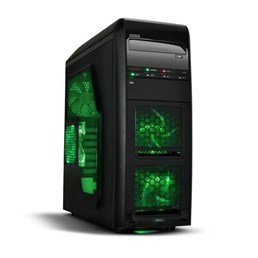
Gambar 1: Hareupeun view of the Advance Darkside 8303B30 PC Case, showcasing its design and front panel features.
2. Fitur Produk
- model: Advance Darkside 8303B30
- Bahan Chassis: SGCC Steel
- warna: Black (interior and exterior)
- Kasaluyuan motherboard: Mikro ATX
- Konéktipitas Panel hareup: 2 x USB 3.0, 1 x USB 2.0, Audio Jacks
- Fitur Panyimpenan: Top panel 2.5/3.5 inch SATA HDD docking station
- Sistim cooling: Five 120mm fans included (two LED fans at the front, one LED fan on the side, one fan at the rear, and one fan at the top). Water cooling ready.
- Rojongan Kartu Grafis: Designed for King Size graphics cards
- Panel Sisi: Plexiglass window
3. Parentah Setup
3.1. Nyiapkeun Kasus
- Unpack the PC case carefully and remove all packaging materials.
- Teundeun wadahna dina permukaan datar anu stabil.
- Cabut panel samping ku cara muka sekrup jempol di tukang wadahna teras ngageser panel ka tukang.
3.2. Instalasi Power Supply
- Locate the power supply mounting area at the rear bottom of the case.
- Secure the power supply unit (PSU) using the provided screws. Ensure the PSU fan faces the bottom or top, depending on your PSU and case design for optimal airflow.
3.3. Pamasangan motherboard
- Pasangkeun tameng I/O kana liang di bagian tukang casing.
- Align motherboard jeung standoffs jero kasus nu. Pastikeun sadaya standoffs cocog liang screw motherboard urang.
- Pasangkeun motherboard nganggo sekrup anu cocog.
3.4. Panyimpenan Girang Instalasi
- For 3.5-inch HDDs, slide the drive into the drive bay trays. The trays are designed to flex slightly to accommodate the drive without screws in some configurations.
- For 2.5-inch SSDs/HDDs, secure them to the designated mounting points or use adapters if necessary.
- Utilize the top panel SATA docking station for quick access to 2.5/3.5 inch SATA drives. Simply insert the drive into the slot until it clicks into place.
3.5. Pamasangan Kartu Grafis sareng Kartu Ékspansi
- Cabut panutup slot ékspansi anu diperyogikeun di bagian tukang wadahna.
- Insert the graphics card or other expansion cards into the appropriate PCIe slots on the motherboard.
- Secure the cards with screws or retention clips.
3.6. Manajemén kabel
Route all cables (power, SATA, front panel connectors) through the designated cutouts and tie-down points behind the motherboard tray to ensure clean airflow and an organized interior.
4. Parentah Operasi
4.1. Powering Dina Sistim anjeun
- Pastikeun sadaya komponén dipasang kalayan leres sareng kabelna disambungkeun kalayan pageuh.
- Sambungkeun kabel kakuatan ka PSU jeung stop kontak témbok.
- Pencét tombol daya anu aya di panel hareup casing.
4.2. Ngagunakeun Port Panel Hareup
- Port USB 3.0/2.0: Connect USB devices such as keyboards, mice, external drives, or flash drives.
- Jacks audio: Connect headphones, microphones, or speakers.
- HDD Docking Station: Insert a 2.5-inch or 3.5-inch SATA HDD/SSD into the top docking slot for quick data access. Ensure the drive is properly seated.
5. Pangropéa
5.1. Ngabersihkeun Casing
- Bersihkeun bagian luar wadah sacara rutin nganggo sabun anu lemesamp lawon. Ngahindarkeun cleaners abrasive.
- Use compressed air to remove dust from fan filters and internal components.
5.2. Pangropéa kipas
- Periodically check the case fans for dust buildup. Clean them gently with compressed air or a soft brush.
- Pastikeun teu aya kabel anu ngahalangan bilah kipas.
6. Cara ngungkulan
6.1. Sistem Teu Bisa Dihurungkeun
- Pariksa naha kabel daya parantos nyambung kalayan pageuh kana PSU sareng stop kontak dina témbok.
- Pastikeun saklar PSU dina posisi 'ON'.
- Pariksa deui yén kabel tombol daya panel hareup parantos disambungkeun kalayan leres kana motherboard.
6.2. Isu Overheating
- Ensure all case fans are spinning correctly and are not obstructed.
- Check for excessive dust buildup on fans and heatsinks.
- Verify proper cable management to allow for unobstructed airflow.
6.3. Front Panel USB/Audio Not Working
- Confirm that the front panel USB and audio cables are correctly connected to the corresponding headers on the motherboard.
- Check motherboard drivers for USB and audio.
7. Spésifikasi
| Fitur | Rincian |
|---|---|
| merek | Maju |
| Nomer modél | 8303B30 |
| Warna | Hideung |
| Bahan Chassis | Alloy Steel (SGCC Steel) |
| Motherboard kasaluyuan | Mikro ATX |
| Ukuran (L x W x H) | 48 x 19.5 x 48.2 cm |
| Beurat produk | 5.8 kg |
| Hareup Panel palabuhan | 2 x USB 3.0, 1 x USB 2.0, Audio Jacks |
| Panyimpenan Dock | Top panel 2.5/3.5 inch SATA HDD docking station |
| Kaasup Fans | 5 x 120mm (2 front LED, 1 side LED, 1 rear, 1 top) |
| Rojongan pendapian | Water cooling ready |
| Panel samping | Plexiglass |
| Dianjurkeun Paké | Kaulinan |
8. Garansi jeung Rojongan
8.1. Produsén jaminan
This product comes with a manufacturer's warranty of 1 year from the date of purchase. Please retain your proof of purchase for warranty claims. The warranty covers defects in materials and workmanship under normal use.
8.2. Rojongan Palanggan
For technical assistance, troubleshooting, or warranty inquiries, please contact Advance customer support. Refer to the official Advance websitus pikeun inpormasi kontak sareng sumber pangrojong pang anyarna.


