
Bubuka
Thank you for choosing the Spectrum AIL 439 54-Note Electric Keyboard. This manual provides essential information for setting up, operating, and maintaining your instrument. Please read it thoroughly to ensure proper use and to maximize your musical experience.
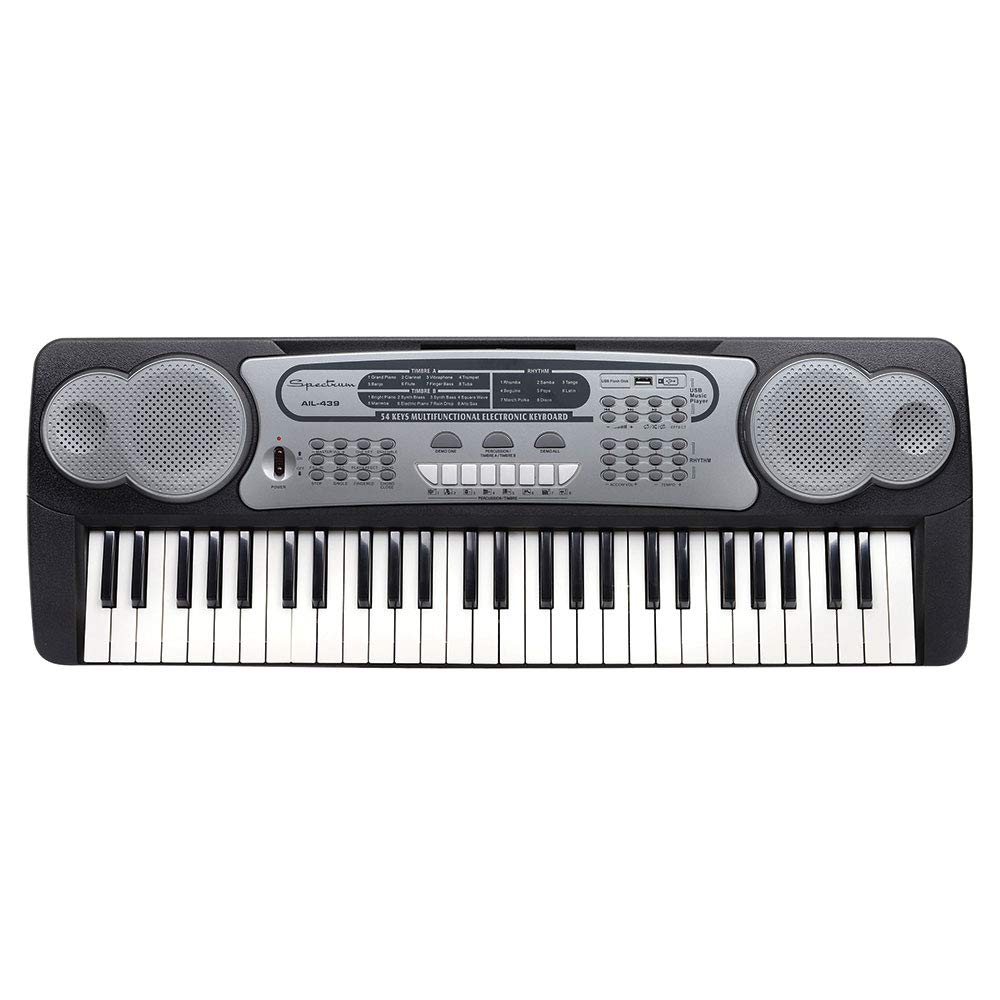
Image: The Spectrum AIL 439 54-Note Electric Keyboard, featuring 54 keys and an integrated music stand.
Disetél
1. Ngabongkar bungkusan
- Sacara saksama miceun sadaya komponén tina bungkusan.
- Verify that all accessories are present: the keyboard, AC adaptor, music sheet holder, and sing-along microphone.
2. Sambungan Daya
- Adaptor AC: Connect the included AC adaptor to the DC IN jack on the rear of the keyboard. Plug the adaptor into a standard wall outlet.
- USB Power (Optional): The keyboard can also be powered via a standard USB cable (sold separately) connected to a USB power source.
3. Music Sheet Holder Installation
- Insert the music sheet holder into the designated slots located on the top panel of the keyboard. Ensure it is securely seated.
4. Sambungan Mikropon
- Plug the sing-along microphone into the Microphone Input jack on the keyboard.
Parentah Operasi
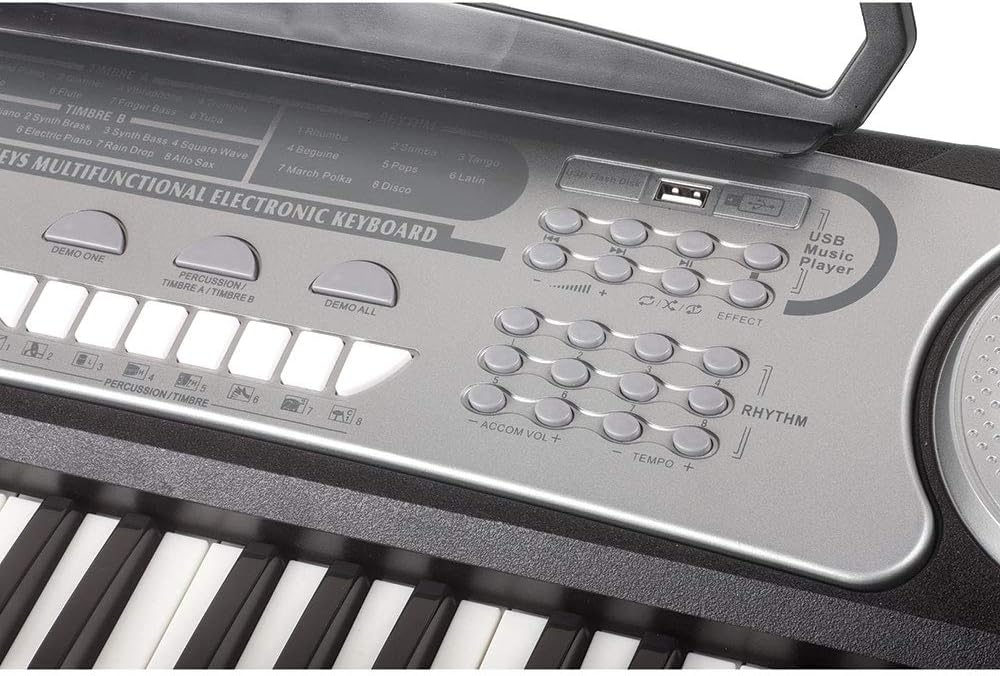
Gambar: Detil view of the keyboard's control panel, showing buttons for tones, rhythms, percussion, volume, tempo, and the USB input.
1. Daya Hurung / Pareum
- Pencét éta POWER tombol pikeun ngaktipkeun atanapi mareuman kibor.
2. Volume and Tempo Controls
- Ngagunakeun éta VOLUME +/- buttons to adjust the overall sound level.
- Ngagunakeun éta TEMPO + / - tombol pikeun nyaluyukeun kecepatan wirahma sareng lagu démo.
3. Selecting Tones (16 Tones)
- Pencét éta NADA button, then use the number keys (0-9) to select from the 16 available instrument tones. Refer to the panel for tone assignments.
4. Selecting Rhythms (8 Rhythms)
- Pencét éta Wirahma button, then use the number keys (1-8) to select from the 8 available rhythms.
- Pencét Mimitian / STOP pikeun ngamimitian atawa mungkas ritme.
5. Selecting Percussion (8 Percussion Tones)
- Pencét éta PERKUSI button, then use the designated keys to play 8 different percussion sounds.
6. Playing Demo Songs (8 Demo Songs)
- Pencét éta DEMO HIJI button to play a single demo song.
- Pencét éta DEMO ALL button to cycle through all 8 demo songs.
7. Record & Replay Function
- Pencét éta RECORD button to start recording your playing.
- Pencét éta ulin button to listen to your recorded performance.
8. Hiji Jari Chords
- Aktipkeun CHORD JARI TUNGGAL mode to play full chords by pressing a single key in the lower section of the keyboard.
9. USB Input for Music Playback
- Selapkeun USB flash drive nu ngandung audio MP3 files kana INPUT USB palabuhan.
- Use the playback controls (Play/Pause, Next, Previous) on the keyboard to manage your music.
10. E-Media Online Interactive Lessons
- Your keyboard includes access to E-Media Introductory Keyboard Lessons. Refer to the included documentation for instructions on how to access these online resources.
Pangropéa
beberesih
- Lap beungeut kibor ku lawon anu lemes sareng garing.
- Keur kokotor bandel, rada dampbilas lawon ku cai sareng sabun anu hampang, teras langsung usap dugi ka garing.
- Entong use abrasive cleaners, solvents, or waxes, as these can damage the finish.
Panyimpenan
- Simpen kibor di tempat anu tiis sareng garing jauh tina sinar panonpoé langsung sareng suhu anu ekstrim.
- Ulah neundeun barang beurat dina kibor.
Pamérésan masalah
| Masalah | Mungkin Cukang lantaranana | Solusi |
|---|---|---|
| Taya kakuatan | AC adaptor not connected or faulty; USB cable not connected or power source insufficient. | Ensure AC adaptor is securely plugged into the keyboard and a working outlet. If using USB, check cable and power source. |
| Taya sora | Volume too low; headphones connected; internal fault. | Ningkatkeun volume ngagunakeun JILID +. Disconnect any headphones. If problem persists, power cycle the keyboard. |
| Rhythm/Demo not playing | Rhythm/Demo not selected; START/STOP not pressed. | Select a rhythm or demo song, then press Mimitian / STOP. |
| Mikropon teu jalan | Microphone not connected properly; microphone faulty. | Ensure microphone is fully inserted into the Microphone Input jack. Test with another microphone if available. |
spésifikasi
- Ngaran modél: AIL 439
- Jumlah konci: 54
- Nada: 16
- Wirahma: 8
- Percussion Tones: 8
- Lagu demo: 8
- Konektipitas: USB Input, Microphone Input
- Sumber Daya: Electric (AC Adaptor) / USB Powered
- fungsi: Two Volume Controls, Tempo Controls, Record & Replay, Single Finger Chords
- Asesoris: Music Book Holder, Sing-along Microphone, E-Media Introductory Keyboard Lessons
- Ukuran produk: 34 x 5 x 16 inci
- Beurat barang: 7.53 pon
- Pabrikan: Ashley Entertainment Corp.
Garansi sareng Rojongan
For warranty information and technical support, please refer to the documentation included with your purchase or contact Spectrum customer service. Keep your proof of purchase for any warranty claims.