Bubuka
Thank you for choosing the Marantec Command 231 Wireless Digital Keypad Remote Control. This device provides convenient and secure access control for your garage door or gate system using a personalized 4-digit PIN code. This manual will guide you through the setup, operation, and maintenance of your new remote control.
Émbaran Kasalametan
- Baca sagala parentah taliti saméméh instalasi tur pamakéan.
- Jauhkeun alat ti barudak.
- Ulah ngalaan alat ka suhu ekstrim, Uap, atawa sinar panonpoé langsung.
- Only use the specified battery type (CR 2032 3V button cells).
- Pastikeun miceun batré anu parantos dianggo kalayan leres numutkeun peraturan lokal.
Produk Leuwihview
The Marantec Command 231 is a wireless digital keypad designed for controlling Marantec garage door or gate operators. It features a numeric keypad for PIN entry and supports programming for multiple channels and functions.
Fitur konci:
- Wireless operation with digital keypad.
- 4-digit PIN code access.
- Programmable for up to 3 temporary channels.
- One channel for a programmable function.
- Light function switch for external lighting (requires Marantec digital receiver).
- Powered by 2 CR 2032 3V button cell batteries.
- rating panyalindungan IP 54.
Eusi pakét:
- Marantec Command 231 Digital Keypad
- 2 x CR 2032 3V Button Cell Batteries
- Bahan Pamasangan
- Coding Pin
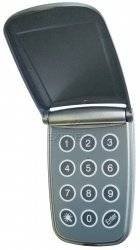
Hareupeun view of the Marantec Command 231 wireless digital keypad remote control, showing the numeric keypad and function buttons.
Disetél
1. Nyelapkeun batré
- Open the battery compartment cover on the back of the keypad.
- Insert the two CR 2032 3V button cell batteries, ensuring correct polarity (+/-).
- Tutup panutup kompartemen batré aman.
2. Masang keypad
The keypad can be mounted on a wall or other flat surface using the provided mounting material. Choose a location that is easily accessible but protected from direct weather exposure.
- Mark the desired mounting position.
- Bor liang pilot lamun perlu.
- Secure the keypad to the surface using the screws and anchors provided.
3. Pairing with Your Marantec Receiver
Refer to your Marantec garage door or gate operator's manual for specific instructions on how to put the receiver into programming mode. Generally, the process involves:
- Activate the programming mode on your Marantec receiver (e.g., press a 'Learn' button).
- On the Command 231 keypad, enter your desired 4-digit PIN code.
- Press the 'Enter' or 'Program' button on the keypad (refer to keypad markings).
- The receiver should confirm successful pairing (e.g., LED flash, audible click).
- Test the keypad by entering the PIN and pressing 'Enter' to operate the door/gate.
Parentah Operasi
Opening/Closing with PIN Code
- Enter your 4-digit PIN code on the numeric keypad.
- Press the 'Enter' button.
- The connected Marantec operator will activate, opening or closing the door/gate.
Programming Channels and Functions
The Command 231 allows for programming up to 3 temporary channels and one channel for a specific programmable function. Detailed programming steps depend on your specific Marantec receiver model. Consult your receiver's manual for advanced programming options.
Light Function (if applicable)
If your Marantec digital receiver supports external light control, the keypad can be programmed to activate this function. This typically involves a specific button or PIN sequence to toggle the light 'on', 'off', or 'stop' (impulse control).
Pangropéa
Ngagantian batré
When the keypad's response becomes sluggish or the indicator light dims, it's time to replace the batteries.
- Buka panutup kompartemen batré.
- Remove the old CR 2032 3V button cell batteries.
- Pasangkeun batré anyar, perhatikeun polaritasna anu leres.
- Tutup panutup kompartemen.
beberesih
Bersihkeun permukaan keypad nganggo lap anu lemes,amp cloth. Do not use abrasive cleaners or solvents, as these can damage the device.
Pamérésan masalah
- Keypad teu ngabales: Check battery levels and replace if necessary. Ensure the keypad is within range of the receiver.
- Door/Gate not operating: Verify that the PIN code is entered correctly. Ensure the keypad is properly paired with the Marantec receiver. Check the receiver's status and power supply.
- Operasi intermittent: This could indicate low battery power or interference. Try replacing batteries and ensuring no obstructions are blocking the signal.
If problems persist, consult your Marantec receiver's manual or contact Marantec customer support.
spésifikasi
| merek | MARANTEC |
| Modél | Paréntah 231 |
| Ukuran (L x W x H) | 70 x 110 x 48 mm |
| Beurat | 0.2 kg |
| Sasayogian tanaga | 2 x CR 2032 3V Button Cell Batteries |
| Peunteun panyalindungan | IP 54 |
| Frékuénsi nirkabel | 868 MHz |
| Produsén | Marantec |
| Negara asal | Jérman |
Garansi sareng Rojongan
Information regarding specific warranty terms and software updates for the Marantec Command 231 is not available in the provided product details. For warranty claims, technical support, or spare parts inquiries, please contact your Marantec dealer or visit the official Marantec websitus.


