Bubuka
This manual provides essential information for the safe and efficient operation of your Pioneer PDR-D5 CD Recorder. Please read it thoroughly before using the unit and keep it for future reference.
Precautions Kasalametan
- Sasayogian tanaga: Ensure the unit is connected to an AC 100V, 50/60Hz power source.
- Ventilasi: Ulah meungpeuk bukaan ventilasi. Ngidinan spasi nyukupan sabudeureun unit pikeun aliran hawa ditangtoskeun.
- Uap: Ulah ngalaan unit ka hujan atawa Uap pikeun nyegah seuneu atawa shock listrik.
- Objék Asing: Ulah ngasupkeun barang naon waé kana liang unit.
- Palayanan: Rujuk sadayana jasa ka tanaga jasa anu mumpuni.
Eusi pakét
Pastikeun yén sadaya item aya dina bungkusan:
- Pioneer PDR-D5 CD Recorder unit
- Kadali jauh
- Kabel listrik
- Kabel Audio RCA
- Manual Pitunjuk (dokumén ieu)

Disetél
1. Panempatan
Place the PDR-D5 on a stable, level surface away from direct sunlight, heat sources, and excessive dust or vibrations. Ensure adequate ventilation around the unit.
2. Panyambungan
Before making any connections, ensure the unit and all connected components are powered off.
- Input Audio: Connect the audio output of your source component (e.g., amplifier, tuner) to the LINE IN (L/R) jacks on the rear panel of the PDR-D5 using RCA audio cables.
- Kaluaran Audio: Nyambungkeun LINE OUT (L/R) jacks on the rear panel of the PDR-D5 to an available audio input on your amplifier atawa panarima.
- Digital Input (Optional): For digital recording, connect a digital audio source (e.g., CD player, DAT player) to the DIGITAL IN (OPTICAL or COAXIAL) terminal.
- Digital Output (Optional): For digital playback to a compatible receiver, connect the DIGITAL OUT (OPTICAL or COAXIAL) terminal.
- Sambungan Daya: Colokkeun kabel listrik kana AC IN terminal on the rear panel, then plug the other end into a wall outlet.

Parentah Operasi
1. Daya Hurung / Pareum
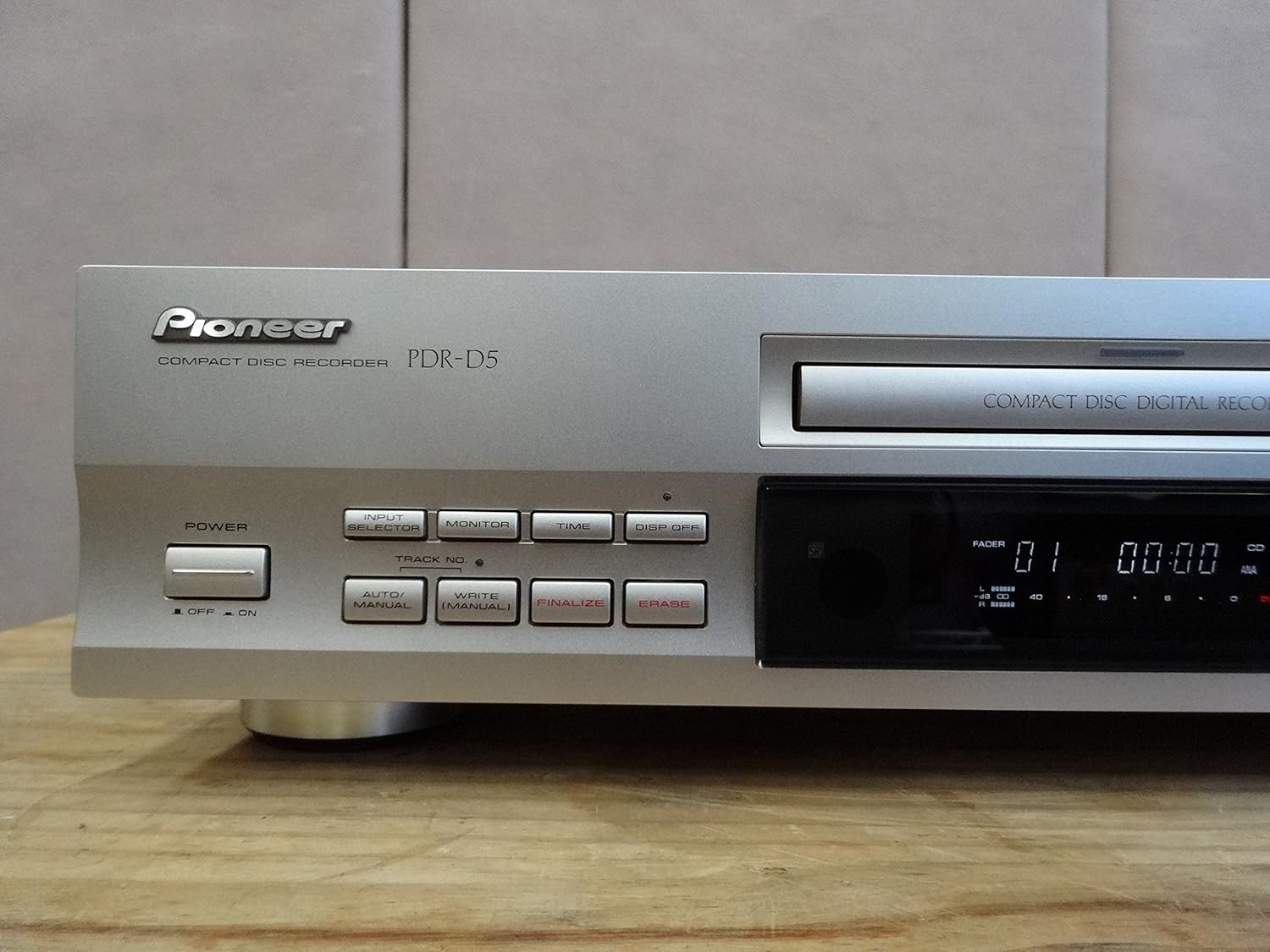
Pencét éta POWER button on the front panel to turn the unit on or off. The display will illuminate when powered on.
2. CD Playback
- Pencét éta BUKA/TUTUP tombol pikeun muka baki disk.
- Place a CD (CD-DA format) onto the disc tray with the label side up.
- Pencét éta BUKA/TUTUP tombol deui pikeun nutup baki. Unit bakal maca disc.
- Pencét éta MAÉN (►) tombol pikeun ngamimitian playback.
- Ngagunakeun éta SKIP (◀◀ / ►►) tombol pikeun nganapigasi antara lagu.
- Pencét éta PAUSE (▐▐) button to temporarily stop playback, and Seureuh (■) to stop completely.

3. CD Recording
The PDR-D5 can record to CD-R (recordable) and CD-RW (rewritable) discs.
- Pencét éta BUKA/TUTUP button and insert a blank CD-R or CD-RW disc. Close the tray.
- Pilih sumber input nganggo PEMILIH INPUT tombol (contona, Analog, Digital).
- Saluyukeun tingkat rékaman ngagunakeun ANALOG REC LEVEL or DIGITAL REC LEVEL knobs. Monitor the level indicators on the display to avoid distortion.
- Pencét éta CATETAN (●) button to enter record-pause mode.
- Start playback on your source component, then press the MAÉN (►) button on the PDR-D5 to begin recording.
- Pikeun ngeureunkeun rékaman, pencét éta Seureuh (■) kancing.
4. Finalizing a Disc (CD-R)
After recording to a CD-R disc, it must be finalized to be playable on standard CD players.
- Ensure the recorded CD-R disc is in the tray.
- Pencét éta MUNGKIN kancing.
- Follow the on-screen prompts to confirm finalization. This process is irreversible.
5. Erasing a Disc (CD-RW)
CD-RW discs can be erased and re-recorded.
- Ensure the CD-RW disc is in the tray.
- Pencét éta HAPUS kancing.
- Follow the on-screen prompts to confirm erasure.
Pangropéa
Ngabersihkeun Unit
- Ngusap bagian luar unit nganggo kaén anu lembut sareng garing.
- Do not use abrasive cleaners, solvents, or chemical cloths, as they may damage the finish.
- Tetep baki disc beresih jeung bébas tina lebu.
Penanganan Cakram
- Keupeul cakram ku sisi-sisina pikeun nyingkahan tapak ramo dina permukaan rékaman.
- Nyimpen cakram dina kasusna nalika henteu dianggo pikeun ngajagaan tina lebu sareng goresan.
- Do not expose discs to direct sunlight or high temperatures.
Pamérésan masalah
If you experience problems with your PDR-D5, refer to the following common issues before seeking service.
| Masalah | Mungkin Cukang lantaranana | Solusi |
|---|---|---|
| Unit teu hurung. | Kabel listrik teu aman disambungkeun. | Pariksa sambungan kabel kakuatan ka unit jeung stop kontak témbok. |
| "NO DISC" or "CHECK DISC" error displayed. | Disc is inserted incorrectly, dirty, scratched, or incompatible. | Ensure disc is inserted correctly. Clean the disc. Try a different, known-good disc. Ensure it's a standard CD-DA, CD-R, or CD-RW. |
| Taya sora salila playback. | Audio cables are not connected correctly or input selector is wrong. | Check RCA audio cable connections. Ensure your amplifier/receiver is set to the correct input. |
| Recording fails or sound is distorted. | Recording levels are too high/low, or disc is faulty/full. | Adjust recording levels. Use a new, blank CD-R/RW. Ensure the disc is not scratched. |
| Disc cannot be finalized. | Disc is not a CD-R, or there is insufficient space. | Ensure you are using a CD-R disc. Finalization requires some disc space. |
spésifikasi
| Fitur | Spésifikasi |
|---|---|
| merek | Panaratas |
| Produsén | Panaratas |
| Média cocog | CD, CD-R, CD-RW |
| Item Beurat | 600 g |
| Ukuran Paket | 48.2 x 28.4 x 14.2 cm |
| Batré Kaasup | No |
| Batré Diperlukeun | No |
| ASIN | B00ESY7I72 |
| Tanggal Sadia munggaran dina Amazon.co.jp | 2013/8/27 |
| Peunteun | 2.5 ti 5 béntang (13 rating) |
| Amazon Best Sellers réngking | Electronics - 405,242nd; Disc Players/Recorders - 437th |
Garansi sareng Rojongan
Pioneer products are designed for reliability and performance. For specific warranty details, please refer to the warranty card included with your purchase or visit the official Pioneer websitus pikeun wewengkon Anjeun.
For technical support, troubleshooting assistance beyond this manual, or service inquiries, please contact Pioneer customer support through their official websitus atanapi inpormasi kontak anu disayogikeun dina dokuméntasi produk anjeun.


