1. Bubuka
This manual provides detailed instructions for the proper setup, operation, maintenance, and troubleshooting of your JVC HR-VP58U 4 Head Hi-Fi Stereo VCR. Please read this manual thoroughly before using the unit to ensure optimal performance and safety. Keep this manual for future reference.
2. Émbaran Kasalametan penting
PERHATOSAN: To reduce the risk of fire or electric shock, do not expose this appliance to rain or moisture. Do not remove the cover. Refer servicing to qualified personnel only.
- Pastikeun catu daya voltage cocog sareng rating dina unitna.
- Entong meungpeung lawang angin.
- Hindarkeun nempatkeun unit caket sumber panas atanapi dina sinar panonpoé langsung.
- Ulah ngalaan unit kana cairan netes atanapi splashing.
- Cabut colokan unit nalika badai kilat atanapi nalika henteu dianggo kanggo waktos anu lami.
3. Eusi Paket
Pariksa yén pakét anjeun ngandung barang-barang ieu:
- JVC HR-VP58U VCR Unit
- Kadali jauh
- Kabel Listrik (dipasang)
- Kabel Audio/Video (tipe RCA, biasana beureum, bodas, koneng)
- Manual Pitunjuk (dokumén ieu)
4. Produk Langkungview
4.1 Panel payun

Gambar 1: Hareupeun view of the JVC HR-VP58U VCR with its remote control. The VCR features a power button, tape slot, and front audio/video input jacks.

Gambar 2: Diwincik view of the JVC HR-VP58U VCR's front panel, showing playback controls (Play, Rewind, Fast Forward, Stop/Eject, Pause) and the remote control.
The front panel provides access to essential controls and input jacks for convenient operation. Key features include:
- Tombol DAYA: Ngahurungkeun atanapi mareuman VCR.
- Tape Slot: Selapkeun kasét VHS pikeun playback atanapi ngarékam.
- VIDEO (MONO) L-AUDIO-R Jacks: Front panel audio/video input for temporary connections (e.g., camcorder).
- Kadali Puteran: Buttons for Play, Stop/Eject, Rewind, Fast Forward, and Pause.
- tampilan: Shows current channel, time, and operational status.
4.2 Panel tukang

Gambar 3: Rear panel of the JVC HR-VP58U VCR, displaying the power cord, serial number, and various audio/video input/output ports.
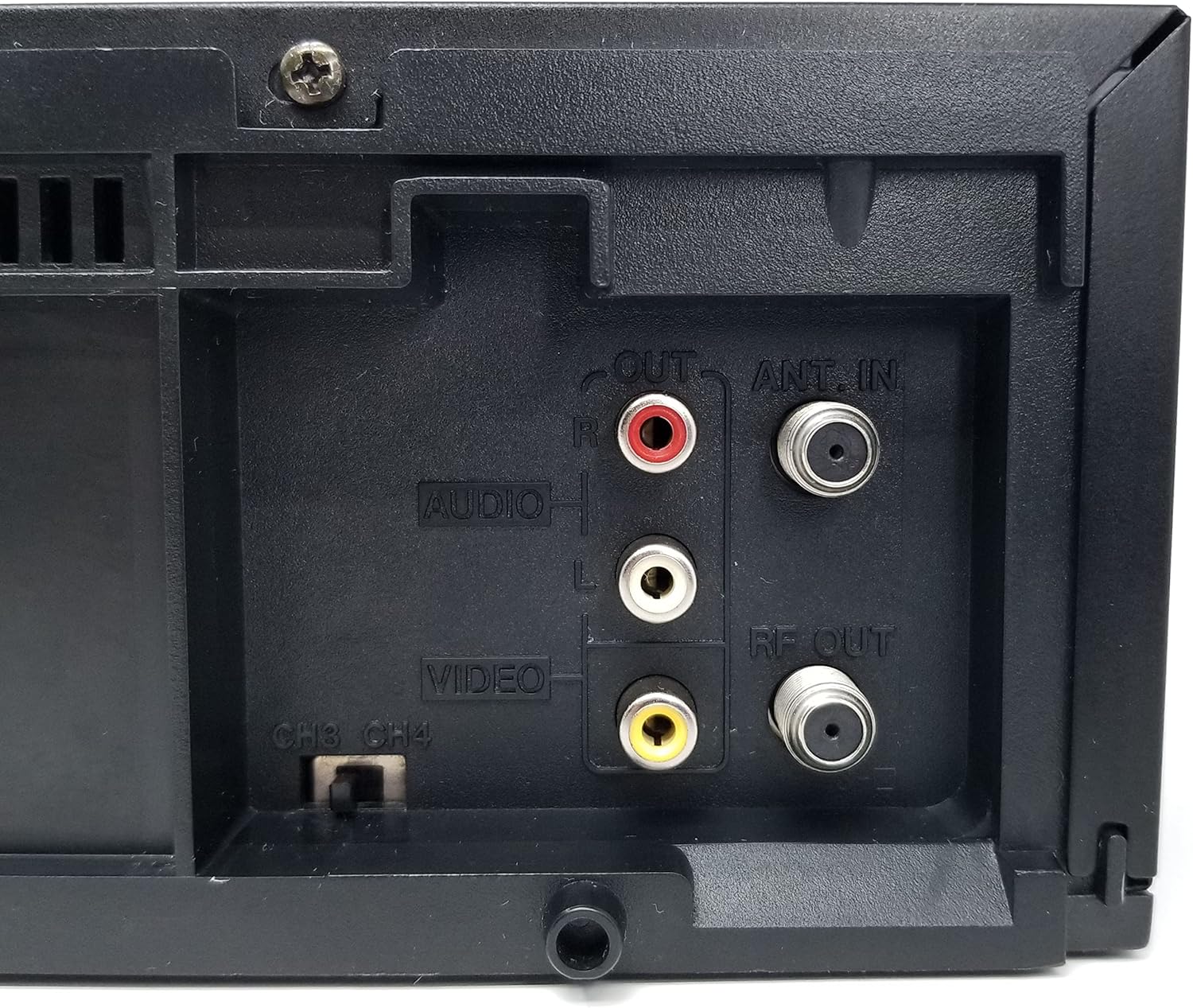
Gambar 4: Close-up of the rear audio (red/white RCA), video (yellow RCA), RF OUT, and ANT. IN connections on the JVC HR-VP58U VCR.
The rear panel houses all necessary connections for integrating the VCR into your home entertainment system.
- ANT. IN: Connects to your antenna or cable TV signal.
- RF kaluar: Connects to your TV's antenna input (typically for older TVs).
- AUDIO OUT (L/R) & VIDEO OUT: RCA jacks (red, white, yellow) for connecting to your TV or audio receiver.
- AUDIO IN (L/R) & VIDEO IN: RCA jacks (red, white, yellow) for connecting external devices for recording.
- CH3/CH4 Switch: Selects the RF output channel for your TV.
5. Setélan
5.1 Nyambungkeun ka Télévisi
Aya dua metode utama pikeun nyambungkeun VCR anjeun ka televisi:
- Using RCA Audio/Video Cables (Recommended for best quality):
- Connect the yellow VIDEO OUT jack on the VCR to the yellow VIDEO IN jack on your TV.
- Connect the white AUDIO OUT (L) jack on the VCR to the white AUDIO IN (L) jack on your TV.
- Connect the red AUDIO OUT (R) jack on the VCR to the red AUDIO IN (R) jack on your TV.
- Select the corresponding Video Input (e.g., Video 1, AV1) on your TV.
- Using an RF Coaxial Cable (for older TVs or limited inputs):
- Connect your antenna or cable TV signal to the ANT. IN jack on the VCR.
- Connect an RF coaxial cable from the RF OUT jack on the VCR to the ANT. IN jack on your TV.
- Set the CH3/CH4 switch on the VCR's rear panel to either 3 or 4.
- Tune your TV to the corresponding channel (3 or 4) to receive the VCR's signal.
5.2 Sambungan Daya
Plug the attached power cord into a standard AC wall outlet (120V, 60Hz).
6. Parentah Operasi
6.1 Playback Dasar
- Turn on your TV and select the correct input source (AV input or Channel 3/4).
- Pencét éta POWER button on the VCR or remote control to turn on the unit.
- Selapkeun pita VHS kana slot pita. VCR bakal otomatis ngamuat pita.
- Pencét éta ulin button on the VCR or remote control to begin playback.
- Ngagunakeun éta REW (Rewind) and FF (Fast Forward) buttons to navigate the tape.
- Pencét éta Reureuh tombol pikeun ngeureunkeun puteran samentawis. Pencét deui pikeun nuluykeun.
- Pencét éta STOP/EJECT tombol pikeun ngeureunkeun puteran sareng ngaluarkeun pita éta.
6.2 Ngarékam
The JVC HR-VP58U allows for recording from various sources.
- Insert a recordable VHS tape with the erase protection tab intact.
- To record from TV: Select the desired TV channel on the VCR.
- To record from external device (e.g., camcorder): Connect the device to the front or rear AUDIO IN/VIDEO IN jacks. Select the appropriate input source on the VCR (e.g., Line 1, L1).
- Pencét éta REC (Record) button. Recording will begin immediately.
- Pencét éta EUREUN tombol pikeun ngeureunkeun rékaman.
Refer to the remote control section for advanced recording features like timer recording.
6.3 Fungsi Remote Control
The included remote control provides full functionality for your VCR. Familiarize yourself with its buttons for convenient operation.
- kakuatan: Turns the VCR on/off.
- SHUTTLE PLUS: For variable speed playback and search.
- MENU / OKÉ: Accesses and confirms menu selections.
- CH +/-: Robah saluran atanapi napigasi ménu.
- TV/VCR: Pindah antara mode TV sareng VCR.
- REC/STOP/PLAY/PAUSE/FF/REW: Standard transport controls.
- TIMER: Accesses timer recording settings.
- TAMPILAN: Shows on-screen display information.
7. Pangropéa
7.1 Ngabersihan Unit
- Ngusap bagian luar VCR ku kaén anu lembut sareng garing.
- Do not use liquid or aerosol cleaners, as they may damage the finish or internal components.
- Keur kokotor bandel, rada dampen lawon ku cai, teras usap garing langsung.
7.2 Tape Head Cleaning
Over time, tape heads can accumulate dirt, leading to poor picture or sound quality. Use a dry-type VHS head cleaning cassette periodically (e.g., every 50-100 hours of use) according to the cleaning cassette's instructions. Avoid wet-type cleaners unless specifically recommended, as they can cause damage if used improperly.
8. Cara ngungkulan
| Masalah | Mungkin Cukang lantaranana | Solusi |
|---|---|---|
| Taya kakuatan | kabel kakuatan unplugged; outlet teu aktip. | Pariksa sambungan kabel kakuatan; test outlet jeung alat sejen. |
| Teu aya gambar/sora nalika diputer | Incorrect TV input selected; A/V cables loose or incorrect; dirty tape heads. | Select correct TV input; check all cable connections; use a head cleaning cassette. |
| Tape moal maén atanapi ngaluarkeun | Pita macét; gagalna VCR. | Do not force the tape. Power cycle the VCR. If issue persists, seek professional service. |
| Kualitas gambar goréng (salju, menyimpang) | Dirty tape heads; worn-out tape; weak signal. | Clean tape heads; try a different tape; check antenna/cable connection. |
| Kadali jauh teu jalan | Dead batteries; obstruction; remote sensor blocked. | Replace batteries; remove obstructions; ensure clear line of sight to VCR sensor. |
9. Spésifikasi
- model: HR-VP58U
- lulugu: 4-Sirah Hi-Fi Stereo
- Sistem Pidéo: NTSC
- Sasayogian tanaga: AC 120V, 60Hz
- Ukuran (L x W x H): Approximately 19.72 x 8.82 x 13.82 inches (based on package dimensions, actual unit may vary slightly)
- beurat: Kurang leuwih 8.98 pon
- Audio: Hi-Fi Stéroid
- Input: Front A/V (RCA), Rear A/V (RCA), RF (Coaxial)
- Kaluaran: Rear A/V (RCA), RF (Coaxial)
10. Garansi jeung Rojongan
For warranty information or technical support, please refer to the documentation provided at the time of purchase or contact your retailer. If you encounter any issues with the product, it is recommended to contact the seller directly for assistance before attempting repairs.
Note: This product is a JVC HR-VP58U VCR. For specific support related to this model, please have your model number and serial number ready when contacting support.


