Produk Leuwihview
The Sagemcom Sixty Cordless Telephone and Answer Machine combines modern technology with a classic design. Its unique aesthetic, smooth finish, and touchscreen functionality make it a distinctive addition to any environment. Designed for user comfort, the Sixty offers a range of features including hands-free mode, extended battery life, and an intuitive interface for easy communication.
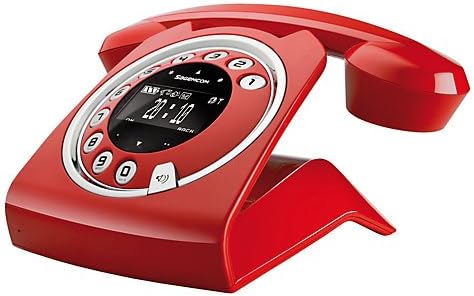
Image: The Sagemcom Sixty Cordless Telephone and Answer Machine in red, showcasing its unique retro-modern design with a circular dial and digital display.

Gambar: Sisi view of the Sagemcom Sixty Cordless Telephone, highlighting its sleek profile and the cradle design.
Guide Setup
1. Ngabongkar bungkusan
Carefully remove all components from the packaging. Ensure you have the base unit, handset, power adapter, and telephone line cord.
2. Nyambungkeun Unit Base
- Connect the power adapter to the 'DC IN' port on the back of the base unit and plug the other end into a wall outlet.
- Connect one end of the telephone line cord to the 'LINE' port on the base unit and the other end to your telephone wall jack.
3. Pamasangan Batré sareng Ngecas
- Buka kompartemen batré dina handset.
- Pasangkeun batré anu tiasa dicas deui, bari tetep merhatikeun polaritasna (+ sareng -) anu leres.
- Tutup kompartemen batré.
- Place the handset on the base unit. The display will indicate charging. Allow the handset to charge for at least 16 hours before first use to ensure optimal battery performance.
Parentah Operasi
Nelepon jeung Narima Telepon
- Pikeun nelepon: Angkat handset atawa pencét kenop Nelepon button. Dial the number using the touchscreen keypad.
- Pikeun Nampa Telepon: Angkat handset atawa pencét kenop Nelepon tombol nalika telepon hurung.
- Pikeun ngeureunkeun telepon: Teundeun héndsét deui dina unit dasar atawa pencét kenop Tungtung Telepon kancing.
Ngagunakeun Layar rampa
The Sixty features a responsive touchscreen for navigation and input. Tap icons or numbers to select functions or dial. Swipe to scroll through lists or menus.
Leungeun-Free Mode
Nalika nelepon, pencét éta Speaker tombol pikeun ngaktipkeun modeu hands-free. Pencét deui pikeun balik deui ka modeu handset.
Manajemén Buku Telepon
- Nambahkeun Kontak: Navigate to the Phonebook menu, select 'Add New Contact', enter the name and number using the touchscreen, and save. The phonebook can store up to 150 names.
- Milarian Kontak: Access the Phonebook and use the search function or scroll through the list.
- Editing/Deleting a Contact: Select the desired contact from the Phonebook and choose the 'Edit' or 'Delete' option.
Answering Machine Functions
The integrated answering machine has a recording capacity of 10 minutes.
- Ngaktipkeun/Nonaktipkeun: Access the Answering Machine menu to turn it on or off.
- Maén pesen: Select 'Play Messages' from the Answering Machine menu.
- Ngarékam Pesen Kaluar: Follow the prompts in the Answering Machine menu to record a personalized outgoing message.
Pangropéa
Ngabersihkeun Telepon Anjeun
To clean the phone, wipe it with a soft, damp cloth. Do not use abrasive cleaners or solvents, as these can damage the surface. Ensure the phone is disconnected from power before cleaning.
Perawatan batré
- Salawasna nganggo accu rechargeable disadiakeun.
- Upami telepon teu tiasa dianggo kanggo waktos anu panjang, cabut batréna pikeun nyegah bocor.
- Buang batré heubeul kalawan tanggung jawab nurutkeun peraturan lokal.
Pamérésan masalah
| Masalah | Solusi anu mungkin |
|---|---|
| Taya nada dial | Check if the telephone line cord is securely connected to both the base unit and the wall jack. Ensure the power adapter is plugged in. |
| Handset teu ngecas | Ensure the handset is correctly placed on the base unit. Clean the charging contacts on both the handset and base unit with a dry cloth. Verify the power adapter is working. |
| Kualitas sora goréng | Pindah ngadeukeutan ka unit dasar. Pariksa gangguan ti alat éléktronik lianna. Pastikeun kabel saluran telepon teu ruksak. |
| Paparanana kosong | Check if the handset battery is charged. If not, place it on the base unit to charge. Ensure the power adapter is connected to the base unit. |
| Teu tiasa nelepon atanapi nampi telepon | Verify that the telephone line is active. Check all cable connections. Restart the base unit by unplugging and replugging the power adapter. |
Spésifikasi teknis
| Fitur | Spésifikasi |
|---|---|
| merek | Sagemcom |
| Modél | Genep puluh |
| Warna | Beureum |
| Tipe Telepon | Tanpa kabel |
| Telepon Talk Time | Nepi ka 10 Jam |
| Waktu sayaga | Nepi ka 120 Jam |
| Recording Capacity (Answering Machine) | 10 Menit |
| Kapasitas Buku Telepon | 150 Ngaran |
| ASIN | B00DX64LPI |
| Tanggal Sadia munggaran | 15 April 2014 |
Garansi sareng Rojongan
For warranty information and customer support, please refer to the documentation included with your purchase or visit the official Sagemcom websitus. Simpen bukti pameseran anjeun pikeun klaim garansi.


