Bubuka
The Logitech Wireless All-in-One Keyboard TK820 is designed to integrate typing, touch, and gestures into a single device for efficient computer control and navigation. This manual provides instructions for setting up, operating, maintaining, and troubleshooting your keyboard.

Gambar: luhur-handap view of the Logitech Wireless All-in-One Keyboard TK820, showcasing its integrated keyboard and large touchpad.
Disetél
- Pasang Batré: The keyboard requires 4 AA batteries, which are included. Open the battery compartment on the underside of the keyboard and insert the batteries, ensuring correct polarity.
- Sambungkeun Panarima Anu Ngahiji: Locate the Logitech Unifying receiver. Plug this small USB receiver into an available USB port on your computer.
- Daya Hurung: Turn on the keyboard using the power switch, typically located on the side or back.
- Pangenal Sistim: Your computer should automatically detect and install the necessary drivers. The keyboard is compatible with Windows 7 and Windows 8 operating systems.
Catetan: This keyboard does not feature an integrated storage slot for the Unifying receiver. Please store the receiver safely when not in use or during transport.
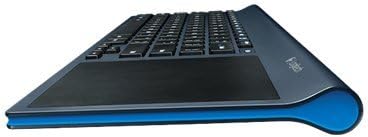
Gambar: Sisi profile of the Logitech TK820 keyboard, illustrating its slim design and ergonomic curve.
Parentah Operasi
Ngetik
- The keyboard features Perfect Stroke and Incurve keys designed for comfortable and fluid typing.
- Standard QWERTY layout with function keys (F1-F12) and media controls.
- To activate secondary functions on the F-keys (e.g., media controls, volume), press and hold the Fn konci sakaligus jeung F-konci nu dipikahoyong.
Touchpad Navigation
The integrated large touch surface allows for precise cursor control and gesture-based navigation.
- Gerakan Kursor: Slide one finger across the touchpad to move the cursor.
- Klik Kénca: Press the bottom-left area of the touchpad or tap once with one finger.
- Klik katuhu: Press the bottom-right area of the touchpad or tap once with two fingers.
- Ngagulung: Slide two fingers up or down to scroll vertically. Slide two fingers left or right to scroll horizontally.
- Zum: Ciwit ka jero atawa ka luar ku dua ramo pikeun ngazum.
- Windows 8 Gestures: The touchpad supports various Windows 8 gestures for enhanced navigation, including swiping from edges for charms bar, app switching, and more. These gestures are also compatible with Windows 7.
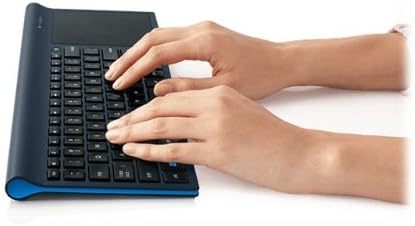
Image: A user's hand demonstrating interaction with the large integrated touchpad on the Logitech TK820 keyboard.
Pangropéa
Ngagantian batré
When the keyboard's battery indicator light signals low power, replace the 4 AA batteries. Ensure the keyboard is powered off before replacing batteries. Dispose of used batteries responsibly according to local regulations.
beberesih
To clean the keyboard and touchpad, use a soft, lint-free cloth. For stubborn dirt, slightly dampen the cloth with water or a mild electronics cleaner. Avoid using harsh chemicals, abrasive materials, or excessive moisture, as these can damage the device.
Pamérésan masalah
- No Response from Keyboard:
- Pastikeun keyboard diaktipkeun.
- Pariksa tingkat batré jeung ngaganti lamun perlu.
- Verify the Unifying receiver is securely plugged into a working USB port on your computer.
- Coba colokkeun panarima Unifying kana port USB anu béda.
- Move the keyboard closer to the Unifying receiver to rule out range issues.
- Touchpad Not Responding or Inaccurate:
- Ensure the touchpad surface is clean and free of obstructions.
- Balikan deui komputer anjeun.
- Check for any software updates for your operating system or Logitech drivers (if installed).
- Sambungan Intermittent:
- Avoid placing the keyboard near other wireless devices or large metal objects that may cause interference.
- Ensure the Unifying receiver is not obstructed.
spésifikasi
| merek | Logitech |
| Nomer modél | 920-005108 |
| Tipe Wireless | 2.4 Frékuénsi Radio GHz |
| Kasaluyuan System Operasi | Windows 7, Windows 8 |
| Sumber Daya | Batré Powered |
| Batré | 4 batré AA (kaasup) |
| Item Beurat | 1.9 pon |
| Ukuran produk (L x W x H) | 16.9 x 1.8 x 7.9 inci |
| Warna | Hideung |
| Bahan | karét |
Garansi sareng Rojongan
For detailed warranty information, please refer to the documentation provided with your product or visit the official Logitech support websitus. Logitech nyayogikeun dukungan palanggan pikeun patarosan produk, bantosan téknis, sareng klaim garansi.