
HEWLETT PACKARD J9783A
HPE J9783A-ABA Aruba 2530 8 Switch
Manual pamaké
Brand: HEWLETT PACKARD | Model: J9783A
1. Bubuka
This manual provides comprehensive instructions for the installation, operation, maintenance, and troubleshooting of the HPE J9783A-ABA Aruba 2530 8 Switch. This device is designed to provide reliable network connectivity for various environments, offering 8 network ports, manageability features, and flexible deployment options.
Please read this manual thoroughly before attempting to install or operate the switch to ensure proper setup and to prevent damage to the unit or connected devices.
2. Setup jeung Instalasi
2.1 Unpacking the Switch
Cabut saklar sareng sadaya asesoris tina bungkusna kalayan ati-ati. Pariksa yén sadaya komponén aya:
- HPE J9783A-ABA Aruba 2530 8 Switch unit
- adaptor kakuatan (12V 0.5A)
- Mounting hardware (if included for rack or wall mounting)
- Dokuméntasi (manual ieu)
Inspect the switch for any signs of physical damage. If any damage is found, contact your vendor immediately.
2.2 Nempatkeun fisik
The HPE Aruba 2530 8 Switch is versatile and can be deployed in several ways:
- Penempatan Desktop: Place the switch on a flat, stable surface. Ensure adequate ventilation around the unit.
- Pamasangan témbok: Use appropriate screws and anchors (not included) to secure the switch to a wall. Refer to the mounting holes on the device.
- Pamasangan rak: The switch is 1U high and can be installed in a standard equipment rack using the provided rack-mount kit (if applicable).
Ensure the installation location is dry, well-ventilated, and within the specified operating temperature range (up to 40°C).

Gambar 1: Tukangeun view of the switch, highlighting the 12V 0.5A power input and product identification label.
2.3 Sambungan Daya
Connect the provided power adapter to the 12V 0.5A DC input port on the rear of the switch. Plug the other end of the power adapter into a suitable electrical outlet. The switch will power on automatically.
2.4 Sambungan Jaringan
The switch features 8 Fast Ethernet (10/100Base-TX) RJ45 ports for connecting network devices such as computers, printers, and other network switches. It also includes 2 dual-personality 10/100/1000Base-T or SFP ports for uplink connections.
- Connect standard Ethernet cables (Cat5e or higher) from your network devices to any of the RJ45 ports (1-8).
- The switch supports auto-MDI/MDIX, so you can use either straight-through or crossover cables.
- For uplink connections, use the dual-personality ports (9G, 10G) with either RJ45 Gigabit Ethernet or SFP transceivers.

Figure 2: Front panel of the switch, illustrating the network ports, console port, and LED status indicators.
2.5 Sambungan Konsol
For initial configuration and advanced management, connect a console cable (not included) from your computer's serial port to the RJ45 console port on the front of the switch. Use a terminal emulation program (e.g., PuTTY, Tera Term) with the following settings:
- Laju Baud: 9600
- Bit Data: 8
- Parity: Euweuh
- Ngeureunkeun Bit: 1
- Kontrol Aliran: Euweuh
3. Ngoperasikeun Switch
3.1 Power On and Self-Test
Once connected to power, the switch will automatically power on and perform a Power-On Self-Test (POST). During POST, the system LEDs will cycle. Upon successful completion, the Status LED will indicate normal operation.
3.2 Indikator LED
The front panel of the switch features several LEDs that provide status information:
- LED kakuatan: Nunjukkeun status kakuatan unit.
- Kasalahan LED: Illuminates if a system fault is detected.
- LED Locator: Used to physically locate the switch in a rack or wiring closet.
- Status LED: Nunjukkeun status operasional sakabéh switch.
- Tombol tés: Dianggo pikeun tujuan diagnostik.
- Tombol Hapus: Used to clear certain diagnostic states.
- Link/Aktivitas LEDs (per port):
- Héjo padet: A valid network link is established.
- Héjo kedip-kedip: Aktivitas data lumangsung dina palabuhan.
- Pareum: Taya link kauninga atanapi port ditumpurkeun.
- Speed LEDs (per port):
- Pareum: 10 Mbps sambungan.
- Héjo padet: 100 Mbps sambungan.
- Héjo kedip-kedip: 1000 Mbps connection (for Gigabit ports).
3.3 Operasi Jaringan Dasar
The HPE Aruba 2530 8 Switch operates as a plug-and-play device for basic network connectivity. Once devices are connected to the ports, they can communicate with each other and with other network segments if the switch is connected to a router or another switch.
3.4 Antarmuka Manajemén
The switch is manageable, allowing for advanced configuration and monitoring. Management can be performed via:
- Antarmuka Jalur Komando (CLI): Accessible via the console port or Telnet/SSH over the network.
- Web-based Graphical User Interface (GUI): Diaksés via a web browser by entering the switch's IP address.
Refer to the comprehensive software configuration guide (available from HPE's support website) for detailed instructions on configuring VLANs, QoS, security features, and other advanced settings.
4. Pangropéa
The HPE Aruba 2530 8 Switch is designed for reliable operation with minimal maintenance. However, periodic checks can help ensure optimal performance and longevity.
4.1 beberesih
Keep the switch clean and free of dust. Use a soft, dry cloth to wipe the exterior. Do not use liquid or aerosol cleaners, as they may damage the unit. Ensure ventilation openings are not obstructed.
4.2 Pertimbangan Lingkungan
Ensure the switch operates within its specified environmental limits:
- Suhu operasi: 0°C nepi ka 40°C (32°F nepi ka 104°F)
- Kalembaban Operasi: 15% nepi ka 95% non-condensing
Avoid placing the switch near heat sources or in direct sunlight. Maintain proper airflow around the unit.
5. Cara ngungkulan
This section provides solutions to common issues you may encounter with the HPE Aruba 2530 8 Switch.
| Masalah | Mungkin Cukang lantaranana | Solusi |
|---|---|---|
| Teu Aya Daya / LED Daya Pareum | Adaptor daya teu nyambung atawa faulty; masalah stop kontak listrik. | Verify power adapter connection to switch and outlet. Test outlet with another device. Replace power adapter if faulty. |
| No Link Light on Port | Cable not connected properly; faulty cable; connected device is off or faulty; incorrect port configuration. | Ensure cable is securely connected at both ends. Try a different Ethernet cable. Verify the connected device is powered on and functioning. Check switch port status via management interface. |
| Kinerja Jaringan anu Leungit | Network congestion; faulty cable; duplex mismatch; outdated firmware. | Check network traffic. Replace suspect cables. Verify duplex settings on both the switch port and connected device. Consider updating switch firmware. |
| Fault LED is On | Internal hardware issue; overheating. | Check ventilation and ensure the switch is not overheating. If the issue persists, contact technical support. |
For more complex issues or if the problem persists, consult the detailed troubleshooting guide available on the HPE support website or contact HPE technical support.
6. Spésifikasi
The following table outlines the technical specifications of the HPE J9783A-ABA Aruba 2530 8 Switch.
| Fitur | Katerangan |
|---|---|
| Nomer modél | J9783A |
| merek | HP (Hewlett Packard Enterprise) |
| Port jaringan | 8 x 10/100Base-TX RJ45 ports |
| Palabuhan Uplink | 2 x Dual-personality 10/100/1000Base-T or SFP ports |
| Laju Mindahkeun Data | 5.6 Gigabit Per Detik (Kapasitas Switching) |
| Dukungan Lapisan | Layer 2 Supported |
| Manageability | Manageable (CLI, Web GUI) |
| Ukuran (L x W x H) | 10 x 6.28 x 1.75 inci (25.4 x 15.95 x 4.45 cm) |
| Beurat | 1.81 pon (820 gram) |
| Bahan Kasus | logam |
| Input kakuatan | 12V DC, 0.5A |
| Suhu Operasi | 0°C nepi ka 40°C (32°F nepi ka 104°F) |
| Pilihan Pamasangan | Rack-mountable (1U), Wall Mountable, Desktop |
| Alat nu cocog | Desktop, Laptop, Printer |
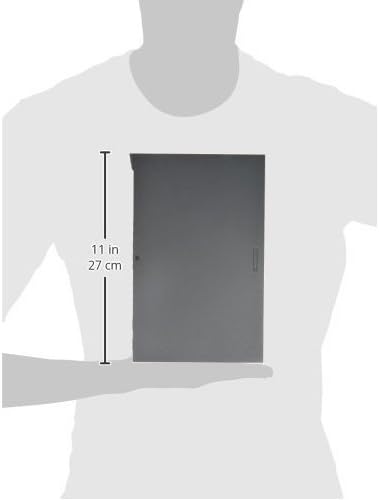
Figure 3: Approximate dimensions of the switch.
7. Garansi jeung Rojongan
This HPE J9783A-ABA Aruba 2530 8 Switch is covered by a manufacturer's warranty. For specific warranty terms and conditions, please refer to the warranty card included with your product or visit the official HPE websitus.
For technical assistance, product registration, or to download the latest firmware and documentation, please visit the HPE support portal or contact their customer service. Have your product model number (J9783A) and serial number ready when contacting support.
Dukungan HPE Websitus: www.hpe.com/support