1. Bubuka
The Radial Voco-Loco is a specialized foot-controlled effects loop designed to seamlessly integrate guitar effects pedals into your vocal or acoustic instrument signal chain. This device allows singers, horn players, and other acoustic instrumentalists to utilize a wide array of guitar effects, expanding their sonic possibilities in live performance or studio settings. It features a high-quality microphone preamplifier, a 2-band equalizer, and a transformer-isolated high-impedance effects loop with individual send and receive controls, along with a blend control for mixing dry and wet signals.
2. Fitur konci
- Foot-controlled Effects Loop with Mic Preamp: Enables hands-free activation of effects.
- Dry/Wet Blend Control: Allows precise mixing of the original signal with the processed effects.
- 2-Band EQ: Provides tone shaping for the microphone signal with Low and High frequency adjustments.
- Transformer-Isolated Hi-Z Effects Loop: Ensures optimal signal integrity and compatibility with guitar pedals.
- Individual Send/Receive Controls: Offers fine-tuning of signal levels to and from the effects pedals.
- 180-degree Phase Lift Switch: Helps eliminate feedback issues.
- 48V Phantom Power: Supplies power to condenser microphones.
3. Setup Guide
Follow these steps to connect your Radial Voco-Loco:
- Sambungan Daya: Connect the included 15VDC power supply to the 'POWER' input on the Voco-Loco. Ensure the power supply is rated for 400mA.
- Input mikropon: Connect your microphone to the 'MIC INPUT' XLR jack on the Voco-Loco. If using a condenser microphone, activate the 48V phantom power switch.
- Effects Loop Connection:
- Connect the 'SEND' 1/4-inch jack on the Voco-Loco to the input of your first guitar effects pedal.
- Chain your desired effects pedals together using standard guitar cables.
- Connect the output of your last effects pedal to the 'RECEIVE' 1/4-inch jack on the Voco-Loco.
- Output to Mixer/PA: Connect the 'LINE OUTPUT' XLR jack on the Voco-Loco to an input on your mixing console or PA system.

Figure 3.1: Rear panel connections of the Radial Voco-Loco, illustrating power, XLR input/output, and 1/4-inch send/receive jacks for effects pedals.

Gambar 3.2: Kelample setup for an acoustic instrument (saxophone) with microphone, Voco-Loco, guitar effects pedals, and a PA system.
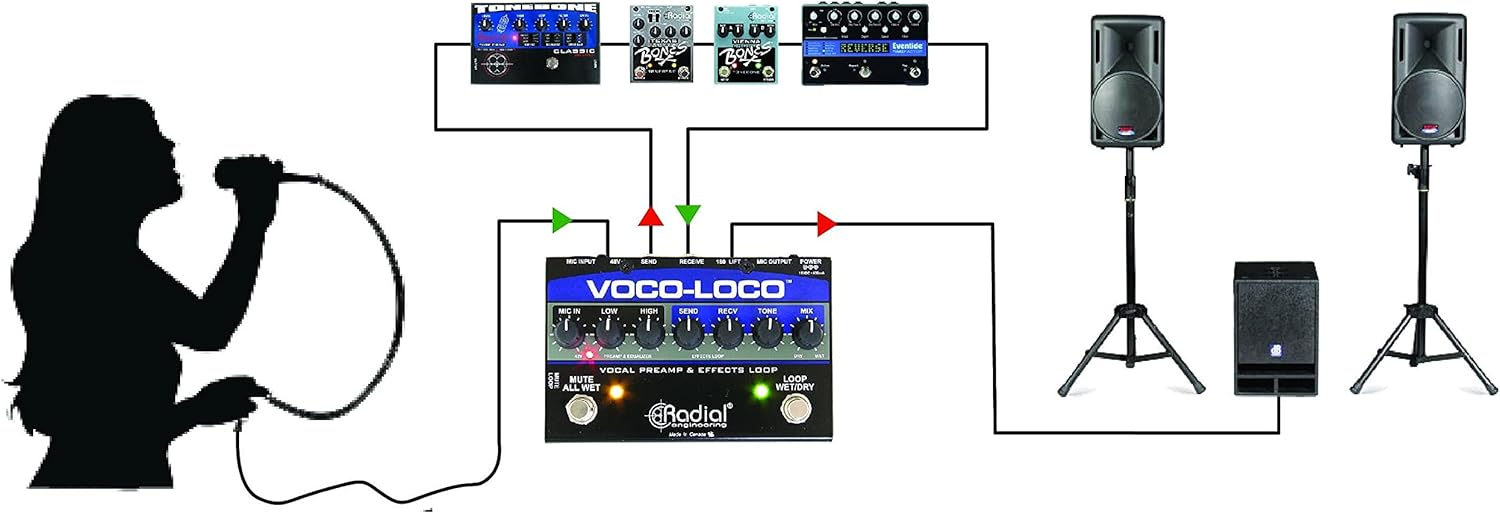
Gambar 3.3: Kelample setup for a vocalist with microphone, Voco-Loco, guitar effects pedals, and a PA system.
4. Parentah Operasi
The Voco-Loco features intuitive controls for shaping your sound and managing your effects loop.

Figure 4.1: Top panel controls and footswitches of the Radial Voco-Loco.
4.1. Praamp & Equalizer Controls
- MIC IN: Adjusts the input gain for your microphone. Start with this control at a low setting and gradually increase until a healthy signal is achieved without clipping.
- RENDAH: Controls the low-frequency equalization for the microphone signal. Use to add warmth or reduce muddiness.
- TINGGI: Controls the high-frequency equalization for the microphone signal. Use to add clarity or reduce harshness.
- 48V Switch: Activates 48V phantom power for condenser microphones. Ensure this is off for dynamic microphones.
4.2. Effects Loop Controls
- Ngirimkeun: Adjusts the signal level sent from the Voco-Loco to your effects pedals. Optimize this to prevent overdriving your pedals.
- RECV (Receive): Adjusts the signal level returning from your effects pedals to the Voco-Loco.
- NADA: Provides additional tone shaping for the signal returning from the effects loop. This can help integrate the processed sound more smoothly.
- MIX (Dry/Wet): Blends the original dry microphone signal with the wet signal from the effects loop. Turn clockwise for more effects, counter-clockwise for more dry signal.
- 180 LIFT (Phase Lift): A switch that inverts the phase of the signal. Useful for resolving phase issues or reducing feedback, especially when combining direct and processed signals.
4.3. Sampéan
- MUTE ALL WET: When engaged, this footswitch mutes the wet (effected) signal, allowing only the dry microphone signal to pass through. This is useful for quickly cutting effects.
- LOOP baseuh/garing: This footswitch engages or bypasses the effects loop. When engaged, the effects pedals are active and blended with the dry signal according to the MIX control. When bypassed, only the dry signal passes.
5. Pangropéa
To ensure the longevity and optimal performance of your Radial Voco-Loco, follow these maintenance guidelines:
- beberesih: Use a soft, dry cloth to clean the exterior of the unit. Avoid abrasive cleaners, solvents, or excessive moisture, which can damage the finish and internal components.
- Panyimpenan: Store the Voco-Loco in a cool, dry environment away from direct sunlight, extreme temperatures, and high humidity.
- Penanganan: While built robustly, avoid dropping the unit or subjecting it to severe impacts.
- Sambungan: Periodically check all cable connections for wear and tear. Ensure cables are securely plugged in during operation.
- Sasayogian tanaga: Always use the original or a Radial-approved replacement power supply to prevent damage.
6. Cara ngungkulan
If you encounter issues with your Voco-Loco, refer to the following troubleshooting tips:
- Taya Kaluaran Sora:
- Pariksa yén catu daya parantos nyambung sareng tiasa dianggo.
- Check all XLR and 1/4-inch cable connections. Ensure they are fully inserted and not damaged.
- Confirm the 'MIC IN' gain control is not set to minimum.
- Ensure the 'LOOP WET/DRY' footswitch is in the desired state (engaged or bypassed).
- If using a condenser mic, ensure 48V phantom power is activated.
- Pangaruh Anu Teu Kadéngé:
- Check that the 'LOOP WET/DRY' footswitch is engaged (LED illuminated).
- Ensure the 'MIX' control is turned clockwise sufficiently to blend in the wet signal.
- Verify that your effects pedals are powered on and functioning correctly.
- Check the 'SEND' and 'RECV' controls; adjust them to appropriate levels.
- Feedback or Unwanted Noise:
- Reduce the 'MIC IN' gain.
- Adjust the 'LOW' and 'HIGH' EQ controls to cut problematic frequencies.
- Engage the '180 LIFT' phase switch to see if it reduces feedback.
- Ensure proper gain staging throughout your effects chain; some guitar pedals can significantly boost signal levels.
- Check for ground loops.
- Sinyal Intermiten:
- Inspect all cables for damage or loose connections. Try swapping cables to isolate a faulty one.
- Ensure the power supply connection is stable.
- Test the unit with a minimal setup (e.g., mic directly to Voco-Loco, then to mixer, bypassing effects pedals) to isolate the problem.
7. Spésifikasi
| Item Beurat | 2.48 pon |
| Dimensi produk | 18 x 4 x 6 inci |
| Nomer modél | R800 1425 00 |
| Tipe Panyambung | XLR, 1/4 inch jack |
| Panganteur Hardware | Audio 1/4 inci |
| Format Sinyal | Analog |
| Sumber Daya | Kabel Listrik |
| Voltage | 48 Volt (pikeun kakuatan phantom) |
| merek | Téknik Radial |
| Gaya | Kompak |
| Warna | Hideung |
| Ampumur | 300 Miliamps (power supply requirement) |
8. Garansi jeung Rojongan
Radial Engineering products are designed for durability and reliability. For specific warranty information, please refer to the warranty card included with your product or visit the official Radial Engineering website. For technical support, product registration, or service inquiries, please contact Radial Engineering customer service directly through their official channels.


