1. Bubuka
The Audiovox ANT700F is an amplified antenna designed for reception of digital television signals. It supports both VHF and UHF frequencies. This antenna can be installed indoors or outdoors, offering versatile mounting options such as to a mast, wall, or deck railings. Its weather-resistant surface is paintable to blend with various environments. This manual provides comprehensive guidance for installation, operation, and maintenance.
2. Eusi Paket
- Unit anteneu
- Baris amppangagung
- 20ft coaxial cable
- Kit pamasangan
- Pitunjuk pamasangan (manual ieu)
3. Setup jeung Instalasi
The ANT700F antenna can be mounted in various locations, including a mast, wall, or deck railings. Ensure the chosen location provides the clearest line of sight to broadcast towers.
3.1. Step 1: Unpack Components
Carefully remove all items from the packaging. Verify that all listed package contents are present.
3.2. Step 2: Choose a Mounting Location
For optimal signal reception, select a location that is as high as possible and free from obstructions such as large buildings or trees. The antenna is weather-resistant for outdoor use and paintable to blend with surroundings.
3.3. Step 3: Mount the Antenna
Use the provided mounting kit to secure the antenna.
- For Mast Mounting: Attach the antenna bracket to a mast using the U-bolts and nuts.
- For Wall/Deck Mounting: Use appropriate screws (not always included, depending on surface) to secure the bracket to a flat surface.
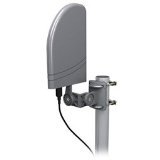
Image Description: A gray, rectangular Audiovox ANT700F antenna is shown mounted on a vertical pole using a gray bracket. A black coaxial cable extends from the bottom of the antenna.
3.4. Step 4: Connect the Coaxial Cable and Amppangagung
Connect one end of the 20ft coaxial cable to the antenna's output port. Connect the other end of the coaxial cable to the in-line amppangagung. Nyambungkeun ka amplifier's output to your television or digital converter box's antenna input. Ensure all connections are secure.
3.5. Step 5: Power the Amppangagung
The in-line amplifier requires power. Connect the amplifier's power adapter to an electrical outlet.
4. Parentah Operasi
4.1. Scanning for Channels
After installation and connection, access your television's menu and navigate to the "Channel Scan" or "Auto Program" function. Initiate the channel scan. This process may take several minutes. Once the scan is complete, your television should display the available digital channels.
4.2. Optimizing Reception
If reception is poor for certain channels, try slightly adjusting the antenna's direction and re-running the channel scan. Small adjustments can significantly impact signal quality.
5. Pangropéa
The Audiovox ANT700F antenna is designed for durability and requires minimal maintenance.
- beberesih: Periodically wipe the antenna's exterior with a soft, damp lawon pikeun miceun kokotor atawa lebu. Ulah make bahan kimia anu kasar atawa pembersih anu abrasif.
- Pamariksaan: Annually inspect all cable connections and mounting hardware for signs of wear, corrosion, or loosening. Tighten any loose connections or hardware.
- Perlindungan Cuaca: While weather-resistant, extreme weather conditions (e.g., heavy ice, strong winds) may require additional inspection after the event.
6. Cara ngungkulan
6.1. No Signal or Poor Reception
- Pariksa sambungan: Ensure all coaxial cable connections are secure at the antenna, amplifier, and television.
- Kakuatan Amppanguat: Verify the in-line amplifier is properly powered and its indicator light (if present) is on.
- Posisi anteneu: Adjust the antenna's direction. Even slight changes can improve signal strength. Re-run a channel scan after each adjustment.
- Halangan: Ensure there are no new obstructions (e.g., new buildings, dense foliage) blocking the line of sight to broadcast towers.
- Setélan TV: Confirm your TV input is set to "Antenna" or "Air" and not "Cable."
6.2. Missing Channels
- Nyeken deui Saluran: Perform a full channel scan on your television.
- Antenna Direction: Adjust the antenna's direction and re-scan. Different broadcast towers may be in different directions.
- Kakuatan sinyal: Some channels may have weaker signals. Consider a higher mounting location if possible.
7. Spésifikasi
- model: ANT700F
- merek: Audiovox
- Reception Type: Digital TV (HDTV/VHF/UHF)
- Rentang Frékuénsi: VHF: 175-240MHz, UHF: 470-862MHz
- Pamasangan: Jero rohangan / Luar
- ukuran: Approximately 6.5" W x 5.1" D x 14" H (16.51 cm W x 12.95 cm D x 35.56 cm H)
- beurat: Kira-kira 1.2 kg (2.65 lbs)
- Kaasup: Antenna, in-line amplifier, 20ft coaxial cable, mounting kit.
8. Émbaran jaminan
This Audiovox ANT700F antenna comes with a 1-year limited warranty from the date of purchase. This warranty covers defects in materials and workmanship under normal use. It does not cover damage resulting from misuse, accident, modification, or unauthorized repair. Please retain your proof of purchase for warranty claims.
9. Rojongan Palanggan
For technical assistance or warranty inquiries, please contact Audiovox customer support. Refer to the official Audiovox websitus atawa dokuméntasi pameseran Anjeun pikeun inpo kontak panganyarna.


