1. Bubuka
Thank you for choosing the Melitta MKM-531-W Pure White Aroma Thermo Stainless Coffee Maker. This manual provides essential information for the safe and efficient operation, maintenance, and care of your new coffee maker. Please read these instructions thoroughly before first use and keep them for future reference.

Gambar 1: Melitta MKM-531-W Coffee Maker. This image shows the complete coffee maker unit with its thermal carafe and filter cone.
2. Parentah Kasalametan penting
- Baca sadaya parentah sateuacan nganggo alat.
- Ulah noél surfaces panas. Paké handles atanapi knobs.
- Pikeun nangtayungan tina seuneu, kejut listrik, jeung tatu ka jalma, ulah neuleumkeun ari, colokan, atawa alat dina cai atawa cairan séjén.
- Pengawasan anu ketat diperyogikeun nalika alat naon waé dianggo ku atanapi caket barudak.
- Cabut colokan tina stop kontak nalika henteu dianggo sareng sateuacan beberesih. Ngidinan pikeun niiskeun sateuacan dipasang atanapi nyabut bagian, sareng sateuacan ngabersihkeun alat.
- Entong ngoperasikeun alat naon waé nganggo kabel atanapi colokan anu rusak atanapi saatos alatna teu tiasa dianggo, atanapi parantos ruksak dina cara naon waé. Balikkeun alat ka fasilitas layanan otorisasi anu pangcaketna pikeun pamariksaan, perbaikan, atanapi pangaturan.
- Pamakéan kantétan aksésori anu henteu disarankeun ku produsén alat tiasa nyababkeun kahuruan, kejutan listrik, atanapi cilaka jalma.
- Ulah make di luar.
- Entong ngantepkeun kabel ngagantung dina ujung méja atanapi konter, atanapi nyabak permukaan anu panas.
- Ulah nempatkeun dina atawa deukeut gas panas atawa burner listrik, atawa dina oven dipanaskeun.
- Sok pasangkeun heula colokan kana alat, teras colokkeun kabel kana stop kontak témbok. Pikeun megatkeun sambungan, balikkeun sagala kadali kana "off", teras cabut colokan tina stop kontak témbok.
- Ulah make alat pikeun lian ti pamakéan dimaksudkeun.
- Scaling bisa lumangsung lamun tutupna dipiceun salila siklus brewing.
3. Bagian Idéntifikasi
Familiarize yourself with the components of your Melitta coffee maker:
- Waduk Cai
- Indikator Level Cai
- Filter Holder (removable)
- Mékanisme Ngeureunkeun Tetesan
- Thermal Carafe with Lid
- Heating Plate (for filter holder, not for carafe warming)
- Power Switch with Indicator Light
- Kabel listrik

Gambar 2: View of the filter basket area. This image highlights the internal structure of the filter holder where the coffee grounds are placed.

Gambar 3: Diagram of the filter's drip stop mechanism. This illustration shows how the stopper at the bottom of the filter interacts with the carafe to prevent dripping when the carafe is removed.
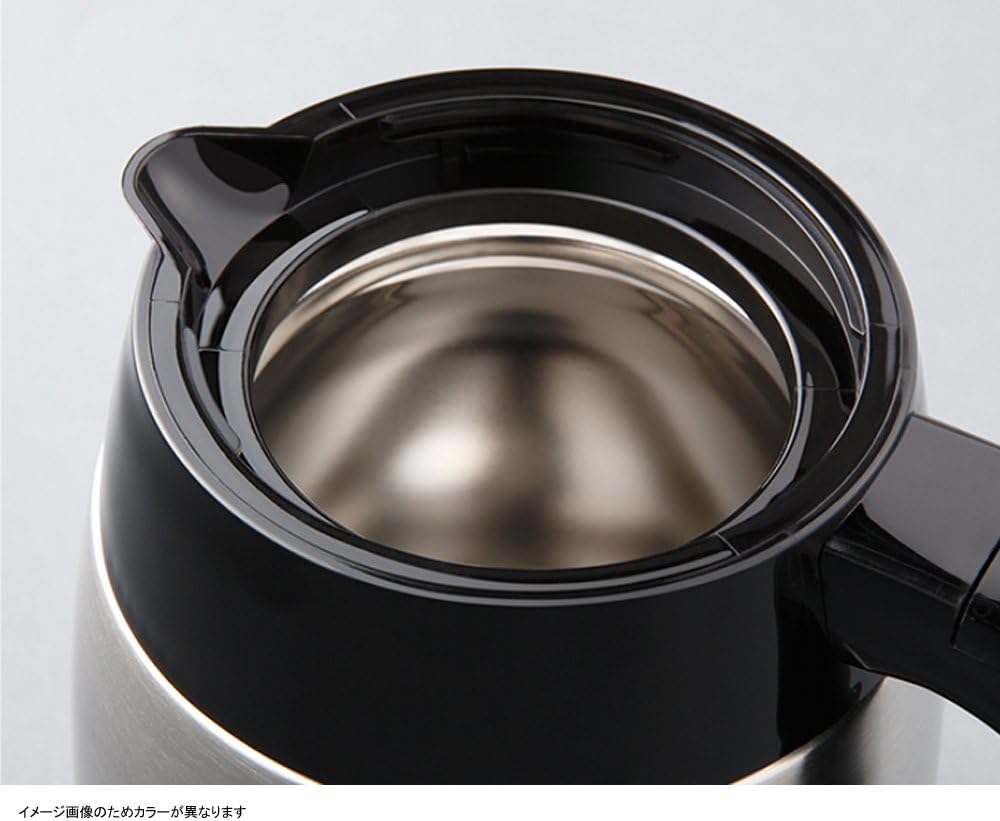
Gambar 4: Puncak view of the thermal carafe. This image displays the opening of the stainless steel thermal carafe, designed to keep coffee warm.
4. Setup jeung pamakéan munggaran
- Ngabongkar: Taliti miceun sadaya bahan bungkusan sareng pastikeun sadaya bagian aya.
- Bersih: Wash the thermal carafe, its lid, and the removable filter holder in warm, soapy water. Rinse thoroughly and dry. Wipe the exterior of the coffee maker with a damp lawon.
- Siklus Brew Kahiji (Beresih):
- Fill the water reservoir with cold water up to the maximum fill line.
- Place the empty thermal carafe with its lid on the heating plate.
- Do not add coffee grounds for this cycle.
- Colokkeun maker kopi kana stop kontak listrik grounded.
- Press the power switch to start the brewing cycle.
- Antepkeun siklus pinuh nepi ka réngsé. Piceun cai panasna.
- Repeat this cleaning cycle once more with fresh water.
- Mesin kopi anjeun ayeuna siap dianggo.
5. Parentah Operasi
Turutan léngkah-léngkah ieu pikeun nyéduh kopi:
- Embung cai: Open the lid of the water reservoir and fill it with fresh, cold water to your desired level, indicated by the water level markings. Do not exceed the maximum fill line.
- Selapkeun Filter: Place a Melitta #1x2 or #1x4 cone-shaped paper filter (depending on model variant, check your filter holder size) into the removable filter holder.
- Tambahkeun bubuk kopi: Add your desired amount of ground coffee into the paper filter. A general guideline is one tablespoon of coffee per cup (5 oz). Adjust to taste.
- Posisi Kafe: Ensure the thermal carafe, with its lid securely attached, is placed correctly on the heating plate beneath the filter holder. The lid must be properly aligned to activate the drip stop mechanism.
- Mimitian Brewing: Plug the coffee maker into a grounded electrical outlet. Press the power switch. The indicator light will illuminate, and brewing will begin.
- Pareuman otomatis: The coffee maker will automatically shut off approximately 10 minutes after the brewing cycle is complete. The indicator light will turn off.
- ngalayanan: Once brewing is complete, carefully remove the thermal carafe to serve. The thermal carafe is designed to keep coffee warm for an extended period without a heating plate.

Gambar 5: Power indicator light showing auto-off. This image illustrates the power indicator light, showing it illuminated during operation and off approximately 10 minutes after brewing, indicating the automatic shut-off feature.
6. beberesih sarta Pangropéa
Pembersih rutin ngajamin kinerja optimal sareng manjangkeun umur mesin kopi anjeun.
beberesih poean:
- Salawasna cabut maker kopi sateuacan beberesih.
- Buang bubuk kopi sareng saringan kertas anu parantos dianggo.
- Wash the thermal carafe, its lid, and the removable filter holder in warm, soapy water. Rinse thoroughly and dry. These parts are generally not dishwasher safe; refer to specific markings if present.
- Ngusap bagian luar mesin kopi ku hipu, damp lawon. Ulah make cleaners abrasive atawa hampang scouring.
- Ulah pernah ngalelepkeun unit utama mesin kopi kana cai atanapi cairan sanésna.
Descaling (Bulanan atawa sakumaha diperlukeun):
Endapan mineral tina cai tiasa numpuk sareng mangaruhan kinerja. Bersihkeun kerak mesin kopi anjeun sacara rutin.
- Prepare a descaling solution according to the descaler manufacturer's instructions, or use a solution of white vinegar and water (e.g., 1 part vinegar to 2 parts water).
- Tuang solusi descaling kana embung cai.
- Place the empty thermal carafe with its lid on the heating plate.
- Start a brewing cycle. Allow half of the solution to brew through, then turn off the coffee maker and let it stand for 15-20 minutes to allow the solution to work.
- Turn the coffee maker back on and allow the remaining solution to brew through.
- Discard the solution and rinse the carafe.
- Run two full cycles with fresh, cold water to rinse out any remaining descaling solution.
7. Cara ngungkulan
| Masalah | Mungkin Cukang lantaranana | Solusi |
|---|---|---|
| Kopi teu diseduh. | Coffee maker not plugged in; power switch not on; no water in reservoir. | Ensure plug is securely in outlet; press power switch; fill water reservoir. |
| Kopi karasa lemah. | Not enough coffee grounds; coffee too coarsely ground; water reservoir overfilled. | Add more coffee grounds; use finer ground coffee; ensure water level matches desired cups. |
| Kopi ngalembur tina saringan. | Too much coffee grounds; filter not seated correctly; clogged drip stop; carafe not positioned correctly. | Reduce coffee grounds; ensure filter is properly seated; clean drip stop; ensure carafe is fully pushed in. |
| Kopi teu cukup panas. | Thermal carafe not pre-warmed; carafe lid not sealed properly. | Rinse carafe with hot water before brewing; ensure carafe lid is tightly closed. |
| Nyieun bir téh laun. | Mineral deposits (scale) in the coffee maker. | Perform a descaling cycle as described in the maintenance section. |
8. Spésifikasi produk
| Fitur | Rincian |
|---|---|
| Nomer modél | MKM-531 |
| merek | Melitta |
| Kapasitas | 0.7 Liter (kira-kira 5 gelas) |
| Warna | White (with stainless steel accents) |
| Modeu Operasi | Pinuh Otomatis |
| Item Beurat | 1.7 Kilogram (3.74 pon) |
| Ukuran Paket | 12.68 x 11.02 x 6.54 inci |
| Tanggal Kahiji Sadia | 21 April 2013 |
9. Garansi jeung Rojongan
Melitta products are manufactured to high-quality standards. For specific warranty information, please refer to the warranty card included with your purchase or visit the official Melitta website. If you encounter any issues not covered in the troubleshooting section, or require further assistance, please contact Melitta customer support.
Melitta Customer Support: Mangga didatangan www.melitta.com for contact details and further product information.


